
July 11, 2026 • General • By Sayad Md Bayezid Hosan
A complete, step-by-step guide to Search Engine Marketing with Google Ads — the exact problem each part of paid search solves, the practical solution and click-by-click setup for each one, ad copywriting formulas backed by real psychology, every major ad extension and format, and a full walkthrough of goals and e-commerce tracking so you can prove, with real numbers, that it's working.
Table of Contents
- Introduction to Paid Search Engine Marketing
- Ad Copywriting
- Bidding Strategies
- Ad Extensions and Formats
- Bonus: Setting Up Goals and E-commerce Tracking
- Quick-Reference Glossary
- Frequently Asked Questions
(Tap any line to jump straight to that section. On mobile, this table of contents is your fastest way back to a specific step without re-scrolling the whole guide.)
How This Guide Works, and Why
Every section below follows the same honest structure, on purpose: the real problem you're actually facing, the practical solution, and the exact steps to do it yourself — followed by the psychology behind why it works, a common mistake to avoid, and a free tool you can use right now to test what you just built. Nothing here is theory you nod along to and forget. If a section gives you a technique, it also gives you a way to verify it worked.
To keep everything concrete rather than abstract, we'll follow one running, hypothetical example throughout: "Sweet Layers," an imaginary home bakery selling custom birthday and wedding cakes online. Every formula, every worked calculation, and every piece of sample ad copy in this guide uses Sweet Layers to show exactly how the idea applies to a real small business — swap in your own product or service as you read, and the same steps apply directly.
Before diving in, here's the full course so far. I'd recommend working through these in order if you haven't already, since each one builds on what came before it:
- Introduction to Online Digital Marketing: A Beginner's Guide
- Importance of Digital Marketing: How It Works and Key Concepts Every Beginner Should Know
- Module 1: Basic Image and Video Editing — Complete Guide to Filmora and Canva
- Module 2: Social Media Optimization (SMO) — A Complete Beginner's Guide
- Module 3: Social Media Marketing (SMM) — Advertising Concepts and Platform Selection
- Module 4: Meta (Facebook) Marketing — The Complete A to Z Mega Guide
- Module 5: Instagram Marketing — The Complete A to Z Mega Guide
- Module 6: X (Formerly Twitter) Marketing — The Complete A to Z Mega Guide
- Module 7: LinkedIn Marketing — The Complete A to Z Mega Guide
- Pinterest Marketing — The Complete A to Z Mega Guide
- TikTok Marketing — The Complete A to Z Mega Guide
- YouTube Marketing — The Complete A to Z Mega Guide
- Video Marketing Through YouTube — The Complete A to Z Mega Guide
- Module 9: Creating a WordPress Website — The Complete A to Z Mega Guide
- Module 10: Search Engine Optimization (SEO) — The Complete A to Z Mega Guide
- Analysis and Keyword Research — The Complete A to Z Mega Guide
- On-Page SEO Optimization — The Complete A to Z Mega Guide
- Off-Page Optimization — The Complete A to Z Mega Guide
- Local SEO and Google Business Profile — The Complete A to Z Mega Guide
- Content Marketing — The Complete A to Z Mega Guide
- Algorithm Updates and Analysis — The Complete A to Z Mega Guide
- Technical SEO Optimization — The Complete A to Z Mega Guide
- Email Marketing — The Complete A to Z Mega Guide
- Google Web Analytics — The Complete A to Z Mega Guide
- Customization and Advanced Features — The Complete A to Z Mega Guide
- Mobile, Cross-Device, and Campaign Analytics — The Complete A to Z Mega Guide
- A Complete Guide to Automated Sitemap Management for Modern SEO
- Master Your Marketing: The Ultimate Guide to the UTM Campaign Link Builder
Introduction to Paid Search Engine Marketing
The Problem
You've built a real WordPress site, written strong content, and worked through months of SEO and keyword research from earlier in this course — and it's genuinely working. But it's slow. A brand-new page can take weeks or months to earn any real ranking, and right now, today, there's a specific group of people typing your exact keyword into Google with their wallet basically already open, and your organic content simply isn't ranked high enough yet to catch them.
The Solution: How Google Ads Actually Works
Search Engine Marketing (SEM) — almost always shorthand for Google Ads — solves this exact problem by letting you pay for a position in search results instead of waiting to earn one. This is distinct from everything covered in the Search Engine Optimization guide, where visibility comes from relevance and quality over time.
The model is called PPC — Pay-Per-Click — because in most cases you only pay when someone actually clicks, not simply for being shown. Every time a matching search happens, Google runs an instant automated auction among eligible advertisers, and the winning position is decided by Ad Rank, a combination of your bid amount, expected click-through rate, ad relevance, and landing page quality — not simply whoever bids the most money.
The Building Blocks of a Google Ads Account
A Google Ads account follows a clear hierarchy: an Account contains one or more Campaigns (each with its own budget and goal type — Search, Display, or Video), each Campaign contains Ad Groups (a tightly related cluster of keywords and ads, ideally one specific theme per group), and each Ad Group contains the Keywords and Ads themselves.
Pro tip: for Sweet Layers, this would mean separate ad groups for "Birthday Cakes," "Wedding Cakes," and "Cupcakes" — never one giant ad group mixing all three, since that dilutes relevance and quietly damages Quality Score, covered in Section 3.
Match Types: Controlling Which Searches Trigger Your Ad
| Match Type | What It Does | Example Keyword | Might Also Trigger |
|---|---|---|---|
| Broad Match | Widest reach, least control | custom cakes | "cake decorating classes" |
| Phrase Match | Must include your phrase's meaning | "custom birthday cake" | "order a custom birthday cake online" |
| Exact Match | Must closely match your exact meaning | [custom birthday cake] | "custom birthday cakes near me" |
A sensible starting approach mirrors the keyword discipline from the Analysis and Keyword Research guide: start with phrase and exact match on your best-researched, highest-intent keywords, rather than broad match across everything.
Step-by-Step: Setting Up Your First Google Ads Campaign
- Go to ads.google.com and sign in, or create an account if this is your first time.
- Click "New Campaign" and select your objective — for Sweet Layers' first campaign, "Sales" or "Leads" is the right choice, not "Awareness."
- Choose "Search" as the campaign type, since this guide focuses on capturing existing high-intent demand first.
- Set your daily budget. Start conservatively — a modest daily figure you're comfortable losing entirely while you gather early data is the right mindset for week one.
- Choose your bidding strategy (Section 3 of this guide walks through exactly how to choose here — for a first campaign, Maximize Clicks is a reasonable, low-risk default).
- Set your location and language targeting. A local bakery should target its actual delivery radius, not the entire country — an easy, high-impact fix beginners often skip.
- Create your first ad group, named after one tight theme ("Birthday Cakes"), and add 5–15 closely related phrase and exact match keywords.
- Write your ad using the copywriting formula in Section 2, then review it once more against the character-limit table there.
- Review and publish. Your ad typically enters review within hours and can begin showing shortly after approval.
Common Mistake to Avoid
The single most expensive beginner mistake is launching one broad ad group covering an entire product catalog, with generic keywords and one generic ad. It feels efficient on day one and quietly wastes budget on irrelevant clicks for months. Tight, specific ad groups always outperform broad, generic ones.
The Psychology Behind Why This Works
Someone searching "custom birthday cake delivery today" isn't casually browsing — they've already decided to buy and are actively choosing who from. This is fundamentally different from the passive scrolling behavior covered in the social media modules earlier in this course. Paid search captures a searcher at the single highest-intent moment in their entire journey, which is exactly why SEM consistently converts at a higher rate than most other channels, even though the traffic itself costs money.
Test This Yourself
Before spending a single rupee or dollar, use Google's free Keyword Planner (the same tool from the Analysis and Keyword Research guide) to check realistic search volume and estimated costs for your exact keywords first, so your budget in Step 4 above is grounded in real numbers rather than a guess.
Ad Copywriting
The Problem
You have roughly 30 characters per headline, sitting directly beside two or three competitors on the exact same results page, and the searcher will decide who to click in under two seconds. Most beginners fill that space with vague, forgettable claims — "Quality Products, Great Service" — that say nothing a competitor couldn't also claim, and get scrolled past without a second glance.
The Solution: A Formula-Driven Approach
Everything you learned about genuinely engaging writing in the Content Marketing guide still applies, but ad copy needs to do its entire job in a fraction of the space, so it needs a repeatable formula rather than free-form writing.
The actual limits you're working within: up to 15 headlines (30 characters each) and 4 descriptions (90 characters each) per ad, with Google mixing and testing combinations automatically — the exact mechanic Section 4's Responsive Search Ads part explains in full.
Headline Hook Templates You Can Copy
Fill in the brackets with your own specifics, and you have a working headline in under a minute:
- The Direct Benefit Hook: "[Get/Save/Try] [Specific Benefit] — [Call to Action]" → "Get Fresh Cakes Today — Order Now"
- The Social Proof Hook: "[Number]+ [Trust Signal] — [Benefit]" → "500+ Happy Customers — Custom Cakes"
- The Search-Match Question Hook: "[Question Mirroring the Exact Search]?" → "Need a Birthday Cake Tomorrow?"
- The Urgency Hook: "[Limited Availability] — [Benefit] Before [Deadline]" → "Only 3 Slots Left This Weekend"
- The Specificity Hook: "[Exact Number/Detail] + [Benefit]" → "48-Hour Custom Cake Delivery"
The Psychology of Why These Actually Work
Specificity beats vagueness because a concrete number or detail is cognitively easier to trust and evaluate than a general claim — "48-Hour Delivery" is instantly verifiable in a way "Fast Delivery" never can be. Social proof reduces perceived risk, since a searcher who's never heard of Sweet Layers unconsciously borrows confidence from the idea that hundreds of other people already made the same choice safely. Urgency and scarcity trigger loss aversion — a well-documented tendency for people to weigh the fear of missing out more heavily than the promise of an equivalent gain, which is exactly why "Only 3 Slots Left" reliably outperforms an otherwise identical ad with no deadline at all. Matching the exact search query creates cognitive ease — when your headline visually echoes the words someone just typed, their brain processes it faster and trusts it more, the same underlying principle behind the search-intent matching covered in the SEO guide.
Step-by-Step: Writing Your First Ad
- Pull your top keyword for this ad group — for Sweet Layers, "custom birthday cake."
- Write one Search-Match Question headline using it directly: "Need a Custom Birthday Cake?"
- Write one Specificity or Urgency headline: "Order 48 Hrs Before Your Party."
- Write one Social Proof or Direct Benefit headline: "500+ Cakes Delivered Fresh."
- Write a description expanding the offer honestly: "Handmade custom cakes, delivered fresh to your door. Order online in minutes — see today's availability now."
- Repeat Steps 2–5 for two more angles (price-focused, trust-focused) so Google's automated testing, covered in Section 4, has genuinely different options to learn from.
Common Mistake to Avoid
Writing five headlines that are all minor rewordings of the same idea gives Google's Responsive Search Ads system nothing real to test — it needs genuinely distinct angles, not synonyms, to find out what actually moves your specific audience.
Test This Yourself
Paste every headline and description into SmartGen's free Word Counter before pasting them into Google Ads, so you catch an accidental mid-word truncation before a real searcher ever does. Once your ad is built inside Google Ads, use the platform's own built-in Ad Strength indicator and ad preview panel to check, in real time, whether you've genuinely provided enough variety before you publish.
Bidding Strategies
The Problem
The bidding strategy names — Target CPA, Target ROAS, Maximize Conversions — sound like a foreign language to most beginners, and the fear of "getting it wrong" and silently burning through a budget stops a lot of people from launching at all, or pushes them toward Manual CPC purely out of caution, even when an automated strategy would genuinely serve them better.
The Solution: Match the Strategy to Your Real Goal, With Real Numbers
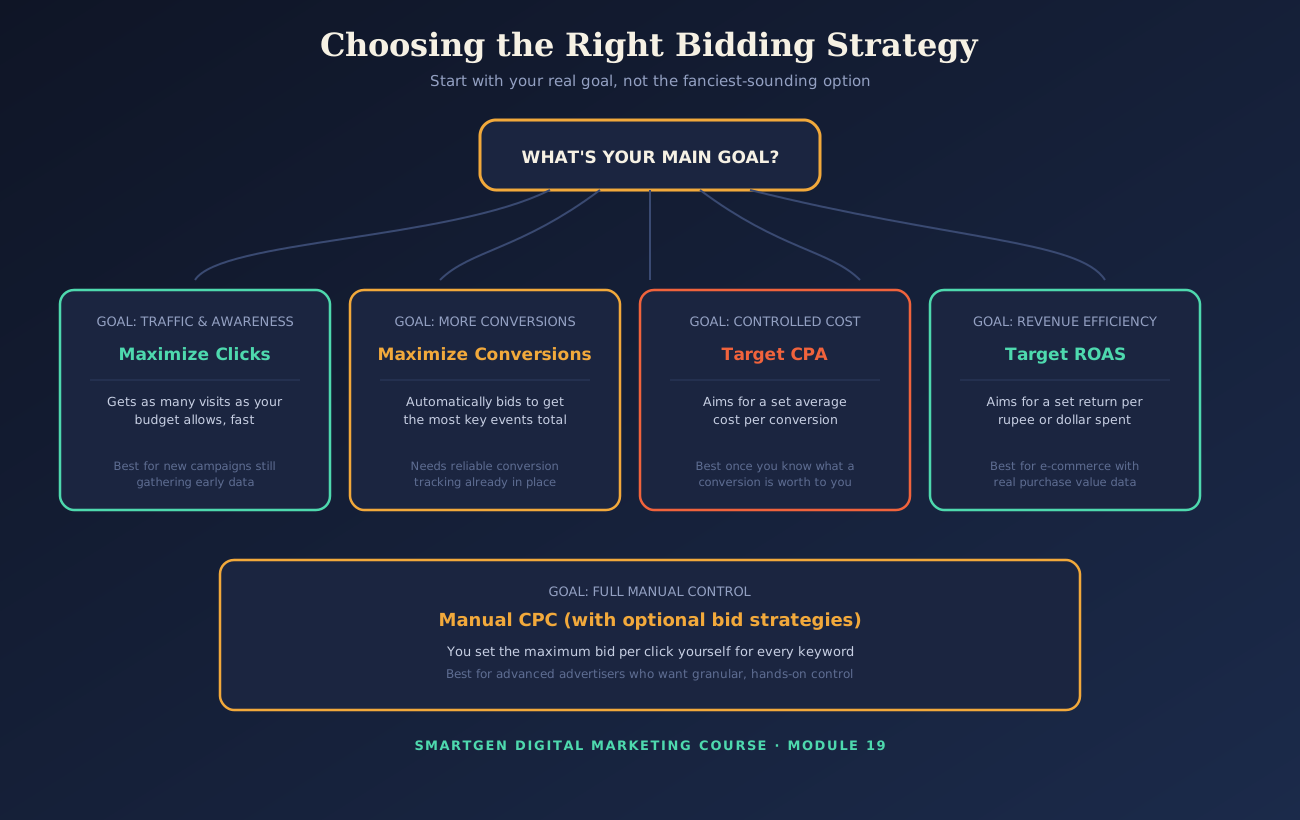
Manual CPC means you personally set the maximum you'll pay per click on each keyword — full control, but it demands ongoing, hands-on management. Automated strategies hand that decision to Google's machine-learning systems, adjusting bids in real time toward your stated goal — genuinely similar in spirit to the RankBrain concept from the Algorithm Updates guide.
Maximize Clicks targets pure traffic volume — a reasonable week-one default while you gather data. Maximize Conversions optimizes toward key events directly, but depends entirely on accurate tracking already being in place (the bonus section covers this fully). Target CPA aims for a set average cost per conversion. Target ROAS aims for a set revenue return per unit spent, and suits e-commerce where individual sales carry different real values.
A Worked Example: Sweet Layers Does the Math
Suppose Sweet Layers knows, from past orders, that a typical customer is worth $60 in profit, and they're comfortable spending up to 30% of that on acquiring the sale — meaning a Target CPA of roughly $18 makes sense. Before committing that number to Google Ads, they plug their estimated ad spend, expected clicks, and expected conversion rate into SmartGen's free CPM & ROI Calculator, and use the Percentage Calculator to sanity-check what conversion rate they'd realistically need to hit that $18 target at their current cost-per-click. Only once the math actually works on paper do they set Target CPA live in the account.
Quality Score: The Multiplier Hiding Behind Every Bid
Quality Score is Google's 1–10 rating of how relevant your keyword, ad, and landing page combination genuinely are, and it directly multiplies your effective auction position — a higher score can let you outrank a competitor bidding more than you. It's built from expected click-through rate, ad relevance, and landing page experience (the same fundamentals in the Technical SEO Optimization guide). Tight ad groups, covered in Section 1, are the simplest lever for keeping it high.
Common Mistake to Avoid
Setting a Target CPA or Target ROAS before you actually know your own numbers is a common way to either starve a campaign of any traffic at all (a target set too aggressively low) or quietly overspend for weeks (a target set with no real ceiling in mind). Do the math in the worked example above before setting either one live.
Test This Yourself
Google Ads' own "Bid Simulator" tool, available inside a campaign's keyword view, shows you a real, direct estimate of how a different bid or budget would have changed your actual results — genuinely useful for calibrating a manual bid before switching to an automated strategy.
A Mid-Guide Reality Check — What I Actually Want You to Walk Away Understanding
We've now covered getting an ad shown and getting it clicked. A great headline and a smart bidding strategy can absolutely earn a click — but the click was never the actual goal. The goal, always, is whatever happens after the click. Everything from here forward exists to either strengthen that post-click outcome or to prove, with real evidence, whether it happened at all.
Ad Extensions and Formats
The Problem
Your ad is live, technically correct, and being quietly outperformed by a competitor's ad sitting right above or below it that simply looks bigger — more links, more trust phrases, more visual real estate on the exact same results page, for the exact same cost-per-click.
The Solution: Ad Extensions
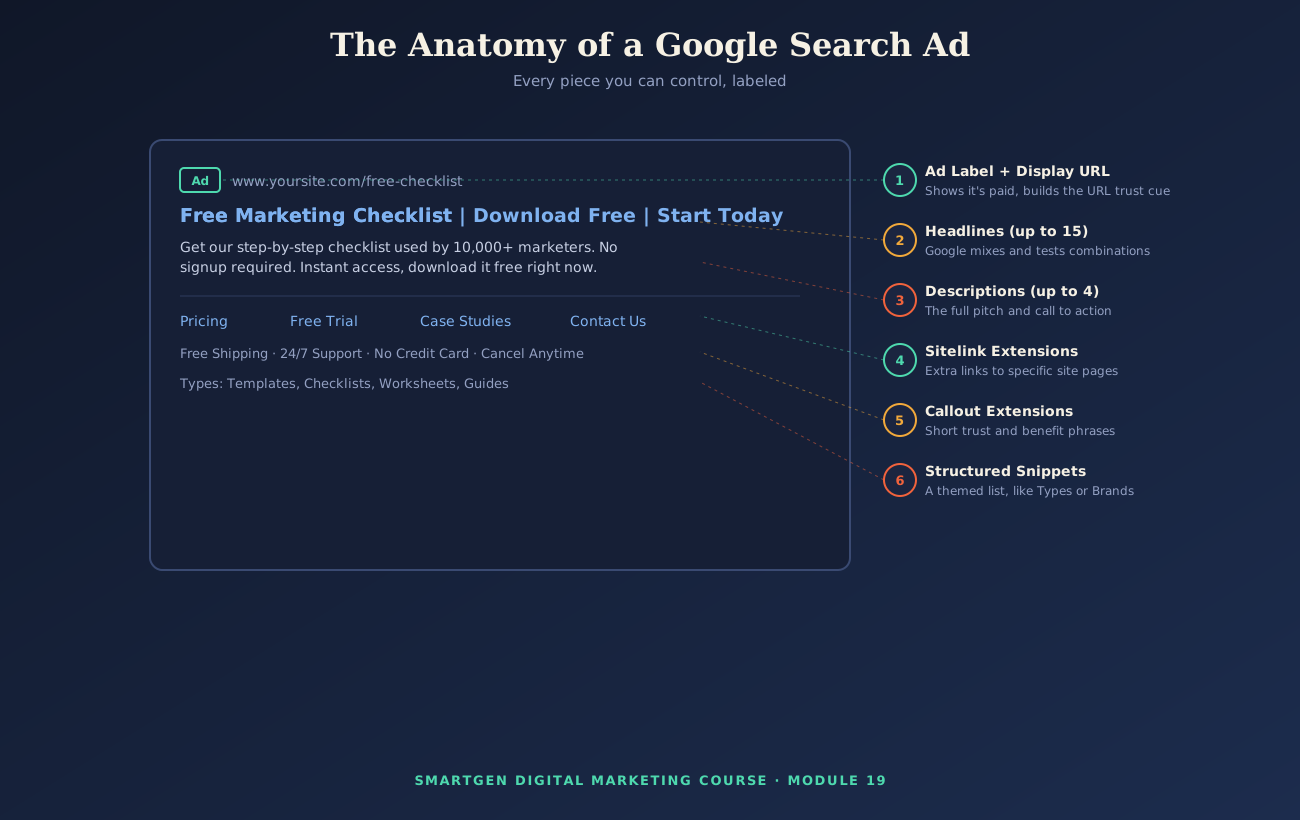
Ad extensions add extra information beyond your basic headlines and description, making your ad larger and more informative at no extra cost per click.
Sitelink and Callout Extensions
Sitelinks add extra clickable links beneath your ad, each pointing to a specific page. For Sweet Layers: Menu, Custom Orders, Delivery Areas, Contact — giving a searcher a direct path to exactly what they want, echoing the "link to the most useful destination" principle from the Pinterest Marketing guide.
Callouts add short, non-clickable trust phrases: "Free Local Delivery," "Made Fresh Daily," "Custom Designs Welcome."
Structured Snippets and Price Extensions
Structured snippets display a themed, pre-set list — for Sweet Layers: Types: Birthday Cakes, Wedding Cakes, Cupcakes, Custom Orders. It's worth being precise here: this is a distinct Google Ads feature from schema markup, the on-page SEO technique from the Algorithm Updates guide's E-E-A-T discussion — similar name, entirely different systems.
Price extensions display specific items with their own price and link — Sweet Layers could show "6-inch Cake — $35," "8-inch Cake — $50," "Cupcake Dozen — $24" — letting price-conscious searchers self-select before they even click.
Ad Formats for Display and Video Campaigns
Display campaigns show image-based ads across Google's partner network, generally better for awareness and retargeting than the high-intent capture Search excels at. Run display creative through SmartGen's free Image Compressor to keep file sizes small, and the free Color Palette Extractor to keep creative visually consistent with your real brand.
Video campaigns run on YouTube and the Display Network, pairing naturally with the YouTube Marketing and Video Marketing Through YouTube guides — a well-performing organic video is often already a proven candidate for paid promotion.
Responsive Search Ads
Responsive Search Ads (RSAs) are now the default Search format: you supply up to 15 headlines and 4 descriptions (reuse the Hook Templates from Section 2), and Google automatically tests combinations against real searchers, learning which pairings perform best for each specific query.
Common Mistake to Avoid
Adding only the bare minimum of one or two sitelinks and skipping callouts entirely is the single easiest, lowest-effort improvement most beginner accounts leave sitting on the table — extensions cost nothing extra and consistently improve both visibility and click-through rate.
The Psychology Behind Why Extensions Work
More genuinely relevant information reduces a searcher's perceived uncertainty before they've even clicked — each extension answers a small doubt (where's their menu, do they deliver here, what does it cost) before it has the chance to send that searcher to a competitor's result instead. On mobile especially, where screen space is scarce and attention is fleeting, a larger, more scannable ad chunked into clear, small pieces holds attention noticeably longer than a single dense block of text.
Test This Yourself
Use Google Ads' own ad preview and diagnosis tool (inside the interface, without ever affecting your real Quality Score) to see exactly how your extensions will actually render across devices before your ad goes live.
Bonus: Setting Up Goals and E-commerce Tracking
The Problem
You're spending real money on everything covered so far, and without solid tracking, you genuinely cannot tell whether any of it is working. Every automated bidding strategy in Section 3 that optimizes toward conversions is optimizing toward nothing at all if the underlying data feeding it is missing or wrong.
The Solution: Connect Google Ads to Real Conversion Data
If you've worked through the Google Web Analytics guide, you've already set up GA4 and defined key events — the modern term for what Google Ads still calls "conversions." Linking your Google Ads account to that same GA4 property (Google Ads' Admin settings, or GA4's Admin → Product Links) imports those key events directly, rather than building tracking twice.
A Developer-Friendly Look at E-commerce Tracking
For an actual purchase — not just a form submission — you need the transaction value itself flowing through, not just the fact that a conversion happened. Using the exact Tag, Trigger, and Variable structure from the Customization and Advanced Features guide, a purchase event pushed to the data layer on Sweet Layers' order confirmation page looks like this:
dataLayer.push({
  event: 'purchase',
  transaction_id: 'ORDER10452',
  value: 45.00,
  currency: 'USD',
  items: [
    { item_name: 'Custom Birthday Cake', price: 45.00, quantity: 1 }
  ]
});
In plain language: this tells Google exactly what happened (a purchase), how much it was worth ($45), and what was actually bought — the specific data Target ROAS in Section 3 needs to calculate real return, not just a conversion count.
Tracking Campaigns Precisely With UTM Parameters
You'll also want to know exactly which campaign or ad drove each sale, not just that "Google Ads" broadly sent traffic. A properly tagged Sweet Layers campaign link looks like this:
https://sweetlayersbakery.com/birthday-cakes/?utm_source=google&utm_medium=cpc&utm_campaign=birthday_cakes_search&utm_term=custom_birthday_cake
SmartGen's free UTM Builder generates links like this correctly and consistently every time — our full walkthrough, Master Your Marketing: The Ultimate Guide to the UTM Campaign Link Builder, covers the tool in complete depth. For tracking across phones, tablets, and desktops, the Mobile, Cross-Device, and Campaign Analytics guide extends this same discipline across every device a customer might use.
Step-by-Step Setup Checklist
- Confirm your GA4 key events fire correctly, verified through Realtime, as covered in the Google Web Analytics guide.
- Link your Google Ads account to that same GA4 property so key events import automatically.
- Build and test the purchase event above using GTM, confirming the correct transaction value appears.
- Tag every campaign link with the UTM Builder before it ever goes live in an ad.
- Only then switch a campaign to Maximize Conversions, Target CPA, or Target ROAS.
Common Mistake to Avoid
Switching to an automated, conversion-based bidding strategy before confirming tracking is accurate is one of the most common ways beginners waste an entire month of budget — the algorithm optimizes confidently toward broken or incomplete data, with no way to know it's wrong.
Test This Yourself
Immediately after publishing the code above, open GTM's Preview mode alongside GA4's DebugView (Admin → DebugView) or the Realtime report, complete a real test purchase yourself, and confirm the purchase event appears with the correct transaction value attached before trusting it with real ad spend behind it.
Quick-Reference Glossary
| Term | Plain-Language Meaning |
|---|---|
| SEM / PPC | Paying for search visibility, typically per click |
| Ad Rank | The score deciding ad position, beyond just bid amount |
| Quality Score | Google's 1–10 relevance rating for your keyword, ad, and page |
| Match Type | How closely a search must match your keyword to trigger your ad |
| RSA | Responsive Search Ad — multiple headlines/descriptions Google tests automatically |
| Sitelink Extension | Extra clickable links to specific pages beneath your ad |
| Callout Extension | Short non-clickable trust phrases beneath your ad |
| Structured Snippet | A themed list, like Types or Brands, shown in your ad |
| Target CPA | A bidding strategy aiming for a set average cost per conversion |
| Target ROAS | A bidding strategy aiming for a set revenue return per spend |
| Data Layer | The structured data object a website passes to GTM for tracking |
Module Summary
In this guide, we covered the real problem paid search solves and exactly how the Google Ads auction works, ad copywriting built on repeatable hook templates and the psychology behind why they convert, the bidding strategies matched to real goals with real math, every major ad extension and format, and a full, developer-friendly walkthrough of goal and e-commerce tracking — all followed through with one running example, Sweet Layers, from first campaign to a verified purchase event.
Practice exercise: Using your own product or service in place of Sweet Layers, write one headline from each Hook Template in Section 2, check them all against the free Word Counter, calculate a realistic Target CPA using the CPM & ROI Calculator, and confirm your GA4 key events are linked correctly using the checklist in the bonus section before turning on any conversion-based bidding strategy.
Frequently Asked Questions
How much does Google Ads actually cost to get started?
There's no fixed minimum — you set your own daily budget, and cost is driven by how competitive your keywords are. Start conservatively, as shown in Section 1's setup walkthrough, and scale once tracking from the bonus section proves it's profitable.
Should a beginner start with Search campaigns or Display campaigns?
Search is the stronger starting point for most beginners, since it captures people already actively searching with clear intent, while Display and Video generally suit broader awareness once you already know what converts.
Do I need a dedicated landing page, or can I just use my homepage?
A dedicated, tightly relevant landing page almost always outperforms a generic homepage, directly improving both Quality Score and real conversion rate, for the same reason covered in the Pinterest Marketing guide.
What's the real difference between Google Ads and Google AdSense?
Opposite sides of the same ecosystem: Google Ads is how you pay for your own ads to appear in search results, while AdSense is a separate program for showing other advertisers' ads on your own site to earn revenue.
How long before I can judge if a campaign is actually working?
Give it enough time to exit Google's learning phase and gather a meaningful number of clicks and conversions — generally at least a couple of weeks — before drawing conclusions, the same small-sample caution covered in the Customization and Advanced Features guide.
Can I run Google Ads without setting up any conversion tracking first?
Technically yes, but you'd be flying blind, with no reliable way to know if your spend produces real results — and automated bidding strategies simply won't have the data they need to work properly, which is exactly why the bonus section exists.
— Written by Sayad Md Bayezid Hosan for the SmartGen blog
 ✓
✓
Sayad Md Bayezid Hosan
Founder & Tech Entrepreneur | Full-Stack Developer
Full-stack Web Developer, Digital Marketing Strategist, and Tech Entrepreneur with 5+ years of experience delivering innovative digital solutions. Specializing in web development, AI integration, strategic digital marketing, and tech entrepreneurship. As a leading Tech Provider, I help audiences navigate digital platforms safely through permission-based technical solutions and digital business asset management.
Credentials & Expertise:
- Founder of CWB Agency & GenZFrontier
- Final-year English Student at Northern University Bangladesh
- Specialized in AI-powered web development & content strategy
- Published author on tech, digital marketing & entrepreneurship
This article was written by Sayad Md Bayezid Hosan for the SmartGen blog. For free tools to support your digital marketing journey, visit smartgentools.com.