
July 01, 2026 • General • By Sayad Md Bayezid Hosan
MODULE 7: LinkedIn Marketing — The Complete A to Z Mega Guide for Beginners
A complete, practical guide to LinkedIn marketing and profile optimization: choosing between an individual profile and a company page, building a profile that actually gets found, creating content the algorithm wants to spread, growing a real professional network, running an effective Company Page, using LinkedIn Ads, and reading your analytics so you know what's actually working.
Welcome to Module 7: LinkedIn Marketing
We've now covered Facebook, Instagram, and X in real depth. Today we're moving onto the one platform in this entire course that plays by completely different rules: LinkedIn. Everywhere else in this series, the goal has largely been attention — getting someone to stop scrolling. On LinkedIn, the goal is closer to credibility — getting the right person, usually someone with a job title and a budget, to trust you enough to take a meeting, click "apply," or say yes to a deal.
If you treat LinkedIn like Instagram with a suit on, you'll struggle. A glossy sales graphic that performs well on Instagram often gets ignored here, while a slightly rough, honestly-written post from a real person doing real work tends to outperform it. LinkedIn's entire culture runs on one idea: people trust people, not brands, and they especially trust people who clearly know what they're talking about.
This guide walks you through the full picture: setting up the right kind of presence (personal, company, or both), building a profile that actually converts visitors into connections or customers, creating content that LinkedIn's algorithm wants to spread, growing a network of people who matter to your goals, running a proper Company Page, using LinkedIn's ad platform when you're ready to pay for reach, and reading the analytics that tell you whether any of it is working.
Before diving in, if you haven't already gone through the earlier modules, I'd recommend doing so, since the concepts build on one another throughout this course:
- Introduction to Online Digital Marketing: A Beginner's Guide
- Module 3: Social Media Marketing (SMM) — Advertising Concepts and Platform Selection
- Module 4: Meta (Facebook) Marketing — The Complete A to Z Mega Guide
- Module 5: Instagram Marketing — The Complete A to Z Mega Guide
- Module 6: X (Formerly Twitter) Marketing — The Complete A to Z Mega Guide
Why I'm Writing This Guide the Way I Am
LinkedIn rewards a completely different instinct than every other platform we've covered in this course. It isn't about being early to a trending topic or posting something visually perfect — it's about demonstrating, consistently and specifically, that you know what you're doing. The accounts and pages that win on LinkedIn over the long run are run by people who show their actual thinking, not just their highlight reel.
That's the lens this entire guide is built around. Every section below is written to be something you can act on this week, not abstract theory you'll forget by tomorrow. Where the platform's own data and well-documented industry research back something up, I've included it. Where advice is more a matter of judgment, I've said so plainly rather than dressing it up as a hard rule.
1. Introduction to LinkedIn Marketing
LinkedIn has grown into the largest professional network in the world, with well over a billion members across more than 200 countries. What makes it different from every platform we've covered so far isn't just its size — it's intent. People open Instagram to be entertained and X to catch up on a conversation. They open LinkedIn to think about their career, their industry, or their next business decision. That single difference changes everything about how marketing works here.
This matters enormously for B2B businesses in particular. A commonly cited industry figure is that roughly four out of every five LinkedIn members hold some kind of decision-making influence at their organization, which is part of why the platform consistently outperforms other social channels for B2B lead quality, even when it doesn't win on raw traffic volume.
LinkedIn marketing isn't one single activity — it's a combination of several moving parts that all reinforce each other:
Profile strategy — deciding whether your personal profile, your company page, or a combination of both should carry your main message.
Profile optimization — making sure that profile actually communicates value the moment someone lands on it.
Content — showing up consistently with posts, articles, documents, or video that demonstrate real expertise.
Network — building real, relevant connections instead of chasing a meaningless follower count.
Company presence — giving your business a credible, well-maintained home base on the platform.
Paid reach — using LinkedIn's ad platform to put your message in front of people you couldn't reach organically.
Measurement — actually checking what's working, instead of guessing.
The rest of this guide walks through each of these in order, building one on top of the next, exactly the way you'd want to approach it if you were starting from zero today.
2. Individual Profile vs. Company Profile
This is usually the first real decision point, and it trips up more beginners than almost anything else in this guide, so let's get it right early.
Your individual profile is you. It's tied to your name, your face, your career history, and your personal voice. You can post, comment, message, and build a network of up to 30,000 first-degree connections, plus an unlimited number of followers if you let people follow you without connecting.
Your Company Page is your business. It represents the organization as a brand, not a person. It can't send connection requests, can't comment as "itself" in quite the same conversational way, and — this surprises a lot of beginners — it almost always gets dramatically less organic reach than a real person's profile posting the exact same content.
That last point is worth sitting with, because it goes against how most people assume social media works. On platforms like Instagram or X, a brand account is usually the default. On LinkedIn, industry research consistently shows that posts from personal profiles reach several times more people, organically, than the identical content posted from a Company Page. LinkedIn's algorithm is, in effect, built to trust people more than it trusts brands, because a personal post signals an authentic opinion while a company post signals a marketing message.
So which one should you actually use?
If you're a freelancer, consultant, coach, founder, salesperson, recruiter, or anyone whose business depends on people trusting you specifically, your individual profile should be the main engine. Use it to share your expertise, your work, and your perspective consistently.
If you're representing an established brand with a team, you generally need both, used differently. The Company Page becomes your credible, searchable home base — the place a prospect checks before doing business with you, where you list your team, your openings, and your official updates. Your individual profile (and ideally your colleagues' profiles too) becomes the actual engagement engine, regularly sharing and adding personal commentary to what the Company Page posts.
A simple rule that holds up well in practice: let the Company Page establish legitimacy, and let real people drive reach.
3. Building a Strong LinkedIn Profile
Whichever path you chose in Section 2, your individual profile is doing far more work than most beginners realize — it shows up in search results, in comment sections, in connection requests, and is often the very first thing a prospect, employer, or client looks at before deciding whether to take you seriously. Here's how to make every section of it earn its place.
Profile photo. Use a recent, friendly, well-lit headshot where your face is clearly visible. Profiles with a photo get dramatically more profile views and connection requests than profiles without one — this isn't optional on LinkedIn the way it might be elsewhere.
Banner image. This is prime, frequently wasted real estate sitting directly behind your photo. A plain default banner is a missed opportunity. Use it to state what you do, show your branding, or reinforce your professional positioning at a glance.
Headline. This is arguably the single highest-leverage field on your entire profile, because it's what shows up everywhere — search results, comments, connection requests, the works. Don't just list your job title. A stronger formula is: what you do + who you help + the outcome you create, written in plain, specific language rather than vague buzzwords like "passionate" or "synergy."
About section. Write this in first person, like you're actually talking to the person reading it. Open with a hook, not a résumé recap — what problem do you solve, and for whom? Use short paragraphs, not a wall of text, and close with a clear next step: what should the reader do after reading this (message you, visit your site, book a call)?
Experience section. Don't just copy-paste job descriptions. For each role, briefly describe the outcomes you were responsible for, ideally with specifics. "Managed social media" tells a reader nothing; "Grew organic LinkedIn engagement 3x over 12 months for a 40-person SaaS company" tells them a great deal.
Skills and endorsements. List the skills genuinely relevant to where you want to be found in search, and periodically endorse colleagues whose skills you can honestly vouch for — endorsements tend to flow back far more often when you give them first.
Recommendations. A handful of specific, genuine written recommendations from former colleagues, clients, or managers do more for your credibility than almost anything else on the page, because they're someone else's words, not yours. Ask for them directly, and offer to write one in return.
Featured section. Pin your strongest content here — a standout post, an article, a case study, a link to your portfolio. Treat it the same way you'd treat the homepage of a website: as your best foot forward, not an afterthought.
Custom URL and contact info. Clean up your profile URL (linkedin.com/in/yourname rather than a string of numbers) and keep your contact info current, especially if you want people to reach you outside the platform.
4. Content Marketing on LinkedIn
This is where most of your week-to-week effort will actually go, so let's get specific about what genuinely performs well here in 2026.
Know your formats. Text-only posts are the simplest and still work well when the writing is strong. Image posts get a meaningful engagement bump over plain text. Carousel or "document" posts — multi-page PDFs people swipe through in the feed — consistently rank among the highest-performing content types on the entire platform right now, often outperforming every other format by a wide margin, because they reward someone for sticking around and engaging with multiple "pages" inside a single post. Native video (uploaded directly, not linked from YouTube) is the fastest-growing format and tends to get preferential distribution, since LinkedIn would rather keep you watching on-platform. Polls are a low-effort way to invite quick interaction. Newsletters and long-form articles work well for genuinely in-depth thinking that a quick post can't hold.
Write a first line that earns the click. LinkedIn cuts off posts after the first couple of lines behind a "see more" link. If those opening words don't say something specific, useful, or genuinely surprising, most readers will never click through to read the rest, no matter how good it is.
Understand dwell time. LinkedIn's algorithm pays close attention to how long someone actually spends reading or interacting with your post, not just whether they scroll past it. Content that holds attention for a longer stretch — through length, formatting, or a genuinely engaging idea — tends to get pushed to a wider audience than content that gets a quick glance and a scroll-past.
Post consistently, not constantly. The vast majority of LinkedIn's members rarely post at all, which is precisely why showing up consistently is such an outsized advantage for the people who actually do it. You don't need to post multiple times a day. A sustainable, consistent rhythm — several times a week for individuals, a similar cadence for Company Pages — beats sporadic bursts followed by silence almost every time.
Use hashtags lightly. Three to five genuinely relevant hashtags is a reasonable range on LinkedIn — enough to help the right audience find the post, not so many it looks like keyword stuffing.
Engage in the first hour. The early engagement a post receives — comments especially, more than likes — strongly influences how far LinkedIn pushes it afterward. Replying to every comment on your own post in that first hour isn't just polite; it's one of the most effective things you can do for that post's reach.
Build around content pillars. Pick three or four recurring themes tied to your expertise (for example: industry insights, behind-the-scenes work, lessons learned, and client results) and rotate between them. This keeps you from staring at a blank page every time, and it trains your audience to know what to expect from you.
A Quick Reality Check (Before We Go Further)
I want to pause here, halfway through this guide, because this is where most beginners either build real momentum or quietly give up.
The mistakes I see most often: sending dozens of generic, unpersonalized connection requests and wondering why nobody engages; treating LinkedIn like a billboard for polished sales graphics instead of a place for honest, specific thinking; posting once, then disappearing for two weeks; and copy-pasting the exact same caption that worked on Instagram, tone and all, without adjusting it for an audience here to think about work, not to be entertained.
The second thing worth being honest about is timeline. LinkedIn growth is slower and more relationship-driven than almost any other platform in this course. A post doesn't need to go viral to work — it needs to be seen, consistently, by the right hundred or so people. That's a fundamentally different, and for most businesses far more useful, kind of growth than chasing a viral moment that brings in the wrong audience entirely.
This guide draws on LinkedIn's own published platform data, publicly available industry research from firms that study the platform closely, and the practical patterns we've seen hold up across the modules in this course. Where a specific number is genuinely contested across sources, I've said so rather than presenting it as settled fact.
5. Building and Engaging Your Network
A large, irrelevant network is close to worthless for marketing purposes. A smaller, genuinely relevant one is one of the most valuable assets you can build on this platform. Here's how to grow the right kind.
Personalize every connection request. A blank, default "I'd like to add you to my network" request gets ignored or declined constantly. A short, specific note — mentioning a shared interest, a mutual connection, or why you're reaching out — converts dramatically better, because it shows the other person you actually looked at their profile rather than mass-clicking "connect."
Connect with intent, not volume. LinkedIn caps individual profiles at 30,000 first-degree connections, but you'll get far more value from 500 genuinely relevant connections than 5,000 random ones. Prioritize potential clients, industry peers, people at your target companies, and active, engaged members of your specific niche.
Use "Follow" for one-directional reach. If your goal is broadcasting to an audience rather than building one-to-one relationships, you can let people follow your updates without requiring a mutual connection — useful for thought leaders and creators who want reach without managing thousands of individual connections.
Engage before you ask for anything. Comment thoughtfully on posts from people in your target network before you ever send them a pitch. This is the single fastest way to get on someone's radar organically, and it costs nothing but a few minutes a day.
Treat your inbox like a relationship, not a sales funnel. Sending a cold pitch the moment someone accepts your connection request is one of the fastest ways to get blocked or ignored. Build a little context first — a genuine comment, a relevant question, a useful resource — before you ever ask for something.
Revisit LinkedIn Groups selectively. Groups aren't the center of LinkedIn culture they once were, but active, well-moderated groups in a specific niche can still be a useful place to find and engage with relevant people, especially in tighter, more technical industries.
6. LinkedIn for Company Pages
If your business needs a Company Page (see Section 2 if you're still deciding), here's how to make it pull real weight instead of sitting there as a static brochure.
Set up the essentials properly. A clear logo, a banner that communicates what you actually do, a complete "About" section with your specialties listed (LinkedIn lets people search by these), your website link, company size, and industry. An incomplete Company Page reads as inactive or untrustworthy, even if it isn't.
Use Showcase Pages for distinct audiences. If your company has genuinely separate product lines, divisions, or audiences that need different messaging, a Showcase Page lets you speak to each one without diluting your main Company Page feed.
Lean hard into employee advocacy. This is, without question, the single highest-leverage tactic available to a Company Page. Employees are dramatically more likely to share content posted by their own employer than content from almost any other source, and when they do, that content reaches their personal network — which, combined across a whole team, is almost always far larger than the Company Page's own follower count. Make it genuinely easy for your team to share: give them a heads-up before you post, write captions they could plausibly add their own quick comment to, and never make sharing feel mandatory or scripted.
Expect a real ceiling on organic reach. Company Page posts on LinkedIn generally reach only a small slice of total followers without help — this is true across the platform, not a sign you're doing something wrong. That's exactly why employee advocacy and, eventually, paid promotion (Section 7) matter so much for pages specifically.
Don't neglect the Jobs and Careers presence. Even if you're not actively hiring, keeping this section current signals that the company is active and growing, which matters more to prospects and partners browsing your page than most businesses realize.
7. Advertising and Sponsored Content
When organic reach and employee advocacy aren't getting you to the right scale fast enough, LinkedIn's ad platform — run through a tool called Campaign Manager — lets you put your message directly in front of a very specifically targeted, professional audience.
Common campaign objectives. Awareness (maximizing reach), engagement (driving likes, comments, and shares), website visits and conversions (driving action on your own site), lead generation (using LinkedIn's built-in Lead Gen Forms, which pre-fill with the user's profile data and tend to convert noticeably better than sending people to an external landing page), video views, and job applicants for recruiting-focused campaigns.
Common ad formats. Sponsored Content (a boosted single image, video, or carousel post that appears natively in the feed), Message Ads (formerly called Sponsored InMail, delivered directly into someone's LinkedIn inbox), Text Ads (small, simple sidebar ads on desktop), Dynamic Ads (which personalize creative using the viewer's own profile photo or company name), and Document Ads (a sponsored, swipeable PDF carousel).
Targeting — LinkedIn's real strength. This is where LinkedIn ads genuinely separate themselves from every other platform in this course. You can target by job title, job function, seniority level, years of experience, industry, company size, specific named companies (account-based marketing), skills, groups, and schools. No other major ad platform lets you reach "Marketing Directors at companies with 200+ employees in the SaaS industry" with this level of precision, and that precision is exactly why LinkedIn's cost-per-click tends to run noticeably higher than Meta or X — you're paying a premium to reach people by their professional role, not just their demographics.
Budgeting sensibly as a beginner. Because targeting precision comes at a real cost, start with a deliberately modest test budget and a single, clear objective rather than spreading a small budget thin across multiple goals. Check Campaign Manager directly for current minimum daily budgets and bid estimates for your specific targeting, since these shift over time and vary by audience size and competition.
A simple beginner workflow. Start with one specific objective tied to an actual business outcome, not a vague goal like "more visibility." Build your targeting around the audience research you've already done while growing your network in Section 5. Use creative that matches LinkedIn's native, slightly less polished tone rather than something that looks like a traditional ad. Launch with a small test budget, watch performance closely for the first week, and adjust your targeting and creative based on what the actual data shows you.
8. Analytics and Reporting
None of the work in this guide means much if you never check whether it's actually working. LinkedIn gives you several distinct layers of analytics, and each one tells you something different.
Personal profile analytics. Right above your profile, LinkedIn shows who's viewed your profile (with some detail limited to Premium subscribers), how many times you've appeared in search results, and your follower growth over time. These are useful general health signals, but they're not the most important numbers to obsess over day to day.
Post-level analytics. For every post you publish, LinkedIn shows impressions, reactions, comments, reposts, and — critically — a breakdown of who actually saw it, by job title, industry, seniority, and company. This is genuinely valuable: it tells you not just how many people saw your post, but whether the right people saw it.
Company Page analytics. Under the "Analytics" tab on any Page you admin, you'll find visitor analytics (who's viewing your page and from where), update analytics (how individual posts performed), follower analytics (growth and demographics), and competitor benchmarking against other pages you choose to track.
Campaign Manager reporting. For paid campaigns, you'll see impressions, clicks, click-through rate, cost per click, conversions (if you've set up the LinkedIn Insight Tag on your site), and the same rich demographic breakdowns available for organic content — letting you see exactly which job titles and industries are actually converting, not just clicking.
What to actually track. Resist the temptation to fixate on follower count alone — it's the easiest number to see and the least correlated with real business results. Instead, build a simple monthly habit of reviewing which individual posts got the strongest engagement from your target audience specifically (not just engagement in general), how many genuinely relevant connection requests or inbound messages you received, and, if you're running ads, your cost per lead or cost per qualified conversion. A smaller number of the right metrics, checked consistently, will tell you more than a dashboard full of vanity stats ever will.
Visual Summary
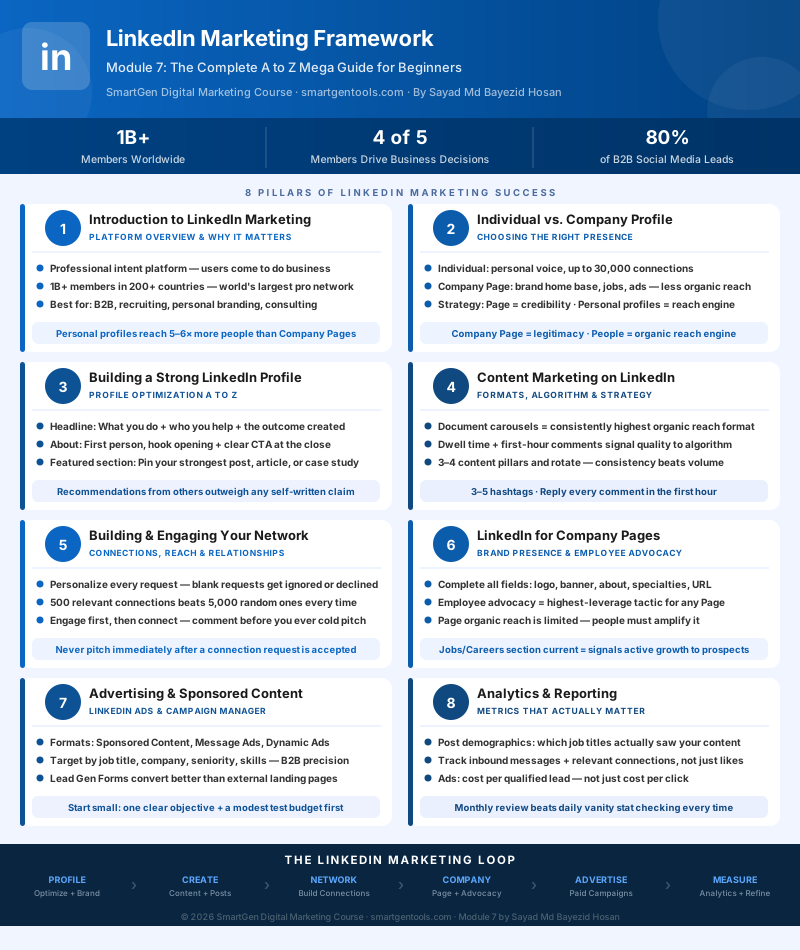
Below is an original infographic mapping out the eight building blocks covered in this guide — from your first decision about individual versus company presence, through profile optimization, content, network growth, Company Pages, advertising, and finally analytics. This graphic was created specifically for this guide and is free to use with attribution back to this article.
Module 7 Mega Guide Summary
In this module, we covered how to choose between an individual profile and a Company Page (and why, in most cases, you'll eventually want both, used differently), how to build a profile that actually converts visitors instead of just listing a job history, what content genuinely performs well on LinkedIn right now and why dwell time and the first hour of engagement matter so much, how to grow a network of people actually relevant to your goals instead of a meaningless follower count, how to run a Company Page that pulls real weight through employee advocacy, how LinkedIn's ad platform and its industry-leading targeting work, and which analytics are actually worth your attention.
Practice exercise: Spend twenty minutes rewriting your own headline and the opening two lines of your About section using the formulas from Section 3. Then find five genuinely relevant people in your target audience, send each a personalized connection request referencing something specific from their profile, and track your acceptance rate over the next 48 hours against whatever your old, generic request approach used to get.
Frequently Asked Questions
Is LinkedIn worth it for a small business or solo freelancer, not just big companies?
Yes, often more so. Individual profiles get more organic reach than Company Pages, which actually works in a solo freelancer's or small business owner's favor — you don't need a large marketing team to be effective here, just consistency and a genuine point of view.
Should I start with my individual profile or a Company Page?
For almost every beginner, start with your individual profile. It's where the algorithm naturally gives you the most reach, and it's where you'll learn what content actually resonates with your audience before investing time in a Company Page.
How often should I actually post?
Consistency matters more than frequency. A few solid posts a week that you can sustain indefinitely will outperform an ambitious daily schedule that burns out after three weeks.
Is LinkedIn Premium necessary to do any of this well?
No. Everything in this guide — profile optimization, organic content, network building, a Company Page, and even advertising through Campaign Manager — works on a completely free account. Premium adds extras like expanded search and deeper profile-viewer data, but it isn't a prerequisite for results.
How long before LinkedIn marketing actually shows results?
Expect this to be slower than other platforms. Most people see early signs — better profile views, a few inbound messages, growing post engagement from relevant people — within four to eight weeks of consistent effort, with more substantial business results compounding over several months as your network and credibility build.
What's Next?
In Module 8, we'll continue building your platform-specific marketing skills. Take a moment to revisit the earlier lessons in this course if you need a refresher, since each module builds on what came before it:
- Introduction to Online Digital Marketing: A Beginner's Guide
- Module 3: Social Media Marketing (SMM) — Advertising Concepts and Platform Selection
- Module 4: Meta (Facebook) Marketing — The Complete A to Z Mega Guide
- Module 5: Instagram Marketing — The Complete A to Z Mega Guide
- Module 6: X (Formerly Twitter) Marketing — The Complete A to Z Mega Guide
- Search Engine Optimization (SEO) — The Complete A to Z Mega Guide for Beginners
This article was written by Sayad Md Bayezid Hosan for the SmartGen blog. For free tools to support your digital marketing journey, visit smartgentools.com.