
July 01, 2026 • General • By Sayad Md Bayezid Hosan
MODULE 8: Pinterest Marketing — The Complete A to Z Mega Guide for Beginners
A complete, practical A to Z guide to Pinterest marketing for beginners — what Pinterest really is and why it works differently from every other platform in this course, how to set up and fully optimize your business profile and boards, how to drive consistent website traffic using Pins and Pinterest SEO, and how to read your analytics so you always know what is genuinely working versus what only looks like it is.
Welcome to Module 8: Pinterest Marketing
Every platform we've covered in this course so far — Facebook, Instagram, X, LinkedIn — is, at its core, a social network. The content you post there lives and dies in a feed. It gets seen for a few hours, maybe a couple of days if it's performing particularly well, and then it sinks and disappears, replaced by the next wave of posts. Your followers had to see it while it was fresh, or they missed it entirely.
Pinterest does not work like that. Not even close.
Pinterest is the one platform in this entire course that behaves fundamentally more like a search engine than a social media feed. People do not come to Pinterest to catch up with friends or follow the news. They come with a specific goal in mind — to find a recipe, plan a renovation, discover a new outfit, research a wedding, or learn how to do something — and they type a search query to find exactly what they're looking for. That single behavioral difference changes everything about how you should approach this platform as a marketer.
A Pin you create today can be discovered by a completely new person six, twelve, or eighteen months from now through a search query they type in the future. No other platform in this course offers that kind of extended lifespan for your content. On Instagram, a post that isn't engaged with in the first 48 hours is effectively invisible. On Pinterest, that same piece of content can quietly drive a steady stream of clicks to your website for the next year and a half.
That's the opportunity. But capturing it requires understanding the platform on its own terms rather than treating it like Instagram with a different logo.
This guide walks you through the full picture: what Pinterest actually is and how businesses genuinely benefit from it, how to build a properly optimized profile and board structure, how to create and distribute content that drives real, consistent website traffic, and how to use Pinterest's analytics to know whether any of it is actually working.
Before diving in, if you haven't already gone through the earlier modules in this course, I'd recommend starting there, since each module builds on the concepts that came before:
- Introduction to Online Digital Marketing: A Beginner's Guide
- Module 3: Social Media Marketing (SMM) — Advertising Concepts and Platform Selection
- Module 4: Meta (Facebook) Marketing — The Complete A to Z Mega Guide
- Module 5: Instagram Marketing — The Complete A to Z Mega Guide
- Module 6: X (Formerly Twitter) Marketing — The Complete A to Z Mega Guide
- Module 7: LinkedIn Marketing — The Complete A to Z Mega Guide
Why I'm Writing This Guide the Way I Am
I'll be honest: Pinterest is one of the most underestimated platforms in digital marketing, particularly among beginners who dismiss it as a place for recipe collections and home décor mood boards. That reputation is outdated and genuinely costly to the marketers who believe it.
The reality is that Pinterest has crossed 619 million monthly active users worldwide, its audience spends money at a rate that outperforms virtually every other social platform, and its architecture gives content a shelf life that no social media feed can match. Businesses operating in the right categories — fashion, food, home, beauty, travel, health, education, finance, and dozens of others — can generate more consistent, compounding website traffic from Pinterest than from almost anywhere else online, often with far less ongoing effort once the content is built.
This guide is written around that reality. It explains how the platform actually works from the inside out, what you need to do to make it work specifically for a business goal rather than just a personal mood board, and how to measure whether it's delivering real results. Everything here is written the way a practitioner explains it — with the reasons behind each piece of advice, not just a list of steps to follow blindly.
1. What Is Pinterest & How to Use Pinterest for Business
Understanding the Platform
Pinterest launched in 2010 as a visual bookmarking tool — a digital pinboard where people could save images and ideas from around the internet by "pinning" them. That core concept has remained constant, but the platform has grown enormously around it. As of early 2026, Pinterest reports over 619 million monthly active users across more than 85 countries, making it one of the largest platforms on the internet by active audience.
What has not changed is the fundamental way people use it. Users come to Pinterest with intent. They are actively looking for something — an idea, a product, a solution, an inspiration — and they use Pinterest's search function the way many people use Google. The difference is that Pinterest's results are visual, organized into boards, and tied to links that send the user elsewhere on the internet when they want to learn more or make a purchase.
This intent-driven behavior is the single most important thing to understand about Pinterest from a business perspective. On Instagram, someone might see your product and think vaguely "oh, that's interesting." On Pinterest, someone sees your product because they searched "minimalist desk setup ideas" or "birthday cake for 5-year-old" — which means they are already in planning or purchasing mode before they even find you.
The Pinterest Vocabulary You Need to Know
Before going any further, let's define the terms that come up constantly when working with Pinterest, because they have specific meanings here that differ from how the same words are used on other platforms.
Pin — Any piece of content saved to Pinterest. A Pin can be an image, a video, or a collection of images called a carousel. Every Pin links somewhere: to a blog post, a product page, a recipe, a landing page, or wherever you want the user to go after they click. The link is what makes Pins valuable for driving traffic, not just visibility.
Board — A named collection of related Pins. Think of a board like a folder or a chapter in a book. A food blogger might have boards for "Weeknight Dinners," "Desserts," and "Meal Prep Ideas." A business might have boards for "Product Inspiration," "How-To Guides," and "Customer Stories." Boards are how Pinterest organizes your content and helps the algorithm understand what topics you cover.
Repin (or Save) — When someone else saves your Pin to one of their own boards, this is called a Save. It's the Pinterest equivalent of a share on other platforms, and it's one of the most important signals of content quality on the platform. A Pin that gets saved widely spreads far beyond your own followers and keeps compounding over time.
Impression — How many times a Pin appeared somewhere on Pinterest (in a feed, search result, or related content section), regardless of whether anyone clicked or engaged with it.
Outbound Click — When someone clicks a Pin and follows the link to your website. This is, for most businesses, the most valuable single action on the platform, because it means someone has left Pinterest and arrived at your business.
Rich Pin — A special type of Pin that pulls live data from your website automatically, so the Pin always shows current pricing, availability, or article titles. There are three types: Product Pins (show price and availability), Article Pins (show headline, author, and description), and Recipe Pins (show ingredients and cooking time). Rich Pins require a one-time setup connecting your website to Pinterest, and they consistently outperform standard Pins in click-through rates.
Pinterest Tag — Pinterest's version of a tracking pixel. You install a small piece of code on your website, and it allows Pinterest to track what actions users take after clicking a Pin — page views, add-to-cart events, purchases, and more. This is essential for running ads, measuring conversions, and understanding the full impact of your Pinterest activity.
Why Pinterest Works for Business
The numbers behind Pinterest's commercial performance are genuinely striking compared to other platforms covered in this course.
Research consistently shows that around 85% of weekly Pinterest users have made a purchase based on something they discovered on the platform. That figure is remarkable. On most other social media platforms, the percentage of users who move from content discovery to an actual purchase is far lower, because the browsing intent isn't there in the same way.
Two more statistics that matter enormously for traffic-focused marketing: Pinterest users are reportedly about three times more likely to click through to a brand's website than users on other social platforms, and a striking 97% of the top searches on Pinterest are unbranded — meaning people are searching for things like "living room ideas" or "summer outfit," not "IKEA furniture" or "Zara dress." This unbranded search dominance means a small or new business can genuinely compete with major brands in Pinterest search results, which is almost impossible on Google at scale without significant SEO investment.
The practical implication: if you sell something that someone could realistically dream about, plan for, or aspire to, Pinterest is worth your serious attention.
Who Should Prioritize Pinterest
Pinterest performs particularly well for businesses in a specific set of categories. The platform's audience skews heavily female (around 70% globally), significantly millennial and Gen Z (with Gen Z now making up roughly 42% of all global users), and heavily oriented toward planning, shopping, and aspiration rather than passive entertainment.
If your business operates in any of the following areas, Pinterest deserves a prominent place in your strategy: food and recipes, home decoration and renovation, fashion and personal style, beauty and skincare, health and fitness, travel and destinations, parenting and education, wedding and event planning, personal finance and budgeting, crafts and DIY, and photography or visual art.
If your business is purely B2B with no consumer-facing visual product or service, Pinterest is less naturally suited to your goals, and the time might be better spent on LinkedIn (covered in Module 7). But even some B2B categories — design agencies, architecture firms, educational content creators — have found genuine success here because their work is inherently visual.
2. How to Create & Optimize Your Pinterest Profile & Boards
Setting Up a Business Account
The very first thing to get right before any optimization is making sure you have a Pinterest Business Account, not a personal one.
A Business Account is free and gives you access to everything that actually matters for marketing: Pinterest Analytics, the ability to run paid ads through Pinterest Ads Manager, the ability to install the Pinterest Tag on your website, Rich Pin verification, and access to Pinterest's shopping features. None of these are available on a personal account. If you already have a personal Pinterest account you've been using, you can convert it to a Business Account directly from Settings without losing any content.
To create or convert: go to pinterest.com/business, click "Get started" or "Convert to a business account," fill in your business name, website URL, and choose the category that most closely describes your business. That category helps Pinterest understand what your account is about from day one.
Claiming Your Website
The single most important technical step after setting up a Business Account is claiming your website. This links your Pinterest account to your domain, which does several important things: it adds your profile photo and name to every Pin saved from your website (by you or by anyone else), it unlocks analytics for those Pins, and it gives your account a trust signal that the Pinterest algorithm uses when deciding how widely to distribute your content.
To claim your website, go to Settings → Claimed Accounts → Website, and follow the verification steps (usually either adding a meta tag to your site's HTML or uploading a verification file to your server). This takes about ten minutes and is completely worth doing before you create your first piece of content.
Optimizing Your Profile
Think of your Pinterest profile the way you'd think of the homepage of a business — it's where new visitors form their first impression.
Profile name. Use your real business name here, and if there's room, add a short keyword phrase that describes what you do. Pinterest is searchable, and your profile name is indexed, which means including a relevant keyword phrase helps your profile appear when people search for businesses in your category.
Profile description (About section). You have 160 characters. Use them to explain exactly what your business does, who you help, and what kinds of content people will find on your boards. Include two or three natural keyword phrases that your target audience would actually search for. Do not write something vague and generic like "inspiring content for everyone" — write something specific like "Weekly dinner recipes and meal planning tips for busy families."
Profile photo. For a business, use your logo. Make sure it's clean, high resolution, and recognizable at a small size, because it appears next to every Pin you create across the platform.
Featured boards. Pinterest lets you choose which boards appear most prominently on your profile. Put your most strategic, best-content boards here — the ones that best represent your expertise and speak directly to your target audience.
Website URL. Make sure your website is correctly linked and showing as verified (the claimed website indicator). This is the primary destination for all the traffic Pinterest will eventually send you.
Building and Optimizing Your Boards
Boards are the organizational spine of your entire Pinterest presence. They are what the algorithm uses to understand your account's focus, and they are what users browse when they arrive on your profile and want to explore your content beyond a single Pin. Getting your board structure right matters more than most beginners realize.
Name boards with real keywords. Generic board names like "Inspiration" or "Ideas" tell the algorithm almost nothing. Specific board names like "Healthy Meal Prep for Beginners" or "Modern Farmhouse Living Room Ideas" are searchable phrases that help your boards appear in Pinterest search results. Every word in a board name is indexed, so treat it with the same care you'd give a blog post headline.
Write detailed board descriptions. Each board has a description field that most users leave blank, which is a genuine missed opportunity. Write two to four sentences for every board description that describe the content on that board in natural, keyword-rich language — the kinds of phrases your ideal audience would actually type into the Pinterest search bar. Pinterest uses these descriptions to categorize your boards and rank them in search.
Create between 8 and 15 boards to start. Too few boards makes your account look thin and unfocused; too many sparse boards spread your content too thinly and confuse the algorithm about what you actually specialize in. As your content library grows, you can add boards strategically.
Choose the right board covers. The first image that represents each board matters visually when someone lands on your profile. Pin the most visually compelling, representative image in each board to be its cover.
Use Secret Boards strategically. Pinterest lets you create secret boards that are invisible to anyone except you. These are useful for saving competitor inspiration, testing new content ideas before you're ready to publish them, or organizing content for a campaign that hasn't launched yet.
Consider Group Boards carefully. Group Boards, where multiple contributors can Pin to the same board, were once a major growth tactic on Pinterest. The platform's algorithm has significantly reduced their importance in recent years, and many Group Boards have become cluttered and low quality. They're not worth pursuing aggressively for most businesses in 2026, though joining a small number of well-maintained, highly relevant Group Boards in your niche can still occasionally be useful for reaching new audiences.
A Mid-Guide Reality Check — What I Actually Want You to Walk Away Understanding
Halfway through any guide like this, it's worth pausing to name the thing most beginners get wrong, because it shapes every mistake that follows.
The mistake is treating Pinterest like a broadcast platform — creating an account, posting a batch of Pins, and then waiting for traffic to arrive. Pinterest doesn't work that way for most accounts. It's a compounding platform. The first weeks and months of activity rarely produce dramatic results. What they produce is infrastructure: a profile that's fully set up, boards that are organized and keyword-optimized, and a library of Pins that the algorithm is slowly learning to trust and distribute.
The payoff comes later and stays longer. A blog post I know of in the home renovation space published 40 properly optimized Pins over three months, saw modest traffic in that period, and then watched the same Pins generate consistent, reliable traffic for the following two years without additional effort. That kind of slow-burn compounding simply does not happen on Instagram or Facebook.
The other thing worth naming: the line between "Pinterest is working" and "Pinterest isn't working" is almost never about effort — it's almost always about whether you're approaching the platform as a search engine (keyword-first, evergreen content, patient consistency) or as a social feed (posting for immediate engagement, chasing trends, measuring success in likes). The entire second half of this guide is about how to do the former correctly.
This guide draws on Pinterest's own published platform data, widely available third-party research from firms that track the platform's performance, and practical patterns that show up consistently when you look at what actually drives results for real businesses here. Where specific numbers vary across sources or are genuinely contested, I've said so plainly.
3. Driving Website Traffic with Pinterest
This is, for most businesses, the primary reason to be on Pinterest at all. Everything else in this guide — the profile, the boards, the optimization — exists in service of one core goal: getting people who find your Pins to click through and visit your website, read your blog, buy your product, or sign up for your list.
Here is how to do that well.
Treat Pin Descriptions Like Search Engine Listings
Every single Pin you create should have a description written with Pinterest SEO in mind. This is different from social media captions on other platforms. On Instagram, a caption adds personality and context. On Pinterest, a description is fundamentally a search optimization tool — it is how Pinterest's algorithm decides when to show your Pin to a user and for which search queries.
Write descriptions of 150 to 300 words for your most important Pins. Start with your primary keyword phrase in the first sentence, naturally woven into a description of what the content is and why it's useful to the reader. Include secondary keyword phrases that relate to the topic — the kinds of variations someone might search when looking for the same idea. Close with a clear call to action that tells the reader what to do next: "Save this for later," "Click to read the full guide," "Visit the link for the full recipe and shopping list."
To find the right keywords for your Pins, use Pinterest's own search bar. Type your topic and watch what autocomplete suggestions appear — those are real things people are actively searching for on the platform. The autocomplete results on Pinterest are arguably more useful for Pinterest-specific SEO research than any third-party keyword tool, because they are drawn directly from the platform's search data.
Create Pins That Make Someone Stop and Click
Pinterest is a visual platform, and your Pin's image is what causes someone to stop scrolling and pay attention. The description brings them in through search, but the image is what earns the click.
Vertical images consistently outperform square or horizontal ones. The ideal aspect ratio for standard Pins is 2:3 (roughly 1000 × 1500 pixels). Pinterest's feed is built vertically, and taller images take up more of the screen, which naturally draws more attention than a smaller square image competing in the same space.
Text overlay on images is a genuine advantage on Pinterest. Adding a clear, keyword-rich headline directly onto your Pin image (sometimes called a "title card" in the industry) significantly increases clicks, because it communicates immediately what the content is about to someone who stops scrolling but hasn't read the description yet. A food blogger's Pin image of a pasta dish performs better with "30-Minute Creamy Tomato Pasta Recipe" overlaid in legible text than the same image without any text, because the text tells the viewer exactly what they'll get if they click.
Pin quality matters more than quantity, but consistency matters more than both. A frequently heard mistake from beginners is "I pinned 100 things in one weekend and got nothing." Pinterest's algorithm actually penalizes sudden bursts of mass pinning followed by inactivity — it's designed to favor accounts that show up consistently over time. Several high-quality Pins per week, published at a steady rhythm, will outperform a hundred Pins dropped in one sitting followed by weeks of silence.
Video Pins are the fastest-growing format. Video content on Pinterest grew dramatically in recent years, and the algorithm currently gives video a meaningful reach advantage in some categories. A short (15–60 second) video Pin that demonstrates a process, shows a before-and-after, or walks through a recipe or tutorial tends to perform particularly well. Unlike video on YouTube, Pinterest videos should work without sound (many users browse on mobile without headphones) and should communicate the core idea visually in the first few seconds.
Carousel Pins let you tell a deeper story. A carousel Pin is a multi-image post that users swipe through in the feed, and they consistently achieve higher engagement than single-image Pins because they invite interaction and allow you to build a sequence — a step-by-step tutorial, a product range, a before-and-after series — that would be impossible to convey in a single image.
Enable Rich Pins for Automatic Content Sync
If you have a website, enabling Rich Pins is one of the highest-leverage technical steps you can take for Pinterest traffic, and it's a one-time setup cost.
Product Rich Pins automatically pull your product's current name, price, and availability from your website and display it on the Pin. When your price changes, the Pin updates automatically. This is particularly powerful for e-commerce businesses because it means your Pins always show accurate, current information without you having to manually update them.
Article Rich Pins automatically pull the headline, author name, and article description from your blog posts. This makes article Pins look more authoritative and informative in the feed and removes friction for someone trying to understand what they'll get if they click.
To enable Rich Pins, you need to add specific metadata to your website's HTML (most commonly using Open Graph tags or Schema.org markup, which many WordPress plugins and e-commerce platforms add automatically) and then validate your site through Pinterest's Rich Pin validator tool. The process is well documented in Pinterest's help center.
Link Every Pin to the Most Useful Destination
Every Pin should link to a specific, relevant page — not your website's homepage. A Pin about a blueberry muffin recipe should link to the blog post containing that specific recipe, not the general blog homepage. A Pin showcasing a specific product should link to that product's page, not your homepage or a general category page.
This sounds obvious, but the number of beginners who link all their Pins to their homepage and then wonder why Pinterest traffic doesn't convert is surprisingly large. The more directly your Pin's destination matches the expectation the image and description set, the higher your conversion rate will be.
Use Pinterest SEO Principles Consistently
Pin to the most relevant board first. The first board you save a new Pin to is the most important signal you send the algorithm about what your Pin is about. Save a recipe Pin to your most focused, specific recipe board — not a generic "content" or "my posts" board you use for everything.
Repin at the right times. Pinterest's own research and that of third-party scheduling tools consistently show that the platform sees higher engagement on weekday evenings and on Saturday mornings, though this varies meaningfully by niche and audience location. Check your own analytics (covered in Section 4) to find when your specific audience is most active rather than relying purely on generic advice.
Maintain a mix of your own content and curated repins. Saving other people's relevant Pins to your boards is not a waste of time — it signals to the algorithm that you are an active, engaged account and it helps build your boards into genuinely useful resources that people follow. A reasonable mix for most business accounts is roughly 70–80% of your own content and 20–30% carefully curated repins from other relevant, high-quality accounts.
Use Pinterest Trends for content planning. Pinterest publishes a free Trends tool (trends.pinterest.com) that shows what topics are rising in search volume on the platform in real time, broken down by country and category. This is genuinely one of the most underused free research tools in digital marketing. Checking it before you plan your next month's content calendar can tell you what your audience will be searching for before they search for it — an advantage that's hard to replicate anywhere else.
4. Pinterest Analytics and Reporting
You cannot improve what you do not measure. Pinterest gives Business Account holders a free, built-in analytics dashboard that is genuinely capable and comprehensive once you know what each metric actually means. Here is a plain-English walkthrough of what to look at, why it matters, and how to use it to make better decisions.
Accessing Your Analytics
Log into your Business Account on desktop, open the menu in the top-left corner, and select Analytics → Overview. You will see a dashboard summarizing your account's overall performance across a date range you choose. This is your main reporting hub for everything covered below.
The Core Metrics Explained
Impressions — How many times your Pins appeared anywhere on Pinterest: in feeds, search results, related content sections, or anywhere else. Impressions are your reach signal. A high impression count with a low engagement rate suggests your Pins are appearing in relevant places but not compelling people to take action — usually a signal to revisit your images or headlines rather than your keyword strategy.
Saves (formerly called Repins) — How many times someone saved one of your Pins to one of their own boards. Saves are one of the strongest quality signals on Pinterest. A Pin that gets saved widely means people found it genuinely worth keeping for future reference, and each Save extends the Pin's reach to the Saver's own followers and future searchers. Track your save rate (saves divided by impressions) for individual Pins to identify what content your audience most wants to return to.
Pin Clicks (Closeup Clicks) — How many times someone clicked on your Pin to see it in full detail without necessarily following the link to your website. This tells you the Pin caught attention — but it is not the same as outbound traffic.
Outbound Clicks — How many times someone clicked the link in your Pin and left Pinterest to visit your website. This is, for most businesses, the single most important metric in Pinterest Analytics. It directly measures traffic driven, which is the primary business goal. Watch this number closely for each individual Pin and board to understand which specific content converts curiosity into real visits.
Engagement Rate — Engagement (saves plus Pin clicks) divided by impressions, expressed as a percentage. This tells you, overall, how well your content is connecting with the audience that sees it.
Video Views and Average Watch Time — Available for video Pins specifically, these tell you how many people watched your video and how long they stayed. Average watch time is particularly useful: a video with high view count but very low average watch time often means the thumbnail or first second drew people in but the content didn't deliver on the expectation — an important signal for improving future video.
Understanding Your Audience Demographics
Under Analytics → Audience Insights, Pinterest shows you a breakdown of who is engaging with your content: their age ranges, genders, locations, languages, and the categories and interests Pinterest has associated with them based on their broader platform behavior.
This is valuable in two ways. First, it tells you whether the people engaging with your Pins are actually your target audience. If you're a women's fitness brand and your top engaged audience turns out to be predominantly male users in a geography that doesn't match your market, that's a signal your content isn't reaching the right people — and you need to adjust your board strategy and keyword targeting. Second, if your audience demographics do match your target, you can use this same data to build precise audience targeting when you eventually run paid ads.
Tracking Website Traffic from Pinterest in Google Analytics
Pinterest Analytics gives you the Pinterest-side of the picture. For the full picture — what Pinterest visitors actually do when they arrive on your website, which pages they visit, how long they stay, and whether they convert — you need to look at your website analytics platform, most commonly Google Analytics.
In Google Analytics (GA4, the current version), go to Reports → Acquisition → Traffic Acquisition and look for "pinterest" in the session source column. This shows you how many sessions Pinterest generated, how they compare to your other traffic sources, and what those visitors did on your site.
If you set up the Pinterest Tag correctly (see Section 1), you can also create custom events in GA4 to track specific conversion actions — form submissions, product page views, add-to-cart, checkout completions — that are tied specifically to Pinterest-sourced traffic. This closes the loop entirely and lets you attribute real business outcomes to specific Pins and boards.
Building a Simple Monthly Reporting Habit
The biggest analytics mistake on Pinterest is checking numbers too often and in isolation. A single Pin's daily impression count tells you almost nothing useful; that same Pin's performance trends over 30, 60, and 90 days tell you a great deal.
Build a simple monthly habit: on the first of each month, spend 20–30 minutes in Pinterest Analytics reviewing these four things. Which three Pins generated the most outbound clicks in the past 30 days? What do they have in common — topic, format, image style, description length? Which three boards drove the most outbound clicks? Are those the same boards you're prioritizing for new content? What did your audience demographics look like — are you reaching your intended target audience, or is there a drift happening? And how are your impression and save trends moving over time — are they growing, flat, or declining?
The answers to these four questions each month will tell you almost everything you need to know about what to adjust in the following month — whether that's doubling down on your highest-performing content format, shifting which boards you add content to most frequently, or revisiting your keyword strategy because your impressions have stalled.
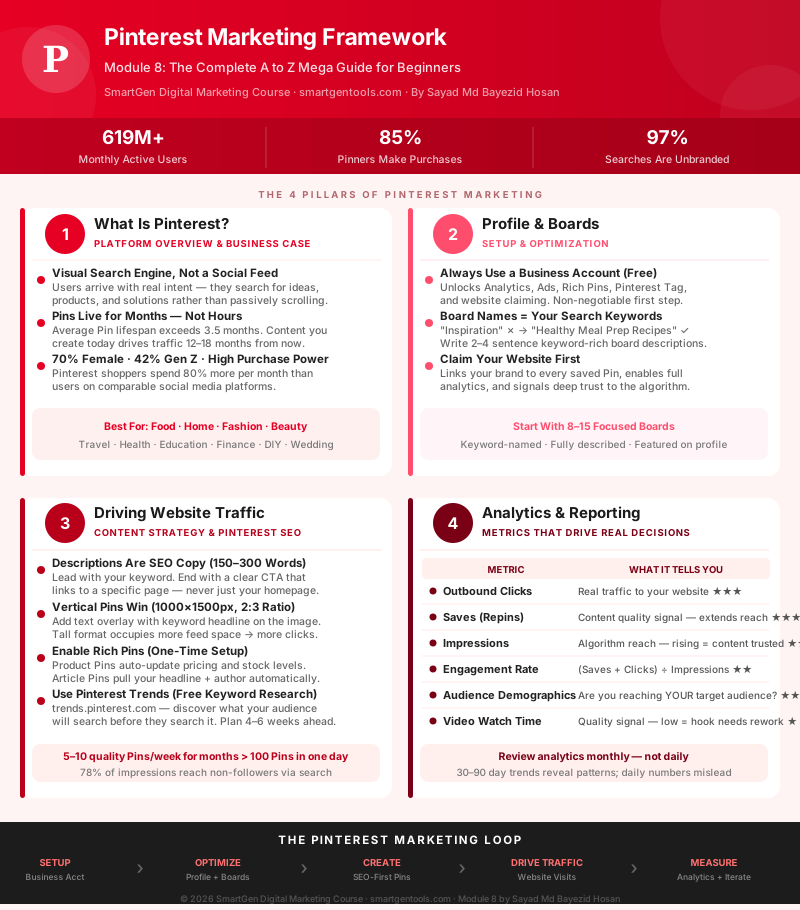
Visual Summary
Below is an original infographic built specifically for this guide, mapping out the Pinterest marketing system from initial setup all the way through analytics and iteration. It was created for this article and is completely free of copyright restrictions.
Module 8 Mega Guide Summary
In this module, we covered what Pinterest actually is (a visual search engine that behaves fundamentally differently from every other platform in this course), why it works so well for businesses in visual categories (high purchase intent, unbranded search dominance, exceptional content longevity), how to set up a properly optimized Business Account with claimed website, keyword-rich profile, and structured boards, what makes a Pin actually work (vertical format, text overlay, keyword description, specific destination link, and consistent publishing rhythm), how to drive real website traffic through Pinterest SEO, Rich Pins, and content strategy, and how to use Pinterest Analytics and Google Analytics together to measure outbound clicks, audience demographics, and actual conversion outcomes.
Practice exercise: Open your Business Account, go to the Pinterest search bar, and type three phrases a potential customer might use to find your product or service. Write down the top five autocomplete suggestions for each one — those are your Pinterest keyword targets for the next month. Then take your top-performing existing blog post or product page and create a new, properly optimized Pin for it using everything from Section 3: 2:3 vertical image with text overlay, 200-word keyword-rich description, linked directly to that specific page. Pin it to your single most relevant board and track its performance over the next 30 days.
Frequently Asked Questions
Is Pinterest really worth the time if my business isn't in a "visual" category?
It depends on how creatively you think about visualization. Obviously a bakery or a home décor brand has an immediate visual product to work with. But a financial planning firm can create infographic Pins around "5 steps to your first emergency fund." A law firm that serves families can pin "questions to ask before writing a will." The question isn't whether your business has a visual product — it's whether your audience has aspirations, problems, or decisions that could be illustrated. If yes, Pinterest is worth testing.
How many Pins should I publish per week?
Quality and consistency beat volume every time. A thoughtful rhythm of five to ten well-optimized Pins per week, maintained consistently for months, will outperform 100 Pins published in a weekend and then abandoned. Start with a pace you can genuinely maintain.
Do I need to follow a lot of accounts to grow on Pinterest?
No. Pinterest is not a reciprocal follow platform the way Twitter or Instagram can be. Your growth comes from search visibility and save velocity, not from following and being followed back. Invest your time in keyword optimization and content quality rather than follower tactics.
What is the Pinterest Tag and do I really need it?
If you are running any paid ads on Pinterest, the Tag is mandatory — without it, you cannot track conversions or build retargeting audiences. If you are focused on organic traffic only, the Tag is still worth installing because it lets you understand what Pinterest visitors do on your site after they arrive, which is otherwise a complete blind spot.
How long before Pinterest starts driving meaningful traffic?
Most accounts see real traffic growth after two to four months of consistent activity. Pinterest is not a platform for quick wins — it is a platform for compounding returns. The businesses that give up after six weeks almost always miss the inflection point that was about to arrive.
Can Pinterest drive traffic even without a large following?
Yes — and this is one of Pinterest's most distinctive qualities. Analytics data from Pinterest's own platform shows that around 78% of Pin impressions go to non-followers, meaning the vast majority of the reach you earn on Pinterest comes from search and discovery, not from your follower count. This is the opposite of how Instagram or Facebook work, where following is the primary distribution mechanism.
What's Next?
In Module 9, we'll continue building your platform-specific marketing skills. Take a moment to revisit the earlier lessons in this course if you need a refresher, since each module builds on what came before it:
- Introduction to Online Digital Marketing: A Beginner's Guide
- Module 3: Social Media Marketing (SMM) — Advertising Concepts and Platform Selection
- Module 4: Meta (Facebook) Marketing — The Complete A to Z Mega Guide
- Module 5: Instagram Marketing — The Complete A to Z Mega Guide
- Module 6: X (Formerly Twitter) Marketing — The Complete A to Z Mega Guide
- Module 7: LinkedIn Marketing — The Complete A to Z Mega Guide
This article was written by Sayad Md Bayezid Hosan for the SmartGen blog. For free tools to support your digital marketing journey, visit smartgentools.com.