
July 04, 2026 • General • By Sayad Md Bayezid Hosan
MODULE 14: Technical SEO Optimization — The Complete A to Z Mega Guide for Beginners
A complete, deeply detailed, beginner-friendly A to Z guide to technical SEO — how to run a full technical SEO audit the way a professional actually would, how to optimize your website's speed and Core Web Vitals (LCP, INP, and CLS) so it passes Google's real-user performance thresholds, how mobile-first indexing and responsive design genuinely work under the hood, how to structure a website so search engines can crawl and index it efficiently, and exactly how to implement schema markup and structured data correctly in 2026 — including which schema types still earn rich results and which ones Google has quietly retired.
Welcome to Module 14: Technical SEO Optimization
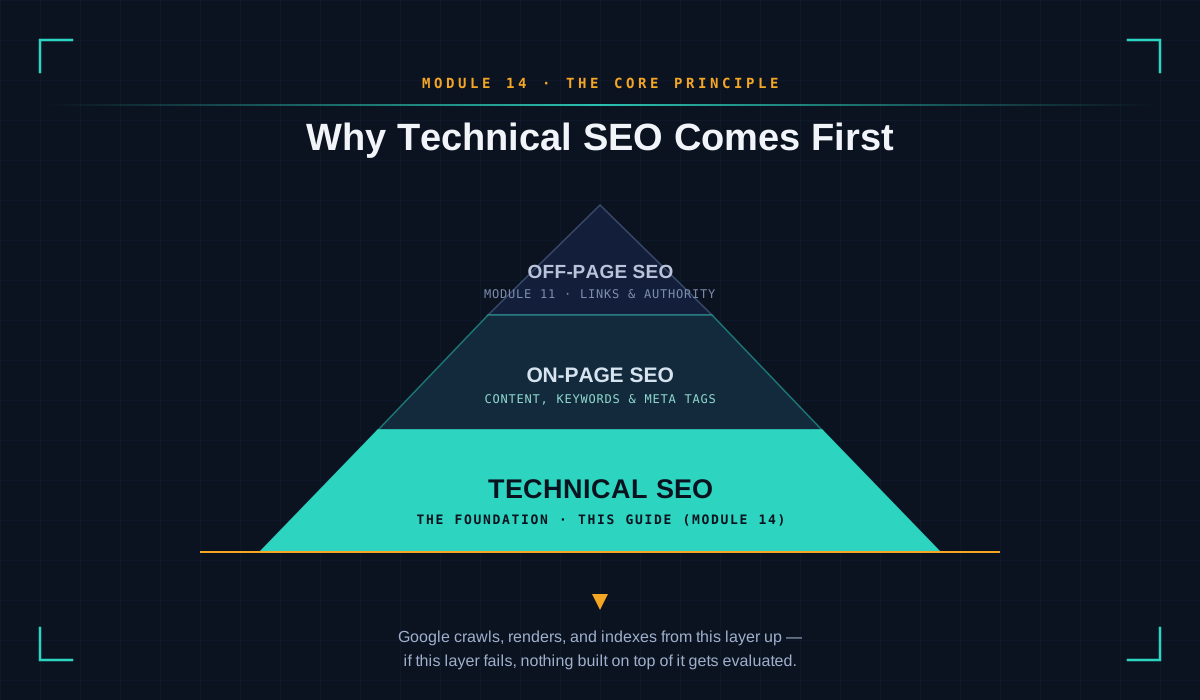
Module 10 introduced the three pillars every complete SEO strategy is built on: technical SEO, on-page SEO, and off-page SEO. Module 11 gave off-page SEO — link building, authority, and the white hat versus black hat divide — its own full mega guide. This module exists to do the same for the pillar that actually comes first, both chronologically and logically: technical SEO.
That ordering isn't an accident, and it's worth being explicit about why. On-page SEO can't help a page Google never indexes. Off-page SEO can't send authority to a page a search engine can't crawl in the first place. Every keyword you target, every backlink you earn, and every piece of content you publish sits on top of a technical foundation — and if that foundation has cracks, everything built above it inherits the damage, often silently, for months before anyone figures out why rankings won't move.
That silence is exactly the trap this module is built to prevent. Technical SEO issues rarely announce themselves with an error message. A slow server, a blocked crawl path, a mobile page quietly missing half its content, or structured data that stopped working after a Google update — none of these throw up a red flag on their own. They just quietly cap how well everything else you do is allowed to perform. This guide walks through exactly how to find those issues before they cost you rankings, using the same free, official tools professional SEO teams rely on every day.
Before diving in, if you haven't already gone through the earlier modules in this course, I'd recommend starting there, since each module builds on the concepts that came before it:
- Introduction to Online Digital Marketing: A Beginner's Guide
- Module 3: Social Media Marketing (SMM) — Advertising Concepts and Platform Selection
- Module 4: Meta (Facebook) Marketing — The Complete A to Z Mega Guide
- Module 5: Instagram Marketing — The Complete A to Z Mega Guide
- Module 6: X (Formerly Twitter) Marketing — The Complete A to Z Mega Guide
- Module 7: LinkedIn Marketing — The Complete A to Z Mega Guide
- Module 8: Pinterest Marketing — The Complete A to Z Mega Guide
- Module 9: Creating a WordPress Website — The Complete A to Z Mega Guide
- Module 10: Search Engine Optimization (SEO) — The Complete A to Z Mega Guide
- Module 11: Off-Page Optimization — The Complete A to Z Mega Guide
- A Complete Guide to Automated Sitemap Management for Modern SEO
- Module 13: Algorithm Updates and Analysis — The Complete A to Z Mega Guide for Beginners
- Module 14: Technical SEO Optimization — The Complete A to Z Mega Guide for Beginners
- local-seo-google-business-profile-complete-guide
Why This Guide Treats Technical SEO as Non-Negotiable
Technical SEO has an image problem among beginners. It sounds like the boring, back-end, developer-only part of SEO — the part you can quietly skip while you focus on the more exciting work of writing content and building links. That impression is understandable, and it's also exactly backwards.
Here's the honest version: a beautifully written, keyword-optimized, well-linked page that Googlebot can't crawl, can't render properly on mobile, or can't load in under five seconds might as well not exist as far as rankings are concerned. Google has said plainly, through its own Search Central guidance, that page experience and technical health are genuinely part of how it evaluates a page — not a tiebreaker reserved for two otherwise-identical competitors, but a real, measurable filter that content quality alone cannot buy its way past.
This is also, not coincidentally, the part of SEO most directly connected to the algorithm knowledge covered in Module 13. Broad core updates and page experience updates alike tend to reward sites with a clean technical foundation and quietly punish sites that let one slide — which is exactly why this module exists as the bridge between the algorithm theory in Module 13 and the hands-on audit work covered here.
So this guide is organized around one governing standard: nothing gets recommended here unless it can be verified, for free, with a tool you can open in another browser tab right now. No vague advice to "just make it faster" without a number attached, and no schema recommendation without first checking whether Google still actually displays it. That standard is also, deliberately, the same one this module holds itself to — which is the entire subject of the next section.
Why You Can Trust This Technical SEO Guide (Our E-E-A-T Commitment)
Google's own quality guidelines ask a simple question about every page it ranks: does this content demonstrate real Experience, Expertise, Authoritativeness, and Trustworthiness — the framework the SEO industry calls E-E-A-T? A guide about technical SEO carries a specific responsibility here that other content doesn't. If a guide about passing audits and avoiding penalties is itself outdated or inaccurate, it fails the exact standard it's trying to teach. So here is exactly how this module earns that standard — laid out plainly rather than just claimed.
Experience. Nothing in this guide is described in the abstract. Every tool referenced — Google Search Console, PageSpeed Insights, the Rich Results Test, and SmartGen's own Schema Generator — is a tool you can open in another tab right now and follow along with. Every threshold given is the actual number that tool will show you, not a rounded-off approximation.
Expertise. This module is built directly from Google's official Search Central documentation and current Core Web Vitals guidelines, not recycled from older SEO advice that's quietly gone stale. That distinction matters more in technical SEO than almost anywhere else in this course, because this is a part of SEO that genuinely changes under your feet — Google fully retired FAQ and HowTo rich results from Search in 2026, for example, and a guide still teaching the old "add FAQ schema for a bigger search listing" advice would now be actively wrong. Section 5 of this module reflects that change directly, instead of repeating outdated advice.
Authoritativeness. This is Module 14 in a structured, sequential digital marketing course, not a standalone post chasing a single keyword in isolation. It builds directly on the SEO foundations laid in Module 10 and the off-page authority work covered in Module 11, and it's published under a consistent, named byline you can follow across every module in this series.
Trustworthiness. Every recommendation in this module can be implemented with free, official tools — nothing here depends on a paid audit or an unverifiable black-box score. Where SmartGen's own Schema Generator is recommended in Section 5, that recommendation comes with an explicit, upfront statement about exactly what happens to your data when you use it, not a buried line in a separate policy you'd have to go looking for.
What Is Technical SEO? A Clear Definition Before We Start
Technical SEO is the practice of optimizing a website's infrastructure — its code, server, and configuration — so that search engines can crawl, render, index, and rank it efficiently, and so that real visitors get a fast, stable, usable experience once they arrive. It's the answer to a narrower question than most beginners expect: not "is this content good?" but "can a search engine even access this content in the first place, and does it load well once it does?"
It helps to place technical SEO next to the two terms it's most often confused with. On-page SEO is about the content and optimization choices within a page that's already accessible — keyword usage, headings, meta titles, internal topical relevance. Off-page SEO, covered in Module 11, is about signals that happen outside your own site — backlinks, brand mentions, and authority. Technical SEO sits underneath both of them. It doesn't care what your page says; it cares whether a search engine can reach the page, understand its structure, load it quickly, and trust what it finds there.
In practice, technical SEO breaks down into exactly the five areas this module is built around, each covered in full below:
- Technical SEO audits — the process of systematically finding what's broken.
- Site speed and Core Web Vitals — how fast and stable the experience is.
- Mobile-friendliness and responsive design — how the site performs on the version of it Google actually indexes.
- Site architecture and crawlability — how pages are organized, linked, and discovered.
- Schema markup and structured data — how machines understand what a page actually is.
Get these five right, and you've removed every technical ceiling standing between your content and the ranking it deserves. Get any one of them wrong, and it doesn't matter how good the writing is above it.
1. Conducting a Technical SEO Audit
What a Technical SEO Audit Actually Is
A technical SEO audit is a systematic review of every technical factor that affects whether search engines can crawl, render, index, and rank your website — separate entirely from the quality of your writing or the strength of your backlinks. Where Module 10 taught you to read a page the way a search engine reads it, a technical audit is the practical exercise of actually doing that reading, page by page, with real tools, and writing down exactly what's broken.
Beginners often assume an audit is something you do once, early on, and then forget about. Professional SEO teams treat it as an ongoing discipline instead: a full audit on a quarterly basis, with lighter monthly checks on the fastest-moving metrics (Core Web Vitals, crawl errors, and indexing status) in between, plus a full audit immediately before or after any major site change — a redesign, a CMS migration, or a domain change. Technical issues introduced during a site update are some of the most common, and most avoidable, causes of a sudden ranking drop.
The Five-Phase Framework
A useful way to structure any technical audit, beginner or advanced, is around five phases that build on each other in order:
- Crawlability — can search engines reach your pages at all? This covers your
robots.txtfile, your XML sitemap, internal linking, and whether anything is accidentally blocking important pages. - Rendering — once a crawler reaches a page, can it actually see the content? Heavy JavaScript that hides content until after a user interaction can leave a crawler seeing a mostly empty page.
- Architecture — how your pages are organized and connected, covering URL structure, click depth, and how authority flows through internal links (covered in full in Section 4).
- Indexation — of the pages Google can crawl and render, which ones does it actually choose to keep in its index? This is where duplicate content and canonicalization issues show up.
- Performance — how fast and stable the experience is once a page loads, covered in full in Section 2.
Running Your First Audit: A Practical Starting Checklist
You don't need an expensive enterprise tool to run a genuinely useful first audit. Here's a sequence that covers the most common, highest-impact issues, using entirely free tools:
- Crawl your own site. A tool like Screaming Frog's free tier (crawls up to 500 URLs at no cost) shows you exactly what a search engine sees: every page, every status code, every redirect, every missing title tag.
- Check your indexing status in Google Search Console. The Pages report shows exactly which URLs are indexed, and — more usefully — exactly why any given URL isn't, in Google's own words.
- Review your Core Web Vitals report, also inside Search Console, to see which URL groups are passing and which are flagged "Needs Improvement" or "Poor."
- Run your most important pages through PageSpeed Insights individually, since Search Console's report works at the URL-group level and can hide a problem on a single high-value page.
- Check mobile usability — covered in full in Section 3.
- Validate your structured data — covered in full in Section 5.
- Review your robots.txt and XML sitemap for anything accidentally blocking or omitting pages you actually want indexed — covered in full in Section 4.
Free vs. Paid Technical SEO Audit Tools
Beginners often stall out trying to pick a tool before they've even started. Here's how the most commonly recommended options actually compare:
| Tool | Cost | Best For |
|---|---|---|
| Google Search Console | Free | Indexing status, Core Web Vitals field data, mobile usability, structured data errors — your source of truth |
| Screaming Frog SEO Spider | Free up to 500 URLs, paid beyond | Full-site crawls, status codes, titles/metas, redirect chains |
| Google PageSpeed Insights | Free | Per-page speed diagnostics with prioritized fixes |
| Google's Rich Results Test | Free | Structured data validation |
| Sitebulb / Semrush Site Audit / Ahrefs Site Audit | Paid | Larger sites, visual crawl maps, scheduled recurring audits |
| Lighthouse (built into Chrome DevTools) | Free | Local, on-demand performance and accessibility scoring |
For a beginner auditing a site under a few hundred pages, the first four rows in that table are genuinely enough — you don't need a paid subscription to run a credible, thorough audit.
Understanding Crawl Errors: What Each Status Code Actually Means
A crawl will hand you a list of HTTP status codes, and knowing what each one means is the difference between a useful audit and a spreadsheet full of numbers. A 200 means the page loaded successfully — this is what you want on every URL you care about. A 301 is a permanent redirect, which is fine in small numbers but a warning sign in bulk, since every redirect adds latency and, if chained (a 301 pointing to another 301), can waste crawl budget and dilute link equity. A 302 is a temporary redirect and should almost never be used for a permanent change — using 302s where 301s belong is one of the most common architecture mistakes beginners make, because it tells search engines "don't bother updating your index yet," even when the change is permanent. A 404 means the page wasn't found; a handful are normal on any live site, but a large or growing number, especially on pages with existing backlinks or search traffic, means you're actively losing equity you've already earned. A 5xx error means the server itself failed to respond, and even a small number of these on important pages deserves immediate attention, since repeated server errors can cause Google to slow down or reduce how often it crawls your site.
Duplicate Content and Thin Content: The Quiet Index-Budget Killers
Two related issues show up in almost every first audit, and both quietly damage how Google perceives the overall quality of a site. Duplicate content happens when the same or near-identical content is reachable at multiple URLs — common causes include URL parameters (?sort=price), both http and https versions resolving without a redirect, or a "www" and "non-www" version both being live. Thin content is the opposite problem: pages that technically exist and are technically unique, but don't offer enough substance to be worth indexing on their own — old tag pages, empty category pages, or auto-generated pages with just a sentence of unique text. Both problems dilute the average quality signal Google forms about your entire domain, which is why cleaning them up (through canonical tags, consolidation, or noindex) is consistently one of the highest-leverage fixes in a first audit.
The HTTPS and Security Check
A modern technical audit also confirms the basics of site security, since Google has treated HTTPS as a baseline expectation for years now. Check that your entire site loads over https://, that http:// requests redirect to https:// with a single 301 (not a chain), and that there's no mixed content — pages served over HTTPS that still load some resources (usually images or scripts) over an insecure http:// connection, which browsers will flag and which can quietly break page functionality.
A 2026 Addition: Auditing for AI Crawlers Too
One genuinely new habit worth building into your audit routine: your robots.txt file is no longer only a conversation with Googlebot and Bingbot. A growing list of distinct crawlers — including GPTBot, ClaudeBot, PerplexityBot, and Google-Extended — now request access to your content for different purposes, from AI model training to real-time answer retrieval. Blocking all of them by default isn't automatically the "safe" default; it's a real trade-off, since it also removes your content from the citation pipelines that increasingly drive branded visibility inside AI-generated answers. A modern technical audit should include a deliberate look at which bots your robots.txt currently allows or blocks, rather than leaving that file untouched since the day the site launched. Section 4 covers the exact robots.txt syntax for handling this.
Prioritizing What You Find
A first audit on a site that's never had one will almost always surface more issues than you can fix in a single afternoon — that's normal, not a sign you did something wrong. Prioritize with a simple two-factor test: how much traffic or revenue does the affected page actually drive, and how much effort will the fix genuinely take? Fixing a Core Web Vitals issue on your five highest-traffic landing pages is a better use of a Tuesday afternoon than fixing a broken canonical tag on a page that gets four visits a year, even though a crawler will flag both as "issues."
Common Technical Audit Mistakes Beginners Make
A few patterns show up again and again in first-time audits: treating every flagged issue as equally urgent instead of prioritizing by traffic and effort; auditing once and never again, missing the issues a redesign or plugin update quietly introduces months later; ignoring the Search Console "why isn't this indexed" explanation in favor of guessing; and auditing only the homepage and a few top pages while ignoring how the same template-level bug might be repeating across thousands of product or category pages at once.
2. Website Speed and Performance Optimization
Why Site Speed Is a Direct, Measurable Ranking Signal
Website speed stopped being a "nice to have" the moment Google formalized it into Core Web Vitals — a specific, numeric, real-user-measured set of page experience signals. This isn't a vague suggestion to "make your site feel faster." It's three precise metrics, each with a published pass/fail threshold, measured from real visitors' actual browsers rather than a lab simulation.
The Three Core Web Vitals, Explained Properly
Largest Contentful Paint (LCP) measures how long it takes the largest visible piece of content on a page — usually a hero image or headline — to finish loading. Google's threshold for a "good" score is under 2.5 seconds. The most common causes of a poor LCP are slow server response times, render-blocking CSS or JavaScript, and unoptimized images; the fixes that move the needle most are compressing and serving images in modern formats like WebP or AVIF, preloading your LCP image, inlining critical CSS, and using a CDN to cut server response time.
Interaction to Next Paint (INP) measures how responsive your page feels across every click, tap, and key press during a visit — not just the very first one. INP officially replaced the older First Input Delay (FID) metric in March 2024, precisely because FID only measured a single first interaction and told you almost nothing about the rest of the visit. Google's threshold for a good INP score is under 200 milliseconds, and it's consistently the hardest of the three metrics for real websites to pass, since fixing it demands a genuine rethink of how JavaScript executes rather than one quick tweak. The core techniques are breaking up long JavaScript tasks, deferring non-critical scripts, and minimizing how much work third-party scripts (chat widgets, ad tags, analytics) are doing on your main thread.
Cumulative Layout Shift (CLS) measures visual stability — how much visible content unexpectedly shifts around while a page is loading. Google's threshold for a good score is under 0.1. The fix is almost always the same regardless of the specific cause: give every image, video, iframe, and embedded ad slot an explicit width and height in your code, so the browser reserves the correct space before the content itself finishes loading.
The Detail That Trips Up Almost Every Beginner: The 75th-Percentile Rule
Here's the part of Core Web Vitals that beginners consistently misread, and it changes how you should interpret your own reports. Google doesn't average your site's performance. A page only earns an overall "Good" Core Web Vitals status when at least 75% of real visits individually clear the good threshold for LCP, INP, and CLS simultaneously — not the typical visit, but the rough 75th-percentile visit, with all three metrics passing at once. A site that feels fast on your laptop over fast office WiFi can still fail this test in the field, because it's effectively measuring the experience of your fourth-slowest visitor out of every four, on whatever device and connection they actually have — frequently a mid-range phone on a patchy mobile connection.
Tools for Measuring, In the Right Order
Google Search Console's Core Web Vitals report is your source of truth, because it uses real-user field data (the Chrome UX Report, or CrUX) rather than a lab simulation — the same data Google itself uses for ranking. PageSpeed Insights gives you both field data (when enough traffic exists for a given URL) and lab data, plus a specific, prioritized list of what to fix on that exact page. Chrome DevTools, built into every Chrome browser, lets you find the specific render-blocking resources and long JavaScript tasks causing a slow score, which is genuinely useful for working through fixes one at a time.
Why This Matters Beyond the Ranking Signal Itself
Site speed's business impact consistently outpaces its direct ranking weight. A widely cited industry benchmark holds that every additional second of load time can reduce conversions by as much as 7%, and that pattern shows up across almost every study measuring the relationship between speed, bounce rate, and revenue. Treat Core Web Vitals as a floor worth clearing for its own sake — the visitors and conversions you keep by passing it are usually worth more than the ranking boost alone.
Time to First Byte (TTFB): The Metric Underneath All Three Core Web Vitals
Before a browser can even start painting content, it has to wait for your server to respond to the initial request — that wait is Time to First Byte, and Google's general guidance is to keep it under 200 milliseconds. TTFB isn't one of the three official Core Web Vitals, but it's arguably the most foundational metric of all, because a slow TTFB puts a hard floor under how good your LCP can ever be — no amount of image compression fixes a server that takes two seconds just to start responding. The most common causes are underpowered or oversold shared hosting, unoptimized database queries on dynamic sites, and the absence of server-side or edge caching. The fixes are usually infrastructure-level: upgrading hosting, adding a caching layer, or serving static assets from a CDN edge location physically closer to the visitor.
Image Optimization: The Single Highest-Leverage Speed Fix for Most Sites
For the average content or ecommerce site, images are the single biggest contributor to a slow LCP, which makes image optimization the highest-leverage speed fix most beginners can make in one sitting. Four practices matter most: serve modern formats — WebP or AVIF instead of JPEG or PNG, which typically cut file size by 25–50% at the same visual quality; compress before upload, since even modern formats benefit from a compression pass; size images to their actual display dimensions rather than uploading a 4000px-wide photo into a 600px-wide container and letting CSS scale it down in the browser; and use the srcset attribute to serve appropriately sized versions of the same image to different devices, so a phone isn't downloading a desktop-sized file. Lazy-loading offscreen images (loading="lazy") helps too, but should never be applied to your LCP image itself, since delaying the load of your largest contentful element defeats the purpose.
Caching and CDNs: Serving Content Closer to the Visitor
Browser caching tells a returning visitor's browser to reuse files it already downloaded (your logo, your CSS) instead of re-requesting them, configured through cache-control headers on your server. Server-side caching (common in WordPress through plugins, or built into modern frameworks) stores a pre-built version of a page so your server doesn't have to rebuild it from a database on every single request — this is frequently the single biggest TTFB improvement available on a dynamic CMS site. A Content Delivery Network (CDN) takes this a step further by storing copies of your static assets on servers physically distributed around the world, so a visitor in Singapore isn't waiting on a round trip to a server in the United States. For any site with a global or even national audience, a CDN is one of the highest-return infrastructure investments available.
Minification and Reducing JavaScript Weight
Minification strips unnecessary characters — whitespace, comments, long variable names — from your CSS and JavaScript files without changing what they do, typically shrinking file size by 20–40% for a few minutes of build-time work. Beyond minification, the bigger INP-related win is auditing what JavaScript is running at all: third-party scripts for chat widgets, ads, and analytics are frequently the biggest single contributor to a poor INP score, since they compete with your own code for the browser's main thread. Loading non-critical third-party scripts with defer or async, and removing any tool your team has stopped actually using, often produces a bigger INP improvement than any code-level optimization to your own site.
Font Loading: A Small Detail That Affects Both LCP and CLS
Web fonts can quietly hurt two Core Web Vitals at once if handled carelessly. Use font-display: swap so text renders immediately in a fallback font rather than staying invisible while the custom font downloads (protecting LCP), and preload your most critical font file with a <link rel="preload"> tag so it's available as early as possible in the page load. Without these, it's common to see a visible flash where text jumps or reflows once the real font finally loads — a direct contributor to a poor CLS score.
Common Speed Optimization Mistakes Beginners Make
The most common mistake is optimizing based on a single Lighthouse or PageSpeed Insights score from one test run and declaring victory, without checking the field data (CrUX) that actually determines your ranking signal — lab and field data can and do disagree. A close second is fixing LCP and CLS, which have well-known, mechanical fixes, while ignoring INP because it requires touching JavaScript architecture rather than just adding an image attribute. And a third is treating a speed optimization plugin as a substitute for actually removing unused scripts, fonts, and page builder bloat — a plugin can compress what's there, but it can't fix a page that's carrying five tools you stopped needing two redesigns ago.
3. Mobile-Friendliness and Responsive Design
Why "Mobile-Friendly" Undersells What's Actually Happening
Calling this section "mobile-friendliness" almost undersells the real stakes, because Google isn't simply handing out a ranking bonus to sites that happen to work well on phones. Google now uses mobile-first indexing across effectively the entire web — meaning the mobile version of your site is what Google actually crawls, indexes, and evaluates for ranking, for both mobile and desktop search results. If a piece of content, a link, or a block of structured data exists only on your desktop layout and is missing from the mobile version, it doesn't get a ranking discount. It functionally doesn't exist to Google at all.
The Three Technical Configurations, and Why Google Picks One
Google recognizes three ways to serve a mobile-friendly experience. Responsive design serves identical HTML and one single URL to every device, adjusting the visual layout purely through CSS. Dynamic serving keeps a single URL but sends different HTML depending on the requesting device. Separate URLs (the old "m.example.com" pattern) uses entirely distinct URLs for mobile and desktop.
Google explicitly recommends responsive design, and for a beginner, that recommendation is worth simply following rather than re-litigating. It's the easiest of the three to build and maintain, it eliminates an entire category of canonicalization and duplicate-content errors that separate URLs are prone to, and because there's only ever one version of the content, the "content parity" problem below can't happen in the first place.
Content Parity: The Single Most Common Mobile SEO Mistake
The most frequent, damaging mistake beginners make under mobile-first indexing is quietly serving less on mobile than on desktop — shortened product descriptions, a trimmed navigation, testimonials or entire sections dropped to save space. Since Google evaluates the mobile version, anything present only on desktop simply isn't part of what gets ranked. This doesn't mean every element needs to sit immediately visible on the smallest screen; tucking content into accordions or tabs is a legitimate, Google-recognized mobile design pattern. The requirement is narrower and more specific: the content has to genuinely exist in the page's HTML and be reachable without requiring a user interaction just to load it in the first place, not merely to reveal it.
Practical Design Standards Worth Building In From the Start
A handful of concrete standards separate a technically-responsive site from one that actually performs well on mobile: touch targets — buttons and links — should be at least 44×44 pixels (Apple's guideline) to 48×48 pixels (Google's Material Design guideline), sized up further to 56–60 pixels for a primary call-to-action. Fluid layouts should use relative units and flexible grids rather than fixed pixel widths, so the design scales smoothly rather than breaking at specific device widths. And modern responsive CSS is generally written mobile-first at the code level too — base styles written for the smallest screen, with min-width media queries layering on complexity for larger viewports, rather than the older approach of designing for desktop and stripping things down as an afterthought.
The Viewport Meta Tag: The One Line That Makes Responsive Design Possible
None of the responsive behavior described above works without one line in your page's <head>:
<meta name="viewport" content="width=device-width, initial-scale=1">
Without it, mobile browsers render the page at a fixed desktop-like width and then shrink the whole thing down to fit the screen — the classic "pinch to zoom just to read a sentence" experience. This single tag tells the browser to match the page's width to the device's actual screen width and set the initial zoom level to 100%, and it's the technical foundation every other mobile-friendliness practice in this section depends on. It's also one of the first things worth checking when a page fails a mobile usability test for no obvious reason — it's easy to lose this tag during a template migration or theme change.
Text Size and Readability Standards
Beyond touch targets, Google's mobile usability guidance also looks at whether text is actually readable without zooming — the general recommendation is a base font size of at least 16px for body text, with adequate line height (around 1.5) and enough spacing between paragraphs and tappable elements that a thumb doesn't accidentally trigger the wrong link. Sites that shrink font size to squeeze in more content above the fold on mobile routinely fail this check even though the layout is technically "responsive."
The Intrusive Interstitials Penalty: A Mobile-Specific Ranking Risk
Since January 2017, Google has penalized mobile pages that show an intrusive interstitial — a popup or overlay that blocks the main content — specifically during the transition from a mobile search result into the page itself. This remains active, current guidance in 2026, and it's narrower and more forgiving than most beginners assume. It only targets the moment right after a click from Google's mobile search results, not popups that appear later in a user's browsing path or on desktop. It's also not a blanket ban on popups: Google explicitly exempts interstitials required for legal or regulatory reasons (cookie consent notices, age verification for restricted content) and login walls on genuinely non-indexable content, along with reasonably-sized banners like app-install prompts. What gets penalized is a full-screen promotional popup, discount offer, or newsletter signup that covers the content a visitor just clicked through from Google to see. The practical rule of thumb: if a first-time mobile visitor arriving from a Google search result can't see your actual content without dismissing something first, that's the pattern to remove.
Mobile-Specific Speed Considerations
Section 2 covers Core Web Vitals in general, but it's worth restating here because Google's Core Web Vitals data is now predominantly a mobile-first measurement — mobile devices generate the majority of the real-user field data Google uses to score your site, and mobile connections are inherently more variable than a wired office connection. This means a site that comfortably passes Core Web Vitals on a desktop-focused internal test can still fail in the field simply because the majority of your real traffic, and therefore the majority of your CrUX data, is coming from phones on cellular connections. Testing and optimizing with a throttled mobile connection profile (available directly in Chrome DevTools) gives a far more honest picture than testing on a fast office WiFi connection alone.
Testing Your Own Site
Start with Google Search Console's mobile usability data and PageSpeed Insights, both of which flag mobile-specific issues directly. Chrome DevTools' device mode gives you a fast, free way to preview your site across common screen sizes right in your browser. For anything about to be published at scale, testing on a handful of real physical devices, not just simulators, remains the most reliable final check — simulators are good at catching layout breaks but can miss real-world issues, like touch target spacing, that only become obvious with an actual thumb.
Common Mobile SEO Mistakes Beginners Make
Beyond the content-parity mistake already covered, the most common errors are: forgetting the viewport meta tag after a template change; using a font size small enough to require zooming; running a promotional popup that qualifies as an intrusive interstitial without realizing it; and testing exclusively on a high-end phone over WiFi, which hides exactly the mobile performance problems that matter most for the actual visitors on mid-range devices and patchy cellular data.
4. Site Architecture and Crawlability
What Site Architecture Actually Governs
Site architecture is how your pages are organized, categorized, and connected to one another through internal links. It might sound like a purely organizational concern, but it directly governs two things search engines care about enormously: how easily a crawler can discover every page you want indexed, and how efficiently authority — the ranking value passed through links — flows from your most powerful pages, usually your homepage, out to the rest of your site.
Crawl Budget and Index Budget: Two Different Constraints
It's worth separating two concepts beginners frequently conflate. Crawl budget is the number of pages a search engine is willing and able to crawl on your site within a given period, largely a function of your server's capacity and response speed. Index budget is a separate constraint entirely: even among pages Google successfully crawls, it only keeps the ones it judges worth including in its index at all. For the overwhelming majority of small-to-medium sites, crawl budget genuinely isn't a limiting factor worth losing sleep over — Google's own guidance is direct about this, noting that crawl-budget micro-optimization mostly matters for very large or extremely fast-changing sites. What trips up most sites instead is an index budget problem: too many thin, near-duplicate, or low-value pages diluting the perceived quality of the site as a whole.
The Core Building Blocks
A logical URL structure groups related content under clear, human-readable paths (/blog/technical-seo/ rather than an opaque string of parameters and IDs), signaling hierarchy to users and crawlers before they even click.
Internal linking is the mechanism that actually moves authority around your site and helps crawlers discover new or deep pages faster. A flat architecture — where any page can be reached within roughly three clicks from the homepage — is a good beginner-friendly target, since pages buried deep with no internal links pointing to them (orphan pages) are frequently missed by crawlers entirely, regardless of how good the content on them is.
An XML sitemap is a direct, explicit list of the URLs you want search engines to know about, submitted through Google Search Console. It doesn't guarantee indexing, but it's one of the simplest, lowest-effort signals you can give a search engine about which pages you consider worth crawling.
Your robots.txt file sits at your domain's root and tells crawlers which parts of your site they should and shouldn't access. As covered in Section 1, this file has taken on a genuinely new dimension in 2026: it now governs a growing list of distinct AI crawlers alongside the traditional search bots, and it deserves a periodic, deliberate review rather than being treated as a set-once, forget-forever file.
Canonicalization, using the rel="canonical" tag, tells search engines which version of a page is the "real" one when multiple URLs show the same or very similar content — a common situation caused by URL parameters, session IDs, or printer-friendly page versions. Getting this wrong is one of the most common causes of the index-budget dilution problem described above.
Pagination and Faceted Navigation: Where Architecture Problems Multiply
Category pages, product listings, and filtered search results are where site architecture problems tend to multiply fastest, because a single underlying set of products can generate an enormous number of unique, filterable URL combinations — by color, size, price, and sort order, in any combination. Left unmanaged, this can generate thousands of thin, near-duplicate URLs that overwhelm crawl and index budget alike. The practical fix is a combination of canonical tags pointing filtered variations back to their main category page, and, in genuinely large cases, using robots.txt or noindex tags to keep the least valuable parameter combinations out of the crawl and index entirely.
Reading the Reality, Not Just the Sitemap
An experienced technical auditor eventually learns to check server log files in addition to standard crawl-simulation tools, because a sitemap and a crawl tool both show you what should be discoverable — log files show you what Googlebot actually requested. The gap between the two is frequently where the most valuable architecture insights hide: pages your sitemap lists that Googlebot rarely bothers visiting, or crawl traffic being spent disproportionately on low-value URLs that are quietly starving your genuinely important pages of crawl attention.
Topic Clusters and Content Silos: Architecture That Signals Expertise
Beyond the mechanics of crawlability, how you group related content sends its own signal about topical authority. A content silo (or topic cluster) organizes a broad subject into a central "pillar" page — think of Module 10's SEO overview — with more specific, related articles like this one linking back to it and to each other. This isn't just tidy organization; it concentrates internal linking authority around your most important pages on a subject and makes it far easier for both search engines and readers to understand how your content fits together. This entire course is itself a working example: Module 10 acts as the pillar for SEO, with Module 11, Module 13, and this module all linking back to it and to one another.
A Real XML Sitemap Example
An XML sitemap doesn't need to be complicated. Here's a minimal, valid example covering a single URL:
<?xml version="1.0" encoding="UTF-8"?>
<urlset xmlns="http://www.sitemaps.org/schemas/sitemap/0.9">
  <url>
    <loc>https://smartgentools.com/blog/technical-seo-optimization-the-complete-a-to-z-mega-guide-for-beginners-smartgen-blog/</loc>
    <lastmod>2026-07-04</lastmod>
    <changefreq>monthly</changefreq>
    <priority>0.8</priority>
  </url>
</urlset>
Most CMS platforms (including WordPress with an SEO plugin) generate and update this automatically, but knowing what's actually inside the file makes it much easier to spot when something's wrong — for example, a sitemap still listing URLs that now 404, or omitting an entire new content section entirely.
A Real robots.txt Example, Including 2026's AI Crawler Considerations
A robots.txt file lives at your domain root (yoursite.com/robots.txt) and uses simple, plain-text rules. Here's an example that allows standard search crawling, explicitly allows a couple of common AI crawlers, blocks one, and points to your sitemap:
User-agent: *
Allow: /

User-agent: GPTBot
Allow: /

User-agent: PerplexityBot
Allow: /

User-agent: Google-Extended
Disallow: /

Sitemap: https://smartgentools.com/sitemap.xml
There's no universally "correct" answer for which AI bots to allow — that's a genuine business decision, not a technical one, and it depends on whether you want your content available for AI training, for real-time AI answer citation, both, or neither. What matters technically is that the decision is deliberate, documented, and revisited periodically, rather than left as whatever the default happened to be when the site launched.
301 vs. 302 Redirects: Why the Difference Actually Matters
A 301 redirect tells search engines a change is permanent, and it passes the vast majority of the original page's ranking value to the new URL — this is what you want for a page that's moved for good. A 302 redirect signals a temporary change, and search engines will generally keep the original URL indexed rather than transferring its value to the destination, since they expect the original to come back. Using a 302 for a permanent move is one of the most common architecture mistakes beginners make, often introduced by a CMS or plugin's default setting, and it can quietly prevent link equity from ever reaching the new, correct URL. It's also worth watching for redirect chains — URL A redirecting to B, which redirects to C — since every hop adds latency and some tools will only follow a limited number of redirects before giving up entirely.
5. Schema Markup and Structured Data
What Schema Markup Actually Does
Schema markup is structured data written in the standardized vocabulary maintained at Schema.org, added to your page's code to describe its content in a format machines can parse directly, rather than making a search engine infer meaning from raw text alone. It's worth being precise about what this does and doesn't do: schema markup is not a direct ranking factor. What it does instead is make a page eligible for enhanced search features (rich results), help Google's systems verify what an entity — your brand, your author, your product — actually is, and, increasingly in 2026, feed the entity-verification and trust signals that AI systems like Google's AI Overviews rely on when deciding what to cite.
JSON-LD is the format Google explicitly recommends, over the older Microdata and RDFa formats. It lives in a self-contained script block, completely separate from your visible HTML, which makes it dramatically easier to add, template, and maintain without any risk of breaking your page's visual layout.
A Necessary, Current Update: What Changed With FAQ and HowTo Schema in 2026
This is a section where being current, rather than repeating older advice, genuinely matters. For years, adding FAQPage schema to a page was one of the most commonly recommended "quick wins" in SEO, because it could trigger an expandable Q&A dropdown directly in Google's search results. That's no longer accurate, and repeating it as if it still were would be exactly the kind of stale advice this guide's E-E-A-T commitment exists to avoid.
Google restricted FAQ rich results to a narrow set of authoritative government and health websites back in August 2023. Then, on May 7, 2026, Google removed FAQ rich results from Search entirely — including for the government and health sites that had remained eligible. HowTo rich results followed a similar path and are now largely absent from standard search too. Here's the important nuance, though: FAQPage remains a completely valid Schema.org type, Google has stated it will continue using it to understand page content, and there's a reasonable, growing body of evidence that clearly-structured question-and-answer content still helps AI systems like AI Overviews extract and cite an answer — it simply no longer earns the visible dropdown rich result in classic Google Search that made it so popular in the first place. If you already have well-implemented FAQ content, there's no urgent need to tear it out; just stop expecting it to expand your search listing, and don't treat it as a priority for new implementation.
The Schema Types Actually Worth Your Time in 2026
For a beginner, five schema types cover the overwhelming majority of real-world value:
- Organization — establishes your brand as a distinct, verified entity, including your logo, official name, and social profiles via the
sameAsproperty. This is a foundational entity signal almost every site should implement, and it remains one of the most underused schema types relative to its value. - Article / BlogPosting — for content pages like this one, covering author, publish date, and update date. With FAQ and HowTo rich results in decline, well-implemented Article schema has become one of the single most valuable schema types for content sites, supporting both author attribution in search and AI Overview citation signals.
- Product — for ecommerce, covering price, availability, and ratings; still one of the strongest, most reliably active rich result types in Search.
- LocalBusiness — for any business with a physical location or service area, covering hours, address, and service area, feeding directly into map-pack and local search visibility.
- BreadcrumbList — arguably the single best effort-to-reward ratio in all of structured data. It replaces a raw URL in search results with a clean, readable breadcrumb trail, and it's simple enough to implement sitewide in one pass.
JSON-LD Code Examples for Each Schema Type
Seeing the actual syntax makes this far less abstract. Each of these is a complete, valid JSON-LD block meant to sit inside a <script type="application/ld+json"> tag in your page's <head>.
Organization:
{
  "@context": "https://schema.org",
  "@type": "Organization",
  "name": "SmartGen",
  "url": "https://smartgentools.com",
  "logo": "https://smartgentools.com/logo.png",
  "sameAs": [
    "https://www.facebook.com/yourpage",
    "https://www.linkedin.com/company/yourcompany"
  ]
}
Article:
{
  "@context": "https://schema.org",
  "@type": "Article",
  "headline": "Technical SEO Optimization — The Complete A to Z Mega Guide",
  "author": { "@type": "Person", "name": "Sayad Md Bayezid Hosan" },
  "datePublished": "2026-07-04",
  "dateModified": "2026-07-04",
  "publisher": { "@type": "Organization", "name": "SmartGen" }
}
Product:
{
  "@context": "https://schema.org",
  "@type": "Product",
  "name": "Your Product Name",
  "image": "https://example.com/product.jpg",
  "offers": {
    "@type": "Offer",
    "priceCurrency": "USD",
    "price": "29.99",
    "availability": "https://schema.org/InStock"
  }
}
BreadcrumbList:
{
  "@context": "https://schema.org",
  "@type": "BreadcrumbList",
  "itemListElement": [
    { "@type": "ListItem", "position": 1, "name": "Home", "item": "https://smartgentools.com/" },
    { "@type": "ListItem", "position": 2, "name": "Blog", "item": "https://smartgentools.com/blog/" },
    { "@type": "ListItem", "position": 3, "name": "Technical SEO Optimization" }
  ]
}
This is exactly the hand-coding SmartGen's Schema Generator exists to skip — but understanding the underlying shape makes it far easier to spot an error later in Search Console's Enhancements report.
Connecting Your Schema Together With @id
As you add more than one schema type to a site, a subtler best practice becomes worth knowing: using the @id property to explicitly connect them — for example, having your Article schema's publisher reference the same @id as your standalone Organization schema, rather than repeating the organization's details inline every time. This tells Google these blocks describe the same entity across multiple pages, which strengthens the entity-verification signal referenced earlier rather than leaving Google to infer the connection on its own.
Validating What You Build
Correct-looking schema that's actually broken is a genuinely common failure mode, and it produces zero benefit while looking, at a glance, like it's working. Always run new structured data through Google's Rich Results Test, which tells you specifically which rich result features a page qualifies for and flags any errors, and cross-check against the general Schema.org Validator for broader markup validity. After deploying, the Enhancements reports inside Google Search Console will flag any structured data errors Google's own crawlers encounter — usually within a couple of days of a new deploy.
Common Schema Markup Mistakes Beginners Make
The most frequent error is copy-pasting a schema template from an old tutorial without updating every placeholder field, leaving a fake phone number or "Example.com" URL live in production. Close behind is marking up content that isn't actually visible on the page — Google's guidelines require structured data to reflect real, visible content, and mismatched schema can lead to manual action rather than a rich result. A third common mistake is implementing FAQ schema in 2026 purely for search appearance, expecting a rich result that no longer exists for any site. And a fourth is never validating after a site migration or theme change, which is one of the most common ways previously-working schema silently breaks.
The Easiest Way to Get Started
If hand-writing JSON-LD feels like a lot for a first attempt, that's a completely reasonable place to start from — and it's exactly the gap SmartGen's free Schema Generator is built to close.
🧩 Skip the manual JSON-LD.
Generate clean, Google-compliant schema markup — Organization, Article, Product, LocalBusiness, BreadcrumbList and more — in seconds.
Your data is never stored or shared. Read our Privacy Policy to understand exactly how SmartGen handles your information.
(If your site's editor strips embedded HTML, use this fallback link instead: Generate Your Schema Markup Now → · Your data is never stored or shared — read the Privacy Policy for details.)
Technical SEO Glossary: Key Terms Explained
A quick reference for the terms used throughout this module, in one place:
- Technical SEO — optimizing a site's infrastructure so search engines can crawl, render, index, and rank it.
- Crawlability — whether a search engine can reach and access a given page at all.
- Crawl Budget — the number of pages a search engine will crawl on your site in a given period.
- Index Budget — how many of the pages Google can crawl it actually chooses to keep indexed.
- Core Web Vitals — Google's three real-user page experience metrics: LCP, INP, and CLS.
- LCP (Largest Contentful Paint) — how long the largest visible element takes to load; good is under 2.5 seconds.
- INP (Interaction to Next Paint) — how responsive a page feels to clicks and taps; good is under 200 milliseconds.
- CLS (Cumulative Layout Shift) — how much content visually shifts while loading; good is under 0.1.
- TTFB (Time to First Byte) — how long the server takes to send the first byte of a response.
- Mobile-First Indexing — Google's practice of using a site's mobile version as the primary version it indexes and ranks.
- Responsive Design — one URL and one HTML document that adapts its layout to any screen size via CSS.
- Canonical Tag (
rel="canonical") — an HTML tag telling search engines which URL is the authoritative version among duplicates. - XML Sitemap — a file listing the URLs on a site that you want search engines to know about.
- Robots.txt — a root-level file telling crawlers which parts of a site they may or may not access.
- Schema Markup / Structured Data — standardized code (usually JSON-LD) that describes page content in a machine-readable format.
- Rich Result — an enhanced search listing (like a breadcrumb trail or star rating) made possible by structured data.
- Orphan Page — a page with no internal links pointing to it, making it hard for crawlers to discover.
- E-E-A-T — Experience, Expertise, Authoritativeness, and Trustworthiness; Google's content quality framework.
Visual Summary
Below is an original infographic built specifically for this guide, mapping the complete technical SEO system covered in this module — from the crawl-render-index-rank pipeline, through Core Web Vitals thresholds, mobile-first indexing, site architecture fundamentals, and the current, accurate state of schema markup in 2026.
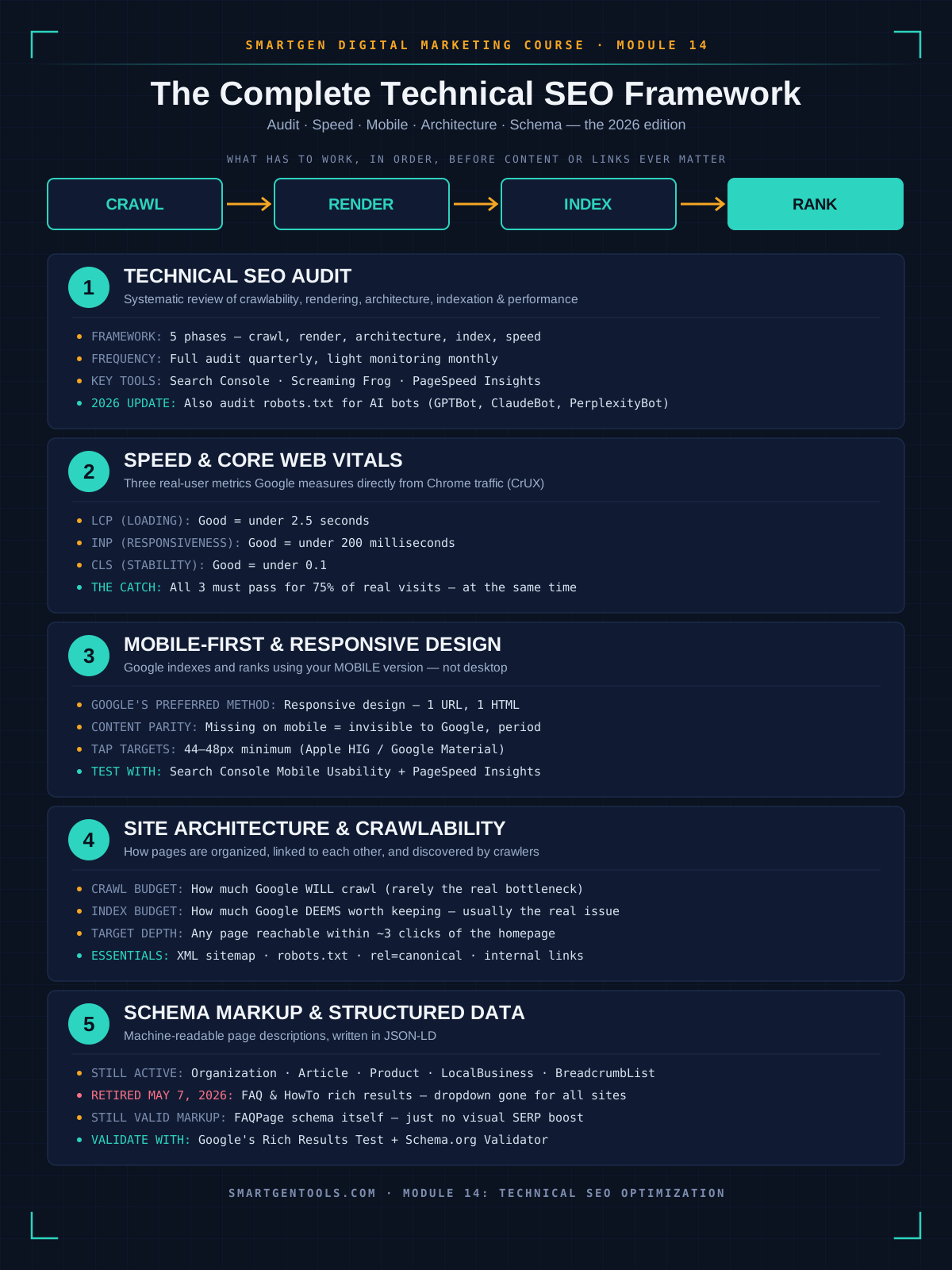
Module 14 Mega Guide Summary
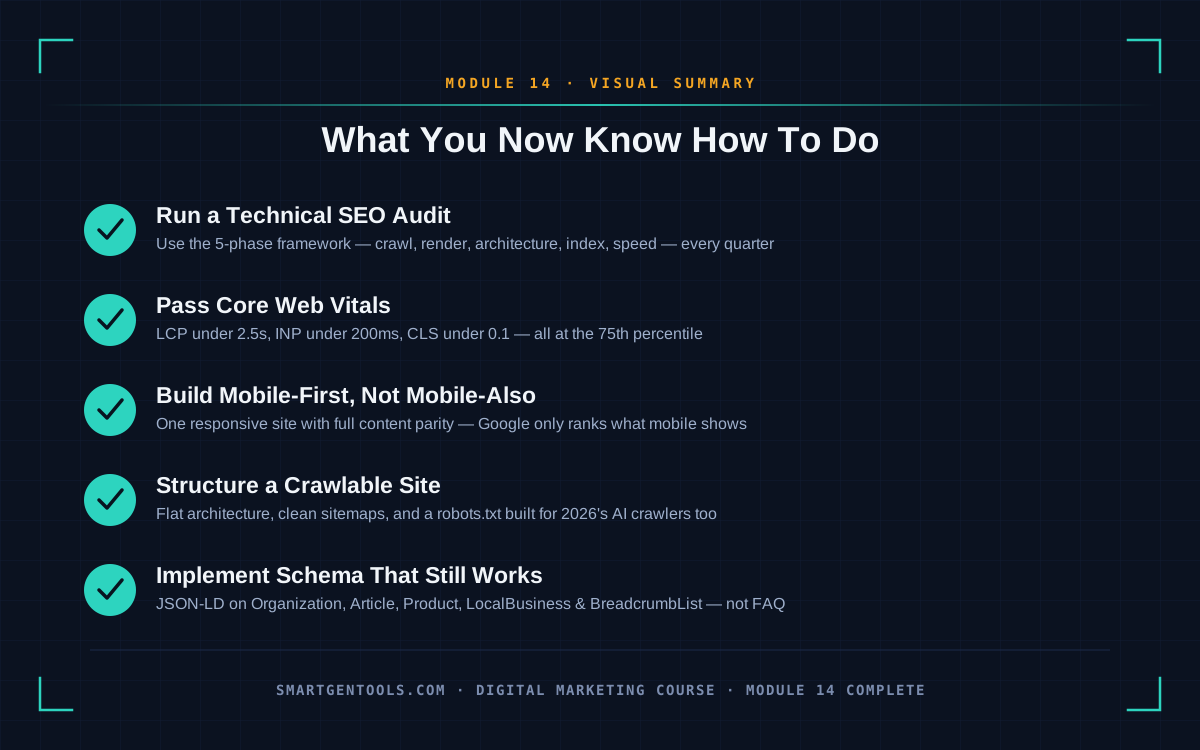
In this module, we covered technical SEO as the foundational pillar beneath everything else in this course — the pillar that determines whether your on-page work and off-page authority ever get the chance to be evaluated at all. We walked through how to conduct a full technical SEO audit using the five-phase framework (crawlability, rendering, architecture, indexation, performance) professional teams rely on, plus the growing importance of auditing your robots.txt file for AI crawlers specifically. We covered website speed and Core Web Vitals in real depth — LCP, INP, and CLS, their exact thresholds, and the 75th-percentile rule that trips up most beginners reading their own reports. We covered mobile-first indexing and responsive design, including the content-parity mistake that quietly costs sites their rankings without any obvious error message. We covered site architecture and crawlability, from crawl budget and index budget through URL structure, internal linking, sitemaps, and the specific dangers of unmanaged faceted navigation. And we closed with an honest, current look at schema markup and structured data — including exactly what changed with FAQ and HowTo schema in 2026, and which five schema types are genuinely worth your time going forward.
Practice exercise: This week, run a mini-audit on your own site using only free tools. Check your Core Web Vitals report in Google Search Console and note which URL group, if any, is flagged "Needs Improvement" or "Poor." Run your homepage through the mobile usability check inside Search Console. Then generate one piece of Organization schema for your own site using SmartGen's Schema Generator and validate it in Google's Rich Results Test. Write down the single biggest issue you find across all three checks — that becomes the first item on your technical SEO to-do list.
Frequently Asked Questions
What's the actual difference between technical SEO and on-page SEO?
Technical SEO governs whether search engines can access, render, and index your pages at all — crawlability, speed, mobile experience, site structure, and structured data. On-page SEO governs the content and optimization choices within a page that's already accessible, like keyword usage, headings, and meta tags. You need both; technical SEO simply has to work first, since on-page optimization can't help a page that never gets indexed.
How often should I actually run a full technical SEO audit?
A full audit on a quarterly basis is a reasonable default for most sites, with lighter, ongoing monitoring of Core Web Vitals, crawl errors, and indexing status in between. Always run a full audit immediately before and after any major site change — a redesign, a CMS migration, or a domain change — since these are the moments technical issues get introduced most often.
Do Core Web Vitals really affect my rankings, or is this overstated?
Google has confirmed Core Web Vitals are a real ranking signal, though content relevance and quality remain the dominant factors overall. Where Core Web Vitals matter most is as a genuine differentiator between pages that are otherwise closely matched in relevance and authority — and separately, poor Core Web Vitals scores are strongly associated with higher bounce rates and lower conversions regardless of their exact ranking weight, which is reason enough on its own to fix them.
Should I still bother implementing FAQ schema in 2026?
Not for the reason most beginners assume. FAQ schema no longer produces the visible dropdown rich result in Google Search for any site, following Google's full removal of the feature in May 2026. It's still valid markup, and there's reasonable evidence it can help AI systems parse clearly-structured Q&A content, but it should no longer be a priority implementation purely for search appearance. Prioritize the five schema types covered in Section 5 instead.
My site looks fine on my phone — do I still need to worry about mobile-first indexing?
Yes, and this is one of the most common blind spots for beginners. "Looks fine" and "contains all the same content, links, and structured data as the desktop version" are two different standards. Since Google evaluates the mobile version of your site for indexing and ranking, content that's present on desktop but missing, shortened, or hidden behind an interaction on mobile simply isn't counted — even if the mobile page itself looks visually polished.
Do I need to hire a developer to fix technical SEO issues?
Some fixes, especially around JavaScript execution and INP, genuinely benefit from developer involvement. But a large share of the issues a beginner audit surfaces — a missing XML sitemap submission, a misconfigured robots.txt line, unoptimized images, or basic schema implementation using a generator tool — are well within reach without writing code yourself. Start with the audit in Section 1 before assuming you need outside help; you may find the highest-impact fixes are simpler than expected.
What's the difference between crawl budget and index budget?
Crawl budget is how many pages a search engine is willing to crawl on your site in a given period, mostly governed by your server's speed and capacity. Index budget is separate: even among pages Google successfully crawls, it only keeps the ones it judges worth including in its index. Most small-to-medium sites should worry far more about index budget — cleaning up thin and duplicate pages — than crawl budget.
Should I use a 301 or 302 redirect?
Use a 301 for any permanent change, since it passes the vast majority of the original page's ranking value to the new URL. Reserve 302 redirects for genuinely temporary situations, like a page under maintenance that will return to its original URL shortly. Using a 302 for a permanent move is a common mistake that can prevent link equity from ever transferring to the new page.
Is AMP still necessary for mobile SEO in 2026?
No. AMP is now legacy technology that Google no longer requires or specially rewards. A well-optimized responsive page, built with the Core Web Vitals practices in Section 2, can match or beat AMP's speed without maintaining a separate, simplified version of every page.
— Written by Sayad Md Bayezid Hosan for the SmartGen blog
 ✓
✓
Sayad Md Bayezid Hosan
Founder & Tech Entrepreneur | Full-Stack Developer
Full-stack Web Developer, Digital Marketing Strategist, and Tech Entrepreneur with 5+ years of experience delivering innovative digital solutions. Specializing in web development, AI integration, strategic digital marketing, and tech entrepreneurship. As a leading Tech Provider, I help audiences navigate digital platforms safely through permission-based technical solutions and digital business asset management.
Credentials & Expertise:
- Founder of CWB Agency & GenZFrontier
- Final-year English Student at Northern University Bangladesh
- Specialized in AI-powered web development & content strategy
- Published author on tech, digital marketing & entrepreneurship
What's Next?
Take a moment to revisit the earlier lessons in this course if you need a refresher, since each module builds on what came before it:
- Introduction to Online Digital Marketing: A Beginner's Guide
- Module 3: Social Media Marketing (SMM) — Advertising Concepts and Platform Selection
- Module 4: Meta (Facebook) Marketing — The Complete A to Z Mega Guide
- Module 5: Instagram Marketing — The Complete A to Z Mega Guide
- Module 6: X (Formerly Twitter) Marketing — The Complete A to Z Mega Guide
- Module 7: LinkedIn Marketing — The Complete A to Z Mega Guide
- Module 8: Pinterest Marketing — The Complete A to Z Mega Guide
- Module 9: Creating a WordPress Website — The Complete A to Z Mega Guide
- Module 10: Search Engine Optimization (SEO) — The Complete A to Z Mega Guide
- Module 11: Off-Page Optimization — The Complete A to Z Mega Guide
- A Complete Guide to Automated Sitemap Management for Modern SEO
- Module 13: Algorithm Updates and Analysis — The Complete A to Z Mega Guide for Beginners
- Module 14: Technical SEO Optimization — The Complete A to Z Mega Guide for Beginners