
July 03, 2026 • General • By Sayad Md Bayezid Hosan
Local SEO & Google Business Profile — The Complete A to Z Mega Guide for Beginners
A complete, practical A to Z guide to Local SEO and Google Business Profile (formerly Google My Business) for beginners — creating and claiming your GMB listing the right way, optimizing every profile field to rank higher on Google Maps, using GBP Posts and Updates to win more clicks and customers, and reading your Insights and Analytics to make decisions based on real data instead of guesswork.
Welcome: Why Local SEO Is the Highest-ROI Marketing Channel Most Beginners Ignore
Here is a number that changes how you should think about digital marketing if you run any kind of local business: 46% of all Google searches carry local intent. That means nearly one in every two searches typed into Google right now is someone looking for a product, service, or business near them. Restaurants, plumbers, dentists, accountants, gyms, tutors, electricians, lawyers, salons — if your business serves customers in a specific geographic area, local SEO is not optional. It is the most direct, most measurable connection between your online presence and real customers walking through your door.
The second number worth sitting with: 76% of people who conduct a local search on mobile visit a physical business within 24 hours. Not sometime this week. Within 24 hours. That conversion speed is something no social media platform in this course can match, because the person is not passively browsing — they are actively looking for a business like yours, right now, near where they are.
And the third number, which explains exactly where to focus your energy first: Google Business Profile signals account for 32% of local pack ranking weight — the single largest factor category in local search, according to Moz's annual Local Search Ranking Factors study. Your Google Business Profile (GBP, formerly Google My Business or GMB) is not a nice-to-have secondary listing. It is the most powerful free tool in local digital marketing, and most businesses are leaving it almost entirely unconfigured.
This guide walks through the complete local SEO picture for beginners, with Google Business Profile at its center: how to claim and set it up correctly, how to optimize every field that affects your ranking, how to use Posts strategically, and how to read your Insights data so your decisions are grounded in what's actually happening, not what you hope is happening.
What Is Local SEO & How Is It Different From Regular SEO?
Regular SEO — the kind covered in our on-page optimization guide — focuses on ranking individual pages for specific keywords, primarily in the standard blue-link results that appear on Google's search results page. Local SEO focuses specifically on ranking your business in location-based searches, and particularly in what is called the Local 3-Pack (or Local Pack) — the map with three business listings that appears at the top of Google results when someone searches for something near them.
The Local Pack is the most valuable real estate in local search. Research consistently shows that 42% of all local search clicks go to the top 3 Local Pack results, while organic results below the map receive considerably less. If you are running a local business and you are not in that pack, you are effectively invisible to almost half of your potential customers before they even scroll down.
The Three Pillars Google Uses to Rank Local Businesses
Google is clear about what it uses to determine local rankings. It comes down to three core signals:
Relevance — How closely does your business match what the person searched for? This is determined primarily by your category selection, your business description, your services list, and the keywords that appear throughout your profile and website.
Distance — How far is your business from the searcher's location (or the location they searched for)? This is partially within your control — you can't change your address — but your service area settings and the way your profile describes your geographic coverage both influence how Google interprets your distance relevance.
Prominence — How well-known and trusted is your business? This is driven by review quantity and quality, your website's domain authority, local citations (consistent mentions of your business name and address across the web), and your activity level on the GBP platform itself.
Understanding these three pillars tells you exactly why each section of this guide matters: everything we're doing is sending clearer signals on one or more of these three dimensions.
1. Creating and Claiming Your Google Business Profile
Why This Step Comes Before Everything Else
You cannot optimize a profile you don't own. And the reason this matters urgently is that Google often creates GBP listings for businesses automatically, pulling information from public directories, websites, and user suggestions — without the business owner ever being involved. That auto-created listing may have incorrect information, an outdated address, the wrong category, or no phone number. If you haven't claimed it, you have no control over what potential customers see when they find your business on Google Maps.
The first step in local SEO is always: go to business.google.com, search for your business name, and either claim the existing listing or create a new one from scratch if one doesn't exist yet.
Creating a New Listing Step by Step
Go to business.google.com and click "Manage now." Enter your business name exactly as it appears on your signage, legal documents, and website — not with added keywords or location names stuffed in (more on why shortly). Select your business type: does your business have a physical location customers can visit, do you go to customers at their location, or both?
If you have a storefront, add your address. If you operate a service area without a customer-facing office (a plumber who drives to clients, for example), you can set a service area and hide your address from public view — which is the correct configuration for service-area businesses.
Add your primary phone number, your website URL, and your business hours. These seem basic, but accuracy here is critical because inconsistency between what's on Google and what's on your website (what local SEOs call NAP consistency — Name, Address, Phone) is a direct negative signal for your local ranking.
Verifying Your Listing
In 2026, video verification is now the primary verification method for new listings in most regions. Google asks you to record a single continuous, unedited video showing your business signage, the interior of your business, and yourself performing a live management action (like accessing your business computer or opening a filing cabinet). This change was introduced to reduce the widespread fake listing abuse that plagued the platform for years.
If video verification is not available for your business type or region, you may receive a postcard verification code by mail, a phone call, or an email code. Whatever method you receive, complete it promptly — an unverified GBP listing does not rank in the Local Pack.
The Most Important Setup Decision: Your Primary Category
Your primary category is the single most influential ranking signal in your entire Google Business Profile, according to Whitespark's annual Local Search Ranking Factors survey, where it received the highest expert score of any individual ranking factor — a score of 193 out of 200.
This is not a decision to make casually. The wrong primary category — even one that seems close to correct — can limit your entire local pack visibility for your most important queries. A criminal defense attorney who sets their category to "Law Firm" instead of "Criminal Justice Attorney" will rank significantly worse for criminal defense queries than a competitor who chose the specific category, all else being equal.
The correct approach: search Google incognito for your most important service terms in your area, look at the top three results, and check which primary category they use. That tells you exactly what Google associates with those queries. Match your category to what's already ranking, not to what seems most intuitive.
2. Optimizing Your GBP Profile Information
Claiming your listing is the prerequisite. Optimization is where the competitive advantage is actually built. Research shows that only 35% of small businesses have a fully claimed GBP, and only a fraction of those have properly optimized their profile. That means the floor for competition in most local markets is remarkably low — a fully optimized profile can stand out dramatically even in competitive areas.
Business Name: Don't Keyword-Stuff It
Google's guidelines explicitly prohibit adding keywords, location names, or slogans to your business name in GBP unless they are genuinely part of your legal business name. "Dhaka Plumbing Services Best Plumber Emergency" is a violation, even if that's your actual DBA. "Dhaka Plumbing Services" is correct.
This matters for two reasons: first, Google will periodically suspend profiles that violate this guideline, which can cost you days or weeks of visibility during a suspension review. Second, keyword stuffing in the business name is also one of the most common tactics your competitors might try — which means flagging their profiles for the violation is a legitimate competitive tactic if they're doing it.
Business Description: 750 Characters, Use Every One
Your business description has a 750-character limit and appears prominently on your profile in both Google Search and Google Maps. Most businesses use far fewer characters than they have available, which is a missed opportunity to communicate relevance signals to both users and the algorithm.
Lead your description with your primary keyword and service area in the first sentence. A strong opener for a Dhaka-based accounting firm might be: "We are a certified public accounting firm serving small businesses and entrepreneurs across Dhaka and the surrounding districts, specializing in tax preparation, bookkeeping, and financial planning."
Then expand through the remaining characters with your specific services, your differentiators (years of experience, certifications, awards, unique approaches), and a clear invitation to contact you. Do not include URLs, promotional pricing, or misleading claims — all of these violate GBP content policies.
Categories: Primary Plus Up to Nine Secondary
After your primary category (covered above), you can add up to nine secondary categories. Use them to cover every legitimate service line your business offers. A general practice law firm might set "Law Firm" as primary and add "Immigration Attorney," "Family Law Attorney," "Estate Planning Attorney," and others as secondary categories. Each secondary category helps you appear for additional query types beyond your primary focus.
Review your secondary categories carefully against what Google offers — the category list is specific, and choosing the closest available option rather than the most accurate one is better than leaving categories blank.
Photos: More Than You Think You Need
Photos are not cosmetic on Google Business Profile — they are a direct engagement and conversion signal. Google's own data shows that businesses with photos on their GBP receive 42% more direction requests and 35% more website clicks than businesses without photos, and businesses with 100 or more photos see dramatically higher engagement than those with fewer than 10.
Upload photos in every available category:
- Exterior photos (at least 3–5): showing your storefront from multiple angles and at different times of day so customers recognize it when they arrive.
- Interior photos (at least 5–10): showing the inside of your business so customers know what to expect.
- Team photos: real photos of your staff humanize your business and build trust.
- Product or work samples: what you make, serve, or do — the most direct demonstration of relevance.
- Cover photo: the primary image displayed prominently at the top of your profile — choose carefully, as it is the single most-seen image.
Add new photos regularly. An account with 200 photos uploaded three years ago and nothing since sends a stagnation signal. Fresh media at a steady pace (a few new photos each month) signals an active, current business.
Services, Products, and Attributes
These sections are completed so rarely that filling them in puts you immediately ahead of most competitors.
Services — List every individual service you provide, with a short description for each. Not just "Plumbing" but "Emergency Pipe Repair," "Water Heater Installation," "Drain Cleaning," "Bathroom Fixture Installation." Each service is separately indexed by Google and can help you appear for more specific query variations.
Products — If you sell physical or digital products, add them with photos, descriptions, and pricing. As of 2026, Google Maps is pulling product listings directly into AI-generated local answers — a placement that was unavailable before this year.
Attributes — These are the checkboxes that describe your business: "Women-led," "Veteran-owned," "Wheelchair accessible entrance," "Free Wi-Fi," "Outdoor seating," "Accepts credit cards," and dozens of others depending on your category. Attributes appear as visual filters in Google Maps, and users actively use them to narrow down local results. An unchecked attribute is a missed filter inclusion.
The Real Gap Between Businesses That Rank and Businesses That Don't
The most striking thing about local SEO data from 2026 is not that the platform is complicated — it isn't. The most striking thing is the gap between what the data says drives rankings and what the average local business has actually done.
Only 35% of small and medium businesses have claimed their GBP at all. Of those that have, a significant majority have never filled in their Services section, their Products section, or their Attributes. The median local business has fewer than ten reviews. Most have not posted to their profile in months or years.
This means that in most local markets, the competitive threshold for appearing in the top 3 Local Pack results is genuinely low for a business willing to do the work described in this guide. You do not need a large budget. You do not need to outspend competitors on advertising. You need a complete, accurate, actively managed profile — and most of your competitors simply don't have one.
Every statistic in this guide is drawn from primary research published in 2025–2026 by BrightLocal, Whitespark, Moz, and Google's own published data. Where specific numbers vary across sources or may be subject to regional differences, I've aimed to present the range rather than a single figure. Local SEO outcomes vary by industry, geography, and competition level — treat every benchmark here as directional rather than guaranteed.
3. GBP Posts and Updates
Google Business Profile Posts are short-form content updates that appear directly on your profile in both Google Search and Google Maps when someone finds your business. They expire after seven days (for "What's New" posts) or on your specified end date (for Events and Offers), which means maintaining a consistent posting rhythm is part of the practice, not a one-time setup.
What Posts Actually Do (and What They Don't)
Let's be clear about the expectation: GBP Posts are not a direct Local Pack ranking factor. Publishing a post does not push your business up in the map results. What Posts do accomplish is equally valuable but different: they increase your click-through rate from the Local Panel (the panel that appears on the right side of Google Search or when your listing is clicked), they occupy space that would otherwise be blank (or used to surface a competitor's content), and they feed freshness signals that Google's 2026 AI summary system uses when generating local answers.
Think of Posts as conversion assets — content that converts someone who has already found your listing into a customer — rather than ranking assets.
The Four Post Types and When to Use Each
What's New — Your default post type for general updates, blog content, news, or anything without a fixed time frame. Use these to share helpful content, answer common customer questions, highlight a staff member, or describe your process. Expires after 7 days.
Event — For any time-bound happening: a sale, a community event you're hosting, a workshop, an open house, a seasonal promotion. Events show your event dates prominently in the panel and signal to Google that your business is actively engaged in your community.
Offer — For promotional discounts or special pricing. Offer posts display with a distinct "View offer" button and tend to generate higher engagement than plain What's New posts because they promise a tangible benefit.
Product — For specific products with photos, descriptions, and optional pricing. As noted above, these are being integrated into Google's AI local answer cards in 2026, making them newly important.
How to Write Posts That Actually Get Clicks
Start with a clear, specific first line that communicates value without requiring a click. "We fixed 47 leaky pipes in Dhaka last month — here's the most common cause we found" is more compelling than "Read our latest blog post." The headline is what most users will see; the body is what they'll read if they're already engaged.
Keep posts between 150 and 300 words — enough to be substantive, not so long the user loses interest. Include your primary service keyword and your city/neighborhood naturally within the text. End every post with a specific call to action: "Call us to book," "Get directions," "Claim this offer," "Visit our website to learn more" — whatever action most directly benefits your business.
Post frequency: Weekly is ideal for most businesses. If weekly feels unsustainable, start with twice monthly and build the habit. The worst outcome is a burst of five posts in a week followed by two months of silence — that signals inactivity to both Google and potential customers.
Review Management: The Third Highest-Ranked Local Factor
Reviews are not covered in the four topics above but they deserve special attention in any honest guide about GBP, because review signals account for 16% of Local Pack ranking weight — the third-highest factor category — and a staggering 87% of consumers read online reviews before visiting a local business in 2026.
How to ethically generate more reviews: The single most effective method is simply asking satisfied customers directly. A brief message after completing a job, a card left at checkout, or a follow-up text with your GBP review link all convert at meaningful rates when the customer has had a positive experience. Google provides a shareable direct link to your review section in your GBP dashboard — use it.
Responding to every review: Businesses whose review responses average around 140 words tend to rank in the top three local positions, according to Localo's research across two million GBP profiles. Responding to positive reviews with a genuine, specific acknowledgment (not "Thank you for your review!") and responding to negative reviews with a calm, professional offer to resolve the issue both signal to Google that you're an active, engaged business owner.
Never purchase fake reviews. Google's review spam detection has become significantly more sophisticated in 2025–2026. Profile suspensions for fake review activity are common, increasingly permanent, and devastating to a local business's online presence. The risk is categorically not worth it.
4. GBP Insights and Analytics
Google Business Profile's built-in analytics — accessed under the "Performance" tab of your profile — gives you direct visibility into how your listing is performing in local search. Understanding what each metric means is the difference between using this data to make better decisions and ignoring it because it seems like abstract numbers.
How People Find Your Profile
The Performance tab breaks down your profile discoveries into three search types:
Direct searches — People who searched for your business name or address specifically. This means they already knew you existed. Direct search volume is a measure of brand awareness.
Discovery searches — People who found you by searching for a category, product, or service (like "plumber near me" or "Italian restaurant Dhaka") and your profile appeared. This is the most important category for growth — discovery searches bring in customers who didn't know you existed before they searched.
Branded searches — Searches that include your brand name in a query that isn't a direct name search (like "SmartGen tools review" vs. just "SmartGen"). This indicates growing brand recognition in your market.
Most local businesses want to see their discovery search share growing over time. If 80% of your profile views come from direct searches and 20% from discovery, your Local Pack visibility for non-branded queries is probably limited. An optimizing profile gradually shifts this ratio as rankings for discovery queries improve.
What Actions Are People Taking?
The Performance tab also tracks the specific actions users take after finding your profile:
Calls — How many times someone clicked your phone number from your profile. This is one of the most direct measures of profile-to-lead conversion. An average verified GBP receives approximately 595 calls per year, or roughly 50 per month. If you are significantly below this without a good explanation (highly seasonal business, very niche service), your profile is likely either not ranking or not compelling enough to click.
Direction requests — How many times someone asked Google Maps for directions to your business. This is the clearest indicator of foot traffic intent — someone requesting directions is very likely to actually visit.
Website clicks — How many times someone clicked through to your website from your profile. Compare this against your Google Analytics data to understand the full user journey from GBP to website to conversion.
Booking actions — If you've enabled booking through your profile, how many booking actions originated from GBP.
Photo Views and Engagement
In the Photos section of Performance, you can see how many views your uploaded photos have received, broken down by category. This is useful for understanding which visual content is most compelling to your audience and which photo categories may be underperforming (usually because they're empty or have low-quality images).
The 2026 Metric to Watch: AI-Surface Share
In 2026, a new metric has emerged as arguably the most important signal for forward-looking local SEO: AI-surface share — the proportion of your profile views that come from Google's AI-generated local answer cards (the cards that appear at the top of search results, above the traditional Local Pack, and in Google Maps AI summaries).
If your AI-surface share is below 15%, your profile is likely missing key grounding content — detailed product descriptions, comprehensive service listings, or a sufficient volume of keyword-rich reviews — that Google's AI system uses as source material for these summaries. Profiles that actively supply this structured content are capturing a new traffic channel that competitors without it simply can't access.
Using Competitor Benchmarks
Under the Performance tab, Google now provides anonymized competitor benchmarking data — showing how your profile's view count and action rates compare against other businesses in your primary category and region. If you are consistently below the benchmark median, the gap almost always traces to one of three things: incomplete profile fields, a low review count, or low post frequency. The benchmark is not a precise measurement tool, but it gives you a directional signal about where your profile stands relative to peers.
🔧 SmartGen Free Tool Recommendation
Schema Generator — Add LocalBusiness Structured Data and Win Rich Results
One of the most powerful and most underused tactics in local SEO is adding LocalBusiness Schema markup to your website. This is structured data (in JSON-LD format) that tells Google's systems not just what your website says, but what kind of business you are, where you're located, what your hours are, what your phone number is, and what services you offer — in a machine-readable format that Google trusts more than plain text.
LocalBusiness Schema helps your website appear with rich information in Google search results — including your address, hours, star rating, and price range displayed directly in the search snippet. It also reinforces your NAP (Name, Address, Phone) consistency between your GBP and your website, which is a confirmed local ranking signal.
The SmartGen Schema Generator supports LocalBusiness Schema and many other types: Article, FAQ, Product, Review, VideoObject, Recipe, HowTo, and more. Select "LocalBusiness" from the dropdown, fill in your business details, and copy the generated JSON-LD code into your website's
<head>section — no coding knowledge required.Free. No login. No registration required.
⭐ Open Schema Generator — Free
Your data is never stored or shared. Read our Privacy Policy to understand exactly how SmartGen protects your information.
🔧 SmartGen Free Tool Recommendation
Meta Tag Generator — Optimize Your Local Business Website Pages
Local SEO is not only about your GBP profile — your website's on-page signals account for roughly 19% of local organic ranking weight. Every local service page on your website needs a properly formatted title tag that includes your service keyword and city, a meta description that compels local searchers to click, and correct Open Graph tags so your pages look professional when shared on social media.
The SmartGen Meta Tag Generator creates all of these for you in seconds. Enter your page title (include "[Service] in [City]" format for local pages), description, and keywords — and copy the complete HTML meta tag block directly into your page's
<head>section.Free. No login. No registration required.
🔧 Open Meta Tag Generator — Free
Your data is never stored or shared. Read our Privacy Policy to understand exactly how SmartGen protects your information.
NAP Consistency: The Foundation Everything Else Rests On
NAP stands for Name, Address, Phone number — and in local SEO, it refers to the consistency of these three pieces of information across every place your business appears online. Your GBP, your website, your Facebook page, your directory listings on Yelp, Yellow Pages, local business directories, and any other platform where your business is mentioned.
If your GBP says your address is "123 Mirpur Road, Dhaka 1216" and your website footer says "123 Mirpur Rd., Dhaka" and a local directory says "123 Mirpur Road, Dhaka-1216," Google's algorithm treats these as potential inconsistencies, which weakens the trust signal your business profile sends. Citation signals account for roughly 7% of local pack ranking weight — seemingly small, but in competitive local markets, every percentage point matters.
Do a simple audit: Google your business name and phone number in quotation marks and check every result for accuracy. Then check the top 10 local directories in your country (for Bangladesh: yellow pages BD, local business directories, Google Maps, Facebook Places, etc.) and ensure your NAP information is identical everywhere. The exact same formatting, every time.
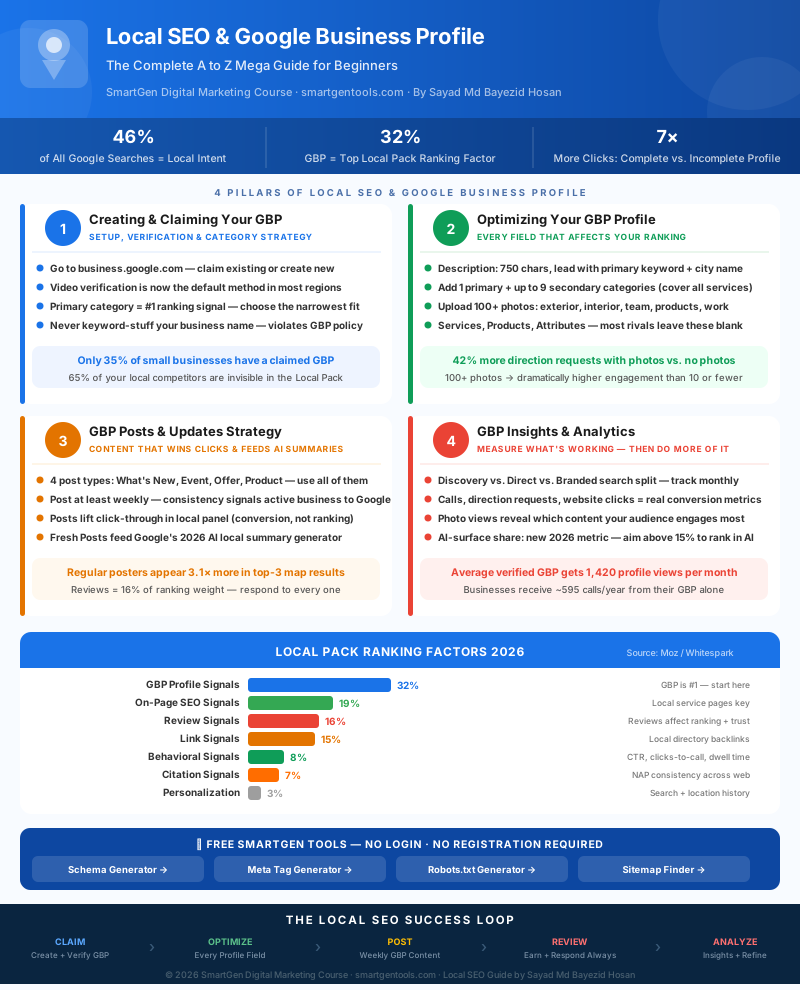
Visual Summary
Below is an original infographic built specifically for this guide, mapping the complete Local SEO and Google Business Profile framework. Created exclusively for SmartGen.
Guide Summary
In this guide, we covered why local SEO is the highest-ROI marketing channel for any location-based business (46% of all Google searches have local intent, and 76% of local mobile searchers visit within 24 hours); Google's three core local ranking signals — Relevance, Distance, and Prominence — and what each one means for your optimization strategy; how to create or claim your GBP correctly, including video verification, the critical importance of primary category selection, and why your business name must not be keyword-stuffed; how to fully optimize every profile field — description, secondary categories, photos (100+), services, products, and attributes — to build the profile completeness that earns 7× more clicks; how to use GBP Posts strategically as conversion assets (not ranking assets), with the right post types, frequency, and format; how to ethically generate and respond to reviews (the third-highest ranking factor at 16%); how to read your GBP Performance Insights including discovery vs. direct search split, call and direction request volumes, and the new 2026 AI-surface share metric; and how to use LocalBusiness Schema markup and optimized meta tags to strengthen the website signals that support your profile's rankings.
Practice exercise: Open your GBP dashboard right now and count how many photos you have uploaded. Then check whether your Services section has every individual service listed with a description. Then look at your Performance tab and find what percentage of your views come from discovery searches. These three data points will tell you where the biggest immediate opportunity is in your specific profile.
Frequently Asked Questions
What is Google Business Profile and is it the same as Google My Business?
Yes, they are the same product. Google renamed Google My Business (GMB) to Google Business Profile (GBP) in 2022. The name changed, but the platform, its features, and its role in local SEO are identical. You may still see both names used interchangeably across the web — including in this guide for clarity with readers who know the older name.
How do I claim my Google Business Profile for free?
Go to business.google.com, click "Manage now," and search for your business name. If a listing already exists, you can request to claim it by clicking "Claim this business." If no listing exists, create a new one. Fill in your business details and complete the verification process (currently video verification in most regions). The entire platform is free — Google does not charge for creating or claiming a GBP.
Why is my Google Business Profile not showing up in local search?
The most common reasons, in order of frequency: your profile has not been verified yet; your primary category is incorrect or too broad; your profile is incomplete (missing description, services, or photos); your business has too few reviews compared to competitors; your profile has been suspended due to a policy violation; or your business is simply too far from the searcher's location for your prominence level to overcome the distance factor. Check your GBP dashboard for any suspension or policy notices first — that is the fastest thing to rule out.
What is the number one ranking factor for Google Maps?
Primary category selection, according to Whitespark's Local Search Ranking Factors survey, which has been conducted annually for over a decade and is the most authoritative industry benchmark for local ranking factors. Choosing the narrowest, most accurate category that matches your primary service is the single highest-leverage individual edit you can make to your GBP.
How many photos should I upload to my Google Business Profile?
Start with a minimum of 20–30 photos across all available categories (exterior, interior, team, products/work). The realistic goal is 100+ over time. Businesses with 100+ photos receive dramatically more engagement than those with fewer than 10 — and critically, those photos should be fresh. Adding a few new photos each month is more valuable than a one-time upload of 200 photos that then never changes.
How do I get more Google reviews without paying for them?
The only ethical and sustainable method is to ask real customers who had genuinely positive experiences. Get your shareable GBP review link from your dashboard and use it in: a post-service text message or email, a card or receipt handed to customers in person, your email signature, and a link on your website. Purchasing or soliciting fake reviews violates Google's policies and can result in profile suspension — do not do it regardless of what a third party promises.
What should I post on Google Business Profile?
Post a mix of all four types — What's New (general updates, helpful content, FAQs), Event (any time-bound happening), Offer (promotions with specific value), and Product (your specific offerings). The best posts are specific, locally relevant, and end with a clear call to action. Think about what a potential customer who found your profile would find most useful or compelling to read.
How often should I post on Google Business Profile?
Weekly is the ideal frequency. If weekly is unsustainable, twice monthly is a defensible minimum. The key rule is consistency — a steady rhythm of posts signals an active, current business. Posting five times in a week and then nothing for two months is worse than two consistent posts per month.
What is NAP consistency and why does it matter for local SEO?
NAP stands for Name, Address, Phone number. NAP consistency means these three pieces of information are identical — same spelling, same format, same abbreviations — across every online platform where your business appears: your GBP, your website, your social media profiles, and every business directory listing. Inconsistencies confuse Google's algorithm about which information is correct, weakening the trust signals that support your local ranking.
Is Local SEO free?
Creating and optimizing a Google Business Profile is completely free. The activities covered in this guide — profile setup, photo uploads, posts, review management, and reading analytics — cost nothing except your time. Where local SEO costs money is if you hire an agency or consultant to manage it for you, or if you choose to run Google Local Services Ads (a paid product separate from organic GBP rankings). The organic local SEO covered in this guide is entirely free.
How long does it take to rank on Google Maps?
For a new, freshly claimed profile in a low-competition market with a complete profile: you may begin seeing Local Pack appearances within 2–4 weeks of completing verification. In more competitive markets or with an incomplete profile, ranking improvements take longer — typically 2–6 months of consistent optimization activity. Reviews compound over time, which is why the businesses that have been actively managing their GBP for 12+ months tend to have a durable advantage over newer profiles regardless of other factors.
What is the difference between the Local Pack and local organic results?
The Local Pack is the map with three business listings that appears at the top of Google for local queries. Local organic results are the standard blue-link results that appear below the map. The two are governed by different ranking algorithms — the Local Pack weights GBP signals most heavily, while local organic results weight on-page SEO signals (content, keywords, backlinks) most heavily. A complete local SEO strategy optimizes for both, because they share some signals (NAP consistency, website quality) but require different primary approaches.
— Written by Sayad Md Bayezid Hosan for the SmartGen blog
 ✓
✓
Sayad Md Bayezid Hosan
Founder & Tech Entrepreneur | Full-Stack Developer
Full-stack Web Developer, Digital Marketing Strategist, and Tech Entrepreneur with 5+ years of experience delivering innovative digital solutions. Specializing in web development, AI integration, strategic digital marketing, and tech entrepreneurship. As a leading Tech Provider, I help audiences navigate digital platforms safely through permission-based technical solutions and digital business asset management.
Credentials & Expertise:
- Founder of CWB Agency & GenZFrontier
- Final-year English Student at Northern University Bangladesh
- Specialized in AI-powered web development & content strategy
- Published author on tech, digital marketing & entrepreneurship
What's Next?
Continue building your digital marketing skills with the full SmartGen course series:
- Introduction to Online Digital Marketing: A Beginner's Guide
- Module 4: Meta (Facebook) Marketing — The Complete A to Z Mega Guide
- Module 5: Instagram Marketing — The Complete A to Z Mega Guide
- Module 6: X (Formerly Twitter) Marketing — The Complete A to Z Mega Guide
- Module 7: LinkedIn Marketing — The Complete A to Z Mega Guide
- Module 8: Pinterest Marketing — The Complete A to Z Mega Guide
- On-Page SEO Optimization — The Complete A to Z Mega Guide
- Module 9: Creating a WordPress Website — The Complete A to Z Mega Guide
- Module 10: Search Engine Optimization (SEO) — The Complete A to Z Mega Guide
This article was written by Sayad Md Bayezid Hosan for the SmartGen blog. All SmartGen tools mentioned are completely free with no registration required. SmartGen Privacy Policy · Visit SmartGen Tools