
Master Your Marketing: The Ultimate Guide to the UTM Campaign Link Builder
In todayâs digital marketing landscape, data is everything. If you are running social media ads, sending out weekly email newsletters, or partnering with influencers, you need to know exactly which efforts are driving traffic and conversions. But how do you separate a click from an email from a click on a Facebook ad?
Enter the UTM Campaign Link Builder.
If you are tired of looking at your Google Analytics dashboard and seeing a massive, unhelpful spike in "Direct" traffic, UTM parameters are the solution. In this comprehensive guide, we will introduce you to our UTM Campaign Link Builder, explain how it works, detail why it is an absolute necessity for your workflow, and show you exactly why our tool stands out as the best in the market.
Best of all? You are free to use our tools right now to streamline your marketing efforts! Try it here for free.
What is a UTM Link Builder?
Before diving into the tool, let's break down the terminology. UTM stands for Urchin Tracking Module. Despite the complex-sounding name, UTM parameters are simply short text tags added to the end of a URL to track the effectiveness of online marketing campaigns across various traffic sources and publishing media.
When a user clicks a URL with UTM parameters attached, those tags are sent back to your Google Analytics (or other web analytics platform). This data allows you to see exactly where that user came from, how they found you, and what specific piece of content convinced them to click.
A UTM Link Builder is a specialized tool that helps you create these tracked links correctly every single time. Instead of manually typing out complicated strings of textâand risking a typo that could ruin your dataâour builder automates the process, ensuring your tracking is flawless.
Why You Must Use UTM Parameters
If you are investing time, money, or resources into digital marketing, flying blind is not an option. Here is why using a UTM Campaign Link Builder is critical for your success:
- Pinpoint ROI (Return on Investment): You might know that your overall marketing makes money, but UTMs tell you which specific campaigns are profitable. If you spend $500 on Facebook and $500 on Google Ads, UTM links will tell you exactly which platform brought in the most sales.
- Eliminate "Dark Traffic": Often, when someone shares your link in a private WhatsApp message or an email, analytics platforms categorize that visit as "Direct Traffic." By using UTM links for your shareable content and campaigns, you force the analytics platform to categorize the traffic correctly.
- A/B Testing Made Easy: Want to know if the red button or the blue button in your email newsletter gets more clicks? Create two distinct UTM links. The data will clearly show which variation performed better.
- Granular Reporting: UTMs allow you to track down to the specific image or call-to-action (CTA) text used in an ad, giving you deep insights into consumer behavior.
How It Works: Using UTM Parameters
Using the UTM Campaign Link Builder is incredibly simple. We designed it to be user-friendly so you can generate your links and get back to managing your campaigns. Here is a step-by-step breakdown of how it works:
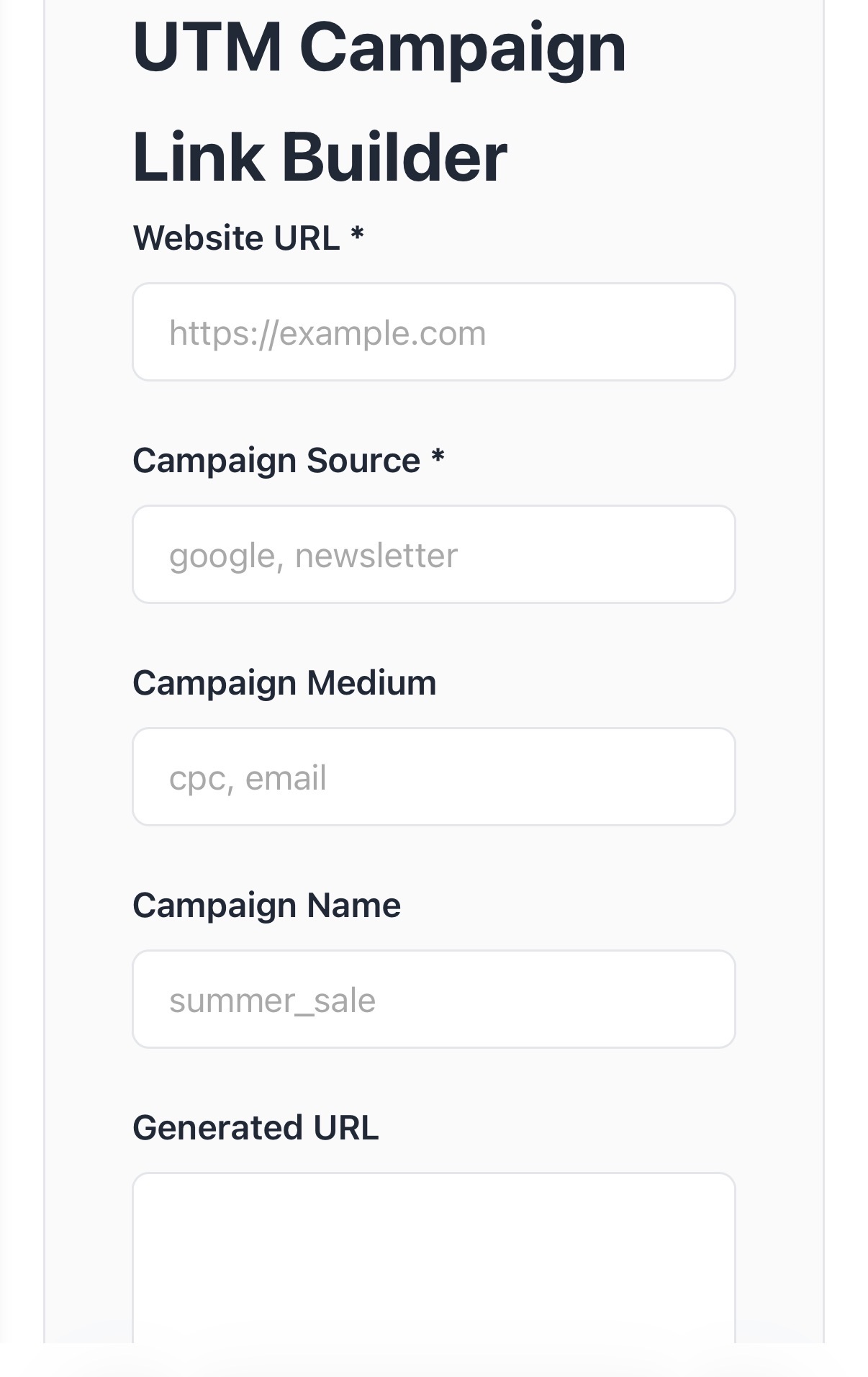
1. Fill in the Required Fields
To generate a link, you will need to input your destination URL and define your campaign parameters. The standard parameters include:
- Website URL: The exact page you want the user to land on (e.g.,
https://yourwebsite.com/product-page). - Campaign Source (
utm_source): The platform or vendor sending the traffic (e.g.,google,facebook,newsletter). - Campaign Medium (
utm_medium): The marketing medium or channel (e.g.,cpc,social,email). - Campaign Name (
utm_campaign): The specific promotion or strategic campaign you are running (e.g.,summer_sale_2026,product_launch).
2. Automatic Parameter Appending
Once you type in your details, you don't need to worry about adding question marks (?), ampersands (&), or equals signs (=). The tool will automatically append the parameters to your link with perfect syntax.
3. Deploy Your Links
Take your newly generated UTM link and use it in your ads, emails, SMS campaigns, and social posts.
4. Analyze in Google Analytics
Once your campaign goes live, open Google Analytics. You will be able to see exactly where your traffic is coming from, filtering your reports by the exact Source, Medium, and Campaign names you created in the builder.
How the UTM Campaign Link Builder Can Help Your Work
Whether you are a solo entrepreneur, a social media manager, or part of a large agency, our UTM Campaign Link Builder optimizes your daily workflow in several tangible ways:
For Social Media Managers
You post across Facebook, Twitter, LinkedIn, and Instagram daily. By using our link builder, you can tag each post uniquely. You will easily prove to your clients or boss whether the Tuesday infographic on LinkedIn drove more sign-ups than the Thursday video on Facebook.
For Email Marketers
You can track not just that a user clicked an email, but exactly which link inside the email they clicked. Did they click the header image, the body text, or the footer button? UTM tracking gives you the answer, helping you design better emails in the future.
For Paid Ads Specialists
When running Pay-Per-Click (PPC) campaigns, every cent counts. Tracking URLs allow you to connect specific ad creatives and keywords directly to conversions, ensuring you scale the ads that work and pause the ones that don't.
Why Our App is the Best on the Market
There are other ways to build URLs, but the UTM Campaign Link Builder was engineered specifically to solve the common frustrations marketers face. Here is why it is the superior choice:
- Error-Free Accuracy: Manual typing leads to broken links. A single misplaced character can render a link useless. Our tool uses rigid algorithms to ensure your links are technically perfect every time.
- Speed and Efficiency: Time is money. Our app is designed for rapid entry, meaning you can generate dozens of campaign links in a fraction of the time it would take to build them manually on a spreadsheet.
- Clean User Interface: We removed the clutter. You donât need a manual to figure out our app. It is highly intuitive, allowing even marketing beginners to start tracking like pros on day one.
- 100% Free to Use: You are free to use our tools at any time, allowing you to scale your campaigns without scaling your costs. Start building your links for free!
Core Features Built for Marketers
We packed the UTM Campaign Link Builder with the features you actually need, without the bloat you don't.
- Instant Generation: The moment you type your parameters, your final URL is generated in real-time. There is no waiting, no refreshing, and no lag.
- Standardized Parameter Formatting: Consistency is the secret to clean analytics. Our tool ensures that your parameters are formatted properly, preventing fragmented data (such as analytics seeing "Facebook" and "facebook" as two different sources).
- One-Click Copy: Once your link is ready, hit the copy button. It instantly saves to your clipboard, ready to be pasted into your ad manager, social scheduler, or email software.
Frequently Asked Questions (FAQs)
To help you get the most out of your campaign tracking, we have compiled answers to some of the most common questions about UTM parameters.
What is UTM Source?
The UTM Source (utm_source) is a required parameter that tells Google Analytics exactly who or what is sending the traffic to your site. Think of it as the referrer. Common examples of a UTM source include google, facebook, mailchimp, twitter, or the name of a specific affiliate partner.
Are UTM links case-sensitive?
Yes, absolutely. Google Analytics is case-sensitive when it reads UTM parameters. This means that if you use utm_source=Facebook for one link and utm_source=facebook for another, Google Analytics will treat them as two completely separate traffic sources. To keep your data clean and easy to read, it is highly recommended to use all lowercase letters for every parameter.
Can I use spaces in UTM tags?
It's best to use underscores (_) or hyphens (-) instead of spaces to avoid encoding issues. If you use a space in a UTM parameter (like summer sale), browsers will automatically convert that space into %20 in the URL (making it summer%20sale). This looks messy and can sometimes cause tracking errors. Stick to hyphens or underscores (e.g., summer_sale or summer-sale) for the best results.
Start Tracking Smarter Today
Marketing without tracking is just guessing. By taking a few extra seconds to run your URLs through the UTM Campaign Link Builder, you are securing the data you need to make intelligent, profitable business decisions.
Stop wondering where your traffic is coming from. Start tracking, analyzing, and optimizing today. You are free to use our tools to get started instantly! Visit our UTM Builder and take control of your analytics now.