
July 12, 2026 • General • By Sayad Md Bayezid Hosan
A complete, step-by-step guide to freelancing on Fiverr — the real problem each stage of building a Fiverr business solves and exactly how to solve it, from creating your account and profile through seller levels, gig creation, gig SEO, image and video optimization, skill tests, organic and paid gig marketing, order delivery, the rules and words that keep your account safe, and exactly how Fiverr's payment system works.
Table of Contents
- Introduction to Fiverr
- Fiverr Rules and Regulations
- Creating Your Account and Setting Up Your Profile
- Understanding Fiverr Seller Levels
- Creating and Optimizing Your Gig
- Skill Tests
- Gig Marketing: Organic and Paid
- Order Delivery and the Payment System
- Positive Links, Negative Words, and Warning Issues
- Quick-Reference Glossary
- Frequently Asked Questions
(Tap any line to jump straight to that section.)
How This Guide Works, and Why
Just like the rest of this course, every section below follows the same honest structure: the real problem, the practical solution, and the exact steps — followed by a common mistake to avoid and, where relevant, a free way to test what you just set up. Every specific number in this guide (seller level requirements, commission rates, warning timelines) has been checked directly against Fiverr's own official Help Center rather than repeated from guesswork, because Fiverr updates these figures periodically and a beginner deserves the current picture, not an outdated one.
To keep everything concrete, we'll follow one running, hypothetical example throughout: "Arif," a freelancer who took the skills from earlier in this course — the WordPress guide, SEO, and On-Page SEO Optimization guides — and turned them into a Fiverr business setting up WordPress websites for small businesses. Swap in your own skill as you read; the same steps apply directly.
Before diving in, here's the full course so far:
- Introduction to Online Digital Marketing: A Beginner's Guide
- Importance of Digital Marketing: How It Works and Key Concepts Every Beginner Should Know
- Module 1: Basic Image and Video Editing — Complete Guide to Filmora and Canva
- Module 2: Social Media Optimization (SMO) — A Complete Beginner's Guide
- Module 3: Social Media Marketing (SMM) — Advertising Concepts and Platform Selection
- Module 4: Meta (Facebook) Marketing — The Complete A to Z Mega Guide
- Module 5: Instagram Marketing — The Complete A to Z Mega Guide
- Module 6: X (Formerly Twitter) Marketing — The Complete A to Z Mega Guide
- Module 7: LinkedIn Marketing — The Complete A to Z Mega Guide
- Pinterest Marketing — The Complete A to Z Mega Guide
- TikTok Marketing — The Complete A to Z Mega Guide
- YouTube Marketing — The Complete A to Z Mega Guide
- Video Marketing Through YouTube — The Complete A to Z Mega Guide
- Module 9: Creating a WordPress Website — The Complete A to Z Mega Guide
- Module 10: Search Engine Optimization (SEO) — The Complete A to Z Mega Guide
- Analysis and Keyword Research — The Complete A to Z Mega Guide
- On-Page SEO Optimization — The Complete A to Z Mega Guide
- Off-Page Optimization — The Complete A to Z Mega Guide
- Local SEO and Google Business Profile — The Complete A to Z Mega Guide
- Content Marketing — The Complete A to Z Mega Guide
- Algorithm Updates and Analysis — The Complete A to Z Mega Guide
- Technical SEO Optimization — The Complete A to Z Mega Guide
- Email Marketing — The Complete A to Z Mega Guide
- Google Web Analytics — The Complete A to Z Mega Guide
- Customization and Advanced Features — The Complete A to Z Mega Guide
- Mobile, Cross-Device, and Campaign Analytics — The Complete A to Z Mega Guide
- A Complete Guide to Automated Sitemap Management for Modern SEO
- Master Your Marketing: The Ultimate Guide to the UTM Campaign Link Builder
- upwork for beginners complete guide 2026
Introduction to Fiverr
The Problem
You've spent this entire course building real, valuable skills — WordPress, SEO, content, analytics — but skills alone don't pay bills. You need a genuine, structured place where real buyers with real budgets are actively searching for exactly what you now know how to do, without you having to cold-pitch a single stranger.
The Solution: What Fiverr Actually Is
Fiverr is a global online marketplace where freelancers list fixed-price services, called Gigs, that buyers can browse and purchase directly, similar in spirit to how a buyer searches Google in the SEO guide — except here, the "search result" they click is a service they can buy in a few clicks, with Fiverr itself holding payment securely until the work is delivered.
This fixed-price, buyer-initiated model is genuinely different from traditional freelancing, where you'd typically pitch a client directly and negotiate a custom rate. On Fiverr, you build the offer once — the Gig — and Fiverr's own search and recommendation systems can then bring you buyers continuously, the same "earn visibility through relevance" principle running through the SEO and gig-SEO sections of this guide.
Common Mistake to Avoid
Treating Fiverr as a one-time side hustle you'll "try for a week" is the most common way beginners fail before they've genuinely given the platform a chance. As you'll see in the Seller Levels section, Fiverr's own system is explicitly built to reward consistency over time, not a single lucky order.
Test This Yourself
Before building anything, spend twenty minutes searching for the exact service you plan to offer, the way a real buyer would. Study the top few results — this is the same SERP-reading discipline from the SEO guide, applied directly to Fiverr's own internal search engine.
Fiverr Rules and Regulations
The Problem
Fiverr's Terms of Service and Community Standards are long, dense, and written like a legal document — and most beginners either never read them at all, or skim them once and forget the details, right up until an innocent mistake triggers a warning they never saw coming.
The Solution: The Rules That Actually Matter Day to Day
Rather than repeating the entire legal document, here are the practical rules that govern almost every real situation you'll encounter as a seller.
All communication and payment must stay on Fiverr. Fiverr's own Community Standards are direct on this point: sharing personal contact details, moving a conversation to WhatsApp or another external platform, or arranging payment outside Fiverr are all prohibited, regardless of how reasonable the request seems in the moment. This exact rule gets its own full treatment in Section 9, since it's the single rule beginners break most often, usually by accident.
Your profile information must be genuine. A fake name, photo, location, or fabricated biographical detail is a direct policy violation, separate from — and just as serious as — the off-platform rules above.
Certain categories of service are prohibited outright, including anything adult-oriented, illegal, deceptive, or in violation of a third party's own terms of service (for example, offering to artificially inflate social media followers).
Professional conduct is non-negotiable. Fiverr's Terms of Service explicitly state that rude, abusive, or threatening language can result in a warning or account suspension on its own, independent of anything else.
Common Mistake to Avoid
Assuming a rule doesn't apply because "the buyer asked first." Fiverr's enforcement applies to both sides of a conversation — if a buyer asks for your WhatsApp number and you provide it, that's still a violation on your account, regardless of who brought it up.
Creating Your Account and Setting Up Your Profile
The Problem
You're ready to start, but a rushed, generic account and profile — a blurry photo, a one-line bio, no verified skills — quietly signals "not serious" to every buyer who lands on it, before you've had a chance to say anything about your actual work.
The Solution: A Deliberate, Complete Setup
Step-by-Step: Creating Your Account
- Go to fiverr.com and click "Join," signing up with an email address, Google account, or Facebook account.
- Choose a professional username. Avoid random numbers or nicknames — Arif, for instance, chose "Arif_WebPro" over a generic handle, since the username appears on every Gig and review.
- Verify your email address immediately; an unverified account has real limits on what it can do.
- Set your account to "Selling" through your profile menu if Fiverr defaults you to a buyer-only view.
Step-by-Step: Setting Up Your Profile
- Upload a genuine, clear headshot photo. A real face outperforms a logo or illustration for individual freelancers, consistent with the trust-building principle behind E-E-A-T from the Algorithm Updates guide.
- Write a specific professional description, not a generic one. Arif's opens with: "I help small businesses launch fast, SEO-ready WordPress websites — the same platform and process taught in SmartGen's Digital Marketing Course."
- Add your genuine skills and languages.
- Add education and certifications honestly — only what you can actually back up if a buyer asks.
- Add a portfolio, Fiverr's own sanctioned way to showcase past work with images or links to live projects — available even at the New Seller stage, and covered further in Section 9's discussion of links done the right way.
- Record a short intro video if you're comfortable on camera, using the editing skills from the Filmora and Canva guide.
Common Mistake to Avoid
Leaving the description generic ("I am a hardworking freelancer ready to help you") wastes the single best opportunity to signal real, specific expertise before a buyer ever opens a Gig.
Test This Yourself
Open your own finished profile in an incognito browser window and read it as a stranger would in ten seconds — that's genuinely close to how long a real buyer spends deciding whether to keep reading.
Understanding Fiverr Seller Levels
The Problem
"Levels," "Success Score," and vague talk of "being active long enough" leave most beginners guessing at what actually moves them forward — and guessing leads to wasted months focused on the wrong metric entirely.
The Solution: The Six Metrics, Exactly as Fiverr Defines Them
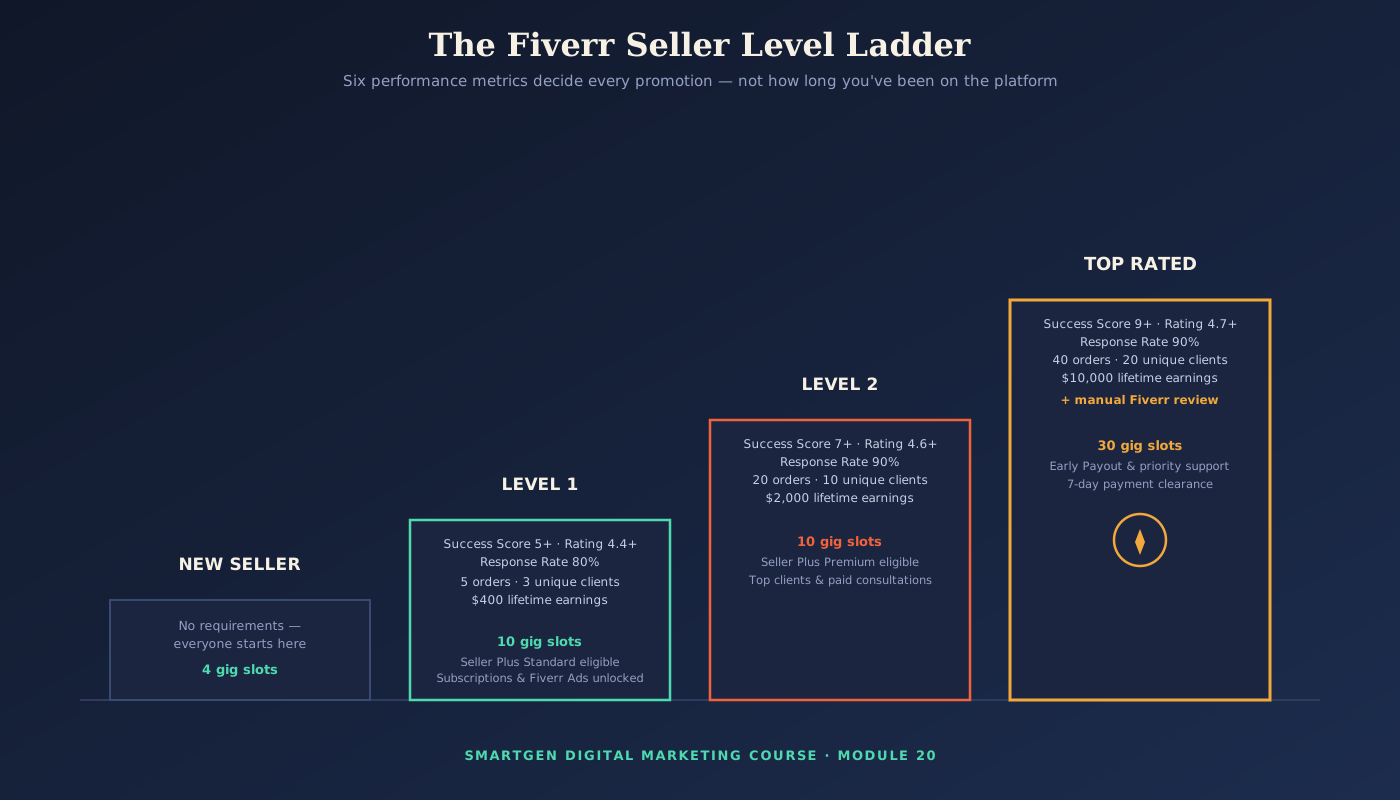
Fiverr's level system is now based entirely on performance, evaluated continuously — there is no minimum tenure or day-count requirement in the current system at all. According to Fiverr's own official level documentation, six metrics determine everything: your Success Score (a relative rating of your order experience compared to sellers in your same price range), your Rating (average client ratings over the past two years), your Response Rate (replies to new messages within 24 hours, over a 90-day window), your total Orders completed, your number of Unique Clients, and your total Earnings.
The Exact Current Requirements
Level 1 requires a Success Score of 5+, a rating of 4.4+, an 80% response rate, 5 completed orders from 3 unique clients, and $400 in lifetime earnings — unlocking 10 Gig slots, Seller Plus Standard eligibility, Subscriptions, and Fiverr Ads.
Level 2 requires a Success Score of 7+, a rating of 4.6+, a 90% response rate, 20 completed orders from 10 unique clients, and $2,000 in lifetime earnings — unlocking Seller Plus Premium eligibility, the ability to add top clients to your profile, and paid consultations.
Top Rated requires a Success Score of 9+, a rating of 4.7+, a 90% response rate, 40 completed orders from 20 unique clients, and $10,000 in lifetime earnings — but meeting these numbers only makes you eligible; Fiverr's evaluation team then manually reviews the account before granting it. Top Rated unlocks 30 Gig slots, Early Payout, priority support, and a faster 7-day payment clearance instead of the standard 14 days.
Once you qualify across all six metrics for Level 1 or Level 2, promotion happens automatically, generally within 24 hours — there's no need to wait for any fixed monthly date. If your metrics later slip below your current level's requirements, Fiverr gives you a 30-day grace period to recover before any demotion takes effect.
Common Mistake to Avoid
Chasing order volume alone while ignoring unique clients is a frequent trap — five orders from a single repeat buyer will not satisfy Level 1's 3-unique-client requirement. Price competitively enough in your first weeks that genuinely different buyers come through the door, not just one.
Test This Yourself
Your Level Overview page (under Growth & Marketing → Level Overview) shows a live progress tracker against all six metrics at once — check it regularly rather than guessing which metric is actually holding you back.
Creating and Optimizing Your Gig
The Problem
Your Gig is technically live, but it's buried on page six of search results, or it's on page one and still not converting — and without understanding what Fiverr's own search algorithm and buyers are actually responding to, you're guessing at fixes with real income on the line.
The Solution: Build the Gig Deliberately, Then Optimize Every Piece
Step-by-Step: How to Create a Gig
- Go to your Seller Dashboard → Gigs → Create a New Gig.
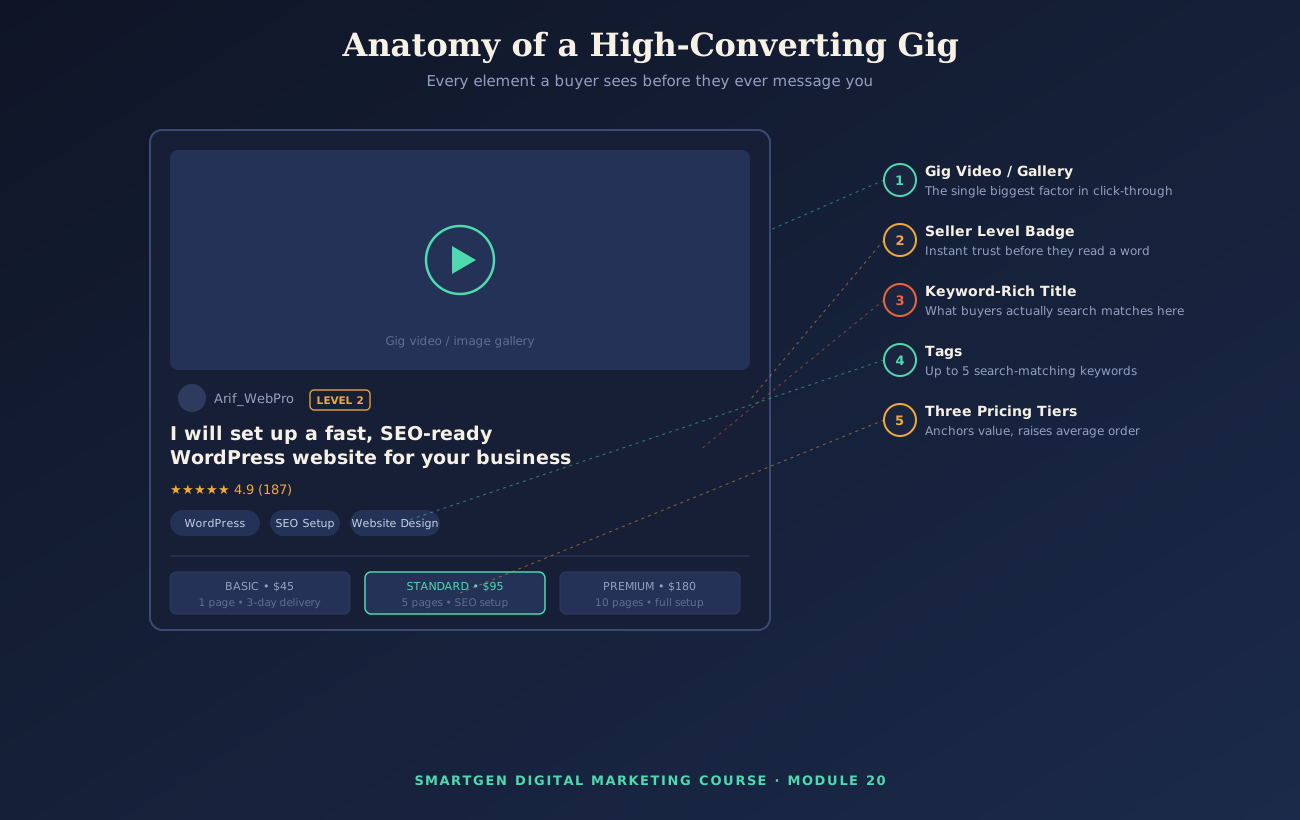
- Choose the correct category and subcategory. Arif selects Programming & Tech → WordPress, not a loosely related category, since accurate categorization directly affects which searches your Gig can appear in.
- Write your Gig title using the formula in the next subsection.
- Add up to five tags — the specific search keywords you want to match, using the exact keyword research discipline from the Analysis and Keyword Research guide.
- Build three pricing packages — Basic, Standard, Premium — rather than a single flat price, since tiered pricing anchors value and lifts average order size.
- Write your Gig description, covered fully below.
- Upload your Gig images and video, covered in the next subsection.
- Complete the FAQ and requirements sections, telling buyers exactly what you need from them to start.
- Publish, and immediately view your own live Gig as a buyer would to catch any formatting issues.
Proper SEO of Your Gig: A Copy-Paste Title Formula
Fiverr's search algorithm, much like Google's, matches buyer searches to Gigs based heavily on title and tag relevance — the exact same keyword-matching principle from the SEO guide, applied to an internal marketplace search engine instead of Google.
The formula: "I will [specific action] + [specific deliverable] + [specific qualifier]"
- Arif's title: "I will set up a fast, SEO-ready WordPress website for your business"
- Generic, weak alternative to avoid: "I will make you a great website"
The specific version directly mirrors real buyer search phrases ("WordPress website," "SEO-ready"), the same intent-matching principle covered in the SEO guide's discussion of search intent.
Common Mistake to Avoid
Stuffing a title or tags with unrelated popular keywords to "catch more searches" backfires — it dilutes relevance signals and attracts buyers who weren't actually looking for what you offer, hurting your conversion rate and your Success Score together.
Image and Video Optimization
Your Gig's main image or video is the single biggest factor in whether a buyer clicks through at all, functioning exactly like the featured image discussed in the Pinterest Marketing guide and the WordPress guide's featured image discussion.
Compress every Gig image with SmartGen's free Image Compressor before uploading, so your Gig gallery loads quickly without visible quality loss. A short intro or explainer video — edited using the skills from the Filmora and Canva guide — consistently outperforms static images alone, the same video-format advantage covered in the YouTube Marketing guide.
Test This Yourself
After publishing, search your own exact target keyword from a logged-out browser and see where your Gig actually appears — the same "search it yourself" discipline from Section 1, now applied to your live listing.
Skill Tests
The Problem
You know you're skilled, but a brand-new profile with zero reviews gives a buyer no objective reason to believe you over a competitor — and in some categories, Fiverr won't even let you publish a Gig at all until you've proven a baseline of competency.
The Solution: Use Skill Tests as Proof, Strategically
Fiverr's free, optional Skill Tests are multiple-choice, timed assessments covering specific tools and topics. In several categories — Writing & Translation is a well-known example, requiring the English Skills Test — passing a specific test is mandatory before you can publish a Gig at all. Outside those required categories, tests remain optional, but a badge showing a strong score (Fiverr displays a percentile like "Top 10%" alongside a plain "Passed" result) gives a new profile with no reviews yet a real, objective trust signal.
It's worth being honest about one thing: Fiverr has not officially confirmed that passing a test directly boosts your Gig's search ranking. What it reliably does is build buyer confidence at the exact moment they're comparing your profile against a competitor's — which is worth having regardless of any ranking effect.
Step-by-Step: Taking a Skill Test
- Go to your Profile → Take a Test.
- Choose the test most directly relevant to your actual Gigs — for Arif, that means WordPress and any available SEO-adjacent test, not an unrelated skill.
- Read the instructions fully before starting, since most tests are timed and multiple-choice.
- After finishing, choose whether to display your score and percentile on your public profile.
Common Mistake to Avoid
Taking a test cold, without reviewing the fundamentals first. Most tests carry a same-day retake limit followed by a much longer wait if you fail repeatedly, so treat your first attempt seriously rather than as a free practice run.
Gig Marketing: Organic and Paid
The Problem
A well-optimized Gig sitting on page one still won't sell itself completely — Fiverr is a genuine marketplace with real competition, and relying purely on organic search from day one leaves real growth on the table.
The Solution: Combine Organic Discovery With Deliberate Promotion
Organic marketing starts with everything already covered: strong SEO in Section 5, a complete profile from Section 3, and consistently meeting buyer requests quickly, since response rate directly feeds your level in Section 4. Beyond the Gig itself, promoting your Fiverr profile through your own existing channels — a WordPress portfolio site, LinkedIn, or the social platforms covered earlier in this course — brings in buyers who already trust you before they ever land on Fiverr.
Paid marketing on Fiverr means Promoted Gigs, a cost-per-click feature (unlocked at Level 1 and above) that boosts your Gig's placement in relevant search results, functioning conceptually like the Google Ads auction from earlier in this course, though scoped entirely within Fiverr's own marketplace. Fiverr's own guidance is direct on one point worth repeating here: a Gig that already converts well organically tends to produce a stronger return when promoted than a weak Gig getting an artificial boost.
A Developer-Friendly Way to Track External Promotion
If Arif shares his Fiverr Gig link on his own WordPress site or in a YouTube description, he genuinely wants to know which of his own pages actually drive clicks through to Fiverr. Reusing the exact Tag Manager pattern from the Customization and Advanced Features guide, a simple Click – Just Links trigger, scoped to any link where the Click URL contains fiverr.com/arif_webpro, paired with a GA4 event tag named fiverr_gig_click, tells him exactly which of his own blog posts or pages send the most outbound clicks to his Gig — tested immediately in Realtime, exactly as covered in that guide.
Common Mistake to Avoid
Promoting a Gig that isn't converting well organically simply "to get more eyes on it" often just pays for more impressions of the same underlying problem — fix the Gig first, using Section 5, before paying to amplify it.
Test This Yourself
If you're running Promoted Gigs, Fiverr's own dashboard shows impressions, clicks, and resulting orders directly — check this weekly rather than letting a campaign run unmonitored.
A Mid-Guide Reality Check — What I Actually Want You to Walk Away Understanding
Everything so far has been about getting discovered and getting chosen. What happens after someone clicks "Order Now" is just as important, and it's exactly where the next section, and the safety rules after it, pick up.
Order Delivery and the Payment System
The Problem
An order just came in, and you genuinely don't know how the money actually works — when you'll actually see it, how much Fiverr takes, or what happens if a delivery is late — and that uncertainty makes it hard to price and plan your business with any real confidence.
The Solution: Understand the Full Order and Payment Lifecycle
How Order Delivery Works
Once a buyer orders, you have an agreed delivery time (set per package) to complete and deliver the work directly through the order page — never outside Fiverr, for the reasons covered fully in Section 9. Delivering late repeatedly affects your Success Score directly, since on-time delivery is one of the order-experience factors that score evaluates. If revisions are needed, Fiverr's revision system lets a buyer request changes within the scope you defined at Gig creation — which is exactly why clearly stating your revision limits up front, back in Section 5, matters so much.
How the Payment System Actually Works
Fiverr charges a flat 20% commission on every completed order, including tips and extras — sellers are credited 80% of the purchase amount. There are no volume discounts or reduced tiers based on how much you sell. Buyers separately pay their own service fee on top of your listed price, which does not come out of your earnings.
Your earnings clear 14 days after an order is marked complete, dropping to 7 days once you reach Top Rated status, as shown in the Level ladder in Section 4. Withdrawal options commonly include PayPal, direct bank transfer, and Payoneer, each with its own small fee and, for non-USD accounts, a currency conversion cost worth factoring into your pricing.
A simple pricing habit worth adopting: to take home a specific target amount after Fiverr's 20% commission, divide your target by 0.80. Arif, wanting to net $80 from his Standard package, prices it at $100.
Common Mistake to Avoid
Pricing a Gig based purely on what you want to earn, without accounting for the 20% commission, is the single most common beginner pricing mistake — and it quietly compounds into working far more hours than the take-home pay reflects.
Positive Links, Negative Words, and Warning Issues
The Problem
This is the section most beginners skip, right up until an innocent message — sharing a WhatsApp number "just to make things easier," or a phone number "in case Fiverr's chat is slow" — triggers a warning they never saw coming, sometimes over something that felt completely harmless in the moment.
The Solution: Know Exactly What Fiverr's Systems Are Watching For
Positive Links: The Right Way to Share Your Work
Fiverr gives you sanctioned, built-in places to link to and showcase outside work: your Portfolio section (available from your very first day as a New Seller), Gig image galleries, and Gig video. These are genuine trust-builders and are explicitly permitted, unlike the off-platform links covered next.
Negative Words: What Fiverr's Systems Actively Scan For
According to Fiverr's own Community Standards, sharing personal contact information — email addresses, phone numbers, WhatsApp, Skype, or social media handles — anywhere on your profile, in a Gig description, or inside order messages, is prohibited, specifically to prevent buyers and sellers from moving business off-platform. Fiverr has confirmed it actively scans messages and delivery files for this kind of information. Suggesting an external payment method, offering a contract outside Fiverr, or proposing to "finish this on WhatsApp instead" are treated exactly the same way, even if the buyer asks first.
If a buyer requests your outside contact information, the professional, policy-safe response is simply to explain that all project communication and files need to stay on Fiverr to keep both sides protected, and to point out that Fiverr's own video call feature is available directly inside an active order for anything that genuinely needs a real-time conversation.
Warning Issues: How Fiverr's Enforcement Actually Escalates
A warning is sent to your account email and is Fiverr's way of flagging a specific policy violation. A warning alone does not block you from working, but it can place your account "on hold" within the level system — meaning you keep any current level's benefits, but cannot progress further while the warning remains active — and warnings expire after 90 days. Fiverr's own documentation is direct that accumulating more than one warning increases the risk of an account being restricted, an intermediate step that still lets you message existing clients and withdraw already-cleared funds for 60 days, after which an unresolved account is permanently suspended.
Common Mistake to Avoid
Assuming a first-time, "small" violation won't matter because it was well-intentioned. Fiverr's enforcement is based on the action itself, not your intent — the safest approach is simply never testing the boundary at all.
Quick-Reference Glossary
| Term | Plain-Language Meaning |
|---|---|
| Gig | A fixed-price service listing you sell on Fiverr |
| Success Score | A relative 1–10 score of your order experience vs. sellers in your price range |
| Response Rate | The share of new messages you reply to within 24 hours |
| Unique Clients | The number of different buyers you've worked with, counted once each |
| Promoted Gigs | Fiverr's cost-per-click paid placement feature |
| Off-Platform Activity | Sharing contact info or payment outside Fiverr — a policy violation |
| Warning | An emailed flag for a specific policy violation, expiring after 90 days |
| Restricted Account | A 60-day intermediate status before permanent suspension |
| Clearance Period | The wait before earnings become withdrawable — 14 days, or 7 for Top Rated |
Module Summary
In this guide, we covered what Fiverr actually is and the fixed-price Gig model it runs on, the rules that matter most day to day, a complete account and profile setup, the exact current six-metric seller level system with official requirements for every tier, how to build and optimize a Gig using a copy-paste title formula and image/video best practices, how skill tests work and when they're mandatory, organic and paid Gig marketing including a developer-friendly way to track your own external promotion, how order delivery and the 20%-commission payment system actually work, and exactly which words and links are safe versus which ones trigger real warnings.
Practice exercise: Using your own skill in place of Arif's WordPress example, write one Gig title using the formula in Section 5, list your five tags using the keyword research process from the Analysis and Keyword Research guide, and calculate your Standard package price using the net-of-commission formula from Section 8 so your real take-home matches what you actually intended to earn.
Frequently Asked Questions
How much does it cost to join Fiverr as a seller?
Nothing — creating an account and publishing Gigs is free. Fiverr earns through its 20% seller commission and a separate buyer service fee, covered fully in Section 8.
How long does it actually take to reach Level 1?
There's no fixed timeline anymore, since the current system is purely performance-based — reaching 5 orders from 3 unique clients, $400 in earnings, and the response rate and score thresholds in Section 4 as quickly as your own effort allows is what triggers the (typically 24-hour) automatic promotion.
Can I ask a buyer for their email just to send a large file?
No — large file transfer should stay inside Fiverr's own delivery system. Requesting contact information for any reason, including file transfer convenience, falls under the same off-platform policy covered in Section 9.
Is it worth taking a Skill Test if it's not required for my category?
Often yes, particularly as a new seller with no reviews yet — a strong score gives buyers an objective reason to trust you sooner, even though Fiverr hasn't confirmed a direct search-ranking benefit.
What happens to orders already in progress if my account gets restricted?
Fiverr's own policy allows continued communication with existing clients and withdrawal of already-cleared funds during the 60-day restricted period described in Section 9, giving you time to wrap up existing commitments even while resolving the underlying issue.
Should I lower my price to compete with cheaper sellers?
Be cautious — racing to the bottom on price also compresses your margin after the fixed 20% commission from Section 8, and Fiverr's Success Score is evaluated relative to sellers in your own price bracket, so competing purely on price doesn't automatically make that score easier to earn.
— Written by Sayad Md Bayezid Hosan for the SmartGen blog
 ✓
✓
Sayad Md Bayezid Hosan
Founder & Tech Entrepreneur | Full-Stack Developer
Full-stack Web Developer, Digital Marketing Strategist, and Tech Entrepreneur with 5+ years of experience delivering innovative digital solutions. Specializing in web development, AI integration, strategic digital marketing, and tech entrepreneurship. As a leading Tech Provider, I help audiences navigate digital platforms safely through permission-based technical solutions and digital business asset management.
Credentials & Expertise:
- Founder of CWB Agency & GenZFrontier
- Final-year English Student at Northern University Bangladesh
- Specialized in AI-powered web development & content strategy
- Published author on tech, digital marketing & entrepreneurship
This article was written by Sayad Md Bayezid Hosan for the SmartGen blog. For free tools to support your digital marketing journey, visit smartgentools.com.