Quickstart Guide
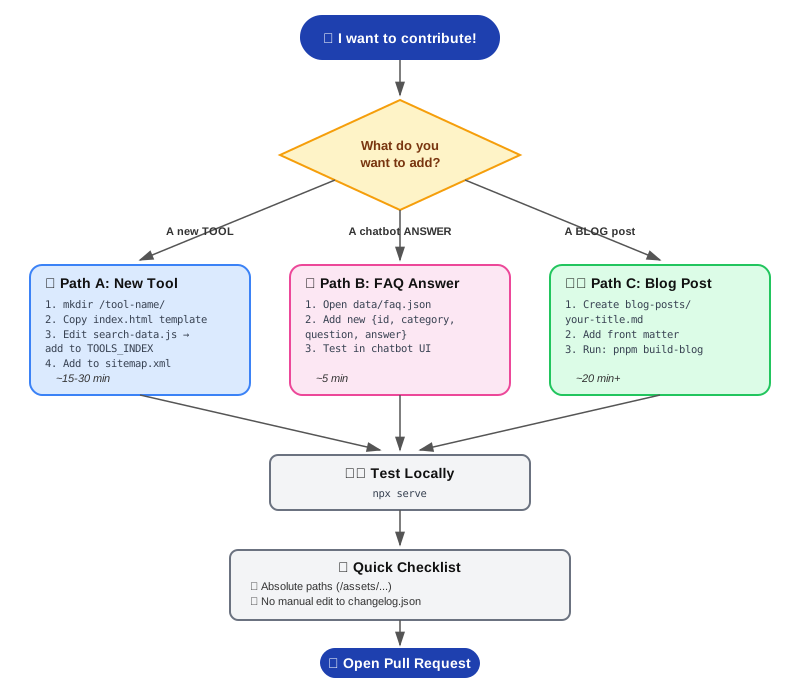
SmartGen — Quickstart Guide ⚡
🎯 Goal of this page: Get you from zero → merged PR in under 10 minutes.
For deep technical details, see `CONTRIBUTOR-GUIDE.md`.
🚀 Setup (once)
git clone https://github.com/bayzed123/SmartGenQR.oi.git
cd SmartGenQR.oi
pnpm install
npx serve
Open the local URL shown in your terminal. You're live. ✅
🧩 Path A: Add a New Tool
1. Create the folder
/your-tool-name/index.html
2. Paste this minimal template:
<!DOCTYPE html>
<html lang="en">
<head>
  <meta charset="UTF-8">
  <title>Your Tool Name | SmartGen</title>
  <meta name="description" content="One sentence SEO description.">
  <link rel="stylesheet" href="/assets/css/chatbot.css">
</head>
<body>
  <header id="main-header"></header>

  <main>
    <h1>Your Tool Name</h1>
    <!-- Your tool's HTML/CSS/JS logic goes here -->

    <!-- 1200+ words of SEO content required below -->

    <div id="dynamic-related-tools"></div>
  </main>

  <footer id="main-footer"></footer>

  <script src="/assets/js/app.js" defer></script>
  <script src="/assets/js/search-data.js" defer></script>
  <script src="/assets/js/related-tools.js" defer></script>
</body>
</html>
3. Register it — open assets/js/search-data.js, add to TOOLS_INDEX:
{
  id: 'your-tool-name',        // must match folder name exactly
  title: 'Your Tool Display Name',
  category: 'Developer & Technical', // or SEO & Content / Marketing & Social Media
  keywords: ['keyword1', 'keyword2'],
  description: 'One sentence description.',
  url: './your-tool-name/',
  icon: '🔧'
}
4. Add to sitemap.xml:
<url>
  <loc>https://smartgentools.com/your-tool-name/</loc>
</url>
5. Test → Commit → PR ✅
⚠️ Always use absolute paths (
/assets/...), never./assets/...— your tool lives in a subfolder.
💬 Path B: Add a New FAQ (Chatbot Answer)
1. Open data/faq.json
2. Add a new entry (use next sequential id):
{
  "id": 21,
  "category": "General",
  "question": "Your question here?",
  "answer": "Your full answer here."
}
Existing categories to reuse:
General · Privacy · Tools · Technical · Account · Features · Support · Developers · Performance · Legal
3. Test it: Open the chatbot → ask your exact question → confirm the answer appears.
4. Commit → PR ✅
✍️ Path C: Write a Blog Post
1. Create blog-posts/your-post-title.md
2. Add front matter + content:
---
title: "Your Post Title"
date: "2026-07-07"
description: "Short SEO description."
author: "Your Name"
---

Your Markdown content starts here...
3. Build & verify locally:
pnpm build-blog
4. Commit both the .md file and generated output → PR ✅
✅ Pre-PR Checklist
- Used absolute paths (
/assets/...) everywhere - New tool added to
TOOLS_INDEXinsearch-data.js - New tool added to
sitemap.xml - No server-side code / no backend calls
- Tested locally with
npx serve - Did not manually edit
data/changelog.json(auto-generated)
🆘 Something Not Working?
| Symptom | Likely Cause |
|---|---|
| Tool not showing in search | Forgot to add to TOOLS_INDEX |
| "Related Tools" empty | id in TOOLS_INDEX doesn't match folder name |
| Chatbot gives wrong/no answer | Check fetch() paths in chatbot.js — must be absolute (/data/faq.json) |
| Navbar/footer missing | Forgot #main-header / #main-footer divs, or app.js not loaded |
| Links break on nested pages | Used relative path (./) instead of absolute (/) |
📚 Need more detail? → `docs-post/CONTRIBUTOR-GUIDE.md`
🐛 Found a bug? → Open an issue