Contributor Guide
SmartGen — Contributor & API Reference Guide



Welcome to SmartGen — an open-source, 100% client-side web utility ecosystem with 131+ free tools for developers, marketers, and creators. This document is the single source of truth for anyone who wants to understand the codebase, fix a bug, or add a new feature.
📌 File location suggestion:
docs-post/CONTRIBUTOR-GUIDE.md
📖 Table of Contents
- Project Philosophy
- Architecture Overview
- Folder Structure
- Getting Started (Local Setup)
- Contribution Rules
- API Reference — Core Modules
- Step-by-Step: Adding a New Tool
- Step-by-Step: Adding a New FAQ Entry
- Step-by-Step: Writing a Blog Post
- Deployment & CI/CD
- License
1. Project Philosophy
SmartGen is built on four non-negotiable principles:
| Principle | What it means for contributors |
|---|---|
| Privacy-First | No server, no tracking, no data storage. All logic must run in the browser. |
| Client-Side Only | Never introduce a backend/API server for tool logic. Pure HTML/CSS/JS only. |
| Zero Cost to Run | No paid dependencies, no paid APIs, no subscriptions. |
| SEO Skyscraper Content | Every tool page (index.html) must contain 1200+ words of content, FAQ schema, and optimized meta tags. |
If a pull request violates any of these four rules, it will be rejected regardless of code quality.
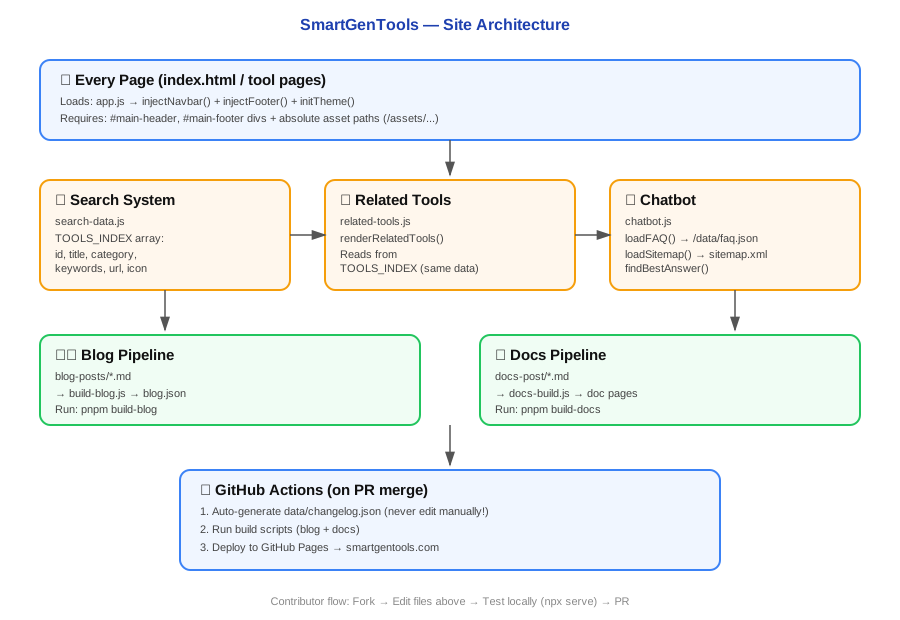
2. Architecture Overview
graph TD
  A[User Browser] --> B[index.html / tool pages]
  B --> C[assets/js/app.js<br/>Navbar + Footer + Theme]
  B --> D[assets/js/search-data.js<br/>TOOLS_INDEX]
  D --> E[assets/js/related-tools.js<br/>Recommendation Engine]
  B --> F[assets/js/chatbot.js<br/>SmartGenChatbot]
  F --> G[data/faq.json]
  F --> H[sitemap.xml]
  I[blog-posts/*.md] --> J[scripts/build-blog.js] --> K[blog.json + static blog pages]
  L[GitHub Actions] --> M[data/changelog.json - auto]
  L --> N[GitHub Pages Deploy]
Key idea: Every page is static HTML. All "smart" behavior (navbar, search, chatbot, related tools) is injected client-side via vanilla JS files loaded on every page.
3. Folder Structure
SmartGenQR.oi/
├── assets/
│   ├── js/
│   │   ├── app.js              # Navbar/footer injection + theme toggle (loads on EVERY page)
│   │   ├── search-data.js      # TOOLS_INDEX — master list of all 131+ tools
│   │   ├── related-tools.js    # Reads TOOLS_INDEX to render "Related Tools" widget
│   │   └── chatbot.js          # SmartGenChatbot class (FAQ + sitemap matching)
│   ├── css/
│   │   └── chatbot.css         # Chatbot UI styling (light/dark theme aware)
│   └── logo.png
├── data/
│   ├── faq.json                # Chatbot FAQ knowledge base
│   └── changelog.json          # AUTO-GENERATED — do not edit manually
├── blog-posts/                 # Markdown source files for blog (with YAML front matter)
├── scripts/
│   ├── build-blog.js           # Compiles blog-posts/*.md → blog.json + static pages
│   └── docs-build.js           # Compiles docs-post/*.md → documentation pages
├── docs-post/                  # 👈 Your documentation markdown files go here
├── <tool-name>/
│   └── index.html              # Each tool = its own self-contained folder
├── sitemap.xml
├── package.json
├── README.md
├── WIKI.md
└── CHATBOT_README.md
⚠️ Rule: Every new tool = a new top-level folder with its own
index.html. Never nest tools inside other tools.
4. Getting Started (Local Setup)
# 1. Clone the repository
git clone https://github.com/bayzed123/SmartGenQR.oi.git
cd SmartGenQR.oi

# 2. Install dependencies (required for blog/docs build + linting)
pnpm install

# 3. Local preview — two options:

# Option A: Open any tool directly (works since site is 100% static)
open ./qr-generator/index.html

# Option B: Full environment with routing (recommended)
npx serve

# 4. Build blog + docs (regenerates static pages from Markdown)
pnpm build
| Script | Command | What it does |
|---|---|---|
pnpm build |
Runs both below | Full production build |
pnpm build-blog (internal) |
node scripts/build-blog.js |
Compiles blog-posts/*.md → blog.json |
pnpm build-docs (internal) |
node scripts/docs-build.js |
Compiles docs-post/*.md → doc pages |
5. Contribution Rules
- One tool = one folder. e.g.
/new-tool/index.html - Client-side only. No
fetch()calls to your own backend. External read-only APIs (like public REST APIs) are okay if privacy-safe. - Register every tool. Any new tool MUST be added to the
TOOLS_INDEXarray inassets/js/search-data.js— otherwise it won't appear in search or "Related Tools." - SEO requirement. Every
index.htmlneeds:- 1200+ words of unique content
- FAQ schema (
<script type="application/ld+json">) - Optimized
<title>and<meta description>
- Use absolute paths (
/assets/js/app.js) not relative paths (./assets/js/app.js) — tools live in subfolders, so relative paths break navigation. (See Section 6.1 for why this matters.) - Never manually edit
data/changelog.json— it's auto-generated by GitHub Actions on every push tomain. - Submit changes via Pull Request, not direct push to
main.
6. API Reference — Core Modules
This section documents every JS "API" surface in the codebase — the functions and data objects other files depend on.
6.1 app.js — Site Shell Engine
Purpose: Injects the shared navbar/footer and manages theme (light/dark) on every single page.
Loaded on: Every page, via <script src="/assets/js/app.js"></script> before </body>.
| Function | Signature | Description |
|---|---|---|
injectNavbar() |
injectNavbar(): void |
Injects navbar HTML into #main-header. Sets up mobile sidebar, theme toggle, and dropdown listeners. |
injectFooter() |
injectFooter(): void |
Injects footer HTML into #main-footer. Calls initFooterAccordion(). |
initTheme() |
initTheme(): void |
Reads localStorage.getItem('theme') and applies data-theme attribute to <html>. Defaults to 'light'. |
toggleTheme() |
toggleTheme(): void |
Flips theme between light/dark, saves to localStorage. |
initAccordion() |
initAccordion(): void |
Enables collapsible FAQ/content accordions (.accordion-header elements). |
initFooterAccordion() |
initFooterAccordion(): void |
Mobile-only footer accordion behavior (.footer-accordion-trigger). |
Required DOM anchors on every page:
<header id="main-header"></header>
<footer id="main-footer"></footer>
⚠️ Why absolute paths matter: The code comment in
app.jsexplicitly states:// Absolute paths (/) are used to prevent routing errors like 'blog/blog/'
Always use/assets/...never./assets/...in any script/link tag you add.
6.2 search-data.js — Tools Index (TOOLS_INDEX)
Purpose: The single master list of all tools. Powers site search, related-tools widget, and (once wired in) the chatbot's tool-matching.
Exposed global: TOOLS_INDEX (Array)
Schema (one object per tool):
{
  id: 'qr-generator',              // Unique slug — MUST match folder name
  title: 'QR Code Generator',      // Display name
  category: 'Developer & Technical', // Used for grouping in related-tools.js
  keywords: ['qr', 'code', 'barcode', 'generator', 'scanner', 'wifi'],
  description: 'Create custom QR codes for URLs, WiFi, and more.',
  url: './qr-generator/',          // Relative — converted to absolute by related-tools.js
  icon: '📱'
}
| Field | Type | Required | Notes |
|---|---|---|---|
id |
string | ✅ | Must exactly match the tool's folder name |
title |
string | ✅ | Human-readable name |
category |
string | ✅ | Used to group related tools (e.g. 'SEO & Content') |
keywords |
string[] | ✅ | Powers search matching |
description |
string | ✅ | 1 sentence, shown in search results & related widget |
url |
string | ✅ | Relative path, format: './folder-name/' |
icon |
string (emoji) | ✅ | Displayed next to tool name |
6.3 related-tools.js — Recommendation Engine
Purpose: Reads TOOLS_INDEX and renders a "Related Tools You Might Need" block on any tool page.
Loaded on: Individual tool pages that include <div id="dynamic-related-tools"></div>.
| Function | Signature | Description |
|---|---|---|
renderRelatedTools() |
renderRelatedTools(): void |
Detects current tool via URL path, matches TOOLS_INDEX by id, finds up to 4 related tools (same category first, fills remainder from other categories), and injects HTML. |
Path resolution logic (important for GitHub Pages vs custom domain):
const isGitHubPages = window.location.hostname.includes('github.io');
const isCustomDomain = window.location.hostname.includes('smartgentools.com');
const repoName = (isGitHubPages && !isCustomDomain)
    ? '/' + window.location.pathname.split('/')[1] + '/'
    : '/';
This ensures links work correctly whether the site is served from smartgentools.com or a GitHub Pages project URL like username.github.io/SmartGenQR.oi/.
Required DOM anchor:
<div id="dynamic-related-tools"></div>
6.4 chatbot.js — SmartGenChatbot Class
Purpose: Client-side FAQ + site-navigation assistant. No server, no API keys.
Exposed global: SmartGenChatbot (class)
Instantiation:
new SmartGenChatbot(); // auto-runs init() in constructor
| Method | Signature | Description |
|---|---|---|
init() |
async init(): Promise<void> |
Orchestrates: loadFAQ() → loadSitemap() → createChatbotUI() → attachEventListeners() |
loadFAQ() |
async loadFAQ(): Promise<void> |
Fetches /data/faq.json. ⚠️ Must use absolute path — see note below. |
loadSitemap() |
async loadSitemap(): Promise<void> |
Fetches /sitemap.xml, parses <url> entries into {loc, path, title} objects |
extractTitleFromPath(path) |
(path: string) => string |
Converts URL slug → readable title (/qr-generator/ → "Qr generator") |
createChatbotUI() |
createChatbotUI(): void |
Injects chat widget HTML into document.body |
attachEventListeners() |
attachEventListeners(): void |
Wires up toggle button, send button, Enter key, quick-reply buttons |
toggleChatWindow() |
toggleChatWindow(): void |
Opens/closes the chat panel |
sendMessage() |
sendMessage(): void |
Reads input value, calls handleUserMessage() |
handleUserMessage(msg) |
(userMessage: string) => void |
Renders user bubble, computes answer via findBestAnswer(), renders bot bubble after 300ms delay |
findBestAnswer(query) |
(userQuery: string) => string |
Scores every FAQ entry + every sitemap page by keyword overlap; returns best match or fallback text |
containsAllWords(a, b) |
(text: string, query: string) => boolean |
Helper: checks if all words of query exist in text |
calculateWordSimilarity(a, b) |
(query: string, question: string) => number |
Fuzzy scoring fallback when no exact/contains match found |
Scoring priority inside findBestAnswer():
- Exact question match → score
100 - Question contains all query words → score
80 - Query contains all question words → score
70 - Word similarity fallback → variable score
+10bonus ifcategorymatches query
⚠️ Known path bug to watch for:
loadFAQ()originally usedfetch("./data/faq.json")(relative). On nested tool pages this resolves incorrectly (e.g./qr-generator/data/faq.json→ 404). Always usefetch("/data/faq.json")(absolute).loadSitemap()already correctly uses/sitemap.xml— use it as the reference pattern for any new fetch calls in this file.
Required includes on every page (for sitewide chatbot):
<link rel="stylesheet" href="/assets/css/chatbot.css">
<script src="/assets/js/chatbot.js" defer></script>
6.5 data/faq.json — FAQ Schema
{
  "faqs": [
    {
      "id": 1,
      "category": "General",
      "question": "What is SmartGen?",
      "answer": "SmartGen is an all-in-one digital and web utility platform..."
    }
  ]
}
| Field | Type | Notes |
|---|---|---|
id |
number | Unique, sequential |
category |
string | One of: General, Privacy, Tools, Technical, Account, Features, Support, Developers, Performance, Legal |
question |
string | Natural-language question |
answer |
string | Full answer text, plain string (no HTML) |
6.6 scripts/build-blog.js — Blog Builder
Purpose: Compiles Markdown files in /blog-posts/ into blog.json + static blog HTML pages.
Run via: pnpm build-blog (internally calls node scripts/build-blog.js)
Dependencies used: front-matter, gray-matter, marked, slugify, luxon
Expected front matter format (YAML header at top of each .md file):
---
title: "My Blog Post Title"
date: "2026-07-06"
description: "Short SEO description"
author: "Sayad Md Bayezid Hosan"
---
6.7 scripts/docs-build.js — Docs Builder
Purpose: Same pipeline as the blog builder, but for /docs-post/ → generates documentation pages.
Run via: pnpm build-docs
💡 This is exactly the tool you'll use for the file you're reading right now — drop this file in
docs-post/CONTRIBUTOR-GUIDE.md, runpnpm build, and it will be compiled into a live doc page automatically.
7. Step-by-Step: Adding a New Tool
- Create folder:
/your-tool-name/ - Add
index.htmlinside it with:<header id="main-header"></header>and<footer id="main-footer"></footer><script src="/assets/js/app.js" defer></script><div id="dynamic-related-tools"></div>(optional, for related tools widget)- 1200+ words of unique SEO content
- FAQ schema JSON-LD block
- Open
assets/js/search-data.jsand add an entry toTOOLS_INDEX:{ id: 'your-tool-name', title: 'Your Tool Display Name', category: 'Pick an existing category', keywords: ['relevant', 'search', 'terms'], description: 'One sentence description.', url: './your-tool-name/', icon: '🔧' } - Add the tool's URL to
sitemap.xml. - Test locally with
npx serve. - Submit a Pull Request.
8. Step-by-Step: Adding a New FAQ Entry
- Open
data/faq.json - Add a new object to the
faqsarray with the next sequentialid - Pick an existing
category(or introduce a new one consistently) - Test: open chatbot on the live site, ask the exact question, confirm it returns your new answer
- Commit and PR
9. Step-by-Step: Writing a Blog Post
- Create a new
.mdfile inside/blog-posts/ - Add YAML front matter (see Section 6.6)
- Write content in standard Markdown
- Run
pnpm build-bloglocally to verify it compiles without errors - Commit both the
.mdsource and any regenerated output files - Submit PR
10. Deployment & CI/CD
| Trigger | Action |
|---|---|
Push to main |
GitHub Actions auto-updates data/changelog.json |
Push to main |
GitHub Pages auto-builds and deploys the site |
You do not need to manually deploy — merging to main is the deployment.
11. License
Licensed under the MIT License.
Copyright (c) 2026 Sayad Md Bayezid Hosan.
Questions or improvements to this doc? Open an issue or PR — this file lives at docs-post/CONTRIBUTOR-GUIDE.md and is itself built via scripts/docs-build.js.