
July 15, 2026 • General • By Sayad Md Bayezid Hosan
A complete, step-by-step guide to Python input and output operations, the break, continue, and pass statements that control exactly how a loop behaves, and the genuinely underused else clause on loops — with real, copy-paste code for every concept.
Table of Contents
- Input and Output Operations
- Break, Continue, and Pass Statements
- Else With Loops
- Quick-Reference Glossary
- Frequently Asked Questions
(Tap any line to jump straight to that section.)
Continuing the Course
This class builds on the loop fundamentals from Loops and Conditionals and Loop Exercises and Strings. Full course so far:
- Class 01: Orientation and Setup
- Class 02: What Is Python?
- Class 03: Python Variables and Data Types
- Master Python Operators — Step-by-Step Guide
- Python Loops and Conditionals — Step-by-Step
- Class 06: Python Loop Exercises and String Basics
- Class 07: Python Data Structures Explained
Input and Output Operations
The Problem
A program that can't take input from a real person or clearly show its results back is really just a calculator running silently in the background — genuinely useful programs need to talk to their user in both directions.
The Solution: input() and print(), Used Properly
name = input("What is your name? ")   # input() always returns a string
print("Hello,", name)                  # print() can take multiple arguments
print(f"Welcome, {name}!")             # f-strings, from earlier classes, work here too
print() has two genuinely useful optional arguments beginners often miss:
print("A", "B", "C", sep="-")    # A-B-C - controls what goes between arguments
print("Loading", end="...")       # no newline after this line
print("Done")                     # continues on the same visual line as "Loading..."
Common Mistake to Avoid
Assuming input() returns a number just because the user typed digits. It always returns a string — revisit Class 03's typecasting section to convert it safely before doing math with it.
Break, Continue, and Pass Statements
The Problem
A basic loop only knows how to run every iteration from start to finish — real problems constantly need to stop early, skip specific cases, or temporarily do nothing at all while you're still writing the logic.
The Solution: Three Distinct Loop-Control Keywords
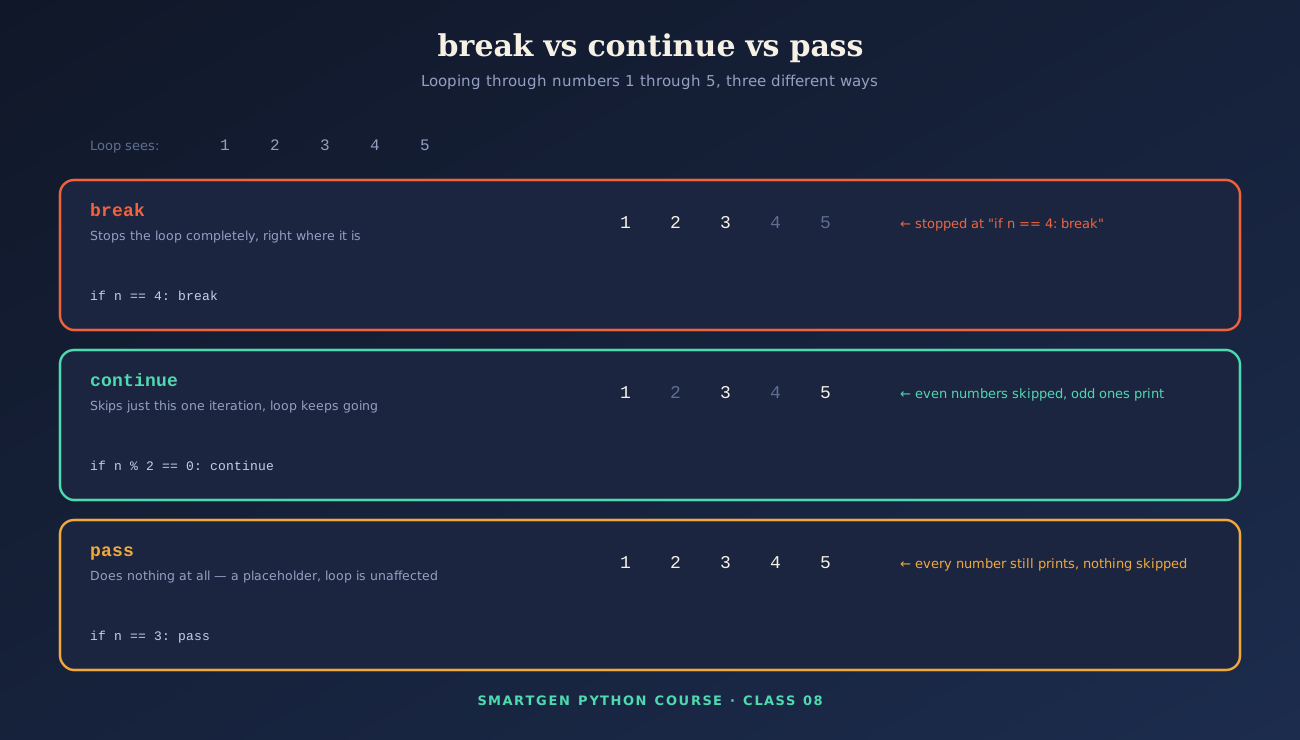
break exits the loop immediately and completely:
for number in range(1, 10):
    if number == 5:
        break
    print(number)
# Output: 1 2 3 4
continue skips only the current iteration and moves straight to the next one:
for number in range(1, 10):
    if number % 2 == 0:
        continue
    print(number)
# Output: 1 3 5 7 9
pass does absolutely nothing — it exists purely as a placeholder where Python's syntax requires a line of code, but you don't actually want anything to happen yet:
for number in range(1, 5):
    if number == 3:
        pass          # a deliberate no-op, doesn't skip or stop anything
    print(number)
# Output: 1 2 3 4 - completely unaffected by the pass
pass is genuinely useful while you're still sketching out a program's structure — writing an if block or an empty function you intend to fill in later, without Python raising a syntax error for an empty block in the meantime.
Common Mistake to Avoid
Using pass when you actually meant continue. pass changes nothing about the loop's behavior — if your intention is to skip the rest of that iteration's code, continue is the keyword you want.
Else With Loops
The Problem
Most beginners never learn that Python loops support their own else clause — and even fewer understand what condition actually triggers it, which means real, working code using this feature can look confusing the first time you encounter it.
The Solution: else Runs Only If the Loop Wasn't Broken
A loop's else clause runs only if the loop completed all its iterations without hitting a break. It's most useful for a specific, common pattern: searching for something and needing to know whether you actually found it.
numbers = [2, 4, 6, 8]

for num in numbers:
    if num % 2 != 0:
        print("Found an odd number!")
        break
else:
    print("All numbers are even.")   # runs only because break never happened
Since every number in this list is even, the loop finishes normally, and the else block runs, printing "All numbers are even." If even one odd number existed and triggered the break, the else block would be skipped entirely.
Common Mistake to Avoid
Assuming a loop's else behaves like the else on an if statement (running whenever the "if" part didn't happen). A loop's else specifically means "the loop finished without a break" — a genuinely different, more specific condition.
Quick-Reference Glossary
| Term | Plain-Language Meaning |
|---|---|
input() |
Pauses and reads text typed by the user, always as a string |
print() |
Displays output, with optional sep and end arguments |
break |
Exits a loop immediately and completely |
continue |
Skips the rest of the current iteration only |
pass |
Does nothing — a placeholder where code is syntactically required |
Loop else |
Runs only if the loop finished without hitting a break |
Class Summary
In this class, we covered how to properly take input and control output formatting with sep and end, the real difference between break (stop entirely), continue (skip this one iteration), and pass (do nothing), and the loop else clause, which runs specifically when a loop completes without ever hitting a break.
Practice exercise: Write a loop that searches a list of numbers for one divisible by 7, printing a message and breaking if found, with an else clause that prints "None found" if the loop completes without a match — then rewrite it once using continue to skip any negative numbers in the list first.
Frequently Asked Questions
Does input() ever return anything other than a string?
No — it always returns a string, even if the user types only digits. Convert it with int() or float(), covered back in Class 03, before using it in math.
What's the actual difference between pass and continue?pass does nothing and has zero effect on the loop; continue actively skips the remaining code in that specific iteration and jumps to the next one. They are not interchangeable.
When would I genuinely use a loop's else clause in real code?
The search-and-confirm pattern in Section 3 is the classic case — looping through data to find something specific, then using else to handle the "nothing was found" outcome cleanly.
Can I use break inside a loop's else block?
That combination is unusual and rarely needed — the else block only runs after the loop has already finished naturally, so there's no active loop left to break out of at that point.
— Written by Sayad Md Bayezid Hosan for the SmartGen blog
 ✓
✓
Sayad Md Bayezid Hosan
Founder & Tech Entrepreneur | Full-Stack Developer
Full-stack Web Developer, Digital Marketing Strategist, and Tech Entrepreneur with 5+ years of experience delivering innovative digital solutions. Specializing in web development, AI integration, strategic digital marketing, and tech entrepreneurship. As a leading Tech Provider, I help audiences navigate digital platforms safely through permission-based technical solutions and digital business asset management.
Credentials & Expertise:
- Founder of CWB Agency & GenZFrontier
- Final-year English Student at Northern University Bangladesh
- Specialized in AI-powered web development & content strategy
- Published author on tech, digital marketing & entrepreneurship
This article was written by Sayad Md Bayezid Hosan for the SmartGen blog. For free tools to support your development journey, visit smartgentools.com.