
July 14, 2026 • General • By Sayad Md Bayezid Hosan
A complete, step-by-step guide to Python variables and data types — what a variable actually is and how to name one correctly, every core built-in data type with real copy-paste code, what object identity means and exactly when to use is versus ==, how to check and convert between types, and how statements and comments actually work.
Table of Contents
- Introduction to Variables
- Data Types in Python
- Object Identity
- Typechecking and Typecasting
- Statements and Comments
- Quick-Reference Glossary
- Frequently Asked Questions
(Tap any line to jump straight to that section.)
Continuing the Course
This is Class 03, building directly on Class 01: Orientation and Setup and Class 02: What Is Python? If you haven't run your first line of Python yet, Class 02's step-by-step section walks you through it before you start here.
Introduction to Variables
The Problem
Every real program needs to store and reuse information — a name, a price, a score — and without understanding exactly how Python does that, every later concept in this course will feel like it's built on sand.
The Solution: What a Variable Actually Is
A variable is a name that refers to a value stored in memory. Creating one in Python is simply a matter of writing a name, an equals sign, and a value:
age = 25
name = "Maria"
price = 19.99
is_active = True
Unlike some other languages, Python never requires you to declare a variable's type in advance — the type is simply determined by whatever value you assign, covered fully in Section 2.
The Real Naming Rules
A variable name must start with a letter or an underscore (never a digit), can only contain letters, digits, and underscores, and is case-sensitive (age and Age are two completely different variables). Python also reserves certain words — like if, for, and class — that can't be used as variable names at all.
# Valid names
user_name = "Arif"
_private_score = 42
total2 = 100

# Invalid - this line would cause a SyntaxError
# 2nd_place = "Silver"
The real-world convention almost all Python code follows is snake_case — lowercase words separated by underscores, exactly as shown above — rather than camelCase common in some other languages.
Common Mistake to Avoid
Reusing a single vague variable name like x or data throughout a longer program. It runs perfectly fine, but it makes your own code genuinely harder to read a week later — a specific name like user_age costs nothing extra to type and pays for itself the moment you revisit the code.
Data Types in Python
The Problem
A value's type determines what you can actually do with it — you can add two numbers together, but adding a number to a sentence the wrong way will crash your program, and you need to know exactly which type you're holding at any given moment.
The Solution: The Eight Core Built-In Types
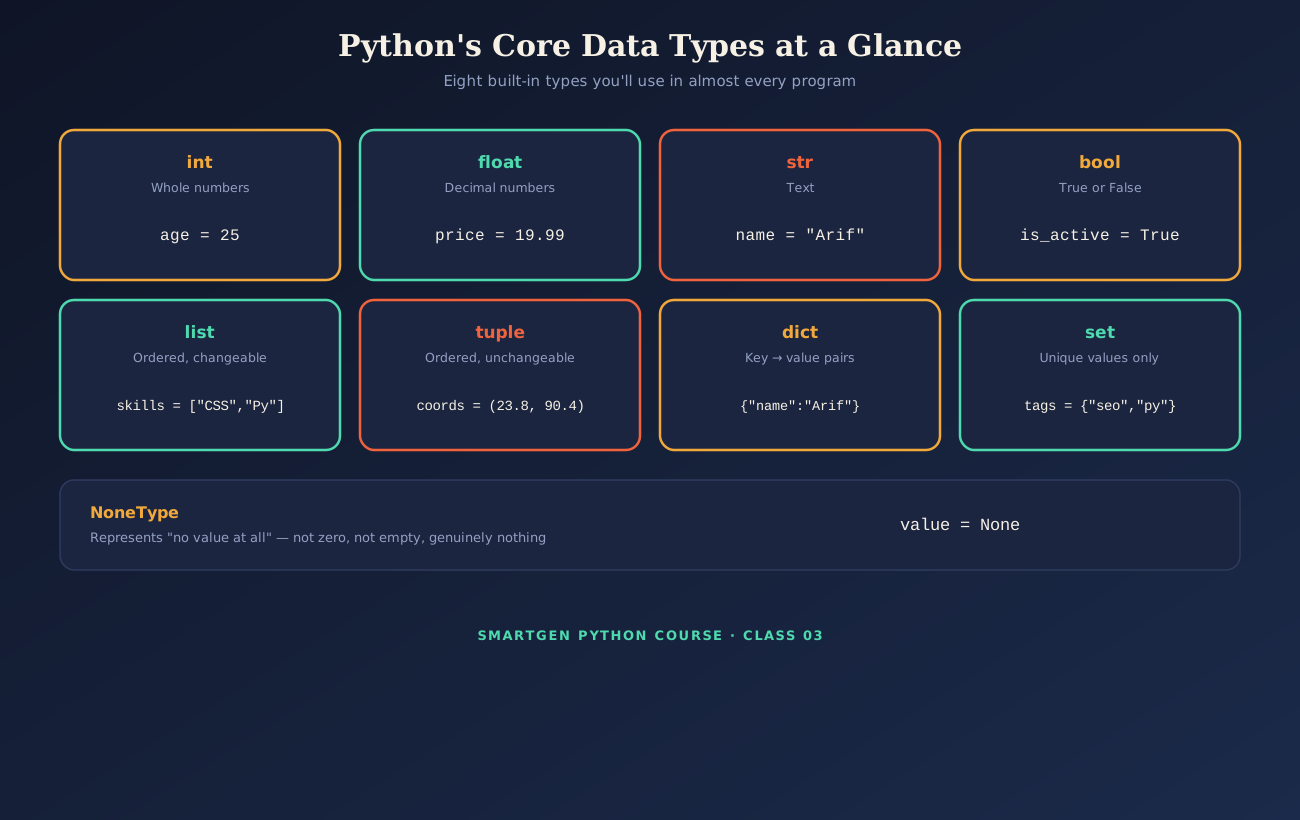
age = 25                              # int - whole numbers
price = 19.99                         # float - decimal numbers
name = "Python"                       # str - text
is_learning = True                    # bool - True or False
skills = ["HTML", "CSS", "Python"]    # list - ordered, changeable
coordinates = (23.8, 90.4)            # tuple - ordered, unchangeable
profile = {"name": "Arif", "age": 25} # dict - key-value pairs
unique_tags = {"seo", "python", "seo"} # set - duplicates automatically removed
nothing = None                        # NoneType - genuinely no value at all
Run this to see Python confirm each type directly:
print(type(age))          # <class 'int'>
print(type(price))        # <class 'float'>
print(type(name))         # <class 'str'>
print(type(unique_tags))  # <class 'set'>
Notice unique_tags — even though "seo" was listed twice, a set automatically keeps only one copy, since sets exist specifically to hold unique values.
Common Mistake to Avoid
Confusing a list ([ ], changeable, allows duplicates, keeps order) with a tuple (( ), unchangeable once created) or a set ({ }, no duplicates, no guaranteed order). All three look similar at a glance but behave genuinely differently — choose based on whether you need duplicates removed, order preserved, or the collection to stay fixed after creation.
Object Identity
The Problem
Two variables can hold the exact same value while actually being two completely separate things in your computer's memory — and mixing up "same value" with "same object" is a genuine, common source of confusing bugs.
The Solution: Understanding == vs is
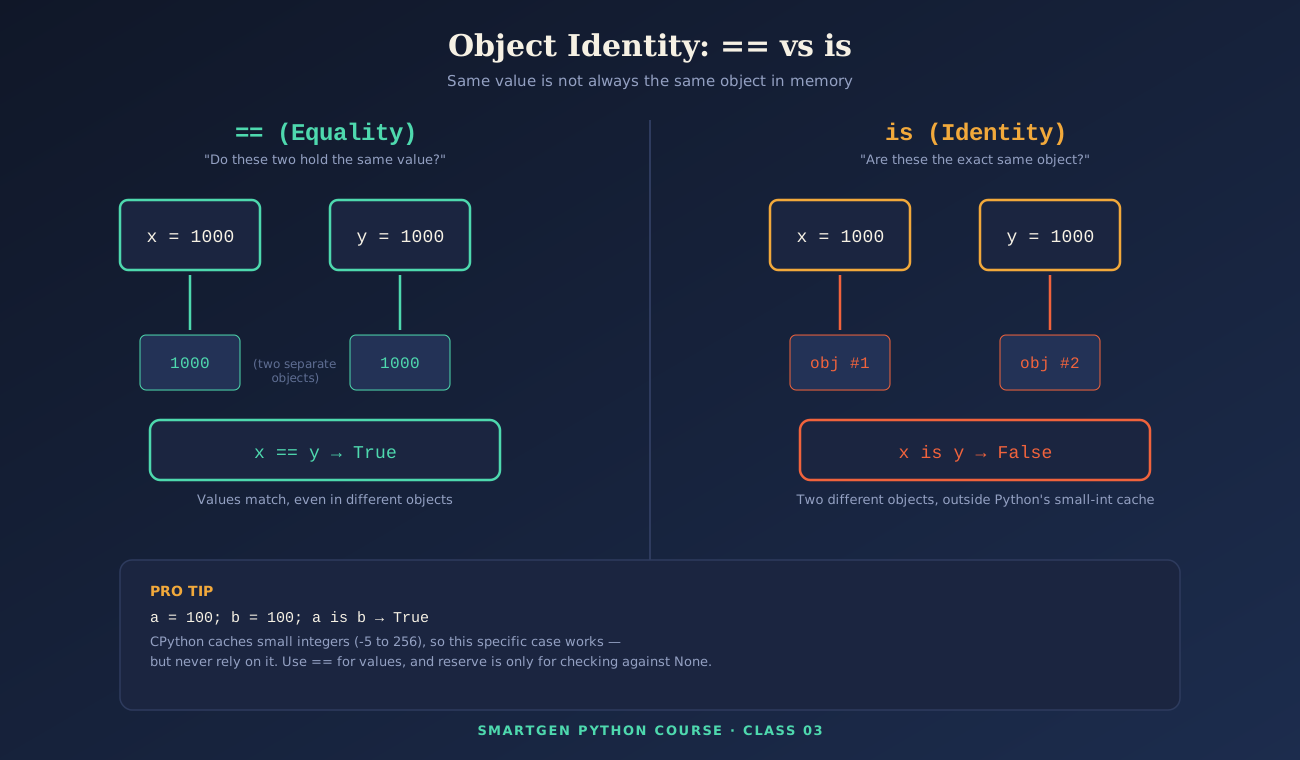
Every object in Python has an identity (a unique reference to where it lives in memory, viewable with the built-in id() function), a type, and a value. == checks whether two variables hold the same value. is checks whether two variables are literally the same object in memory.
x = 1000
y = 1000
print(x == y)   # True  - the values match
print(x is y)   # False - they are two separate objects
Here's the detail that trips up almost every beginner at least once: CPython (the standard interpreter from Class 02) automatically caches small integers from -5 to 256 as shared, reused objects — so this specific case behaves differently:
a = 100
b = 100
print(a is b)   # True - both point to the same cached object
The reliable rule to actually follow: use == whenever you're comparing values, and reserve is specifically for checking against None, which is the one place Python code is expected to use it:
value = None
if value is None:
    print("No value has been set yet.")
Common Mistake to Avoid
Using is to compare numbers or strings for equality because it happened to work once during testing. The small-integer caching shown above is a CPython implementation detail, not a guaranteed language rule — code that relies on it can behave inconsistently the moment the values fall outside that cached range.
Typechecking and Typecasting
The Problem
Data doesn't always arrive in the type you actually need — user input, in particular, always arrives as text, even when it looks like a number — and using it in the wrong type crashes your program or silently produces the wrong result.
The Solution: Checking and Converting Types Deliberately
Typechecking confirms what type you're actually holding, using either type() or the more flexible isinstance():
age = "25"   # stored as text, perhaps from user input

print(type(age))              # <class 'str'>
print(isinstance(age, int))   # False
print(isinstance(age, str))   # True
Typecasting (also called type conversion) deliberately converts a value from one type to another using built-in functions like int(), float(), str(), and bool():
age = "25"
age = int(age)          # typecasting: text becomes a whole number

print(type(age))        # <class 'int'>
print(age + 5)           # 30
A common real scenario combining both:
user_input = input("Enter your age: ")   # always arrives as a string

if isinstance(user_input, str) and user_input.isdigit():
    age = int(user_input)
    print(f"Next year you'll be {age + 1}.")
else:
    print("Please enter a valid number.")
Common Mistake to Avoid
Trying to convert text that isn't actually a valid number — int("hello") raises a ValueError and stops your program immediately. Always validate (as shown with .isdigit() above) before converting data you didn't create yourself.
Statements and Comments
The Problem
Reading someone else's code — or your own from a few weeks ago — is far harder without knowing which lines actually do something versus which lines are just notes left for a human reader.
The Solution: Telling Statements and Comments Apart
A statement is any complete line of code that performs an action — an assignment, a function call, a loop. A comment is text the interpreter deliberately ignores, left purely for human readers.
# This is a single-line comment - Python ignores this entire line
name = "Arif"        # An assignment statement, with a trailing comment

"""
This is a multi-line string.
When placed at the very top of a file or function,
it's commonly used as documentation, called a docstring.
"""

print(name)           # A function-call statement
Common Mistake to Avoid
Over-commenting obvious code (x = 5 # set x to 5) while leaving genuinely tricky logic completely unexplained. A good comment explains why a piece of code exists, not simply restating what it already clearly says.
Quick-Reference Glossary
| Term | Plain-Language Meaning |
|---|---|
| Variable | A name referring to a value stored in memory |
| Type | What kind of value something is (int, str, list, etc.) |
| Identity | Whether two variables point to the exact same object |
== |
Compares values for equality |
is |
Compares identity — the same object in memory |
| Typecasting | Deliberately converting a value from one type to another |
| Statement | A line of code that performs an action |
| Comment | Text ignored by the interpreter, written for humans |
Class Summary
In this class, we covered what a variable actually is and the real naming rules and conventions behind it, all eight core built-in data types with runnable code for each, the difference between == and is and exactly when CPython's small-integer caching can be misleading, how to check and safely convert between types using isinstance() and functions like int(), and the difference between statements that do something and comments left purely for human readers.
Practice exercise: Create one variable of each of the eight types from Section 2, then print both its value and its type using the exact code pattern shown there. Then write a short script that takes a number as text input, safely converts it using the validation pattern from Section 4, and prints the result of adding 10 to it.
Frequently Asked Questions
Do I need to declare a variable's type before using it in Python?
No — unlike some other languages, Python determines the type automatically from whatever value you assign, as shown throughout Section 1 and Section 2.
Why did a is b return True for my two variables holding 100, but False for 1000?
This is CPython's small-integer caching, explained fully in Section 3 — values from -5 to 256 are cached and reused, while larger values typically are not. Use == for value comparisons to avoid this trap entirely.
What actually happens if I try to convert invalid text with int()?
Python raises a ValueError and stops execution immediately, which is exactly why Section 4 recommends validating input with something like .isdigit() before converting it.
Are docstrings the same thing as comments?
They're closely related — a docstring is technically a string literal, but when placed at the top of a file, function, or class, it's conventionally used as documentation, functioning very much like a comment, as shown in Section 5.
Which data type should I use for a fixed set of coordinates that should never change?
A tuple, covered in Section 2 — its unchangeable nature is exactly the point when a value genuinely shouldn't be modified after creation.
— Written by Sayad Md Bayezid Hosan for the SmartGen blog
 ✓
✓
Sayad Md Bayezid Hosan
Founder & Tech Entrepreneur | Full-Stack Developer
Full-stack Web Developer, Digital Marketing Strategist, and Tech Entrepreneur with 5+ years of experience delivering innovative digital solutions. Specializing in web development, AI integration, strategic digital marketing, and tech entrepreneurship. As a leading Tech Provider, I help audiences navigate digital platforms safely through permission-based technical solutions and digital business asset management.
Credentials & Expertise:
- Founder of CWB Agency & GenZFrontier
- Final-year English Student at Northern University Bangladesh
- Specialized in AI-powered web development & content strategy
- Published author on tech, digital marketing & entrepreneurship
This article was written by Sayad Md Bayezid Hosan for the SmartGen blog. For free tools to support your development journey, visit smartgentools.com.