
July 14, 2026 • General • By Sayad Md Bayezid Hosan
A complete, step-by-step beginner's guide to Python — what Python actually is, its full history from 1991 to today's Python 3.14, why so many beginners choose it as their first language, the real-world applications and industries built on it, the most popular frameworks and libraries, and exactly how to run your first line of Python code and understand what happens when you do.
Table of Contents
- What Is Python?
- History, Versions, and Evolution
- Why Learn Python?
- Applications and Use Cases
- Popular Frameworks and Libraries
- Running Python Code and Understanding Its Execution
- Quick-Reference Glossary
- Frequently Asked Questions
(Tap any line to jump straight to that section.)
Continuing From Class 01
This class builds directly on Class 01: Orientation and Setup — if you haven't already got Python installed on your computer, that's the place to start before running the code examples below.
What Is Python?
The Problem
You've heard "learn Python" recommended everywhere — for jobs, for AI, for automating boring tasks — but nobody actually stopped to explain what Python is, in plain language, before telling you to go learn it.
The Solution: A Plain-Language Definition
Python is a high-level, general-purpose programming language known for code that reads almost like plain English. "High-level" means it hides most of the complicated technical detail a computer actually needs, letting you focus on solving your actual problem instead of managing memory or low-level machine instructions by hand. "General-purpose" means it isn't built for just one job — the same language builds websites, analyzes data, automates tasks, and trains AI models, all covered fully in Section 4.
Here's the entire, complete, real, runnable difference in action — this single line is a fully working Python program:
print("Hello, World!")
Save that single line in a file, run it (Section 6 shows you exactly how), and it prints Hello, World! to your screen. No extra setup code, no complicated boilerplate — just the instruction itself.
Common Mistake to Avoid
Assuming Python's simple appearance means it's "less powerful" than more complex-looking languages. Simplicity in Python is a deliberate design choice, not a limitation — the same language builds everything from quick personal scripts to systems running at massive scale, covered fully in Section 4.
History, Versions, and Evolution
The Problem
Search around and you'll find references to "Python 2" and "Python 3" that sound incompatible, plus a confusing string of version numbers — and nobody wants to accidentally learn an outdated version by mistake.
The Solution: The Real Timeline
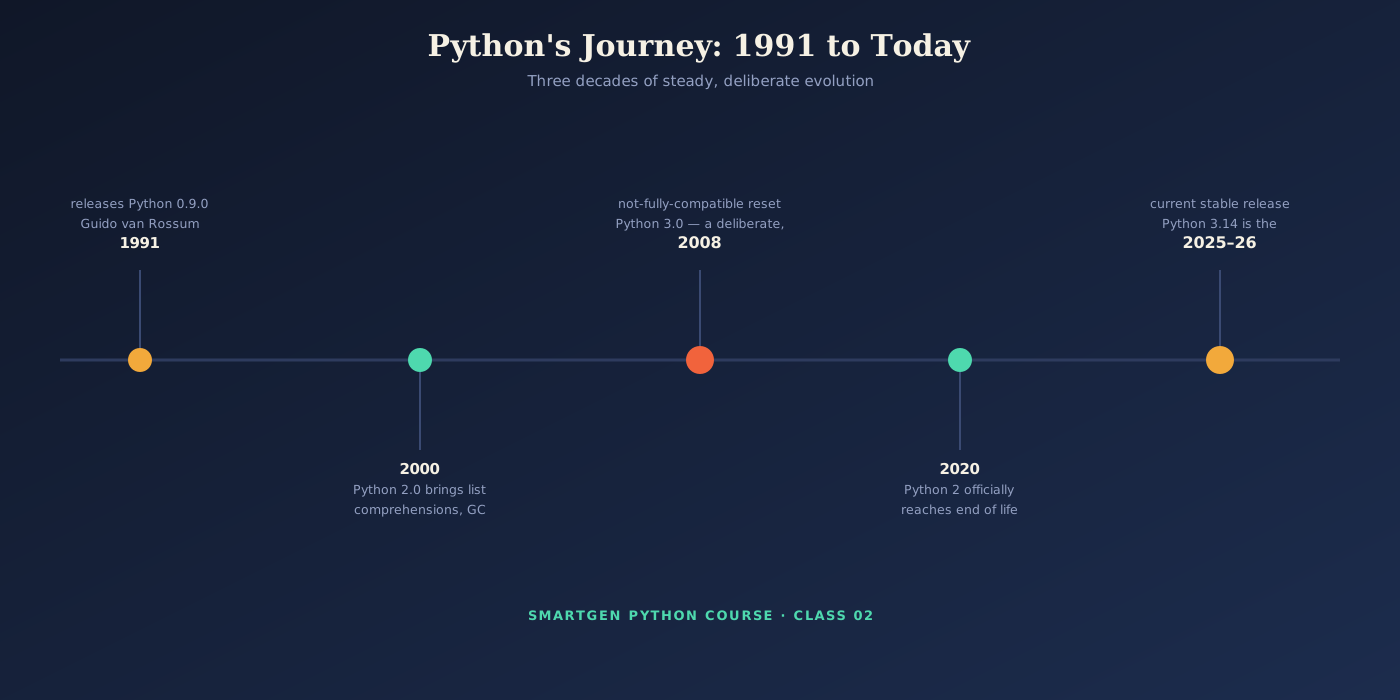
Python was created by Guido van Rossum and first released in 1991. The name has nothing to do with the snake — van Rossum was reading scripts from the British comedy group Monty Python's Flying Circus at the time and simply liked the name.
Python 2.0 arrived in 2000, adding features like list comprehensions and a cycle-detecting garbage collector, and it became hugely popular over the following decade. Python 3.0, released in 2008, was a deliberate, intentionally-not-fully-backward-compatible reset — fixing design inconsistencies (particularly around text and Unicode handling) that couldn't be fixed cleanly within Python 2 itself. This created a genuinely long transition period where both versions were in active, parallel use. Python 2 officially reached end of life on January 1, 2020 and no longer receives any updates, including security fixes — any tutorial still teaching Python 2 syntax today is teaching a retired version.
As of this writing, Python 3.14 is the current stable release, with Python 3.13 still extremely common and fully supported in production environments. Every version since Python 3.0 has stayed within that same Python 3 family — the syntax you'll learn in this course applies directly across all of them.
Common Mistake to Avoid
Following an old tutorial that uses Python 2 syntax (most visibly, print "Hello" without parentheses, instead of the Python 3 print("Hello") you saw in Section 1). If you see that older syntax anywhere, you're looking at retired, unsupported material.
Why Learn Python?
The Problem
With dozens of programming languages competing for a beginner's first choice, it's fair to ask why Python specifically deserves your time over any other option.
The Solution: Four Genuine, Concrete Reasons
Readability lowers the barrier to actually finishing your first project. Python's clean, close-to-English syntax means beginners spend less time fighting confusing punctuation and more time solving the actual problem in front of them.
The community and job market are both enormous. Python consistently ranks among the most widely used programming languages in the world, meaning an answer to nearly any beginner question already exists, and Python skills appear across a genuinely wide range of job listings, well beyond software engineering alone.
One language covers remarkably different careers, as Section 4 covers in full — you can go from this exact class straight into web development, data analysis, or automation without switching languages.
The library ecosystem means you rarely start from zero. Section 5 covers the specific frameworks, but the underlying point is this: whatever you're trying to build, there's very likely already a well-tested Python library that does most of the hard work for you.
Applications and Use Cases
The Problem
"Python can do anything" is technically true and completely unhelpful — you need to actually see the real, distinct careers and projects it powers to understand where you might be headed.
The Solution: Five Genuinely Different Paths
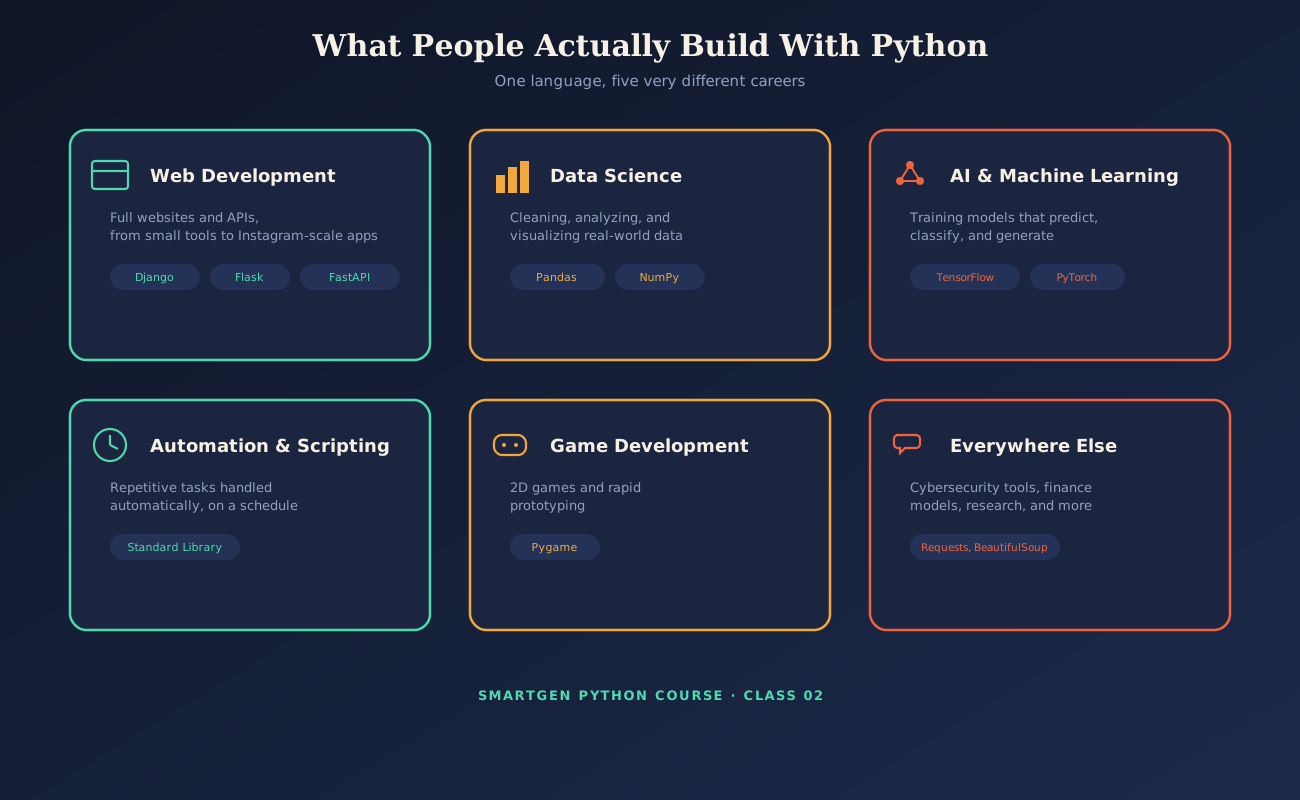
Web development — full websites and APIs, from a small personal project to platforms operating at massive global scale. Data science — cleaning, analyzing, and visualizing real-world data to answer genuine business questions. AI and machine learning — training models that predict, classify, recommend, and generate, currently one of the fastest-growing areas of the entire field. Automation and scripting — handling repetitive, boring tasks automatically, often the very first genuinely useful thing a beginner builds. Game development — particularly strong for 2D games and fast prototyping.
Common Mistake to Avoid
Feeling like you need to pick one single path before you've even finished this course. Section 6 gets you running real code today; which of these five directions you specialize in can wait until you've built a genuine feel for the language itself.
Popular Frameworks and Libraries
The Problem
Python itself is just the core language — the frameworks and libraries built on top of it are what actually let you build real, complete projects quickly, and a beginner needs to know which names actually matter.
The Solution: The Names Worth Knowing, Mapped to Section 4
For web development: Django, a full-featured framework handling almost everything a large site needs out of the box; Flask, a lighter, more flexible alternative for smaller projects; and FastAPI, a newer framework built specifically for fast, modern APIs.
For data science: Pandas, for organizing and analyzing structured, table-like data; and NumPy, for fast numerical computing underneath it.
For AI and machine learning: TensorFlow and PyTorch, the two dominant deep learning frameworks, alongside scikit-learn for more traditional machine learning tasks.
For game development: Pygame, the standard starting point for 2D games in Python.
For automation and scripting: much of this runs on Python's own built-in standard library, supplemented by libraries like Requests (for talking to websites and APIs) and BeautifulSoup (for reading and extracting data from web pages).
Common Mistake to Avoid
Trying to learn a framework like Django before you're genuinely comfortable with core Python itself. Every framework in this section is built on top of the fundamentals this course is teaching first — skipping ahead usually just means backtracking later.
Running Python Code and Understanding Its Execution
The Problem
You understand what Python is conceptually, but you haven't actually run a single line of it yet — and that gap between "reading about it" and "doing it" is exactly where most beginners stall out.
The Solution: Three Ways to Run Python, Step by Step
Step-by-Step: Using the Interactive Shell (REPL)
The fastest way to try Python with zero setup beyond installation is the REPL (Read-Eval-Print Loop) — an interactive shell that runs one line at a time.
- Open your terminal or command prompt.
- Type
python3(orpythonon some Windows setups) and press Enter. - You'll see a prompt like this, confirming your installed version:
Python 3.14.0 (main, Oct  7 2025, 00:00:00)
Type "help", "copyright", "credits" or "license" for more information.
>>>
- Type a line of code directly and press Enter to see it run immediately:
>>> print("Hello, World!")
Hello, World!
>>> 2 + 2
4
- Type
exit()and press Enter to leave the shell.
Step-by-Step: Writing and Running a Real Script
- Open any plain text editor and create a new file named exactly
hello.py. - Copy this complete, working example into it:
# hello.py
name = input("What is your name? ")
print(f"Hello, {name}! Welcome to Python.")
- Save the file.
- Open your terminal, navigate to the folder containing
hello.py, and run:
python3 hello.py
- Type your name when prompted, and press Enter to see your personalized greeting printed back.
Understanding What Actually Happens When Your Code Runs
Python is an interpreted language, which means there's no separate, manual "compile" step you have to run yourself before your code works, unlike some other languages. Behind the scenes, the standard Python interpreter (called CPython) first translates your .py source file into an intermediate form called bytecode — Python often caches this bytecode in a hidden __pycache__ folder so it doesn't have to redo that translation step every single time you run the same unchanged file. That bytecode then runs on the Python Virtual Machine, which executes it one instruction at a time, top to bottom, which is exactly why print() statements run in the order they appear in your file.
Common Mistake to Avoid
Editing your script in a plain text editor, then forgetting to save the file before running it again from the terminal — one of the most common "why isn't my change showing up" moments every beginner runs into at least once.
Quick-Reference Glossary
| Term | Plain-Language Meaning |
|---|---|
| Interpreter | The program that reads and runs your Python code directly |
| REPL | An interactive shell that runs code one line at a time |
| CPython | The standard, most widely used Python interpreter |
| Bytecode | An intermediate form of your code the interpreter actually runs |
| Script | A saved .py file containing Python code to run as a whole |
| Library / Framework | Pre-built code you can reuse instead of writing from scratch |
Class Summary
In this class, we covered what Python actually is in plain language, its real history from Guido van Rossum's 1991 release through the Python 2 to Python 3 transition and today's Python 3.14, four genuine reasons beginners choose it, five real career paths it supports, the specific frameworks and libraries tied to each one, and exactly how to run Python code yourself using both the interactive REPL and a saved script — plus what's actually happening behind the scenes when you do.
Practice exercise: Open your terminal, start the REPL as shown in Section 6, and try three simple calculations (like 5 * 7, 10 / 3, and "Python " + "is fun"). Then create your own version of hello.py, modifying the message to include one more piece of information about yourself, and run it as a script from the terminal.
Frequently Asked Questions
Which Python version should I actually install?
Python 3.14, the current stable release covered in Section 2, is the right default for a new learner today. Python 3.13 remains a completely acceptable, widely-used alternative if a specific course or tool you're following recommends it.
Do I need to understand bytecode to write good Python code?
No — Section 6's explanation is there to remove the mystery of what "running" code actually means, not because you need to manage it directly. Beginners can write fully working programs without ever touching bytecode themselves.
Is Python only for people who want to become professional programmers?
Not at all — the automation and scripting path from Section 4 is genuinely useful for anyone who wants to save time on repetitive computer tasks, regardless of their actual job title.
What's the real difference between a library and a framework?
A library (like Requests) is a tool you call when you need it; a framework (like Django) is a more complete structure that calls your code within its own rules — both are covered by name in Section 5.
Can I skip the REPL and just write scripts?
Sure, once you're comfortable — but the REPL from Section 6 remains genuinely useful throughout your entire coding future for quickly testing a small idea without creating a whole file for it.
— Written by Sayad Md Bayezid Hosan for the SmartGen blog
 ✓
✓
Sayad Md Bayezid Hosan
Founder & Tech Entrepreneur | Full-Stack Developer
Full-stack Web Developer, Digital Marketing Strategist, and Tech Entrepreneur with 5+ years of experience delivering innovative digital solutions. Specializing in web development, AI integration, strategic digital marketing, and tech entrepreneurship. As a leading Tech Provider, I help audiences navigate digital platforms safely through permission-based technical solutions and digital business asset management.
Credentials & Expertise:
- Founder of CWB Agency & GenZFrontier
- Final-year English Student at Northern University Bangladesh
- Specialized in AI-powered web development & content strategy
- Published author on tech, digital marketing & entrepreneurship
** Related article
Class 01: Orientation and Setup
This article was written by Sayad Md Bayezid Hosan for the SmartGen blog. For free tools to support your development journey, visit smartgentools.com.