
July 15, 2026 • General • By Sayad Md Bayezid Hosan
A complete, step-by-step guide to solving real problems with Python loops and mastering strings — hands-on loop exercises including FizzBuzz and reversing a string by hand, plus everything you need to know about string indexing, slicing, immutability, and the core methods you'll use in almost every program you write.
Table of Contents
- Hands-On Loop-Based Problem-Solving
- Introduction to Strings in Python
- Quick-Reference Glossary
- Frequently Asked Questions
(Tap any line to jump straight to that section.)
Continuing the Course
This class assumes you're comfortable with for and while loop syntax from Python Loops and Conditionals and the variable and type fundamentals from Python Variables and Data Types. Here's the full course so far:
- Class 01: Orientation and Setup
- Class 02: What Is Python?
- Class 03: Python Variables and Data Types
- Master Python Operators — Step-by-Step Guide
- Python Loops and Conditionals — Step-by-Step
Hands-On Loop-Based Problem-Solving
The Problem
Knowing the syntax for a for loop and actually being able to look at a blank screen and solve a real problem with one are two completely different skills — and most beginners stall out right at that gap.
The Solution: Four Classic Exercises, Solved Step by Step
Exercise 1: Sum the Numbers From 1 to 100
total = 0
for number in range(1, 101):
    total += number

print(total)   # 5050
Walk through the logic: start a running total at zero, then let the loop add each number from 1 through 100 (remember, range(1, 101) stops before 101) one at a time.
Exercise 2: FizzBuzz
A genuine classic for a reason — it combines loops, conditionals from Loops and Conditionals, and the modulo operator from Python Operators in one small problem:
for number in range(1, 21):
    if number % 15 == 0:
        print("FizzBuzz")
    elif number % 3 == 0:
        print("Fizz")
    elif number % 5 == 0:
        print("Buzz")
    else:
        print(number)
The order of the conditions matters here — checking % 15 first catches numbers divisible by both 3 and 5 before the more general % 3 or % 5 checks would otherwise catch them separately.
Exercise 3: Reverse a String Using Only a Loop
word = "Python"
reversed_word = ""

for letter in word:
    reversed_word = letter + reversed_word

print(reversed_word)   # nohtyP
Each new letter gets added to the front of the result rather than the end, which is exactly what flips the order.
Exercise 4: Find the Largest Number in a List
numbers = [12, 45, 7, 89, 34]
largest = numbers[0]

for num in numbers:
    if num > largest:
        largest = num

print(largest)   # 89
Common Mistake to Avoid
Jumping straight to typing code before describing the steps in plain English first. Every exercise above follows the same pattern — start a tracking variable, loop through the data, update the tracker when a condition is met — and spotting that pattern in plain words first makes the actual code far easier to write correctly the first time.
Introduction to Strings in Python
The Problem
Text is everywhere in real programs — names, messages, file paths — and without knowing how Python actually lets you access and manipulate it, you'll end up fighting the language instead of using it.
The Solution: Indexing, Slicing, and the Methods You'll Actually Use
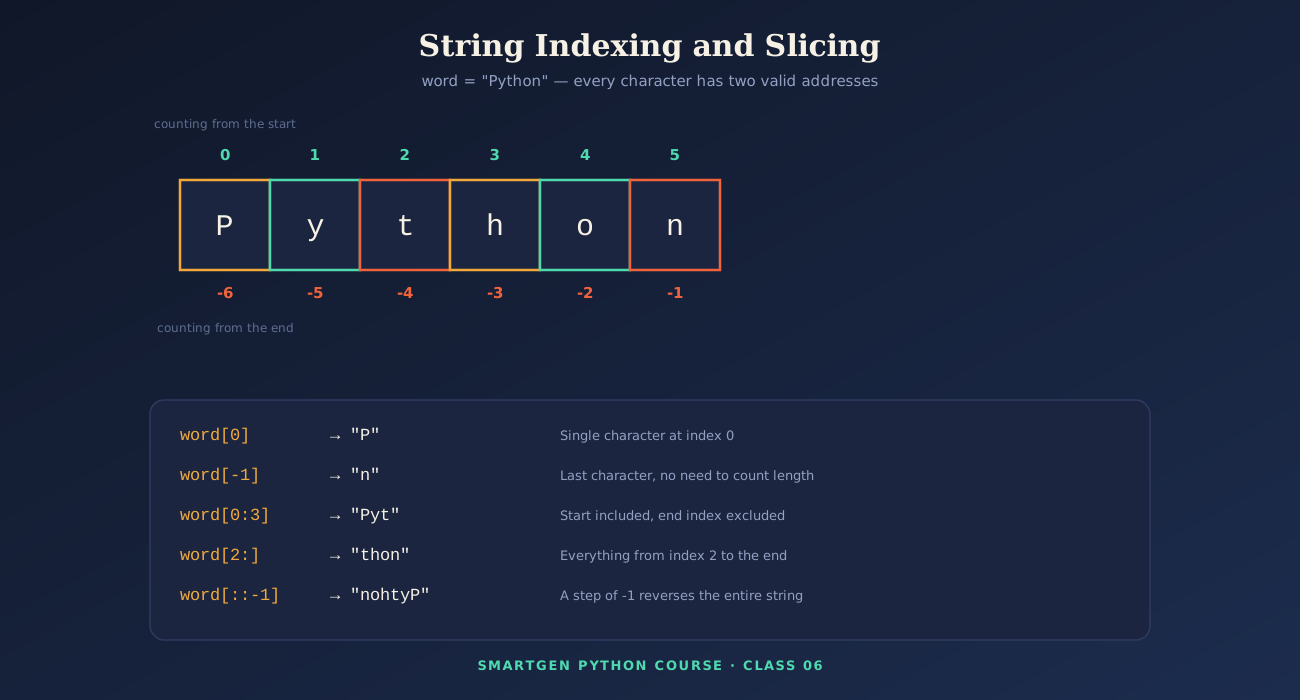
A string is simply text, written between quotes. Every character has a position, called an index, starting at 0 from the left, and counting -1, -2, -3... backward from the right:
name = "Python"
print(name[0])     # P
print(name[-1])    # n
Slicing pulls out a whole section at once, using start:end (the end index is never included):
print(name[0:3])    # Pyt
print(name[2:])     # thon (everything from index 2 onward)
print(name[::-1])   # nohtyP (a step of -1 reverses the whole string)
The Core String Methods Worth Knowing
greeting = "  Hello, World!  "

print(greeting.strip())          # "Hello, World!" - removes outer whitespace
print(greeting.upper())          # "  HELLO, WORLD!  "
print(name.lower())              # "python"
print(name.replace("P", "J"))    # "Jython"

parts = "SmartGen,Python,Course".split(",")
print(parts)                     # ['SmartGen', 'Python', 'Course']
print("-".join(parts))           # SmartGen-Python-Course

age = 25
print(f"I am {age} years old.")  # f-string formatting - the modern standard
Strings Are Immutable
This single fact explains a lot of otherwise-confusing string behavior: once created, a string can never be changed in place.
name = "Python"
# name[0] = "J"      # This raises a TypeError - strings cannot be modified directly

name = "J" + name[1:]   # Instead, build an entirely new string
print(name)              # Jython
Common Mistake to Avoid
Forgetting that a slice's end index is excluded. name[0:3] on "Python" gives you "Pyt" — three characters (indices 0, 1, and 2), not four.
Quick-Reference Glossary
| Term | Plain-Language Meaning |
|---|---|
| Index | A character's position in a string, starting at 0 |
| Slice | A extracted section of a string using start:end |
| Immutable | Cannot be changed in place after creation |
| f-string | A modern way to insert variables directly into text |
.split() |
Breaks a string into a list using a separator |
.join() |
Combines a list of strings using a separator |
Class Summary
In this class, we solved four classic loop-based exercises step by step — summing a range, FizzBuzz, reversing a string, and finding a maximum — and covered string indexing, slicing, immutability, and the core methods (.strip(), .upper(), .split(), .join(), and f-strings) you'll reach for constantly.
Practice exercise: Write a loop that counts how many vowels appear in a word of your choice, then use slicing to print just the first half of that same word.
Frequently Asked Questions
Why does my slice seem to be missing the last character I expected?
Slice end indices are always excluded, exactly as shown in Section 2 — name[0:3] stops before index 3, not after it.
Can I change a single character in a string directly?
No — strings are immutable, as covered in Section 2. Build a new string instead, as shown in the Jython example.
What's the difference between .strip() and .replace()?.strip() only removes whitespace from the outer edges of a string; .replace() swaps any specific substring you name, anywhere it appears.
Is there a faster way to solve the "find the largest number" exercise?
Yes — Python's built-in max() function does it in one line (max(numbers)), but writing it manually with a loop, as shown in Section 1, is exactly the exercise that builds real loop intuition.
— Written by Sayad Md Bayezid Hosan for the SmartGen blog
 ✓
✓
Sayad Md Bayezid Hosan
Founder & Tech Entrepreneur | Full-Stack Developer
Full-stack Web Developer, Digital Marketing Strategist, and Tech Entrepreneur with 5+ years of experience delivering innovative digital solutions. Specializing in web development, AI integration, strategic digital marketing, and tech entrepreneurship. As a leading Tech Provider, I help audiences navigate digital platforms safely through permission-based technical solutions and digital business asset management.
Credentials & Expertise:
- Founder of CWB Agency & GenZFrontier
- Final-year English Student at Northern University Bangladesh
- Specialized in AI-powered web development & content strategy
- Published author on tech, digital marketing & entrepreneurship
This article was written by Sayad Md Bayezid Hosan for the SmartGen blog. For free tools to support your development journey, visit smartgentools.com.