
July 15, 2026 • General • By Sayad Md Bayezid Hosan
Python Operators Explained
A complete, step-by-step guide to Python operators — the real difference between an operand and an operator, every arithmetic, comparison, and assignment operator with runnable code, how logical, membership, and identity operators actually behave (including the short-circuit rule that surprises most beginners), operator precedence and the ternary expression, and the key differences and best practices that separate code that merely runs from code that's actually correct.
Table of Contents
- Operand vs. Operator
- Arithmetic, Comparison, and Assignment Operators
- Logical, Membership, and Identity Operators
- Operator Precedence and Ternary Operators
- Key Differences and Best Practices
- Quick-Reference Glossary
- Frequently Asked Questions
(Tap any line to jump straight to that section.)
Continuing the Course
This is Class 04, building directly on Class 03: Variables and Data Types, Class 02: What Is Python?, and Class 01: Orientation and Setup. Every operator in this class works because of the types you just learned — + behaves one way on two int values and a genuinely different way on two str values, and that only makes sense once you already know what a type is. If you haven't run your first line of Python yet, Class 02's step-by-step section walks you through it before you start here.
Operand vs. Operator
The Problem
Python documentation and error messages constantly use the words "operand" and "operator" as if every reader already knows exactly which is which — and mixing them up makes it genuinely harder to read an error message or ask a good question when your code breaks.
The Solution: Two Precise Definitions
An operator is the symbol that performs an action — +, -, ==, and. An operand is the value the operator acts on. In the expression below, 7 and 3 are the operands, and + is the operator:
result = 7 + 3
print(result)   # 10
Most operators in Python are binary — they act on two operands, one on each side. A few are unary — they act on a single operand, like the minus sign that flips a number's sign:
x = 5
y = -x          # unary operator: one operand (x), one operator (-)
print(y)        # -5

total = 7 + 3    # binary operator: two operands (7 and 3)
print(total)    # 10
Common Mistake to Avoid
Assuming an operator always means the same thing regardless of what type its operands are. + means numeric addition between two int or float values, but between two str values it means concatenation — and between an int and a str, Python refuses outright:
print(2 + 3)         # 5   - numeric addition
print("2" + "3")     # 23  - string concatenation, not addition
print(2 + "3")       # TypeError: unsupported operand type(s)
That last line is one of the single most common errors a Python beginner hits — and now you know exactly why it happens.
Arithmetic, Comparison, and Assignment Operators
The Problem
These three operator families look simple individually, but two specific details inside them — the difference between / and //, and the difference between = and == — cause more beginner bugs than almost anything else in this entire course.
The Solution: Every Operator, With Code You Can Run
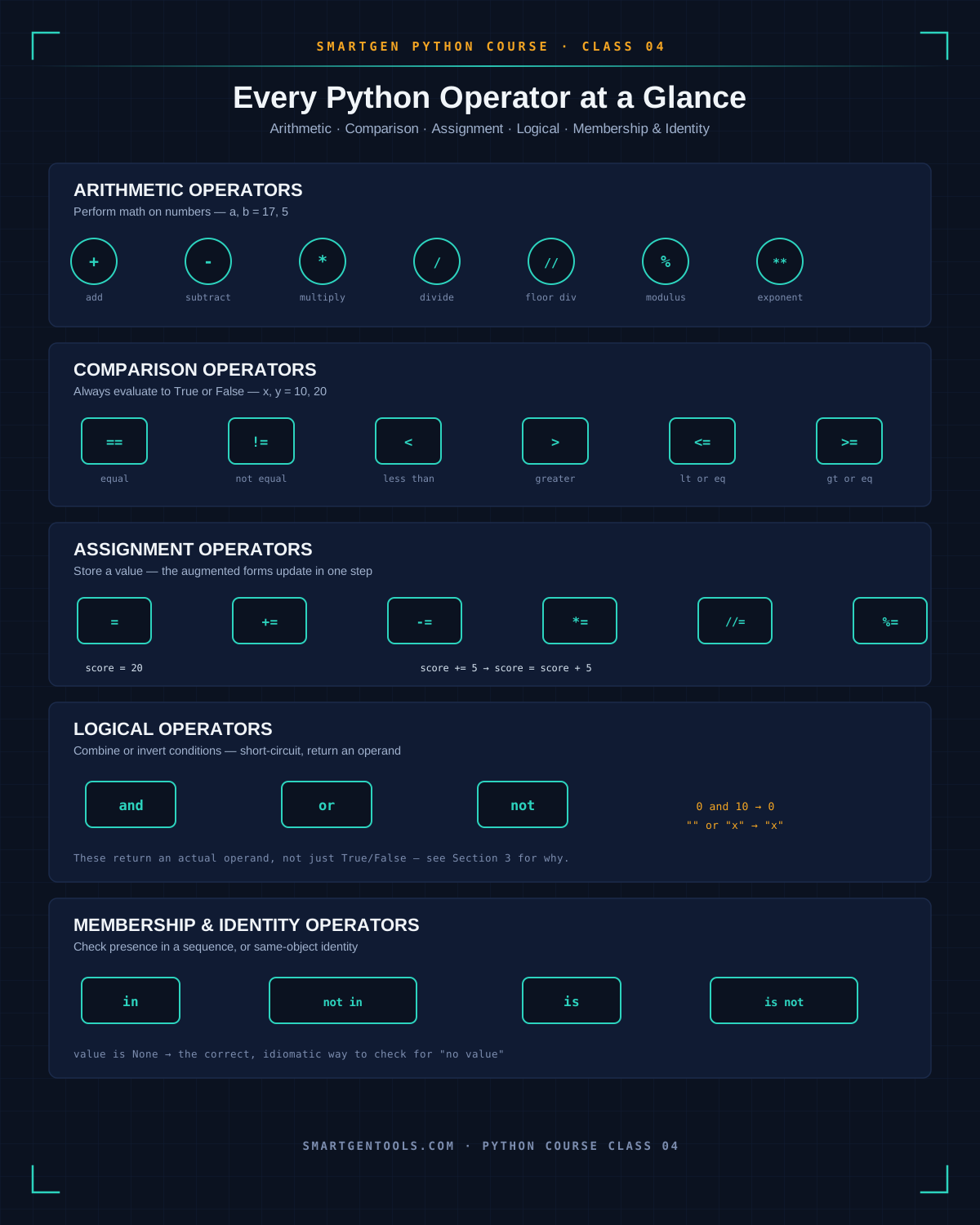
Arithmetic operators perform math on numbers:
a, b = 17, 5

print(a + b)    # 22  - addition
print(a - b)    # 12  - subtraction
print(a * b)    # 85  - multiplication
print(a / b)    # 3.4 - division, always returns a float
print(a // b)   # 3   - floor division, rounds down to a whole number
print(a % b)    # 2   - modulus, the remainder after division
print(a ** b)   # 1419857 - exponentiation, a to the power of b
Comparison operators always evaluate to a bool — True or False:
x, y = 10, 20

print(x == y)   # False - equal to
print(x != y)   # True  - not equal to
print(x < y)    # True  - less than
print(x > y)    # False - greater than
print(x <= 10)  # True  - less than or equal to
print(y >= 21)  # False - greater than or equal to
Assignment operators store a value — and Python's augmented assignment operators let you update a variable in a single, shorter step:
score = 10
score = score + 5   # the long way
print(score)        # 15

score += 5           # the augmented way - identical result
print(score)        # 20

score -= 3           # score = score - 3
score *= 2           # score = score * 2
score //= 4          # score = score // 4
print(score)        # 8
Common Mistake to Avoid
Confusing = (assignment) with == (comparison) inside a conditional. In some languages this silently compiles and creates a hard-to-spot bug — Python actually protects you here, refusing to run at all:
x = 5

if x == 5:      # correct - this is a comparison
    print("Matched!")

# if x = 5:     # this line would raise a SyntaxError, not run silently
That SyntaxError is Python catching your mistake before it becomes a bug — treat it as a feature, not an annoyance.
Logical, Membership, and Identity Operators
The Problem
These three operator families look like simple yes/no logic on the surface, but each one has a specific, non-obvious behavior that trips up beginners the first time they meet it — especially the fact that and and or don't actually return True or False the way most people assume.
The Solution: What Each Operator Actually Returns
Logical operators (and, or, not) combine or invert boolean expressions:
age = 25
has_id = True

print(age >= 18 and has_id)   # True  - both conditions must be true
print(age < 18 or has_id)     # True  - at least one condition is true
print(not has_id)             # False - inverts the boolean
Here's the detail that surprises almost everyone at least once: and and or don't strictly return True/False — they return one of the actual operands, and they short-circuit, meaning the second operand is never even evaluated once the result is already certain:
print(5 and 10)      # 10  - both are "truthy", so it returns the last one
print(0 and 10)      # 0   - 0 is "falsy", so it short-circuits and returns 0 immediately
print("" or "default")   # "default" - empty string is falsy, so it falls through
Membership operators (in, not in) check whether a value exists inside a sequence — a string, list, tuple, dict, or set:
skills = ["Python", "SEO", "HTML"]

print("Python" in skills)       # True
print("Java" not in skills)     # True
print("y" in "Python")          # True - works on strings too, checks substrings/characters
Identity operators (is, is not) check whether two names point to the exact same object in memory — this is the same distinction Class 03 introduced with == versus is:
value = None

if value is None:        # the correct, idiomatic way to check for None
    print("Nothing set yet.")

list_a = [1, 2, 3]
list_b = [1, 2, 3]
print(list_a == list_b)   # True  - same values
print(list_a is list_b)   # False - two separate objects in memory
Common Mistake to Avoid
Relying on short-circuit evaluation without realizing the second operand might never run. If that second operand is a function call with a side effect — like saving data or printing a message — and the first operand already made the result certain, that function call silently never happens:
def log_action():
    print("Action logged!")
    return True

result = False and log_action()   # log_action() never runs - "Action logged!" never prints
Operator Precedence and Ternary Operators
The Problem
Without a clear mental model of which operators run first, expressions that mix arithmetic, comparisons, and logic can produce a result that looks completely wrong at first glance — even though Python is following consistent, learnable rules the entire time.
The Solution: The Order Python Actually Follows

From highest to lowest priority: parentheses run first, always — then exponentiation (**), then multiplication, division, floor division, and modulus (* / // %), then addition and subtraction (+ -), then comparisons (== != < > and friends), then logical operators (not, then and, then or, in that order).
result = 2 + 3 * 4
print(result)          # 14, not 20 - multiplication runs before addition

result = (2 + 3) * 4
print(result)          # 20 - parentheses override the default order

is_valid = 5 > 3 and 2 < 4
print(is_valid)        # True - comparisons run before the "and"
The ternary (conditional) expression is Python's single-line way of writing a simple if/else, in the form value_if_true if condition else value_if_false:
age = 20
status = "Adult" if age >= 18 else "Minor"
print(status)          # Adult

# The equivalent, longer version:
if age >= 18:
    status = "Adult"
else:
    status = "Minor"
Common Mistake to Avoid
Nesting ternary expressions to avoid writing a full if/elif/else block. It's valid Python, but it reads terribly and hides bugs:
# Technically valid - genuinely hard to read at a glance
grade = "A" if score >= 90 else "B" if score >= 80 else "C" if score >= 70 else "F"

# The readable version - use a real if/elif chain once you have more than one condition
if score >= 90:
    grade = "A"
elif score >= 80:
    grade = "B"
elif score >= 70:
    grade = "C"
else:
    grade = "F"
A ternary expression is for one simple choice. The moment you need a second condition, switch to a real if/elif/else block.
Key Differences and Best Practices
The Problem
Knowing what each operator does individually isn't quite the same as knowing which one to reach for in a real piece of code — and a handful of style habits separate code that runs from code other developers (including future you) can actually read.
The Solution: The Rules Worth Committing to Memory
== vs. is — use == for comparing values (almost always what you want), and reserve is specifically for comparing against None, True, or False, exactly as shown in Section 3.
/ vs. // — use / when you want a precise, decimal result, and // when you specifically want a whole number with any remainder discarded, such as calculating how many full groups of 5 fit into 23 (23 // 5 → 4).
Spacing around operators — PEP 8, Python's official style guide, calls for a single space on each side of most operators. x = x + 1 is correct; x=x+1 runs identically but is genuinely harder to scan:
# PEP 8 style
total = price * quantity + tax

# Technically works, but avoid this
total=price*quantity+tax
One operator worth knowing exists — the walrus operator (:=), added in Python 3.8, lets you assign a value and use it in the same expression, which is handy inside a loop or condition:
# Without the walrus operator
data = input("Enter a value: ")
while data != "quit":
    print(f"You entered: {data}")
    data = input("Enter a value: ")

# With the walrus operator - assigns and checks in one line
while (data := input("Enter a value: ")) != "quit":
    print(f"You entered: {data}")
You won't need it constantly as a beginner, but recognizing it when you see it in other people's code will save you a confused pause.
Common Mistake to Avoid
Reaching for the most "clever" or compressed operator combination instead of the most readable one. Python rewards clarity — a slightly longer line that's instantly understandable beats a shorter one that makes the next reader (including you, in six months) stop and puzzle it out.
Quick-Reference Glossary
| Term | Plain-Language Meaning |
|---|---|
| Operator | The symbol that performs an action, like + or == |
| Operand | The value an operator acts on |
| Unary Operator | An operator that acts on a single operand |
| Binary Operator | An operator that acts on two operands |
Floor Division (//) |
Division that rounds down to a whole number |
Modulus (%) |
The remainder left over after division |
| Short-Circuit Evaluation | When and/or skip evaluating the second operand |
| Membership Operator | in / not in — checks if a value exists in a sequence |
| Identity Operator | is / is not — checks if two names are the same object |
| Ternary Expression | A one-line conditional: x if condition else y |
| Operator Precedence | The fixed order in which Python evaluates mixed operators |
Walrus Operator (:=) |
Assigns and returns a value in the same expression |
Class Summary
In this class, we covered the precise difference between an operand and an operator, and why an operator's meaning can change entirely depending on its operand's type. We covered every arithmetic, comparison, and assignment operator with runnable code, including the classic = versus == trap that Python protects you from with a SyntaxError. We covered logical, membership, and identity operators — especially the short-circuit behavior of and/or that returns an actual operand rather than a plain True/False. We covered operator precedence and the ternary expression, including exactly when a ternary stops being readable. And we closed with the practical differences and best practices — == vs. is, / vs. //, PEP 8 spacing, and a first look at the walrus operator.
Practice exercise: Write a short script with two number variables. Print the result of all seven arithmetic operators from Section 2 on them. Then write one line using a ternary expression that prints "Even" or "Odd" based on whether the first number is evenly divisible by 2 — you'll need the modulus operator from Section 2 and the ternary syntax from Section 4 together.
Frequently Asked Questions
What's the actual difference between / and // in Python?/ always returns a float (a decimal), even when the numbers divide evenly — 10 / 2 gives 5.0. // performs floor division, returning a whole number with the remainder discarded — 10 // 3 gives 3. Use // whenever you specifically need a whole-number result.
Why does if x = 5: give me an error instead of just running?
Python deliberately treats = as an assignment-only operator and refuses to let it appear inside a condition, which is exactly why it raises a SyntaxError rather than silently running with unexpected behavior, as covered in Section 2. Use == for comparisons instead.
Do and and or really not return True or False?
Correct — they return whichever actual operand determined the result, not a plain boolean, as shown in Section 3. This is genuinely useful once you know it (it powers common patterns like value = user_input or "default"), but it's worth knowing explicitly so it doesn't surprise you mid-debug.
When should I use is instead of ==?
Almost exclusively when comparing against None, True, or False — covered in Section 3 and first introduced in Class 03. For comparing actual values — numbers, strings, list contents — use ==.
Is the ternary operator considered good practice, or should I avoid it?
It's genuinely good practice for exactly one simple, single condition — assigning one of two values based on one check. The moment you're tempted to nest a second condition inside it, as shown in Section 4, switch to a full if/elif/else block instead.
— This article was written by Sayad Md Bayezid Hosan for the SmartGen blog.

Sayad Md Bayezid Hosan
Full-stack Web Developer, Digital Marketer, and Web Designer with 5+ years of experience delivering innovative digital solutions. Specializing in web development, AI integration, strategic digital marketing, and tech entrepreneurship. As a leading Tech Provider, I help audiences navigate digital platforms safely through permission-based technical solutions and digital business asset management.