
July 15, 2026 • General • By Sayad Md Bayezid Hosan
Master Python Conditionals & Loops: Step-by-Step Guide
A complete, step-by-step guide to Python's decision-making and repetition tools — the if statement and its else and elif extensions, the indentation rules that replace curly braces entirely, the ternary shorthand for one-line decisions, hands-on practice exercises, and both major loop types (while and for) including the control keywords that give you precise command over exactly when a loop runs, skips, or stops.
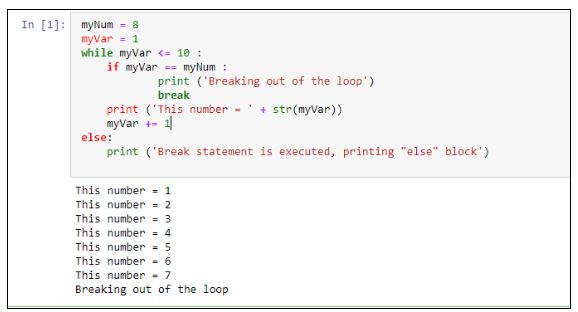
Table of Contents
- What Is a Conditional Statement?
- The if, if-else, and Nested if Statements
- The if-elif-else Structure and Indentation Rules
- Shorthand Conditionals and Hands-On Practice
- While Loops and Loop Control Mechanisms
- For Loops and Practical Use Cases
- Quick-Reference Glossary
- Frequently Asked Questions
(Tap any line to jump straight to that section.)
Continuing the Course
This is Class 05, building directly on Class 04: Python Operators, Class 03: Variables and Data Types, Class 02: What Is Python?, and Class 01: Orientation and Setup. Every condition you write in this class is built from the comparison operators (==, <, >=) and logical operators (and, or, not) you just learned in Class 04 — a conditional statement is simply what you build once you already know how to compare and combine values. If you haven't run a script yet, Class 01's setup walkthrough gets you there before you start here.
What Is a Conditional Statement?
The Problem
Every program you've written so far in this course runs the exact same lines, in the exact same order, every single time. That's fine for a calculator, but it can't build a login system, a grading tool, or a game — anything that needs to behave differently depending on the situation.
The Solution: Letting Your Code Make Decisions
A conditional statement lets your program check whether something is True or False, and run different code depending on the answer. Think of it exactly like a real-world decision: if it's raining, take an umbrella; otherwise, don't. Python's conditional keywords — if, elif, and else — are the direct translation of that everyday logic into code.
is_raining = True

if is_raining:
    print("Take an umbrella.")
That single condition, is_raining, is a Boolean — a value that's either True or False. Every conditional statement in this class boils down to evaluating a Boolean, whether it comes from a variable directly (like is_raining) or from a comparison expression (like age >= 18, which we covered in Class 04).
Common Mistake to Avoid
Writing a condition that isn't actually a Boolean expression and assuming Python will figure out what you meant. if age: doesn't check whether age is 18 or above — it only checks whether age is "truthy" (non-zero, non-empty). Be explicit: if age >= 18: says exactly what you mean; if age: says something different and will silently misbehave for someone whose age happens to be 0.
The if, if-else, and Nested if Statements
The Problem
Once you can check a single condition, two questions come up immediately: what happens when the condition is False, and what do you do when a decision depends on more than one thing?
The Solution: if, if-else, and Nesting
The if statement runs its block only when the condition is True. Nothing happens if it's False — the program just moves on:
age = 20

if age >= 18:
    print("You are eligible to vote.")
The if-else statement adds a fallback path for when the condition is False, so you always run exactly one of the two blocks:
age = 15

if age >= 18:
    print("You can vote.")
else:
    print("You are not eligible yet.")
A nested if statement is an if placed inside another if, for when a second condition only matters after the first one is already True:
age = 20
has_id = True

if age >= 18:
    if has_id:
        print("You can vote.")
    else:
        print("You need an ID to vote.")
else:
    print("You are not eligible yet.")
Common Mistake to Avoid
Nesting if statements when a logical operator would say the exact same thing more clearly. The nested version above is correct, but once you only care about the combined case where both things are true, the and operator from Class 04 collapses it into one clean line:
# Nested version - works, but adds an extra indentation level
if age >= 18:
    if has_id:
        print("You can vote.")

# Cleaner version - same logic, using 'and' from Class 04
if age >= 18 and has_id:
    print("You can vote.")
Reach for nesting only when the inner condition genuinely needs its own separate else — like the "You need an ID" message above, which has no equivalent in the flattened version.
The if-elif-else Structure and Indentation Rules
The Problem
Nested if-else blocks get messy fast once you have more than two possible outcomes — and even once your logic is correct, Python has strict rules about how you arrange your code on the page that, if broken, stop your program before it even runs.
The Solution: elif for Multiple Conditions
The if-elif-else structure checks a series of conditions in order and runs the block for the first one that's True, skipping all the rest automatically:
score = 82

if score >= 90:
    grade = "A"
elif score >= 80:
    grade = "B"
elif score >= 70:
    grade = "C"
else:
    grade = "F"

print(grade)   # B
Python checks score >= 90 first (False, since 82 is less than 90), then score >= 80 (True) — and stops there. It never even looks at the remaining elif or else.
Indentation Rules in Python
This is the mechanism that makes all of the above actually work: Python uses indentation, not curly braces {}, to define which lines belong inside a block. Every statement at the same indentation level inside an if, elif, else, or loop is treated as one group:
if True:
    print("Level 1")
    if True:
        print("Level 2")
        print("Still level 2")
    print("Back to level 1")
The rules are strict and non-negotiable: use a consistent number of spaces (4 spaces is the PEP 8 standard), never mix tabs and spaces in the same file, and every line inside the same block must line up exactly.
Common Mistake to Avoid
Using separate if statements when you meant elif. This is one of the most common logic bugs beginners write, and unlike an indentation error, Python won't stop you — it will just quietly give you the wrong answer:
score = 95

# Wrong - three separate, independent if statements
if score >= 90:
    grade = "A"
if score >= 80:
    grade = "B"      # this check ALSO runs and overwrites grade
if score >= 70:
    grade = "C"      # this one runs too, overwriting it again

print(grade)   # "C" -- wrong! A 95 should clearly be an "A"
Because each if is independent, Python checks all three, and the last one to match wins — silently turning a 95 into a "C." Using elif instead fixes this by stopping at the first match, exactly as shown in the correct version above.
Mixing indentation levels is the second common trap, and this one Python will stop for you with an IndentationError:
if True:
    print("This works")
   print("This breaks!")
# IndentationError: unindent does not match any outer indentation level
The second line uses 3 spaces where the block established 4 — and Python refuses to guess which block you meant.
Shorthand Conditionals and Hands-On Practice
The Problem
Sometimes a full if-else block feels like overkill for a single, simple decision — and reading about conditionals isn't the same as being able to write one yourself under your own steam.
The Solution: The Ternary Expression
Class 04 briefly introduced the ternary (conditional) expression — Python's one-line form of if-else — while covering operator precedence. Here's a closer look at it specifically as a conditional tool, in the form value_if_true if condition else value_if_false:
age = 20
status = "Adult" if age >= 18 else "Minor"
print(status)   # Adult
It's especially handy for quick assignments like these:
a, b = 15, 22
max_value = a if a > b else b
print(max_value)      # 22

is_member = True
discount = 0.20 if is_member else 0.05
print(discount)       # 0.2
As covered in Class 04, a ternary is for exactly one simple choice — the moment you need a second condition, switch back to a real if-elif-else block instead of nesting ternaries inside each other.
Hands-On Exercises: Test Your Logic
Try writing each of these yourself before expanding the solution. If you need a refresher on running a .py file, Class 01's setup walkthrough covers exactly that.
Exercise 1 — Even or Odd: Print whether a number is "Even" or "Odd" using the modulus operator from Class 04.
number = 7

if number % 2 == 0:
    print("Even")
else:
    print("Odd")
Exercise 2 — Grade Calculator: Given a score, print a letter grade using an if-elif-else chain.
score = 74

if score >= 90:
    print("A")
elif score >= 80:
    print("B")
elif score >= 70:
    print("C")
else:
    print("F")
Exercise 3 — Leap Year Checker: A year is a leap year if it's divisible by 4, except centuries, which must be divisible by 400.
year = 2024

if year % 4 == 0 and (year % 100 != 0 or year % 400 == 0):
    print(f"{year} is a leap year.")
else:
    print(f"{year} is not a leap year.")
Exercise 4 — Ternary Practice: Rewrite Exercise 1 as a single-line ternary expression.
number = 7
result = "Even" if number % 2 == 0 else "Odd"
print(result)
While Loops and Loop Control Mechanisms
The Problem
Conditionals let you make a decision once. But plenty of real tasks — reading input until the user quits, retrying a connection, counting down — need to repeat an action for as long as some condition stays true, and you don't always know in advance exactly how many times that will be.
The Solution: The while Loop
A while loop repeats its body for as long as its condition evaluates to True, re-checking the condition before every single pass:
count = 1

while count <= 5:
    print(count)
    count += 1
This prints 1 2 3 4 5, one per line. Each pass through the loop body is called an iteration.
Common Mistake to Avoid: The Infinite Loop
The single most common while loop bug is forgetting to update the value the condition depends on — which leaves the condition permanently True:
count = 1
while count <= 5:
    print(count)
    # forgot count += 1 -- this loop never ends!
Before running any while loop, double-check that something inside the body genuinely moves the condition toward becoming False.
Loop Control Mechanisms
Python gives you three keywords, plus one lesser-known clause, for fine control over exactly how a loop behaves.
break exits the loop immediately, skipping any remaining iterations entirely:
count = 1
while True:
    if count > 5:
        break
    print(count)
    count += 1
continue skips the rest of the current iteration only, and jumps straight to re-checking the condition:
count = 0
while count < 10:
    count += 1
    if count % 2 == 0:
        continue     # skip printing even numbers
    print(count)
# Prints: 1 3 5 7 9
pass does nothing at all — it's a placeholder for a spot where Python's syntax requires some statement, but you don't have real logic to put there yet:
for item in ["a", "b", "c"]:
    if item == "b":
        pass    # TODO: handle this case later
    else:
        print(item)
The while...else clause is the one almost nobody expects: the else block runs only if the loop finishes normally, without hitting a break.
count = 1
while count <= 3:
    if count == 2:
        break
    print(count)
    count += 1
else:
    print("Loop finished normally")

# Output: 1
# (the 'else' never runs, because break interrupted the loop)
Compare that to a version with no break — the else block runs right after the loop completes:
count = 1
while count <= 3:
    print(count)
    count += 1
else:
    print("Loop finished normally")

# Output: 1  2  3  Loop finished normally
For Loops and Practical Use Cases
The Problem
A while loop works, but managing a counter variable by hand — initializing it, checking it, incrementing it — is extra bookkeeping when all you actually want to do is process every item in a list, string, or other known sequence.
The Solution: The for Loop
A for loop repeats its body once for each item in a sequence, handling the "how many times" bookkeeping for you automatically:
fruits = ["apple", "banana", "cherry"]

for fruit in fruits:
    print(fruit)
The built-in range() function generates a sequence of numbers on demand, which makes for loops just as usable for counting as while loops are:
for i in range(5):
    print(i)          # 0 1 2 3 4

for i in range(1, 6):
    print(i)          # 1 2 3 4 5 (start, stop)

for i in range(0, 10, 2):
    print(i)          # 0 2 4 6 8 (start, stop, step)
for loops also work directly on strings, walking through one character at a time:
for letter in "Python":
    print(letter)
Common Mistake to Avoid
Removing items from a list while you're looping over that exact same list. This is a genuinely subtle bug that produces output that looks plausible but is quietly wrong:
numbers = [2, 4, 6, 8]

for num in numbers:
    if num % 2 == 0:
        numbers.remove(num)

print(numbers)   # [4, 8] -- wrong! Every number here is even.
Every value in the list is even, so you'd expect an empty list — instead, two even numbers survive. Removing an item shifts every later item one position to the left, but the loop's internal position counter keeps advancing normally, so it silently skips whatever slid into the spot it just checked.
The fix is to loop over a copy of the list while modifying the original:
numbers = [2, 4, 6, 8]

for num in numbers[:]:      # [:] makes a shallow copy to iterate over
    if num % 2 == 0:
        numbers.remove(num)

print(numbers)   # []
Practical Use Cases
Summing values is one of the most common for loop patterns you'll write:
prices = [19.99, 5.49, 12.00]
total = 0

for price in prices:
    total += price

print(round(total, 2))   # 37.48
enumerate() gives you both the index and the value in a single pass, which is far cleaner than managing a separate counter variable, like the ones we used in Class 03 for storing values:
fruits = ["apple", "banana", "cherry"]

for index, fruit in enumerate(fruits):
    print(index, fruit)

# 0 apple
# 1 banana
# 2 cherry
Nested for loops — a loop inside a loop — let you work through combinations, like generating a small multiplication table:
for i in range(1, 4):
    for j in range(1, 4):
        print(i * j, end=" ")
    print()

# 1 2 3
# 2 4 6
# 3 6 9
A quick heads-up: Python also has a compact way to build a list in a single line called a list comprehension — we'll cover that properly in a future class once you've had more practice with regular for loops first.
While vs. For: Choosing the Right Loop
Use a while loop when... |
Use a for loop when... |
|---|---|
| You don't know in advance how many iterations you'll need | You're iterating over a known sequence — a list, string, or range |
| The stopping point depends on a changing condition (user input, a search result) | You want Python to manage the counting for you automatically |
| You're waiting for something external to happen | You need to process every item exactly once |
Capstone Exercise: FizzBuzz
This classic exercise combines everything in this class into one program — a for loop wrapping an if-elif-else chain:
for number in range(1, 21):
    if number % 15 == 0:
        print("FizzBuzz")
    elif number % 3 == 0:
        print("Fizz")
    elif number % 5 == 0:
        print("Buzz")
    else:
        print(number)
For every number from 1 to 20: print "FizzBuzz" if it's divisible by both 3 and 5, "Fizz" if just by 3, "Buzz" if just by 5, and the number itself otherwise. If this runs cleanly on your machine and prints the right pattern, you've genuinely internalized both halves of this class.
Quick-Reference Glossary
| Term | Plain-Language Meaning |
|---|---|
| Conditional Statement | Code that runs only when a specific condition evaluates to True |
| Boolean | A value that is either True or False |
| Code Block | A group of statements at the same indentation level that run together |
| Nested Conditional | An if statement placed inside another if statement |
| elif | Short for "else if" — checks another condition only if the previous one was False |
| Ternary Expression | A one-line if-else: value_if_true if condition else value_if_false |
| Iteration | One single pass through a loop's body |
| while Loop | Repeats its body for as long as a condition stays True |
| for Loop | Repeats its body once for each item in a sequence |
| break | Immediately exits the loop entirely |
| continue | Skips the rest of the current iteration, moves to the next one |
| pass | A no-op placeholder statement that does nothing |
| range() | Built-in function that generates a sequence of numbers |
| enumerate() | Built-in function that pairs each item in a sequence with its index |
| Infinite Loop | A loop whose condition never becomes False, so it never stops |
Class Summary
In this class, we covered how to make your programs branch and decide with the if statement, its else and elif extensions, and specifically when a nested if earns its keep versus when a logical operator says the same thing more clearly. We covered Python's indentation rules in detail — the exact mechanism that replaces curly braces in most other mainstream languages — and the specific difference between an IndentationError that stops your program and the silent logic bug of using separate if statements where you meant elif. We covered the ternary expression as shorthand for one simple decision, and worked through four hands-on exercises to practice the pattern directly. Then we moved into repetition: the while loop for condition-based repeats, all four loop control tools (break, continue, pass, and the while...else clause), the for loop for iterating over known sequences, range() and enumerate() as your two most common iteration helpers, the classic list-mutation bug and its fix, and a capstone FizzBuzz exercise that ties conditionals and loops together in one program.
Practice exercise: Write a script that repeatedly asks the user to enter a number using input(), adding each one to a running total, and stops as soon as they type "stop". Print the final total once the loop ends. You'll need a while loop from Section 5 and the summing pattern from Section 6 — the only real difference is that your stopping condition depends on what the user types, not a counter.
Frequently Asked Questions
What's the actual difference between if-elif and writing three separate if statements?
An if-elif-else chain checks each condition in order and stops at the first one that's True, skipping the rest automatically. Three separate if statements are each checked independently, no matter what happened before — which, as shown in Section 3, can silently overwrite a correct earlier result with a later, unintended one.
Why does Python use indentation instead of curly braces {}?
It's a deliberate design choice covered in Section 3: enforcing readable structure at the syntax level, rather than leaving formatting to convention (as {}-based languages do), so that code that looks right and code that runs right are always the same thing.
When should I use a while loop instead of a for loop?
Reach for while when you don't know the number of iterations in advance and the stopping point depends on a changing condition. Reach for for when you're iterating over a known sequence — a list, string, or range(). The full comparison is in Section 6.
What's the difference between break and continue?break exits the entire loop immediately, skipping any remaining iterations. continue skips only the rest of the current iteration and moves straight to the next one. Both are covered with runnable examples in Section 5.
Can I use a ternary expression for more than two outcomes?
Technically you can nest them, but as covered in Section 4 (and first flagged back in Class 04), a ternary is meant for exactly one simple choice. The moment a decision needs a second condition, switch to a real if-elif-else block — it will be far easier to read six months from now.
Why did my for loop skip numbers when I tried to remove items from a list?
Because removing an item shifts every later item one position to the left, while the loop's internal counter keeps advancing normally — so it silently skips whatever slid into the spot it just checked. Section 6 walks through the exact trace and the fix: loop over a copy of the list (numbers[:]) while modifying the original.
— Written by Sayad Md Bayezid Hosan for the SmartGen blog
 ✓
✓
Sayad Md Bayezid Hosan
Founder & Tech Entrepreneur | Full-Stack Developer
Full-stack Web Developer, Digital Marketing Strategist, and Tech Entrepreneur with 5+ years of experience delivering innovative digital solutions. Specializing in web development, AI integration, strategic digital marketing, and tech entrepreneurship. As a leading Tech Provider, I help audiences navigate digital platforms safely through permission-based technical solutions and digital business asset management.
Credentials & Expertise:
- Founder of CWB Agency & GenZFrontier
- Final-year English Student at Northern University Bangladesh
- Specialized in AI-powered web development & content strategy
- Published author on tech, digital marketing & entrepreneurship
This article was written by Sayad Md Bayezid Hosan for the SmartGen blog.