
July 15, 2026 • General • By Sayad Md Bayezid Hosan
A complete, step-by-step guide to Python's four core data structures — what lists, tuples, sets, and dictionaries actually do, the real operations you'll use on each, and a clear, practical way to decide which one fits a given job, with copy-paste code throughout.
Table of Contents
- Understanding Lists, Tuples, Sets, and Dictionaries
- Operations and Use Cases
- Quick-Reference Glossary
- Frequently Asked Questions
(Tap any line to jump straight to that section.)
Continuing the Course
Class 03: Variables and Data Types introduced these four structures briefly — this class goes deep on what you can actually do with each one. Full course so far:
- Class 01: Orientation and Setup
- Class 02: What Is Python?
- Class 03: Python Variables and Data Types
- Master Python Operators — Step-by-Step Guide
- Python Loops and Conditionals — Step-by-Step
- Class 06: Python Loop Exercises and String Basics
Understanding Lists, Tuples, Sets, and Dictionaries
The Problem
Real data is almost never a single value — it's a collection: a shopping list, a set of unique tags, a user's full profile. Picking the wrong structure for the job makes simple tasks unnecessarily hard later.
The Solution: What Each One Actually Is
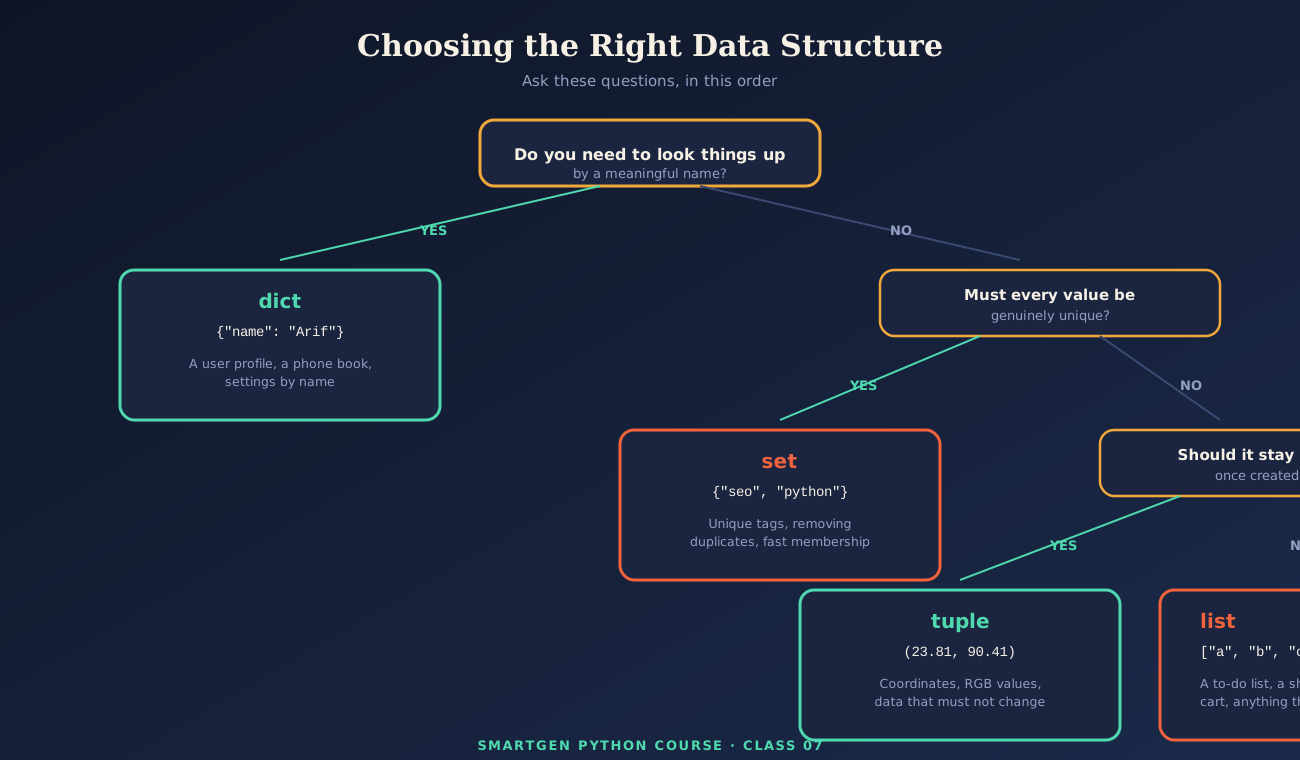
A list is an ordered, changeable collection — items keep their position, and you can add, remove, or edit them freely. A tuple is ordered but unchangeable once created. A set holds only unique values with no guaranteed order. A dictionary stores key-value pairs, letting you look up a value by a meaningful name instead of a numeric position.
fruits = ["apple", "banana", "cherry"]          # list
coordinates = (23.8103, 90.4125)                 # tuple
skills = {"Python", "SEO", "WordPress"}          # set
profile = {"name": "Arif", "role": "Freelancer"} # dict
Common Mistake to Avoid
Defaulting to a list for everything simply because it's the most familiar. If duplicates genuinely shouldn't exist, a set is the right tool; if the data must never change after creation, a tuple communicates that intent directly in your code.
Operations and Use Cases
The Problem
Knowing the four names isn't the same as knowing what to actually call on each one when you need to add data, look something up, or combine two collections together.
The Solution: Real Operations You'll Actually Use
List Operations
fruits = ["apple", "banana", "cherry"]
fruits.append("orange")     # add to the end
fruits.remove("banana")     # remove a specific value
fruits.sort()                # sort in place

print(fruits)        # ['apple', 'cherry', 'orange']
print(fruits[1])     # cherry
Tuple Operations
coordinates = (23.8103, 90.4125)
latitude, longitude = coordinates    # unpacking into separate variables

print(latitude)   # 23.8103
# coordinates[0] = 24.0   # This raises a TypeError - tuples cannot be changed
Set Operations
skills_a = {"Python", "SEO", "WordPress"}
skills_b = {"Python", "JavaScript"}

print(skills_a.union(skills_b))          # every unique skill from both
print(skills_a.intersection(skills_b))   # shared only: {'Python'}
print(skills_a.difference(skills_b))     # in skills_a but not skills_b
Dictionary Operations
profile = {"name": "Arif", "role": "Freelancer", "level": 2}

print(profile["name"])                          # Arif
print(profile.get("email", "Not provided"))      # safely handles a missing key

profile["level"] = 3                             # update an existing value
profile["skills"] = ["Python", "SEO"]            # add a brand-new key

for key, value in profile.items():
    print(f"{key}: {value}")
Common Mistake to Avoid
Using square-bracket access (profile["email"]) on a dictionary key that might not exist — this raises a KeyError and stops your program. Use .get(), as shown above, whenever a key might genuinely be missing.
Quick-Reference Glossary
| Term | Plain-Language Meaning |
|---|---|
| List | Ordered, changeable collection, duplicates allowed |
| Tuple | Ordered, unchangeable collection |
| Set | Unordered collection with no duplicates |
| Dictionary | Key-value pairs, looked up by name |
.get() |
Safely retrieves a dict value without crashing on a missing key |
| Unpacking | Assigning a tuple's items directly into separate variables |
Class Summary
In this class, we covered what genuinely distinguishes lists, tuples, sets, and dictionaries from each other, the real operations for each — appending and sorting lists, unpacking tuples, combining sets, and safely reading dictionaries — and a practical decision path for choosing the right one for a given job.
Practice exercise: Build a dictionary representing your own profile with at least four keys, add one new key after creation, then build a set of your top three skills and a coworker's top three skills, and print what you both share in common using .intersection().
Frequently Asked Questions
Can a list contain a mix of different data types?
Yes — a single Python list can freely mix strings, numbers, and even other lists or dictionaries in the same collection.
Why did my program crash with a KeyError?
You accessed a dictionary key that doesn't exist using square brackets. Use .get(), covered in Section 2, to handle this safely instead.
Is a set ever ordered in Python?
No — sets make no guarantee about order at all. If you need both uniqueness and a guaranteed order, you'd typically convert to a set to deduplicate, then back to a sorted list.
When would I actually choose a tuple over a list?
Whenever the data genuinely shouldn't change after creation — geographic coordinates or an RGB color value are classic examples, both shown in Section 2's decision guide.
What Next : Python I/O, Break, Continue, and Pass Guide
— Written by Sayad Md Bayezid Hosan for the SmartGen blog
 ✓
✓
Sayad Md Bayezid Hosan
Founder & Tech Entrepreneur | Full-Stack Developer
Full-stack Web Developer, Digital Marketing Strategist, and Tech Entrepreneur with 5+ years of experience delivering innovative digital solutions. Specializing in web development, AI integration, strategic digital marketing, and tech entrepreneurship. As a leading Tech Provider, I help audiences navigate digital platforms safely through permission-based technical solutions and digital business asset management.
Credentials & Expertise:
- Founder of CWB Agency & GenZFrontier
- Final-year English Student at Northern University Bangladesh
- Specialized in AI-powered web development & content strategy
- Published author on tech, digital marketing & entrepreneurship
This article was written by Sayad Md Bayezid Hosan for the SmartGen blog. For free tools to support your development journey, visit smartgentools.com.