
Write SEO-Friendly Content Without Being an SEO Expert
Writing content that performs well in search does not require you to become a full-time SEO technician. You do not need to memorize every ranking-system update, build a complex automation stack, or force the same keyword into every paragraph. What you need is a repeatable editorial process that helps a real reader solve a real problem clearly, completely, and efficiently.
This guide shows you how to create that process. It starts before you write a headline and continues after publication, when you study what readers actually do on the page. The goal is not to write for an algorithm instead of people. The goal is to make genuinely useful content easier for people and search engines to discover, understand, and trust.
What SEO-friendly content really means
SEO-friendly content is content that satisfies a searcher’s purpose while making its subject, scope, and value clear. It has a useful answer, a logical structure, a descriptive title, readable language, helpful links, accessible media, and enough technical clarity for search engines to crawl and interpret the page. It is not content that merely repeats a keyword.
Google’s SEO Starter Guide explains that there are no secret tricks that automatically rank a page first. It emphasizes improvements that help search engines crawl, understand, and serve useful pages. Google’s Search Essentials similarly describes people-first content, clear language, crawlable links, and technically accessible pages as foundations rather than shortcuts.
A helpful way to think about SEO is to separate the work into three questions:
| Question | What you are solving | Evidence of a good answer |
|---|---|---|
| What does the searcher need? | Search intent and the underlying problem | The article answers the main question early and completely |
| How can the reader use the answer? | Clarity, examples, process, and next actions | The content is easy to scan, apply, and remember |
| How can the page be discovered and understood? | Titles, headings, links, images, metadata, and technical access | Search engines can interpret the page and users can find the next useful resource |
When these three questions are answered together, optimization becomes an editing discipline rather than a mysterious technical exercise.
Step 1: Choose a specific reader and a specific problem
Start with the reader, not the keyword. “SEO content” is a broad topic, but “a small-business owner writing their first service page” describes a person with a concrete situation. Specific readers make better editorial decisions because you can predict what they already know, what may confuse them, and what action they need to take next.
Write a one-sentence problem statement before creating an outline. For example: “A new website owner wants to write useful articles that can appear in search results but does not know how to choose topics, organize a page, or measure improvement.” This sentence becomes a filter for the rest of the article. If a paragraph does not help solve that problem, move it to another article or remove it.
This step also prevents a common failure: creating a page that mentions SEO, content, keywords, tools, and analytics without giving the reader a clear outcome. A focused page can still be comprehensive, but every section should contribute to the reader’s intended result.
Step 2: Identify the search intent behind the topic
Search intent is the reason someone enters a query. The same subject can produce very different pages depending on what the searcher wants. Someone searching for “what is keyword research” may need a definition. Someone searching for “best keyword research workflow for a small website” may need a comparison and a process. Someone searching for “keyword density checker” may be ready to use a tool.
Before writing, inspect the language and format of pages that already address the topic. You are not copying their content or assuming that current results are perfect. You are looking for clues about the task searchers expect to complete. Are they looking for an explanation, a tutorial, a checklist, a template, a product comparison, or a troubleshooting answer? Your page should meet the dominant need while adding a clear reason to choose it over a shallow alternative.
A simple intent brief can contain the following fields:
| Intent field | Example for this guide |
|---|---|
| Main question | How can I write content that is friendly to search engines without being an SEO expert? |
| Reader stage | Beginner who can write but lacks a reliable SEO workflow |
| Desired outcome | A publishable article with a clear structure, useful links, and basic optimization |
| Likely concerns | Keyword stuffing, technical complexity, and uncertainty about measurement |
| Best format | Step-by-step tutorial with examples, templates, and a post-publication review process |
The brief gives you a standard against which you can judge the draft. If the final article turns into an advanced discussion of crawling directives, it may be accurate but still fail the intended reader.
For a deeper foundation, use SmartGen’s guide to search engine optimization and its core concepts. It provides broader context, while this article focuses on the writing workflow.
Step 3: Build a small, realistic keyword set
Keywords are words and phrases that describe the subject people search for. They are useful because they reveal language, questions, and distinctions. They are not a script that tells you how many times to repeat a phrase.
Choose one primary phrase that represents the page’s main purpose. Then collect a small group of supporting phrases that represent subtopics, questions, synonyms, and adjacent tasks. For this article, the primary phrase might be “write SEO-friendly content,” while supporting ideas include “search intent,” “content outline,” “internal linking,” “SEO title,” “image alt text,” and “measure content performance.”
A practical keyword set should pass three tests. First, the phrases must describe the same page rather than several unrelated pages. Second, they must be natural enough to use in a sentence. Third, they must help you discover what the reader expects, not merely increase the apparent size of a keyword list.
Do not make keyword density your target. Repetition can make a page awkward and may encourage you to remove useful explanations just to preserve a number. If you want to inspect whether important terms are present and whether a draft has an obvious repetition problem, you can use the SmartGen Keyword Density Checker, but treat its output as an editing clue rather than a ranking formula. Google explicitly warns against keyword stuffing in its SEO guidance.
Step 4: Design the answer before writing the paragraphs
An outline is where SEO and good writing meet. It helps you cover the important subtopics in a sequence that mirrors the reader’s decision process. Begin with the answer’s promised outcome, then arrange the supporting sections from foundational to practical.
A strong outline for a how-to article usually includes a short introduction, a definition of the problem, a sequence of actions, examples, common mistakes, a measurement section, and a concise conclusion. The outline should not become a collection of disconnected headings. Each section should create a reason to read the next one.
Use headings that communicate the question or task being answered. “Optimize content” is vague. “Write a descriptive title that matches the page’s promise” tells the reader what to do. Headings should be understandable when viewed alone in a table of contents or screen-reader navigation.
A useful test is to remove the paragraphs and read only the headings. Can someone understand the complete route from problem to outcome? If not, the structure needs work before the prose becomes expensive to revise.
Step 5: Write an opening that confirms relevance quickly
The opening paragraph should reassure the reader that they are in the right place. State the problem, explain the practical outcome, and set a realistic expectation. Avoid beginning with a long history of search engines or a dramatic promise that no article can guarantee.
For example, an effective opening for this guide tells the reader that SEO-friendly writing is a repeatable process, not an advanced technical specialty. It then previews the process: understand intent, create a useful outline, write clearly, optimize the page, add contextual links, and improve it using evidence.
This approach helps users decide whether to continue without hiding the answer behind a long introduction. It also gives search engines and other systems clearer context about the page’s purpose.
Step 6: Explain the subject completely, but do not add filler
Depth is not the same as length. A long article can still be thin if it repeats general advice without examples, decisions, or evidence. Useful depth comes from answering the follow-up questions a reader will have after each major point.
If you tell readers to “understand search intent,” explain how they can recognize informational, commercial, navigational, and transactional needs. If you recommend “using internal links,” show how to choose a relevant destination and write natural anchor text. If you mention “improving content,” describe what evidence would justify a revision.
Specificity creates value. A good paragraph might explain why a beginner should use one primary topic and a few supporting concepts instead of creating a long list of loosely related keywords. Another paragraph might show how the same topic can require a definition page, a tutorial, or a tool page depending on the searcher’s goal.
Use examples that clarify the method without pretending that one example is a universal rule. Readers should finish a section knowing how to make a similar decision for their own subject.
Step 7: Place the primary topic naturally
Use the main topic where it improves clarity: in the page title, the opening, a relevant heading, the URL slug, the meta description, and one or more natural body passages. These locations help readers understand the page, but they do not replace useful content.
Use related language when it makes the explanation more precise. A page about SEO-friendly content may naturally discuss search intent, headings, title links, descriptions, crawlable links, images, structured data, and measurement. These concepts are not decorations; they are part of the reader’s task.
Read the draft aloud or use a text-to-speech tool. If the phrase sounds forced, rewrite the sentence. A clear sentence with a natural variation is usually better than an awkward sentence that preserves an exact phrase.
Step 8: Create a title and description that make an honest promise
The title should describe the page accurately and distinguish it from generic alternatives. It should make the main benefit visible without using exaggerated claims. “How to Write SEO-Friendly Content Without Being an SEO Expert” is useful because it identifies the task and the audience. Adding “A Step-by-Step Guide” makes the format clear.
The meta description is a concise invitation to visit the page. It should summarize what the reader will learn and avoid promising a ranking outcome. Search engines may generate a different snippet when another passage better matches the query, so write a good description for users but do not treat it as a guarantee that every search will display it exactly.
If you need to improve how a title may appear in search results, review the SmartGen SERP Snippet Preview guide. The tool can help you evaluate clarity and truncation, while the final decision should remain editorial.
Step 9: Make the page easy to scan and use
Readers often inspect a page before committing to it. Short paragraphs, descriptive headings, examples, tables, and purposeful emphasis help them locate the part they need. Good formatting is not a substitute for substance, but it makes substance easier to use.
Keep one main idea in each paragraph. Follow a general explanation with an example or a decision rule. Use a table when the reader needs to compare options or remember a sequence. Use a list when the items are genuinely parallel; do not turn every paragraph into a list simply because lists look concise.
Mobile readers need particular care. Avoid oversized blocks of text, very wide tables, and images that communicate important information without an accessible text alternative. Preview the page at a narrow width before publishing.
Step 10: Add contextual internal links that move the reader forward
An internal link is most useful when it answers a related question at the moment the reader is likely to have it. Do not add links merely to increase a count. Link from a meaningful phrase, make the destination’s subject clear, and check that the destination adds value rather than repeating the same introduction.
This guide links to broader SEO fundamentals when a reader needs background, to keyword and snippet resources when the reader needs a practical tool, and to technical pages when the reader is ready for implementation. That creates a topic pathway rather than a random list of URLs.
Use descriptive anchor text. “Read more” tells the reader almost nothing, while “technical SEO optimization guide” communicates the destination. Keep the sentence natural and avoid repeating the exact same anchor phrase every time you link to a page.
A strong internal-linking review asks four questions:
| Review question | What to check |
|---|---|
| Is the destination relevant? | It solves a related problem or explains a term used in the current paragraph |
| Is the anchor descriptive? | The linked words indicate what the reader will find |
| Is the link useful now? | It appears where the reader may reasonably need more detail |
| Does the destination work? | The URL resolves, loads on mobile, and is not a duplicate or redirect chain |
For site-wide architecture, compare this process with SmartGen’s on-page SEO optimization guide and technical SEO optimization guide.
Step 11: Use images as explanations, not decoration
An image should clarify a process, demonstrate a result, or help the reader remember a relationship. Place it close to the paragraph that explains it. Give it descriptive alternative text that communicates its purpose rather than stuffing it with keywords.
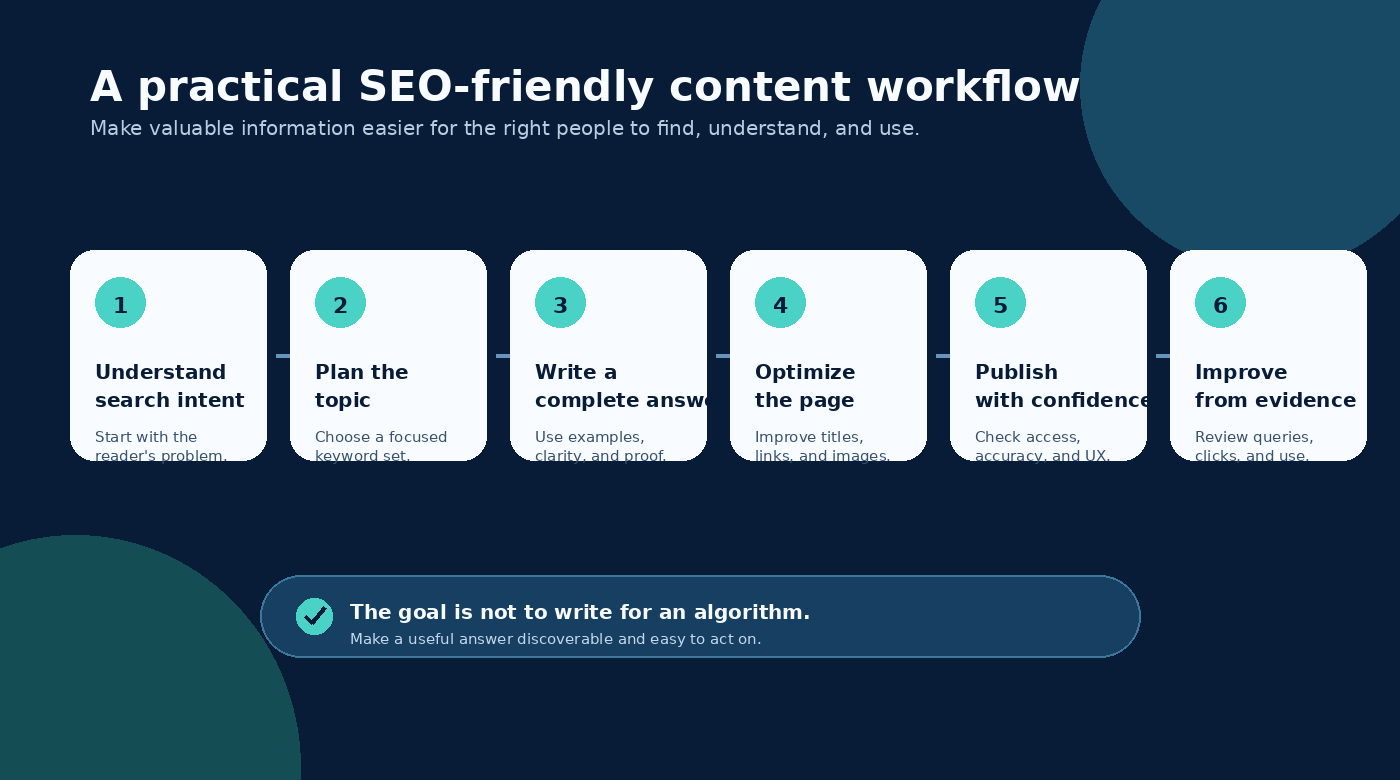
The workflow diagram in this article shows the movement from search intent to planning, writing, optimization, publication, and improvement. It is useful because it represents the process described in the text. If the image failed to load, the surrounding paragraphs and alternative text would still communicate the idea.
Use a stable, direct image URL, confirm that the file is served with an image content type, and keep the visual readable on a small screen. Decorative images can use an empty alternative attribute when implemented in HTML, while explanatory images need a concise description.
Google’s SEO guidance recommends placing sharp images near relevant text and writing descriptive alt text. This is an accessibility practice as well as a discoverability practice. It helps people who use screen readers and gives search systems additional context about the visual.
Step 12: Add basic technical signals without becoming a developer
You do not need to write a crawler to publish a good article, but you should understand the basic checks that protect the reader’s experience. Confirm that the page has a unique title, a readable URL, a useful description, a canonical URL where your platform supports one, and a mobile-friendly layout.
Make sure the page can be reached through normal internal links. A page that exists in a folder but has no navigational path can be difficult for users and crawlers to discover. Confirm that important text is present in the rendered page and not hidden behind an interaction that a search engine or keyboard user cannot use.
Structured data can help a page become eligible for certain search features when it accurately describes the page. It does not guarantee a rich result and should never be used to claim information that is not visible or true. If you want to understand this layer, explore the SmartGen Schema Markup Generator guide.
For broader technical checks, the SmartGen SEO Audit Tool can help you find common issues. Treat an audit as a diagnostic report. Prioritize problems that affect access, clarity, relevance, or user experience rather than trying to achieve a perfect score at any cost.
Step 13: Edit for trust, clarity, and original value
Before publishing, revise the article as an editor rather than as a keyword operator. Remove claims you cannot support. Explain unfamiliar terms. Replace vague advice with a method or example. Add a source when a recommendation depends on documented guidance, research, or a changing platform rule.
Show experience where appropriate. A useful article can explain what to do, why it matters, what can go wrong, and how to recognize a good result. If you have tested a workflow, describe the conditions and limitations instead of presenting a personal observation as a universal law.
Check whether the article leaves the reader with a better understanding than the pages they may have already read. If it only restates common definitions, add a template, a decision framework, a worked example, or a troubleshooting section. Original value can come from clarity and application, not only from discovering a new fact.
Step 14: Publish, inspect, and improve using evidence
Publishing is the beginning of the measurement cycle. Record the article’s publication date, primary topic, intended reader, and target outcome. Then give search systems and readers enough time to produce meaningful signals before changing the page repeatedly.
Look at impressions, clicks, click-through rate, queries, engagement, and conversions in the tools available to you. Interpret each metric in context. High impressions with low clicks may indicate a mismatch between the title and the searcher’s expectation. Clicks with weak engagement may indicate that the opening does not deliver the promised answer. Strong engagement with low impressions may suggest that the page deserves better internal links or broader topic coverage.
Search Console can help you inspect queries and indexing status, while analytics can help you understand what visitors do after arriving. Do not rewrite a page simply because it has not ranked immediately. First check whether it is indexed, whether the intended query matches the page, whether the page is technically accessible, and whether the content provides a strong answer.
Create a simple improvement log. For each revision, record the date, the evidence, the change, and the expected effect. This prevents random edits and helps you learn which improvements actually help your audience.
A practical pre-publication review
Use this review as a final reading exercise rather than as a mechanical scorecard. A page is ready when it gives a specific reader a complete, honest, and usable answer.
| Area | Question to ask before publishing |
|---|---|
| Audience | Is the intended reader and problem clear? |
| Intent | Does the page satisfy the main reason someone would search for this topic? |
| Substance | Does it explain the important decisions, not just name them? |
| Structure | Can a reader understand the route by scanning the headings? |
| Language | Are the main topic and related concepts used naturally? |
| Title and description | Do they make an accurate, compelling promise? |
| Links | Do internal links provide useful next steps and descriptive anchor text? |
| Images | Does every meaningful image have a purpose and useful alt text? |
| Accessibility | Can the page be read and navigated on a small screen and with assistive technology? |
| Technical access | Does the page load, resolve correctly, and remain discoverable through internal navigation? |
| Trust | Are claims accurate, limitations visible, and sources appropriate? |
| Improvement | Do you know which evidence you will review after publication? |
Common mistakes that make content less SEO-friendly
The first mistake is writing for a keyword instead of a reader. This produces repetitive sentences and often answers a narrower question than the headline suggests. The correction is to define the reader’s problem and use the keyword as a description of that problem, not as a quota.
The second mistake is making the introduction long while delaying the practical answer. Readers should not have to pass through a history lesson before discovering whether the page can help. Put the purpose and outcome near the beginning, then provide context where it helps the decision.
The third mistake is adding internal links without a content relationship. A page filled with unrelated links can feel promotional and can distract from the main task. Link when the destination helps the reader continue, verify, compare, or implement.
The fourth mistake is treating an SEO audit score as the objective. Technical tools are valuable when they reveal a real problem, but a perfect score cannot replace an accurate answer, useful examples, or a page that readers trust. Fix the issues that affect access and usefulness first.
The fifth mistake is publishing once and never learning from the result. Search visibility develops over time, and user behavior can reveal questions that were missing from the first version. A thoughtful update can improve a page more than producing another article on the same subject.
Final perspective: make the answer worth finding
You do not need to become an SEO expert to write content that search engines can understand and readers want to use. You need to become disciplined about the reader’s problem, the language used to describe it, the structure of the answer, and the evidence you use to improve it.
Start with intent. Build a focused outline. Write a complete answer in natural language. Make the title and headings descriptive. Add internal links that create a useful path. Use images that explain something and alt text that preserves their meaning. Check basic technical access, publish honestly, and improve the page from evidence rather than guesswork.
That process is simple enough for a beginner and strong enough to support a serious content program. Search optimization then becomes what it should have been all along: making valuable information easier for the right people to find.
Frequently asked questions
Can I write SEO-friendly content without using expensive tools?
Yes. Tools can help you discover questions, inspect technical issues, and measure outcomes, but the foundation is editorial judgment. You can begin with the reader’s problem, a clear outline, careful research, descriptive headings, useful internal links, and a review of the published page. Use tools to reduce uncertainty, not to replace understanding.
How many keywords should I include in one article?
There is no universal keyword count that makes an article rank. Choose one primary topic and use supporting terms only when they make the explanation more complete or precise. If a phrase makes a sentence unnatural, rewrite the sentence rather than forcing the phrase into it.
How long should an SEO-friendly article be?
It should be as long as necessary to satisfy the reader’s intent without repeating itself. A short answer can be the best page for a simple question, while a complex tutorial may need examples, decisions, and troubleshooting. Coverage and usefulness matter more than an arbitrary word count.
Should I update an old article or write a new one?
Update an existing article when it already targets the same intent and can be improved without confusing its purpose. Create a new page when the intent, audience, or promised outcome is meaningfully different. Avoid maintaining several pages that answer the same question with nearly identical content.
Do internal links guarantee higher rankings?
No. Internal links help users navigate and help search engines discover and understand related pages, but they are not a ranking guarantee. Their value comes from creating a coherent site structure and giving readers relevant next steps.
What should I measure after publishing?
Start with indexing status, impressions, clicks, click-through rate, queries, engagement, and the action that matters to your website. The right interpretation depends on the page’s purpose. A tutorial may aim for engaged reading and tool usage, while a commercial page may aim for qualified enquiries.
References
- Google Search Central: SEO Starter Guide
- Google Search Central: Creating Helpful, Reliable, People-First Content
- Google Search Central: Search Essentials
- Google Search Central: SEO Link Best Practices
- Google Search Central: Influencing Title Links
This article was written for the SmartGen blog to help creators and small website owners build a practical, people-first content workflow.
