
✅ Fact-Checked by Sayad Md Bayezid Hosan — SEO Specialist & Founder of SmartGen Tools | Last Updated: June 27, 2026
📖 Table of Contents
- What Is a Google SERP Snippet?
- Why Your SERP Snippet Is Your #1 CTR Lever
- Introducing the SmartGen SERP Snippet Preview Tool
- How to Use the Tool — Step-by-Step
- Writing the Perfect Meta Title: Rules & Formulas
- Writing the Perfect Meta Description: Rules & Formulas
- URL Slug Optimization for SERP Display
- SERP Snippet Best Practices by Page Type
- Common SERP Snippet Mistakes (and How to Fix Them)
- Advanced CTR Optimization Strategies
- How SmartGen's Tool Compares
- FAQ
- Final Checklist
🔍 What Is a Google SERP Snippet? {#what-is-serp-snippet}
Definition: A Google SERP Snippet is the block of text that appears for your webpage in Google's Search Engine Results Pages (SERPs). It consists of three visible elements — your page title, your URL, and your meta description — and it is the very first impression a searcher has of your content before they decide to click.
The acronym SERP stands for Search Engine Results Page — the page Google displays after a user submits a search query.
Here is what a standard Google SERP snippet looks like:
┌─────────────────────────────────────────────────────────────┐
│ 🌐 smartgentools.com › serp-preview-tool                    │
│                                                             │
│ Google SERP Snippet Preview Tool — SmartGen                 │
│                                                             │
│ Preview exactly how your page appears in Google search      │
│ results. Optimize your meta title and description for       │
│ maximum click-through rate. Free, instant, no login.        │
└─────────────────────────────────────────────────────────────┘
Every snippet has three components:
| Component | What It Is | Character Limit |
|---|---|---|
| Page Title | The bold blue (or purple) clickable headline | 50–60 characters (≈600px wide) |
| URL / Breadcrumb | The green path showing your site structure | Varies — keep it short and readable |
| Meta Description | The grey paragraph summarizing your page | 150–160 characters (≈920px wide) |
Key insight: Google does not always show your exact meta title or description. It may rewrite them if it determines your snippet does not match search intent. Writing better snippets reduces the chance Google rewrites yours.
📊 Why Your SERP Snippet Is Your #1 CTR Lever {#why-serp-matters}
Most SEOs obsess over rankings. But your Click-Through Rate (CTR) — the percentage of people who see your result and click it — is equally powerful and far more controllable.
Consider this: If you rank in Position 3 with a compelling snippet, you can outperform the Position 1 result that has a dull, generic title. Real-world CTR data consistently shows this.
Average Organic CTR by Position (2026 Data)
| SERP Position | Average CTR |
|---|---|
| Position 1 | 27.6% |
| Position 2 | 15.8% |
| Position 3 | 11.0% |
| Position 4 | 8.4% |
| Position 5 | 6.3% |
| Position 6–10 | 2–5% |
Source: Industry CTR studies aggregated across 100M+ search impressions, 2025–2026.
A well-optimized SERP snippet can increase your CTR by 20–40% without changing your ranking at all. For a page getting 1,000 impressions per day at Position 3:
- Before optimization: 11% CTR = 110 clicks/day
- After optimization: 16% CTR = 160 clicks/day
- Net gain: +50 clicks/day — from words alone.
That is the power of snippet optimization, and it is exactly what the SmartGen SERP Snippet Preview Tool is built to help you achieve.
🛠️ Introducing the SmartGen SERP Snippet Preview Tool {#introducing-tool}
Tool URL: Google SERP snippet preview tool
Definition: The SmartGen Google SERP Snippet Preview Tool is a free, browser-based utility that renders a real-time visual simulation of how your webpage will appear in Google search results — allowing you to optimize your meta title, URL, and meta description before publishing.
What Makes This Tool Different
Most website owners write their meta tags blind — they type something into their CMS, publish the page, and hope it looks good in Google. The problem is:
- You cannot see if your title is too long until Google truncates it with "..."
- You cannot see if your description fits without counting characters manually
- You have no visual feedback on how your snippet competes against others on the same results page
The SmartGen SERP Preview Tool solves all three problems instantly.
Core Features at a Glance
🔒 100% Private & Client-Side
Your title, URL, and description are processed entirely in your browser. Nothing is sent to any server. This matters when you are previewing unreleased content, confidential pages, or client websites.
⚡ Real-Time Live Preview
As you type each character, the SERP preview updates instantly. You see truncation happen live — no need to count characters manually.
🆓 Always Free, No Account Required
No sign-up, no subscription, no credit card. Open the tool, use it, close it. Unlimited uses, forever.
📱 Fully Mobile-Responsive
Works identically on desktop, tablet, and smartphone. Optimize your snippets from anywhere.
📏 Character Counter with Visual Warnings
The tool tracks your character count in real time and highlights when you are approaching or exceeding the recommended limits.
🎯 Accurate Google-Style Rendering
The preview mimics Google's actual SERP font, colors, spacing, and truncation behavior — not a rough approximation.
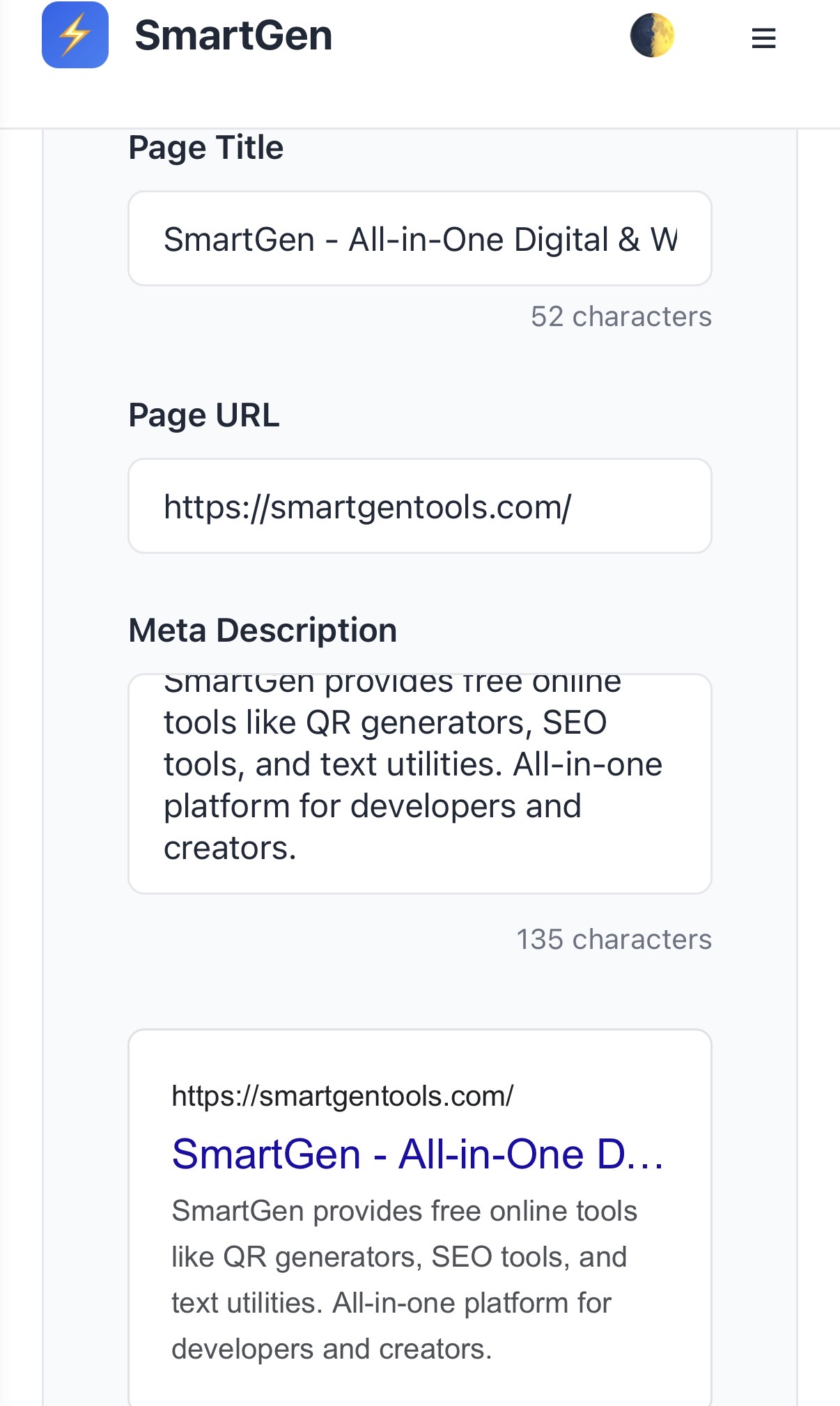
🚀 How to Use the SmartGen SERP Preview Tool — Step by Step {#how-to-use}
Follow these steps to go from blank fields to a fully optimized SERP snippet in under 5 minutes.
Step 1 — Open the Tool
Navigate to the Google snippet preview tool.
No login, no pop-ups. The tool loads instantly and is ready to use.
Step 2 — Enter Your Page Title
In the "Page Title" field, type or paste your proposed meta title.
Watch for:
- The character counter below the field updating in real time
- The preview panel showing your title as the bold blue headline
- Truncation (indicated by "...") if you exceed approximately 60 characters
Goal: Keep your title between 50–60 characters to ensure it displays in full on both desktop and mobile Google searches.
Step 3 — Enter Your Page URL
In the "Page URL" field, enter the full URL of your page.
Example: https://smartgentools.com/serp-preview-tool/
Google will display this as a breadcrumb path (e.g., smartgentools.com › serp-preview-tool). The tool renders this accurately so you can see how your URL structure reads to a searcher.
Watch for:
- Long, messy URLs with numbers or random strings — these reduce trust
- URLs with keywords that reinforce your title (positive signal)
- Overly deep paths that make your site look complex
Step 4 — Enter Your Meta Description
In the "Meta Description" field, type your proposed description.
Watch for:
- The character counter approaching the 160-character limit
- Live truncation in the preview if you exceed the limit
- The description rendering with natural line breaks in the preview
Goal: Write a description of 140–160 characters that summarizes the page value and includes a clear reason to click.
Step 5 — Refine Until the Preview Looks Perfect
This is the real value of the tool. Iterate until:
- ✅ The title displays in full with no truncation
- ✅ The URL is short, clean, and readable
- ✅ The description fills the two-line preview space without being cut off
- ✅ The overall snippet looks compelling compared to what competitors might show
Step 6 — Copy Your Finalized Tags
Once satisfied, copy your optimized title and description and paste them directly into your CMS:
- WordPress: Use Rank Math SEO or Yoast SEO → Edit Snippet
- Webflow: Page Settings → SEO Tab
- Shopify: Online Store → Pages → Edit SEO
- Custom HTML:
<title>tag and<meta name="description">tag in your<head>
✍️ Writing the Perfect Meta Title: Rules, Formulas & Examples {#meta-title}
Definition: A meta title (also called a title tag) is an HTML element that specifies the title of a webpage. It appears as the clickable blue headline in Google search results and is one of the most important on-page SEO elements.
The Non-Negotiable Rules
- Length: 50–60 characters. Under 50 wastes valuable real estate. Over 60 gets truncated.
- Primary Keyword: Include your target keyword as close to the beginning as possible.
- Brand Name: Include your brand name at the end, separated by a pipe
|or dash—. - Unique: Every page on your site must have a distinct, unique title.
- No Keyword Stuffing: Writing "Free SEO Tool | Best SEO Tool | SEO Tool Free" is a spam signal.
- No ALL CAPS: Google may rewrite all-caps titles entirely.
The 5 Most Effective Meta Title Formulas
Formula 1 — The How-To Formula
How to [Achieve Desired Outcome] in [Year] | [Brand]
Example:How to Write Perfect Meta Titles for SEO in 2026 | SmartGen
(60 characters — fits perfectly)
Formula 2 — The Number + Benefit Formula
[Number] [Things] to [Achieve Outcome] | [Brand]
Example:7 SERP Snippet Mistakes Killing Your CTR | SmartGen Tools
(57 characters)
Formula 3 — The Question Formula
[Question Your Audience Is Asking]? [Answer Hook] | [Brand]
Example:Why Is Google Rewriting My Meta Title? Fix It | SmartGen
(56 characters)
Formula 4 — The Tool/Resource Formula
Free [Tool Name]: [What It Does] | [Brand]
Example:Free SERP Preview Tool: See Your Google Snippet | SmartGen
(58 characters)
Formula 5 — The Comparison Formula
[Option A] vs [Option B]: Which [Wins/Is Better]? | [Brand]
Example:Yoast vs Rank Math: Which SEO Plugin Wins in 2026? | SmartGen
(61 characters — trim "in 2026" if needed)
Power Words That Increase CTR in Titles
Incorporate these proven high-CTR words where natural:
| Category | Power Words |
|---|---|
| Urgency | Now, Today, Instantly, Fast, Quick |
| Exclusivity | Free, Proven, Official, Exclusive |
| Completeness | Complete, Ultimate, Full, Definitive, Mega |
| Trust | Expert, Tested, Verified, Step-by-Step |
| Year | 2026 (shows freshness and relevance) |
✍️ Writing the Perfect Meta Description: Rules, Formulas & Examples {#meta-description}
Definition: A meta description is an HTML attribute that provides a brief summary of a webpage's content. It appears below the title in Google search results and, while not a direct ranking factor, strongly influences whether a user clicks your result.
The Non-Negotiable Rules
- Length: 140–160 characters. Under 120 looks sparse. Over 160 gets truncated.
- Include Your Primary Keyword: Google bolds keywords in descriptions that match the search query — this draws the eye.
- Include a Call to Action (CTA): End with a reason to click: "Learn more," "Try it free," "Get started today."
- Match Search Intent: If the user is searching for a how-to, your description should promise a how-to — not a product pitch.
- Unique Per Page: Duplicate descriptions across pages confuse Google and reduce your credibility.
- Write for Humans First: A description stuffed with keywords but lacking a clear message will have a low CTR regardless of rankings.
The 4 Most Effective Meta Description Formulas
Formula 1 — The Problem → Solution Formula
[State the Problem Your Page Solves]. [Describe Your Solution].
[CTA with Unique Benefit].
Example:Tired of guessing how your page looks in Google? Our free SERP Preview Tool shows your exact snippet in real time. Try it now — no login needed.
(148 characters ✅)
Formula 2 — The What + Who + Why Formula
[What the page is]. [Who it's for]. [Why they should click now].
Example:A step-by-step guide to writing meta titles and descriptions that rank and get clicked. Perfect for bloggers, SEOs, and site owners in 2026.
(141 characters ✅)
Formula 3 — The Number + Benefit Formula
Discover [Number] [Things] that [Achieve Outcome]. [Teaser]. [CTA].
Example:Discover 7 proven SERP snippet formulas that boost CTR by up to 40%. Includes real examples and a free preview tool. Start optimizing today.
(141 characters ✅)
Formula 4 — The Direct Answer + Depth Promise Formula
[Direct answer to the query]. [Promise of depth]. [CTA].
Example:SERP snippets are your #1 CTR lever — even more powerful than rankings. This complete guide covers titles, descriptions, and URL structure. Read now.
(152 characters ✅)
What NOT to Write in Your Meta Description
❌ Too short and vague:"Learn about SEO here." (21 characters — wastes space, provides no value)
❌ Keyword-stuffed:"SEO meta description meta title SERP snippet SEO tool free SEO 2026 meta tags." (Looks spammy, Google may ignore it entirely)
❌ Duplicate of title:"Google SERP Snippet Preview Tool | SmartGen Tools" (Repeating the title in the description wastes the description's unique opportunity)
❌ No CTA:"This article explains what SERP snippets are and how they work in Google." (Factually fine, but gives no reason to click over a competing result)
🔗 URL Slug Optimization for SERP Display {#url-optimization}
The URL displayed in your SERP snippet affects both trust and click-through rate. A clean, readable URL signals to the searcher that your page is exactly what they are looking for.
URL Best Practices
✅ Good URL (what Google shows):
smartgentools.com › serp-preview-tool
❌ Bad URL (what Google shows):
smartgentools.com › p=4821&cat=7&ref=blog_2026_03
Rules for SEO-Friendly URLs
- Use hyphens, not underscores:
serp-preview-tool✅ vsserp_preview_tool❌ - Include your target keyword:
/google-serp-snippet-preview-tool/tells Google and users what the page is - Keep it short: Aim for 3–5 words in the slug
- Use lowercase only: Uppercase letters in URLs can cause duplicate content issues
- Remove stop words:
/how-to-use-the-serp-preview-tool/→/serp-preview-tool-guide/ - Avoid dates in URLs:
/2026/06/serp-tool/will look dated in 2028;/serp-preview-tool-guide/stays evergreen
How SmartGen's Tool Renders Your URL
When you enter your URL in the SmartGen SERP Preview Tool, it automatically:
- Strips the
https://prefix (as Google does) - Shows the domain and path in breadcrumb format
- Displays it in the correct Google green/grey color
This lets you see immediately whether your URL structure looks clean and trustworthy in context.
📄 SERP Snippet Best Practices by Page Type {#by-page-type}
Different pages on your website serve different purposes — and your SERP snippets should reflect that. Here is how to tailor your snippets by page type.
Blog Posts & Articles
Goal: Demonstrate expertise and promise specific value.
Title formula: [Keyword]: [Specific Benefit or Number] | SmartGen
Description formula: Problem → Solution → CTA
Example:
- Title:
SERP Snippet Optimization: 7 Formulas for Higher CTR | SmartGen - Description:
Most SEOs focus on rankings but ignore snippet quality. These 7 proven title and description formulas can increase your organic CTR by up to 40%. Try them now.
Tool & Utility Pages (like SmartGen's tools)
Goal: Communicate instant utility and zero friction.
Title formula: Free [Tool Name]: [What It Does in 3 Words] | SmartGen
Description formula: What the tool does + Key benefit + No-friction CTA
Example:
- Title:
Free SERP Preview Tool: Preview Your Google Snippet | SmartGen - Description:
See exactly how your page title, URL, and meta description appear in Google results. Optimize for higher CTR in real time. Free, instant, no sign-up needed.
Homepage
Goal: Communicate brand identity and value proposition.
Title formula: [Brand Name] — [What You Do in 5 Words]
Description formula: Who you help + How + Key differentiator
Example:
- Title:
SmartGen Tools — Free SEO & Digital Utilities for Creators - Description:
SmartGen offers 40+ free online tools for SEO, marketing, and development. No sign-up, no cost. SERP previews, QR generators, keyword tools, and more.
Category / Archive Pages
Goal: Set expectations for a collection of content.
Title formula: [Category Name] Guides & Tutorials | [Brand]
Description: Overview of what the category covers + most popular topics
Product / Service Pages
Goal: Drive conversion-intent clicks.
Title formula: [Product Name] — [Core Benefit] | [Brand]
Description formula: Feature + Benefit + Social proof + CTA
⚠️ Common SERP Snippet Mistakes (and How to Fix Them) {#mistakes}
Mistake 1 — Title Is Too Long (Gets Truncated)
Problem: Your title exceeds 60 characters, so Google shows: How to Write the Perfect Meta Title for Maximum SEO Results an...
Fix: Use the SmartGen SERP Preview Tool to see truncation happen in real time. Rewrite until your full title is visible. Prioritize the most important words at the beginning.
Mistake 2 — Meta Description Too Short or Missing
Problem: You left your meta description blank, so Google pulls random text from your page — often a date, a menu item, or an unrelated sentence.
Fix: Always write a custom meta description. Use the SmartGen tool to verify it fills the two-line preview space appropriately (140–160 characters).
Mistake 3 — Duplicate Titles Across Pages
Problem: You have 10 blog posts all titled "SEO Tips | SmartGen" — Google cannot differentiate them and may suppress or rewrite all of them.
Fix: Every page needs a unique title that accurately reflects its specific content. Use your CMS's SEO plugin to audit for duplicate titles.
Mistake 4 — Keyword Not in Title or Description
Problem: Your page targets "SERP snippet optimization" but your title says "Improve Your Search Results | SmartGen" — the keyword is absent.
Fix: Place your primary keyword as early as possible in both the title and description. Google bolds query-matching words in snippets, which visually attracts clicks.
Mistake 5 — Writing for Bots Instead of Humans
Problem: "SERP snippet preview tool free SERP preview Google snippet optimizer online" — keyword stuffed, reads like spam.
Fix: Write naturally. If you read your snippet aloud and it sounds strange, rewrite it. The best snippets sound like something a knowledgeable friend would say.
Mistake 6 — Ignoring Mobile Truncation
Problem: Your title is 58 characters and looks perfect on desktop — but on mobile, Google truncates at approximately 50–55 characters.
Fix: Aim for 50–55 characters for critical pages where mobile traffic dominates. Use the SmartGen tool to preview and adjust accordingly.
Mistake 7 — No Call to Action in Description
Problem: Your description is informative but passive: "This article covers everything about SERP snippets and how they work."
Fix: End every description with an action phrase: "Learn the full strategy here." / "Try the free tool now." / "Read the complete guide." These micro-CTAs measurably improve CTR.
🎯 Advanced CTR Optimization Strategies {#advanced-strategies}
Once you have mastered the basics, these advanced techniques will push your CTR above the industry average for your ranking position.
Strategy 1 — Use Emotional Trigger Words
Beyond power words, emotional triggers create urgency and personal relevance:
- Fear of missing out: "Before you publish," "Don't make this mistake," "What most bloggers overlook"
- Curiosity gap: "The real reason your CTR is low," "Why Google keeps rewriting your title"
- Achievement: "Finally rank on Page 1," "The strategy that doubled our traffic"
Strategy 2 — Include Numbers and Specificity
Specific numbers in titles and descriptions consistently outperform vague claims:
| Vague | Specific |
|---|---|
| "Improve your CTR" | "Increase your CTR by 40%" |
| "Many SEO tools available" | "40+ free SEO tools, no login" |
| "Quick and easy" | "Ready in under 5 minutes" |
| "Save time" | "Save 2 hours per week" |
Strategy 3 — A/B Test Your Snippets Using Google Search Console
- Publish a page with Snippet Version A
- Track its CTR in Google Search Console → Performance → Pages for 4 weeks
- Update the meta title/description to Version B
- Track CTR for another 4 weeks
- Keep whichever version has a higher CTR
This is the only data-driven way to know which snippet wording actually works for your specific audience.
Strategy 4 — Match Your Snippet to Search Intent
Google classifies searches into four intent types. Your snippet must signal the right type:
| Intent Type | User Goal | Snippet Signal |
|---|---|---|
| Informational | Learn something | "Guide," "What is," "How to," "Explained" |
| Navigational | Find a specific site | Brand name prominently in title |
| Commercial | Research before buying | "Best," "Review," "Compare," "vs" |
| Transactional | Buy or take action | "Free," "Download," "Sign up," "Try now" |
A mismatch between intent and snippet is why pages with good rankings get low CTR.
Strategy 5 — Preview Competitor Snippets and Differentiate
Before finalizing your snippet, search your target keyword on Google. Look at the top 5 results:
- What words do they all use? Avoid those exact words — your snippet needs to stand out.
- What tone do they use? Choose a different tone (if they are formal, be conversational; if they are listicles, be narrative).
- What benefits do they emphasize? Emphasize a different benefit.
Use the SmartGen SERP Preview Tool to draft your snippet, then visually compare it mentally against what you saw in Google. Ask: "If I were the user, would I click mine over the others?"
📊 How SmartGen's SERP Preview Tool Compares {#comparison}
| Feature | SmartGen SERP Tool | Typical Browser Extension | Paid SEO Platform |
|---|---|---|---|
| Price | Free | Free | $99–$299/month |
| Account Required | No | Sometimes | Yes |
| Data Privacy (Client-Side) | Yes — 100% | Varies | No — data sent to servers |
| Real-Time Preview | Yes | Yes | Yes |
| Character Counter | Yes | Yes | Yes |
| Mobile Preview | Yes | Rarely | Sometimes |
| Works on Unreleased Pages | Yes | No | No |
| Works Without Installing Software | Yes | No | Sometimes |
| Unlimited Uses | Yes | Limited in free tier | Plan-dependent |
SmartGen's tool wins on the combination of privacy, zero friction, and zero cost — making it the practical first choice for bloggers, small business owners, and freelance SEOs who do not need to pay for an enterprise platform just to preview a meta tag.
❓ FAQ — Google SERP Snippet Preview Tool {#faq}
Q1: What is the SmartGen SERP Snippet Preview Tool?
It is a free, browser-based Google SERP snippet tool that lets you type in your page title, URL, and meta description and instantly see a pixel-accurate preview of how your page will appear in Google's search results — before you publish anything.
Q2: Does Google always use my meta title and description?
No. Google rewrites meta titles approximately 33% of the time (according to Portent's 2022 study, still applicable in 2026) and rewrites meta descriptions even more frequently. However, writing well-optimized, intent-matching snippets significantly reduces the chance of Google overriding yours. A snippet that matches the searcher's query perfectly is less likely to be rewritten.
Q3: How many characters should my meta title be?
The universally recommended range is 50–60 characters. Google measures pixel width rather than character count (600px is the desktop limit), but 50–60 characters is a reliable approximation that works across most fonts and devices. Use the SmartGen tool to see visually whether your title gets truncated.
Q4: Does the meta description affect my Google ranking?
Not directly. Google has confirmed that meta descriptions are not a ranking factor. However, they heavily influence CTR, and CTR is widely believed to be an indirect ranking signal — meaning a higher-CTR snippet may improve your ranking over time. Additionally, higher CTR means more organic traffic at the same ranking position.
Q5: What happens if I leave my meta description blank?
Google will automatically generate a description by pulling text from your page that it considers most relevant to the search query. This is called a dynamic snippet. While sometimes adequate, auto-generated snippets often pull incomplete sentences, dates, or navigation items. Writing a custom description gives you control over your first impression.
Q6: Can I use the SmartGen SERP Tool for client websites without sharing their data?
Yes — and this is one of the tool's key advantages. Because the SmartGen SERP Preview Tool is entirely client-side (processed in your browser, not on a server), you can safely preview snippets for confidential or unreleased client pages without any data being transmitted or stored externally.
Q7: Does the tool work for YouTube videos or Google Shopping results?
The SmartGen SERP Preview Tool is optimized for standard web page (blue link) snippets. YouTube videos and Shopping results have different SERP formats (video thumbnails and product cards) that are determined by structured data and Google's own systems, not by meta tags alone.
Q8: How often should I update my meta titles and descriptions?
Review your snippets:
- Every 6–12 months for evergreen content (update the year, refresh the CTA)
- Immediately if Google Search Console shows a declining CTR for the page
- Whenever rankings change significantly — a page moving from Position 6 to Position 2 may need a different snippet to match the competitive landscape at that position
Q9: My page ranks well but has a low CTR. What should I do?
This is the perfect use case for the SmartGen SERP Preview Tool. Steps:
- Find the page in Google Search Console with high impressions but low CTR
- Search your target keyword in Google and note what the top results' snippets look like
- Use the SmartGen tool to draft a new title and description that differentiates your snippet
- Update your meta tags, monitor CTR in Search Console for 4 weeks, and compare
Q10: Is the SmartGen SERP Preview Tool always free?
Yes — completely and permanently free. No premium tier, no credit card, no usage limits. Open the free SERP snippet preview tool any time to use it.
✅ Final SERP Snippet Optimization Checklist {#checklist}
Use this checklist every time you publish or update a page. Open the SmartGen tool alongside it.
Meta Title ✍️
- Between 50–60 characters (no truncation in the preview)
- Contains your primary target keyword (as early as possible)
- Includes your brand name at the end (
| SmartGenor— SmartGen) - Is unique — no other page on your site has this exact title
- Uses a proven formula (How-to, Number, Question, Tool, Comparison)
- Contains at least one power word or emotional trigger
- Does not use ALL CAPS or excessive punctuation
Meta Description ✍️
- Between 140–160 characters (fills two lines in the preview, not truncated)
- Contains your primary keyword (Google will bold it when it matches the query)
- Ends with a clear Call to Action (e.g., "Try it free," "Read the full guide")
- Matches the search intent of your target keyword
- Is written for humans — reads naturally when spoken aloud
- Is unique — no other page on your site has this exact description
- Does not repeat the title word-for-word
URL 🔗
- Uses hyphens between words, not underscores
- Contains your primary keyword
- Is short (3–5 meaningful words in the slug)
- Is all lowercase
- Does not contain dates, random numbers, or session parameters
Final Preview Check 🎯
- The snippet has been previewed in the SmartGen SERP Tool
- No truncation visible on title or description in the preview
- The URL displays cleanly as a breadcrumb
- The overall snippet looks compelling — you would click it yourself
- You have checked what competing snippets look like for this keyword and yours stands out
🎓 Conclusion
Your SERP snippet is a tiny billboard on the most competitive advertising real estate on the internet. Every word counts. The difference between a title that reads "SEO Tips for Bloggers | SmartGen" and one that reads "7 SERP Snippet Fixes That Doubled Our Organic Traffic | SmartGen" could be thousands of additional clicks per month — at zero additional cost.
The SmartGen Google SERP Snippet Preview Tool removes all guesswork from this process. You can see exactly what your audience sees before they ever visit your site, iterate until the snippet is compelling, and publish with confidence.
Start optimizing your snippets now:
👉 Open the Google SERP snippet preview tool
It takes under 5 minutes. It is 100% free. And the CTR gains you can unlock are real.
About the Author
Sayad Md Bayezid Hosan is the founder of SmartGen Tools and a digital marketing specialist with over 5 years of experience in SEO, content strategy, and website monetization. He built SmartGen Tools to give every blogger, marketer, and creator access to professional-grade digital utilities — completely free and with zero data tracking.
🛠️ Related Tools on SmartGen
- 📊 Keyword Density Checker — Analyze keyword frequency in your content
- 🔗 UTM Link Builder — Build trackable campaign URLs in seconds
- 📱 meta tag generator — Create custom meta tag codes for any URL
© 2026 SmartGen Tools (www.smartgentools.com). All rights reserved. Unauthorized reproduction of this content is strictly prohibited.
This article is for informational and educational purposes only. CTR figures cited are industry averages and individual results will vary based on niche, competition, and content quality.