
August 14, 2026 • General • By Sayad Md Bayezid Hosan
UI/UX Design Course Class 03: The UX Design Process
There's a specific moment where most beginner app projects quietly go wrong: right after learning Figma in Class 02, it's tempting to open a blank frame and start dragging rectangles into something that looks like an app. The screens might even look good. But without the work covered in this class first, they're built on guesses about who's using the product and what they actually need — and a beautifully executed screen built on a wrong assumption doesn't get fixed later, it gets thrown away.
This class covers the process that comes before visual design: the overall app design and UX process, how to conduct real user research, and how to turn that research into user personas your team can actually design against.
Welcome to Class 03
Everything in this class is deliberately low-cost to practice. You don't need a research budget, a recruiting agency, or a single paying user to do a real, useful version of what's covered here — you need a notebook, a handful of honest conversations, and the willingness to be wrong about your first assumptions. That's genuinely most of what separates a research-informed design from a guess with good typography.
1. App Design & The UX Process
Why Skipping Straight to Design Backfires
Every app that feels intuitive went through a process before a single pixel was finalized. Skipping that process doesn't save time — it just moves the cost later, when a launched feature nobody wanted has to be reworked or removed entirely, at a much higher cost than getting it right before development ever started.
The Seven Stages
This structure closely mirrors the Design Thinking framework popularized by IDEO and Stanford's d.school (Empathize → Define → Ideate → Prototype → Test), adapted here specifically for app design:
- Discovery — define the problem you're actually solving and the business goal behind it, before touching the solution at all.
- Research — go find out whether your assumptions about users are true (Section 2).
- Define — synthesize research into personas and a clear, specific problem statement (Section 3).
- Ideate — brainstorm multiple possible directions before committing to one.
- Design — wireframes first, then high-fidelity UI — this is where Class 02's Figma skills, and Class 01's color and typography fundamentals, get applied.
- Prototype & Test — validate the design with real users before a single line of production code gets written.
- Launch & Iterate — ship, then keep learning from how the app actually gets used.
The stages aren't strictly linear in practice — most real projects loop back a step or two as they learn — but the order matters: research and definition genuinely need to happen before design, not alongside it or after.
2. User Research: Understanding Who You're Actually Designing For
Qualitative vs. Quantitative Research
These two categories answer fundamentally different questions, and confusing them is one of the most common early mistakes.
| Type | Answers | Common Methods | Typical Sample Size |
|---|---|---|---|
| Qualitative | Why? How? | Interviews, field studies, usability testing | Small (5–10 people) |
| Quantitative | How many? How often? | Surveys, analytics, A/B testing | Large (as many as practical) |
Most early-stage app research leans qualitative — you're trying to understand why people behave a certain way, which numbers alone can't tell you.
Four Research Methods Worth Learning First
User interviews. One-on-one conversations, typically 20–45 minutes, exploring how someone currently handles the problem your app addresses. The goal isn't to pitch your idea — it's to listen for real frustrations and existing workarounds.
Surveys. Useful once you already have a hypothesis and want to check how common it is across a larger group. Keep them short; a 20-question survey gets abandoned far more often than a 5-question one.
Usability testing. Watching someone actually try to complete a task in your app (or a prototype of it) and noting exactly where they hesitate, misclick, or give up. This is the method most directly connected to what you'll design in Class 02's Figma skills — a clickable prototype is enough to run one.
Competitive analysis. Studying how existing apps in your space solve (or fail to solve) the same problem. This isn't about copying — it's about understanding what users already expect, so you know when you're meeting that expectation and when you're deliberately breaking from it.
How Much Research Is Enough?
A widely cited finding from Jakob Nielsen's research suggests that testing with around five users can surface roughly 85% of usability problems in a design — a heuristic that's been genuinely useful for decades because it makes research feel achievable rather than an all-or-nothing budget item. It's worth knowing this comes with real caveats: it's a simplified model, later researchers have pointed out it depends heavily on how consistent the problems are across users, and five deeply similar users will always teach you less than five genuinely different ones. Treat it as permission to start small, not as a hard ceiling on how much research is ever worth doing.
3. User Personas: Turning Research Into a Design Tool
What a Persona Actually Is — and Isn't
A user persona is a fictional but research-grounded representative of a real user group — built from patterns you actually observed, not a character invented to sound plausible. This distinction matters enough that the field has a specific term for getting it wrong: an assumption persona is one built from internal guesses about users instead of real research, and it tends to quietly reinforce whatever the team already believed rather than challenge it. A persona is only as useful as the research underneath it.
The Core Elements of a Strong Persona
- Name and photo — makes the persona memorable and specific enough for a team to actually reference in a meeting, instead of falling back on "the user."
- A short quote — one sentence, in the persona's own voice, that captures their core motivation.
- Goals and motivations — what they're actually trying to accomplish, not what feature they'd ask for.
- Frustrations and pain points — specifically the ones your research surfaced, not a generic list.
- Relevant behaviors — how they currently solve this problem, including any workarounds.
- Demographics, only where relevant — age, location, or job title belong in a persona only if they genuinely change a design decision. Padding a persona with irrelevant demographic detail is one of the most common ways personas end up unused.
From Research Notes to Persona: A Step-by-Step Walkthrough
- Gather your raw research notes from every interview or survey response, without editing them yet.
- Look for patterns across participants — an approach often called affinity mapping, where similar quotes and behaviors get grouped together physically or digitally.
- Cluster similar users into archetypes. You're looking for 3–5 genuinely distinct patterns, not one persona per person you talked to.
- Draft one persona per archetype, using the core elements above.
- Validate it against real quotes and data. If you can't point to where a trait came from in your research, it doesn't belong in the persona yet.
- Put it somewhere the team will actually see it — pinned in your Figma file, referenced in planning docs — since a persona that only exists as a forgotten PDF has no real effect on the product.
How Many Personas Do You Need?
Most real projects land on three to five personas — enough to represent genuinely different user needs without diluting focus across too many. It's common to designate one as the primary persona (the person most design decisions are optimized for) with the others as secondary, rather than treating all personas as equally weighted.
Common Mistakes Beginners Make
- Opening Figma before any research happens. Every hour spent designing on top of an untested assumption is an hour that may need to be redone.
- Treating research as a one-time checkbox. The most useful research habits are ongoing, not a single sprint at the very start of a project.
- Building personas from internal assumptions instead of real conversations. This is exactly what turns a persona into an assumption persona — confident-sounding, but not actually grounded in evidence.
- Creating too many personas. Ten personas means no clear priority; the whole point is focus.
- Never validating the persona against new data. A persona built once and never revisited slowly drifts away from who your users actually are.
Practice: Build Your First Research-Based Persona
You don't need a research budget to do a genuine version of this exercise.
- Pick an app idea — real or hypothetical — and identify 3 people in your life who represent your target user type.
- Ask each of them the same five or six open-ended questions about how they currently handle the problem your app addresses: What do you use today? What's frustrating about it? What have you tried that didn't work? What would make this easier?
- Write down their answers as close to their actual words as possible — don't paraphrase into what you expected to hear.
- Look for the pattern that shows up across at least two of the three conversations.
- Draft one persona using the core elements from Section 3, built only from what you actually heard.
This is a genuinely smaller version of the same process professional UX researchers use — the method scales, the sample size is just smaller.
Knowledge Check
1. What's the core difference between qualitative and quantitative research?
Qualitative research answers why and how, typically through small-sample methods like interviews. Quantitative research answers how many and how often, typically through larger-sample methods like surveys and analytics.
2. According to Nielsen's widely cited finding, roughly how many users can surface about 85% of usability problems?
Around five — though it's a simplified heuristic, not a hard rule, and depends on how similar or different those five users are.
3. What's the difference between a research-based persona and an assumption persona?
A research-based persona is built from patterns in real user conversations or data. An assumption persona is built from internal guesses about users, without that grounding — and tends to just reinforce what the team already believed.
4. How many personas does a typical project usually need?
Three to five, usually with one designated as the primary persona that most design decisions optimize for.
5. Name at least four of the seven stages in the UX process covered in Section 1.
Any four of: Discovery, Research, Define, Ideate, Design, Prototype & Test, Launch & Iterate.
Visual Summary
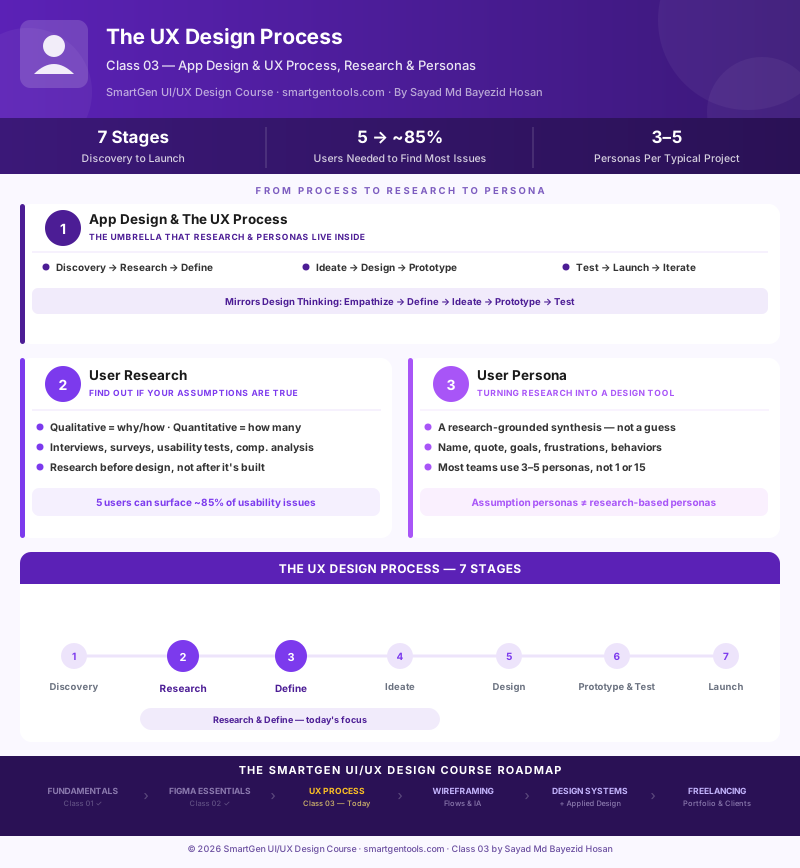
The infographic below maps all seven stages of the UX process, plus the core building blocks of user research and user personas covered in this class.
Where This Course Is Headed
| Module | Focus |
|---|---|
| 1 — Done | UI/UX Fundamentals: Color Theory, Color Psychology, Typography, Design Principles |
| 2 — Done | Figma Essentials: interface, plugins, components, and Auto Layout |
| 3 — Today | The UX Process: App Design & UX Process, User Research, User Personas |
| 4 — Next | Completing the UX Process: Empathy Mapping, User Flows, Information Architecture, Wireframing |
| 5 | Design Systems & Applied Design: dashboards, landing pages, e-commerce, prototyping |
| 6 | Portfolio, Case Studies & Freelancing |
Frequently Asked Questions
Do I need a research budget or recruiting agency to do real user research?
No. The practice exercise in this class — five open-ended questions with three people who represent your target user — is a genuinely smaller-scale version of the exact same method professional researchers use. Budget changes the scale, not the fundamental process.
Is user research only necessary for large companies?
It's arguably more valuable for smaller teams and solo builders, since there's no larger budget or brand recognition to absorb the cost of building the wrong thing. A single afternoon of conversations before designing can prevent weeks of rework later.
What's the difference between a user persona and a target audience?
A target audience is typically a broad demographic description ("women aged 25–34 interested in fitness"). A persona is a specific, research-grounded individual representation that includes goals, frustrations, and behaviors — detailed enough to make a real design decision against, not just a marketing segment.
Should personas include demographic details like age and income?
Only when that detail genuinely changes a design decision. A finance app where income bracket affects which features matter most should include it; a to-do list app usually shouldn't bother, since it adds detail without adding design guidance.
How often should personas be updated?
Whenever new research meaningfully contradicts or expands what's currently documented — there's no fixed schedule. A persona that hasn't been revisited in over a year, on an actively evolving product, is worth double-checking against current users.
Can I skip research if I'm building an MVP quickly?
You can scale it down, but skipping it entirely usually costs more time later, not less. Even three quick conversations before building beats zero — the goal is catching a wrong assumption while it's still just a conversation, not a shipped feature.
What's the difference between a persona and a customer journey map?
A persona describes who you're designing for. A journey map describes the path that person takes through a product over time, including their emotions at each step. They're complementary tools, usually built in that order — persona first, journey map second.
Do personas replace real usability testing?
No — they inform what to design, not whether it actually works. A well-built persona still needs the design built for it to go through real usability testing (Section 2) before launch.
What should I learn right after this class?
Class 04 completes the UX process with empathy mapping, user flows, information architecture, and wireframing — turning the research and personas from today into an actual structural blueprint for your app.
This article is Class 03 of the free SmartGen UI/UX Design Course, written by
— Written by Sayad Md Bayezid Hosan for the SmartGen blog
Founder & Tech Entrepreneur | Full-Stack Developer
Full-stack Web Developer, Digital Marketing Strategist, and Tech Entrepreneur with 5+ years of experience delivering innovative digital solutions. Specializing in web development, AI integration, strategic digital marketing, and tech entrepreneurship. As a leading Tech Provider, I help audiences navigate digital platforms safely through permission-based technical solutions and digital business asset management.
Credentials & Expertise: ✓
✓
Sayad Md Bayezid Hosan