
Advanced Sitemap Management: Submission, Auditing, and Error Fixing
Creating a sitemap is only the first step in your SEO journey. To truly dominate search engine rankings, you must know how to properly submit, continuously monitor, and instantly troubleshoot your XML sitemaps. Here is your master guide to advanced sitemap management.
Now that you have successfully created and optimized your sitemap, the real technical SEO work begins. Having a beautifully structured XML file sitting on your server does you no good if search engine spiders don't know it exists or if it is riddled with formatting errors.
Sitemap finder and download txt file /xml file Use Free Our tools
In this advanced guide, we will walk you through the exact protocols for submitting your sitemaps to major search engines, setting up automated monitoring workflows, and troubleshooting the most common (and frustrating) sitemap errors.
How to Submit Your Sitemap to Search Engines
You want your new content indexed in minutes, not weeks. To achieve this, you must proactively push your XML sitemap to major search engines like Google, Bing, and Yahoo! rather than waiting for their crawlers to naturally stumble upon it.
While the core concept remains the same across different platforms, let's look at the exact workflow for the undisputed king of search: Google.
Step-by-Step Submission via Google Search Console (GSC):
- Log in to GSC: Open your Google Search Console dashboard and select the correct verified domain property from the top-left dropdown menu.
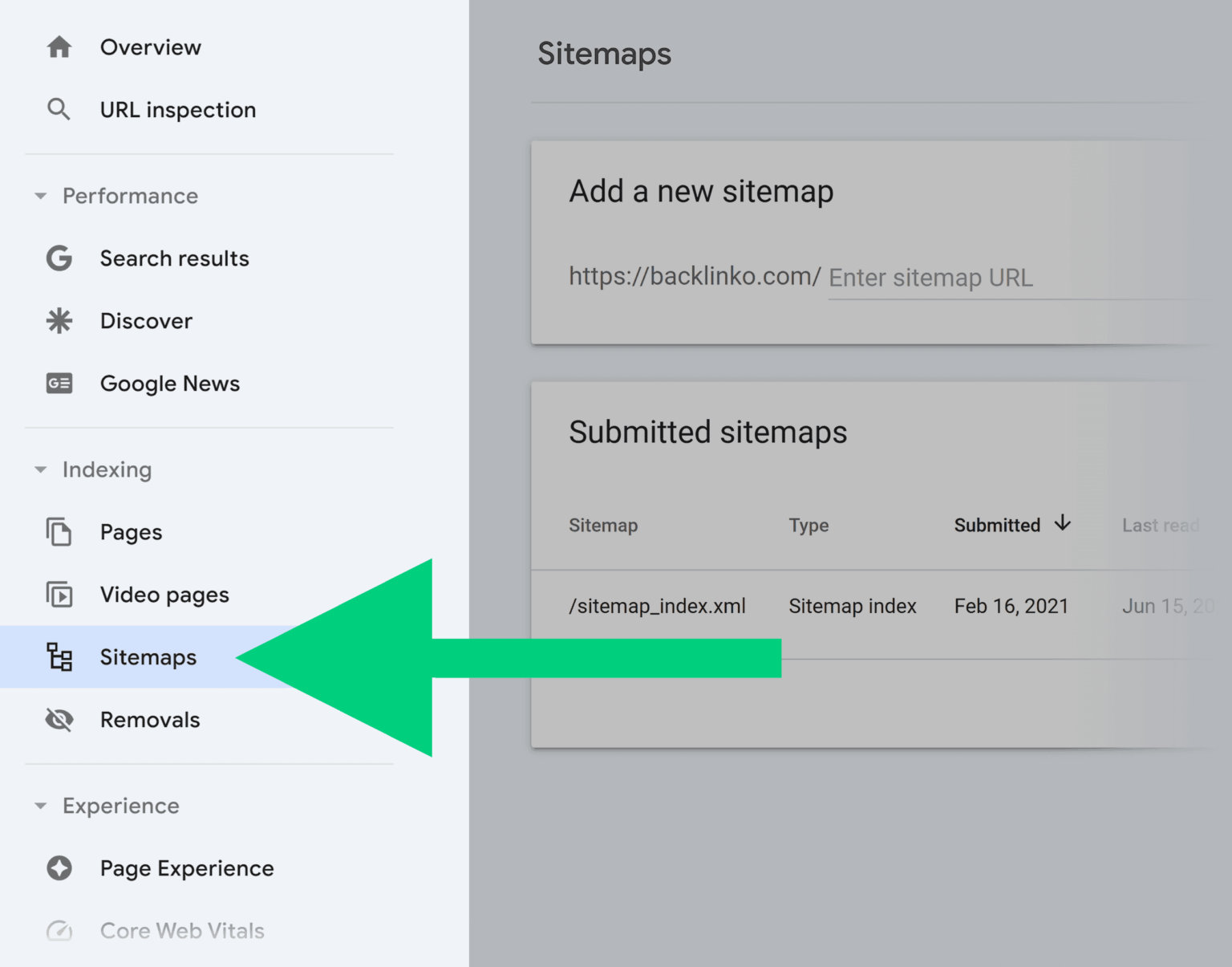
- Navigate to the Sitemaps Report: On the left-hand navigation menu, scroll down to the "Indexing" section and click on Sitemaps.
- Enter Your URL Path: In the "Add a new sitemap" module, simply type the exact file path of your sitemap (e.g.,
sitemap_index.xmlorsitemap.xml). - Hit Submit: Click the "Submit" button.
If your XML file is cleanly formatted, Google will instantly display a "Success" badge under the Status column. It will also populate the "Submitted sitemaps" list, showing you exactly how many URLs were discovered.
Pro Tip: Don't ignore alternative search engines! You can follow a nearly identical process using Bing Webmaster Tools (which covers both Bing and Yahoo). If you are targeting international markets, consider submitting your sitemaps to Yandex (Russia), Baidu (China), and Naver (South Korea).
How to Monitor and Maintain Your Sitemap's Health
Search engines are constantly evolving, and your website is likely undergoing frequent updates. An XML sitemap is not a "set it and forget it" tool. You must establish a routine monitoring process to catch crawlability issues before they tank your traffic.
Google Search Console is your first line of defense. When you periodically check the Sitemaps report, keep a close eye on the "Status" column. If everything is operating smoothly, it will read "Success." However, if you see an "Error" or a "Couldn't fetch" warning, you need to take immediate action.
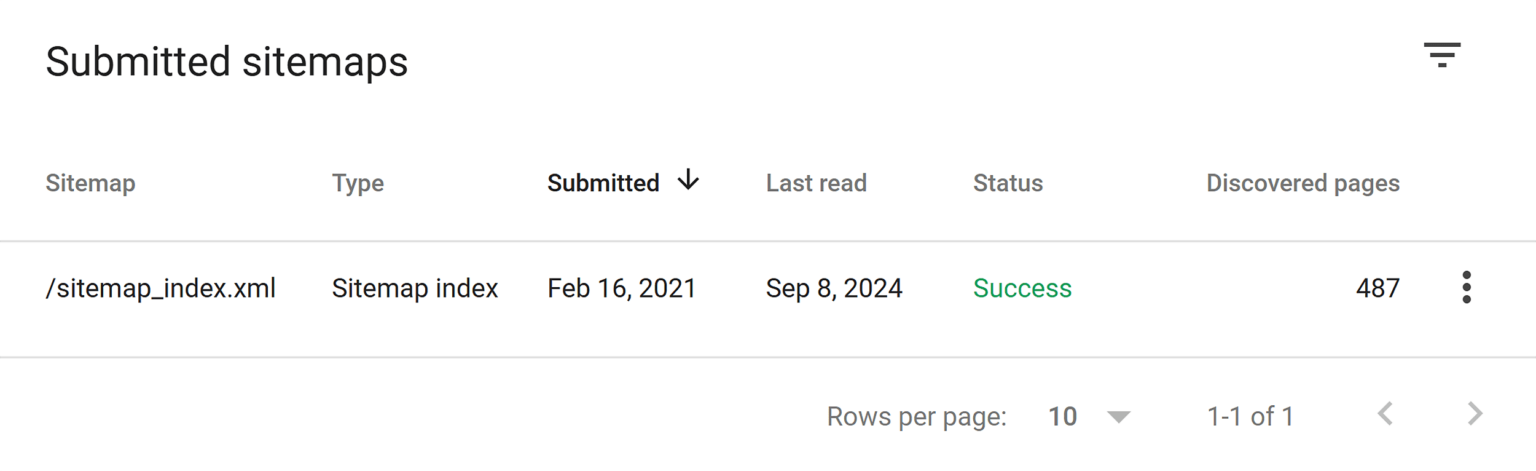
Monitoring sitemap fetch status inside Google Search Console.
If you click on the specific sitemap URL showing an error, GSC will provide a detailed diagnostic report. Based on these insights, your next move might involve:
- Renaming and re-uploading the sitemap file.
- Removing dead (404) or blocked URLs from the list.
- Resubmitting the fixed sitemap to force a fresh crawl.
Using Advanced Site Audit Tools
For a more granular, proactive approach, professional SEOs rely on comprehensive auditing software (like Semrush, Ahrefs, or Sitebulb). By running a deep site audit and filtering for "sitemap" issues, you can uncover hidden conflicts that GSC might not explicitly warn you about right away.
For a complete breakdown on how to leverage these audits alongside your overall strategy, make sure to read our foundation article: The Ultimate Guide to Sitemaps: How to Create, Optimize, and Boost Your SEO.
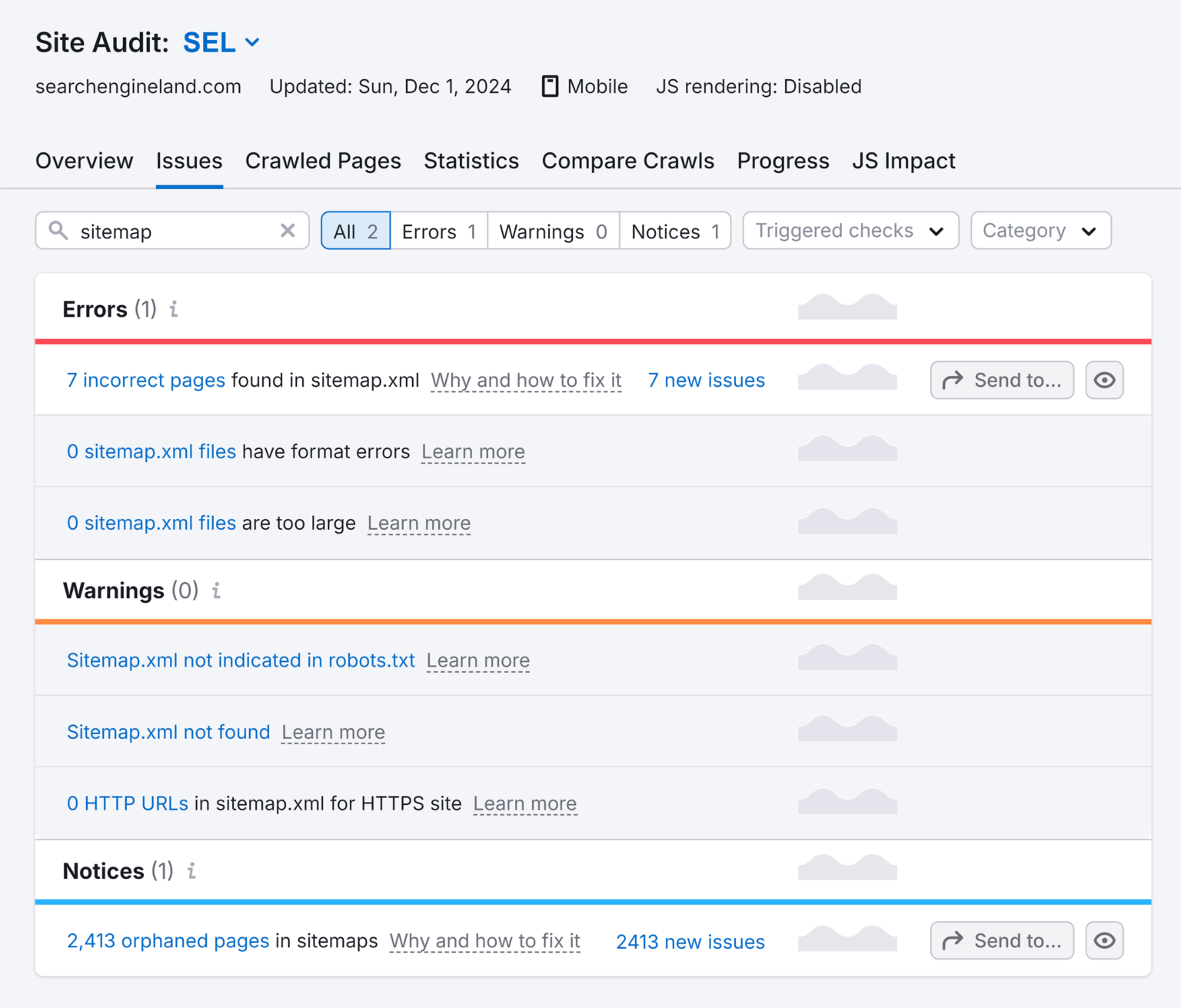
Using an advanced site audit tool to pinpoint deep-level XML errors.
Ultimately, the goal is to ensure search engines are always digesting the most accurate, real-time snapshot of your site. If you aren't using a CMS that auto-generates sitemaps, consider using robust dynamic tools to keep your URLs perfectly synced with your live content.
Common Sitemap Errors and How to Fix Them Instantly
Even the best webmasters run into technical hurdles. Most sitemap errors fall into two distinct buckets: Formatting Issues and URL-Level Conflicts.
A massive mistake many site owners make is failing to declare their sitemap inside their robots.txt file. This single line of code is crucial for crawler efficiency. Simply add this to the bottom of your robots.txt file:Sitemap: https://www.yourdomain.com/sitemap_index.xml
Here is a master list of the most notorious sitemap errors and how to resolve them:
1. Invalid Date (Datetime Encoding Error)
Search engines rely on the <lastmod> tag to know when a page was updated. If you use a format like 12/05/2026, crawlers will reject it. Sitemaps demand strict W3C Datetime encoding.
- The Fix: Ensure all dates follow the
YYYY-MM-DDformat (e.g.,2026-05-31). Configure your generator tool to output standard W3C timestamps.
2. Sitemap File Size Exceeded
Google will outright reject any single XML file that contains more than 50,000 URLs or exceeds 50MB in raw file size.
- The Fix: Paginate your sitemaps. Break them down into smaller, categorical files (e.g.,
posts-sitemap1.xml,posts-sitemap2.xml) and house them all under one master Sitemap Index File.
3. 400-Level HTTP Status Codes (The 404 Trap)
Your sitemap must be a pristine list of high-quality, live pages. If your sitemap contains URLs that return a 404 (Not Found) or 410 (Gone) status code, you are explicitly asking Google to crawl dead ends.
- The Fix: Purge all dead URLs, 301 redirects, and server error (500-level) pages from your XML file. Only include canonical pages that return a healthy
200 OKstatus.
4. Compression Errors
To save server bandwidth, webmasters often compress their sitemaps into .gz files. If this compression is corrupted, Googlebot cannot unpack it.
- The Fix: Recompress your XML file using a reliable tool like GZIP or 7-Zip, delete the old file from your server, upload the fresh one, and resubmit it via GSC.
5. Media-Specific Sitemap Issues (Images, Video & News)
Specialized sitemaps come with their own strict rulebooks:
- News Sitemaps: Cannot contain more than 1,000 URLs and only support articles published within the last 48 hours.
- Image Sitemaps: The most frequent error is omitting the
<image:loc>tag or providing emptyalttext metadata. - Video Sitemaps: Ensure your videos are hosted via supported protocols (HTTP/FTP), do not require a user login to view, and are not actively blocked by your
robots.txt.
Top Tools to Generate and Monitor Your Sitemaps
You don't have to manage this technical workload manually. The SEO industry provides incredible software to automate, generate, and monitor your XML files seamlessly.
Here is a curated list of the best tools for the job:
- Yoast SEO / RankMath (WordPress): The absolute gold standard for WP users. These plugins automatically generate structured XML files and instantly ping search engines the second you hit "Publish."
- Screaming Frog SEO Spider: A powerhouse desktop crawler. Use it to mimic Googlebot, extract all your live URLs, and instantly export a flawlessly formatted XML sitemap.
- Semrush Site Audit: Ideal for enterprise-level monitoring. It continuously crawls your domain, immediately alerting you to orphan pages, broken sitemap links, and formatting violations.
- SmartGen Tools: If you need to quickly extract, modify
<lastmod>dates, or download custom XML structures on the fly, a dedicated client-side utility is your best friend. - Sitebulb: Another elite auditing tool that provides deeply visual, easy-to-understand reports regarding your sitemap's compliance and overall SEO health.
- Slickplan / PowerMapper: Excellent for UX designers and project managers who need to map out visual HTML sitemaps for clients before coding begins.
The Final Verdict: You don't need every tool on this list. Pair a reliable automated generator (like Yoast or a custom CMS script) with a heavy-duty monitoring platform (like Semrush or Google Search Console). By keeping your sitemaps clean, updated, and error-free, you guarantee that search engines will always prioritize your most valuable content.