
The Ultimate Guide to Sitemaps: How to Create, Optimize, and Boost Your SEO
When building a website, having stellar content and a beautiful design is only half the battle. If search engines cannot efficiently navigate, discover, and index your web pages, your target audience will never find you. Whether you are launching a brand-new website, adding a blog, or restructuring your domain, you need a clear roadmap for search engine crawlers. This is exactly where a Sitemap becomes your most powerful SEO asset.
In this comprehensive guide, we will dive deep into what sitemaps are, why they are crucial for your organic search visibility, and how you can easily generate and submit them to dominate Google Search Engine Results Pages (SERPs).
What is a Sitemap?
Think of a sitemap as the architectural blueprint of your website. It is a dedicated file that outlines the structure of your website, listing all the essential pages, files, and media hosted on your domain. It explicitly demonstrates how different URLs relate to one another.
Search engines like Google, Bing, and Yahoo utilize this structured data to comprehend the hierarchy of your content. A well-optimized sitemap doesn't just list URLs; it provides highly valuable metadata about each page, including:
- A complete list of page URLs: Ensuring no page is left undiscovered.
- The Last Modified Date (lastmod): Telling crawlers when the content was recently updated.
- Page Hierarchy & Structure: Showing which pages hold the highest priority.
- Change Frequency: How often the page is expected to update (daily, weekly, monthly).
- Media Entries: Specific details about images, videos, and localized languages (hreflang).
Sitemap finder and download txt file /xml file Use Free Our tools
Why Sitemaps are Critical for SEO
Technically, search engines and human visitors can discover your content without a sitemap by following internal links. However, relying solely on internal linking is a risky SEO strategy. A sitemap acts as a direct fast-track pass for search engine bots (like Googlebot) to discover your most valuable pages—even if they are buried several clicks deep from your homepage.
One of the biggest advantages of a sitemap is the discovery of Orphan Pages. These are pages that exist on your server but have zero internal links pointing to them. Without a sitemap, crawlers might never find them. By directly surfacing your URLs to crawlers, you achieve faster indexing, better crawl budget optimization, and ultimately, higher organic traffic.
According to Google's Search Advocates, a sitemap is an absolute necessity if:
- You manage a massive website: Like an e-commerce store with thousands of product pages.
- Your site is brand new: It lacks the external backlinks needed for natural crawler discovery.
- You frequently update content: Search engines need to know when fresh data is available.
- You have isolated archive pages: Pages that lack proper internal link architecture.
Types of Sitemaps: XML vs. HTML
Sitemaps generally fall into two distinct categories: XML and HTML. Depending on your SEO goals and user experience (UX) strategy, you can implement one or both.
1. What is an XML Sitemap?
If your primary focus is technical SEO, the XML (Extensible Markup Language) sitemap is your holy grail. This is a machine-readable text file created exclusively for search engine spiders, helping them understand crawlability and indexation queues.
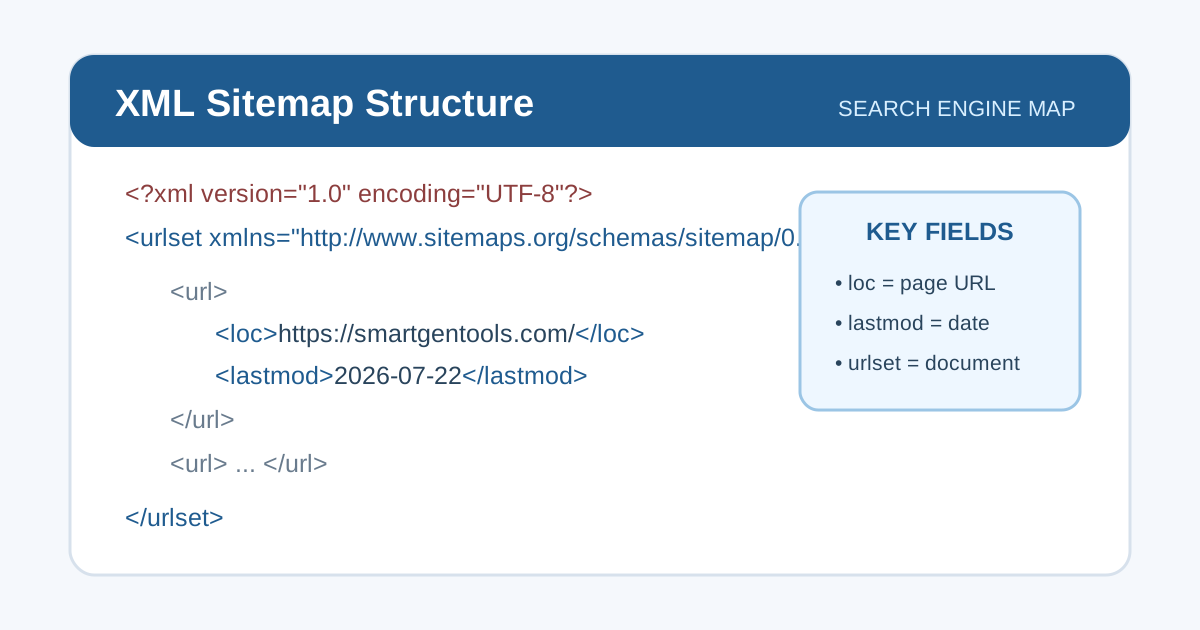
Standard XML Sitemap Structure targeted for search engines.
Usually, this file resides in the root directory of your website (e.g., https://www.yourdomain.com/sitemap.xml). However, for security reasons, some webmasters prefer to hide it from competitors by placing it in a custom subfolder or renaming the file.
Specialized XML Sitemaps
A standard XML sitemap has strict limits: it cannot exceed 50,000 URLs or 50 MB in file size. If your website exceeds this, or if you host heavy media, you need specialized sitemaps:
- Image Sitemaps: Perfect for photography portfolios or e-commerce sites. It helps Google locate hidden images and boosts visibility in Google Image Search.
- Video Sitemaps: Provides critical context about video content, including titles, length, categories, and age ratings, ensuring rich snippets in search results.
Google News Sitemap Guidelines:** Crucial for digital publishers. Google requires a specific news sitemap containing articles published in the last 48 hours. This guarantees rapid indexing for Google News placement.
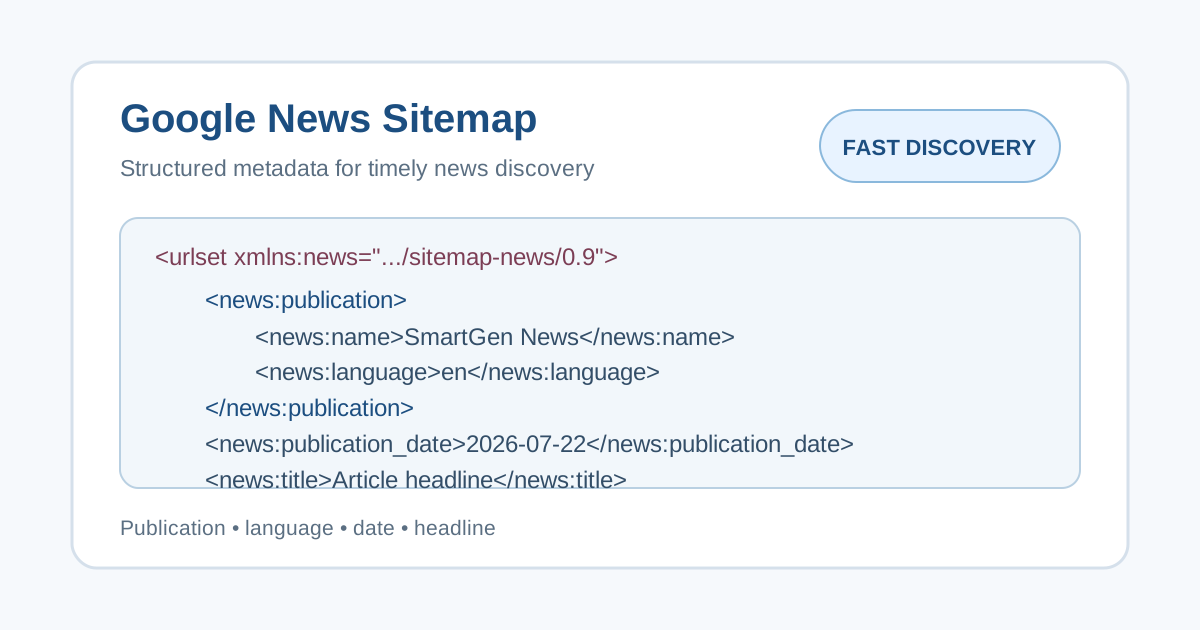
Format of a specialized Google News Sitemap.
2. What is an HTML Sitemap?
While XML is for bots, an HTML sitemap is built for human visitors. It is an actual webpage containing clickable links to your most important categories, contact pages, and products.
Web Accessibility (WCAG): Beyond basic navigation, HTML sitemaps play a massive role in web accessibility. Under the Web Content Accessibility Guidelines (WCAG) Section 2.4.5, providing a sitemap ensures that visually impaired users utilizing assistive screen readers can effortlessly find content without navigating complex dropdown menus. Prioritizing accessibility doesn't just improve UX; it widens your audience reach.
How to Create and Generate a Sitemap
Depending on your technical expertise and website size, you can create a sitemap manually or use automated generator tools.
Manual Creation: If you run a micro-site with less than 50 pages, you can write an XML file manually using Windows Notepad or TextEdit. You must strictly follow the standard XML protocol, carefully wrapping URLs in <loc> tags and assigning <lastmod> dates.
Automated Sitemap Generators: For modern, growing websites, automation is the only logical path. If you are on WordPress, SEO plugins like RankMath, Yoast SEO, or Simple Sitemap automatically generate dynamic XML sitemaps that update the moment you publish a new post.
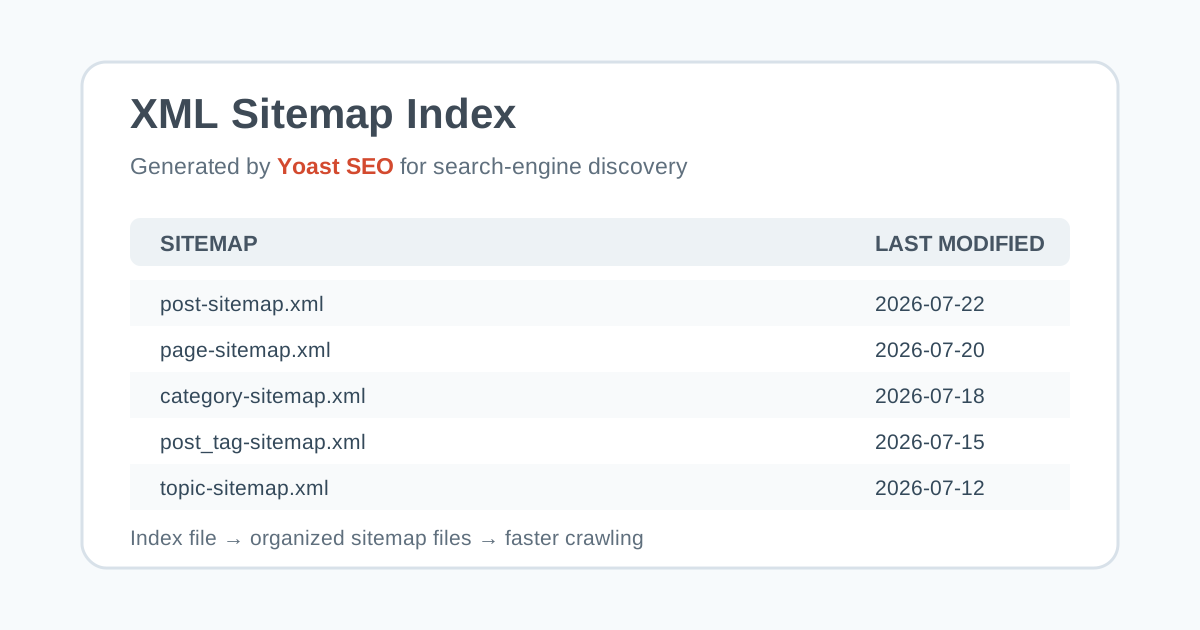
Automated sitemap generated via Yoast SEO.
If you are using a custom-coded website or other CMS, you can utilize advanced tools like SmartGen's Custom Sitemap Downloader, Screaming Frog, or XML-Sitemaps.com to crawl your domain and instantly export perfectly formatted XML files.
Best Practices for Elite Sitemap Optimization
Simply having a sitemap isn't enough; you must optimize it to prevent search engines from wasting crawl budget on useless pages. Follow these SEO best practices:
- Keep URLs Clean: Strip out session IDs, tracking parameters (like UTMs), and special characters that cause duplicate content issues.
- Exclude "Noindex" & Blocked Pages: Never include admin pages, password-protected areas, or URLs tagged with
noindex. If you tell Google not to index a page, forcing them to crawl it via a sitemap sends conflicting signals. - Strictly Use Canonical URLs: If you have multiple versions of a page, only include the primary (canonical) URL in the XML file.
- Ensure UTF-8 Encoding: Your XML file must be saved in UTF-8 format to ensure bots can seamlessly read non-ASCII characters and foreign languages.
- Deploy a Sitemap Index File: If your site exceeds the 50,000 URL limit, split your sitemaps categorically (e.g., posts-sitemap.xml, products-sitemap.xml) and unite them under a single "Sitemap Index File" located in your root directory.
How to Submit Your Sitemap to Search Engines
Once your sitemap is perfectly structured and optimized, the final step is inviting search engines to crawl it. The most critical platform for this is Google Search Console (GSC).
To submit your sitemap:
- Log into your verified Google Search Console account.
- Select your domain property from the left-hand menu.
- Navigate to the "Index" section and click on Sitemaps.
- Enter your sitemap URL (e.g.,
sitemap.xml) in the provided field and hit Submit.
Google will instantly process the file, and within a few days, you will be able to monitor index coverage, spot crawler errors, and watch your organic traffic grow!
Frequently Asked Questions (FAQs)
1. What is the main difference between XML and HTML sitemaps?
An XML sitemap is coded specifically for search engine bots (like Googlebot) to efficiently crawl and index your web pages. An HTML sitemap, on the other hand, is a visually clickable webpage designed to help human visitors navigate your site.
2. Do I really need a sitemap if my website is small?
While small websites (under 100 pages) with great internal linking might get indexed naturally, having an XML sitemap speeds up the discovery process. It is highly recommended for all websites, regardless of size, to ensure faster indexing.
3. How often should I update my XML sitemap?
Your sitemap should be updated dynamically every time you publish a new page, update an existing post, or delete a URL. If you use a CMS like WordPress, plugins like Yoast or RankMath handle this automatically.
4. Can a sitemap guarantee that Google will index my pages?
No. A sitemap acts as a strong suggestion to search engines about which pages you consider important, but it does not guarantee indexing. Google ultimately decides what to index based on content quality, uniqueness, and overall SEO value.
5. What are the size limits for an XML sitemap?
A single XML sitemap cannot contain more than 50,000 URLs and its uncompressed file size must not exceed 50 MB. If your site surpasses these limits, you must split your URLs across multiple sitemaps and use a Sitemap Index file.
6. Should I include "noindex" or blocked pages in my sitemap?
Absolutely not. Including URLs tagged with "noindex" or pages blocked by your robots.txt file wastes your crawl budget and sends conflicting signals to search engines. Only include 200 OK, indexable, and canonical URLs.
7. What is an orphan page, and how does a sitemap help?
An orphan page is a live webpage on your domain that has zero internal links pointing to it, making it nearly impossible for crawlers to find naturally. Including it in your sitemap gives search engines a direct path to discover and index it.
8. What is a Sitemap Index file?
A Sitemap Index file is essentially a "sitemap for sitemaps." If you have a large website and need multiple XML sitemaps (e.g., one for posts, one for products, one for images), the index file links them all together so you only have to submit one master URL to Google Search Console.
9. Does my website need separate sitemaps for images and videos?
If visual media is critical to your business (e.g., photography sites, e-commerce stores, or video-heavy blogs), then yes. Specialized image and video sitemaps help Google extract specific media metadata, increasing your chances of ranking in Google Images and Video snippets.
10. Why is the "lastmod" tag important in a sitemap?
The "lastmod" (Last Modified) tag tells search engines the exact date and time a specific URL was last updated. This is a critical SEO signal that encourages crawlers to re-index pages that have fresh, newly updated content.