
July 14, 2026 • General • By Sayad Md Bayezid Hosan
A complete, step-by-step guide to actually getting paid as a freelancer in Bangladesh — Payoneer signup, identity and address verification, setting up your full account, linking a bank account, and transferring dollars, connecting Payoneer to bKash, daily limits and real fees, and how bank account payment policies, minimums, maximums, and currency selection actually work.
Table of Contents
- Introduction: Why Getting Paid Is Its Own Skill
- Payoneer: Signing Up and Account Creation
- Payoneer: Verification and Full Account Setup
- bKash: Linking Payoneer and Understanding Limits
- bKash: Transaction Methods, Charges, and Fees
- Bank Account: Payment Policies, Limits, and Currency Selection
- Quick-Reference Glossary
- Frequently Asked Questions
(Tap any line to jump straight to that section.)
Introduction: Why Getting Paid Is Its Own Skill
The Problem
Arif, from the Fiverr guide and Bangladesh Job Sites guide, just landed his first big international client. The work is done, the client paid — and now he's stuck. His client's money is sitting in USD on a platform, and he genuinely doesn't know the safest, cheapest, fastest way to turn it into Bangladeshi Taka he can actually spend.
The Solution: A Clear, Verified Path
This guide walks that exact path in full: Payoneer as the international holding account, bKash as the fast local mobile route, and a bank account for larger transfers — with every fee and limit checked directly against official sources rather than repeated from outdated guesswork, since these numbers genuinely change over time.
An honest note before we start: this guide is factual and educational, not financial or legal advice — payment rules, fees, and regulations can change, and Bangladesh Bank does periodically adjust limits, so always confirm current figures directly inside your own Payoneer and bKash apps before making a real transfer.
Payoneer: Signing Up and Account Creation
The Problem
Rushing through signup with mismatched names, a temporary phone number, or a blurry ID photo is the single biggest cause of delayed or rejected accounts — and a rejected account can't receive Arif's payment at all.
The Solution: A Careful, Correct Signup
Step-by-Step: Creating Your Payoneer Account
- Go to payoneer.com and click "Sign Up."
- Choose "Individual" (most freelancers) or "Business," depending on how you actually operate.
- Enter your legal name exactly as it appears on your government ID — no nicknames, abbreviations, or spelling changes. Mismatched names are one of the most common causes of delayed verification.
- Use a real, stable email address and phone number — avoid temporary or virtual numbers, since Payoneer may send verification codes to it later.
- Select your country and agree to Payoneer's terms.
- Create a strong, unique password, and set up two-factor authentication once your account exists, for real account security.
Common Mistake to Avoid
Never buy a "pre-verified" or "aged" Payoneer account from a third party. In researching this guide, I came across multiple sites openly advertising this — it's a genuine scam pattern, it violates Payoneer's terms of service outright, and it can result in permanent account suspension with your own funds frozen inside it. There is no legitimate shortcut around verifying your own identity.
Payoneer: Verification and Full Account Setup
The Problem
After signing up, Arif gets an email asking for identity documents — and without knowing exactly what's required, it's easy to submit something that gets rejected, adding days of delay right when a client is waiting to pay.
The Solution: Exactly What Payoneer Verification Requires
According to Payoneer's own official guidance, once you're asked to verify (commonly triggered from Receive → Request a Payment), you'll need a valid government-issued photo ID — a national ID card, passport, or driver's license all work, as long as it hasn't expired. Upload clear copies of both sides, in color where possible, with no fingers or glare obscuring any part of the image.
Address Verification
In some cases, Payoneer will also request a proof-of-address document — commonly a recent utility bill or bank statement, typically no older than about three months, showing your name and address matching what's on your account.
Verifying Your Profession
For certain account types, Payoneer may also ask about your actual professional activity — your work history and a link to a genuine, active professional website or social media profile. If you don't have one, simply explain honestly how you operate and how clients actually reach you.
Setting Up the Full Account
Once verified, explore your dashboard properly before your first transfer: Receiving Accounts shows your local bank details in various currencies (Payoneer supports receiving in numerous local currencies including USD, EUR, and GBP-equivalent virtual accounts, depending on your country); Settings → Security is where you should immediately enable two-factor authentication; and Balances shows exactly what's currently available to withdraw.
Step-by-Step: Adding a Bank Account or Other Payment Method
- Go to Settings → Bank Accounts (or the equivalent withdrawal setup section).
- Add your bank account details, making sure the account name matches your verified Payoneer identity exactly.
- For Bangladesh specifically, this is also where the bKash linking discussed in Section 4 becomes available, once your account is fully verified.
Step-by-Step: Transferring Dollars
- From your dashboard, choose Withdraw or Transfer to Bank Account.
- Select the destination — your linked bank account or bKash.
- Enter the amount, review the displayed, real-time exchange rate and any fee before confirming — rates can shift slightly day to day.
- Confirm and track the transfer status directly from your dashboard.
Common Mistake to Avoid
Confirming a transfer without actually reading the exchange rate and fee shown on the confirmation screen. Both are disclosed before you confirm — take the extra ten seconds to check them every time.
bKash: Linking Payoneer and Understanding Limits
The Problem
Arif's client payment is sitting in Payoneer, but he needs Taka in hand quickly, and moving money to a traditional bank account can take longer than he'd like for smaller, everyday amounts.
The Solution: The Official Payoneer–bKash Link
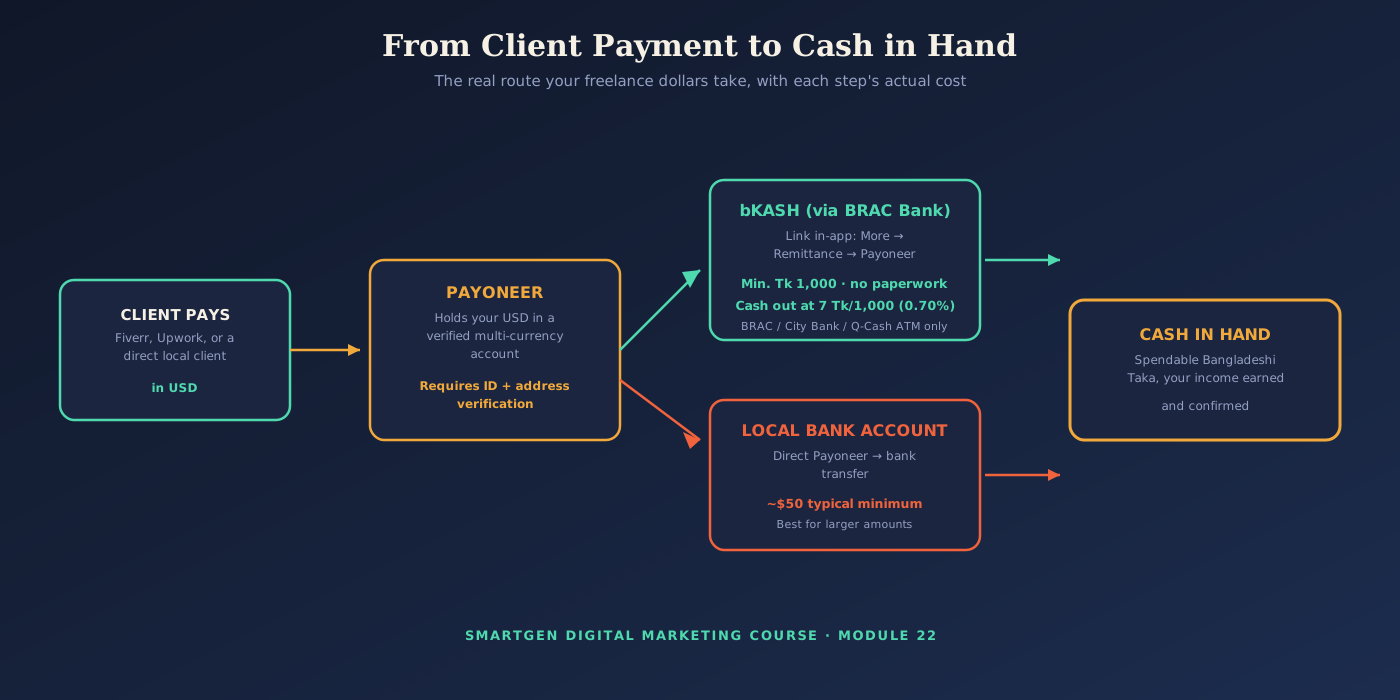
bKash, Bangladesh's largest mobile financial service, has an official partnership with Payoneer (running through BRAC Bank as the licensed local payment gateway) specifically built for freelancers bringing home international earnings.
Step-by-Step: Adding Your bKash Account to Payoneer
- Open the bKash app and log in as usual.
- Go to More → Remittance.
- Select Payoneer, then Link My Payoneer Account.
- Enter your Payoneer username and password to connect the two accounts.
- Once linked, your Payoneer balance (shown in its original currency) becomes available to pull directly into bKash.
This linking requires no paperwork, and according to bKash's own official information, transfers can complete in as little as a few seconds once initiated, with a minimum transfer of BDT 1,000. One detail worth knowing clearly: the standard 2.5% government remittance incentive does not apply to Payoneer transfers specifically, unlike some other remittance channels.
Per-Day Limits You Should Know
Based on bKash's current published limits, a standard account can send money up to Tk 50,000 per day (Tk 300,000 per month), cash out up to Tk 30,000 per day (Tk 200,000 per month), and hold a maximum balance of Tk 500,000 at any one time. Bangladesh Bank does occasionally impose temporary, much lower limits around national elections as an anti-fraud measure (as low as Tk 1,000 per transaction for a few days) — if a transfer suddenly won't go through for the full amount you expect, this kind of short-term restriction is worth checking for before assuming something is wrong with your account.
Common Mistake to Avoid
Treating every "Payoneer to bKash" tutorial you find online as equally trustworthy. Stick to the official in-app link described above — some third-party sites advertise "instant exchange" services promising better rates, and using unlicensed currency exchangers for foreign earnings can violate Bangladesh's foreign exchange regulations and carries real risk of lost funds with no recourse. When in doubt, the feature built directly into the bKash app is the one to trust.
bKash: Transaction Methods, Charges, and Fees
The Problem
bKash's fee structure has several different rates depending on exactly how you move money, and using the wrong method for a given situation can quietly cost several times more than necessary.
The Solution: Know Which Method Costs What
Cash Out (standard agent): Tk 18.50 per Tk 1,000 (1.85%) — the widest network, but the highest rate.
Cash Out (Priyo Agent or partner ATM): Tk 14.90 per Tk 1,000 (1.49%) — cheaper, available at BRAC Bank, City Bank, and Q-Cash ATMs.
Cash Out specifically for Payoneer/remittance funds: a special discounted rate of just Tk 7 per Tk 1,000 (0.70%) at BRAC Bank, City Bank, and Q-Cash ATM booths — significantly cheaper than regular cash-out, and the rate freelancers should specifically look for when withdrawing freelance income.
Send Money: free to designated Priyo Numbers up to Tk 25,000 cumulative per month, with small flat fees above that threshold.
bKash to Bank (via NPSB interoperability, available since late 2025): up to 0.85% (Tk 8.50 per Tk 1,000) — often the cheapest way to move a bKash balance directly into a linked bank account.
Common Mistake to Avoid
Using the standard 1.85% agent cash-out rate for freelance income without realizing the discounted 0.70% Payoneer-specific rate exists at the same ATM network. On a Tk 50,000 withdrawal, that difference alone is over Tk 500.
Bank Account: Payment Policies, Limits, and Currency Selection
The Problem
For a larger payment — a full website project, for instance — pulling everything through bKash's daily limits could take several days, and Arif needs to understand the direct bank route instead.
The Solution: Direct Bank Transfers for Larger Amounts
A direct Payoneer-to-local-bank transfer is generally the better route once an amount exceeds bKash's daily limits, or when a client specifically needs a documented bank record for their own accounting. Payoneer bank withdrawals commonly carry a minimum around $50 per transfer — noticeably higher than bKash's BDT 1,000 minimum — so it's better suited to larger payments than small, frequent ones.
Currency Selection
Payoneer lets you receive funds in several major currencies depending on your account type and where your client pays from — commonly including USD, EUR, and GBP-equivalent receiving accounts. When you withdraw, you choose the destination currency (Bangladeshi Taka, for a local bank), and Payoneer applies its own currency conversion rate at that moment — always visible on the confirmation screen before you approve the transfer, exactly as covered in Section 3.
A Simple Policy Habit Worth Adopting
Keep a simple personal record of every transfer — date, amount, method, and fee — both for your own budgeting and because accurate records make any future tax or income reporting conversation far simpler than reconstructing it later from memory.
Common Mistake to Avoid
Assuming bank transfer fees and minimums are fixed forever. Payment providers adjust these periodically — treat any specific number in this guide as a strong current estimate, and always confirm the live figure shown in your own Payoneer dashboard before a large transfer.
Quick-Reference Glossary
| Term | Plain-Language Meaning |
|---|---|
| Payoneer | A global platform that holds and moves your international earnings |
| KYC | "Know Your Customer" — the identity verification process |
| Remittance | Money sent home from abroad, including freelance earnings |
| Cash Out | Converting your bKash balance into physical cash |
| NPSB | National Payment Switch Bangladesh, enabling bKash-to-bank transfers |
| Priyo Number/Agent | A designated preferred contact or agent with lower bKash fees |
Module Summary
In this guide, we covered how to sign up for and correctly verify a Payoneer account, how to set up the full account and add a bank withdrawal method, exactly how to link Payoneer to bKash through the official in-app process, current daily limits and the real, tiered fee structure bKash charges — including the discounted freelancer rate most people miss — and how direct bank transfers, minimums, and currency selection work for larger payments.
Practice exercise: If you haven't already, complete Payoneer's identity verification using the exact document requirements in Section 3, then link your bKash account following the five steps in Section 4 — and before your first real withdrawal, calculate what a Tk 20,000 cash-out would cost at the standard agent rate versus the Payoneer-specific rate from Section 5, so you feel the real difference for yourself.
Frequently Asked Questions
How long does Payoneer verification actually take?
Commonly a few business days for individuals with clear, matching documents; mismatched names or blurry uploads are the most common cause of longer delays.
Is it safe to link my bKash account to Payoneer?
Yes, when done through the official in-app process described in Section 4 — this is an officially sanctioned partnership, not a third-party workaround.
Why did my bKash transaction get limited to a much smaller amount than usual?
Bangladesh Bank occasionally imposes short, temporary limits on mobile financial services, most notably around national elections, as an anti-fraud measure — check for any current notice in your app before assuming an account problem.
Should I use a third-party "exchanger" website for a better Payoneer-to-bKash rate?
Be cautious — stick to the official in-app link. Unlicensed currency exchange carries real legal and financial risk, and if something goes wrong there is often no recourse to recover lost funds.
Bank transfer or bKash — which should I use for a large payment?
Generally a direct bank transfer once an amount is large enough to bump against bKash's daily limits, since a bank transfer isn't constrained by the same daily caps.
— Written by Sayad Md Bayezid Hosan for the SmartGen blog
 ✓
✓
Sayad Md Bayezid Hosan
Founder & Tech Entrepreneur | Full-Stack Developer
Full-stack Web Developer, Digital Marketing Strategist, and Tech Entrepreneur with 5+ years of experience delivering innovative digital solutions. Specializing in web development, AI integration, strategic digital marketing, and tech entrepreneurship. As a leading Tech Provider, I help audiences navigate digital platforms safely through permission-based technical solutions and digital business asset management.
Credentials & Expertise:
- Founder of CWB Agency & GenZFrontier
- Final-year English Student at Northern University Bangladesh
- Specialized in AI-powered web development & content strategy
- Published author on tech, digital marketing & entrepreneurship
This article was written by Sayad Md Bayezid Hosan for the SmartGen blog. For free tools to support your digital marketing journey, visit smartgentools.com.